
Windows配置本地Hadoop运行环境
很多人喜欢用Windows本地开发Hadoop程序,这里是一个在Windows下配置Hadoop的教程。
首先去官网下载hadoop,这里需要下载一个工具winutils,这个工具是编译hadoop用的,下载完之后解压hadoop文件,然后把winutils.exe放到hadoop文件的bin目录下面
然后在hadoop/etc/hadoop下修改以下文件:
core-site.xml:
<?xml version="1.0" encoding="UTF-8"?>

<?xml-stylesheet type="text/xsl" href="configuration.xsl"?>

<!--

  Licensed under the Apache License, Version 2.0 (the "License");

  you may not use this file except in compliance with the License.

  You may obtain a copy of the License at

    http://www.apache.org/licenses/LICENSE-2.0

  Unless required by applicable law or agreed to in writing, software

  distributed under the License is distributed on an "AS IS" BASIS,

  WITHOUT WARRANTIES OR CONDITIONS OF ANY KIND, either express or implied.

  See the License for the specific language governing permissions and

  limitations under the License. See accompanying LICENSE file.

-->

<!-- Put site-specific property overrides in this file. -->

<configuration>

  <property>

    <name>fs.defaultFS</name>

    <value>hdfs://localhost:9000/</value>

  </property>

  <property>

    <name>io.native.lib.available</name>

    <value>false</value>

  </property>

  <property>

    <name>hadoop.native.lib</name>

    <value>false</value>

  </property>

  <property>

    <name>io.compression.codecs</name>

    <value>org.apache.hadoop.io.compress.GzipCodec,

           org.apache.hadoop.io.compress.DefaultCodec,

           com.hadoop.compression.lzo.LzoCodec,

           com.hadoop.compression.lzo.LzopCodec,

           org.apache.hadoop.io.compress.BZip2Codec,

           org.apache.hadoop.io.compress.SnappyCodec

        </value>

</property>

<property>

    <name>io.compression.codec.lzo.class</name>

    <value>com.hadoop.compression.lzo.LzoCodec</value>

</property>

</configuration>
hdfs-site.xml:
<?xml version="1.0" encoding="UTF-8"?>

<?xml-stylesheet type="text/xsl" href="configuration.xsl"?>

<!--

  Licensed under the Apache License, Version 2.0 (the "License");

  you may not use this file except in compliance with the License.

  You may obtain a copy of the License at

    http://www.apache.org/licenses/LICENSE-2.0

  Unless required by applicable law or agreed to in writing, software

  distributed under the License is distributed on an "AS IS" BASIS,

  WITHOUT WARRANTIES OR CONDITIONS OF ANY KIND, either express or implied.

  See the License for the specific language governing permissions and

  limitations under the License. See accompanying LICENSE file.

-->

<!-- Put site-specific property overrides in this file. -->

<configuration>

       <property>

               <name>dfs.replication</name>

                <value>1</value>

       </property>

       <property>

                <name>dfs.namenode.name.dir</name>

               <value>file:///D:/Hadoop/namenode</value>

       </property>

       <property>

               <name>dfs.datanode.data.dir</name>

               <value>file:///D:/Hadoop/datanode</value>

       </property>

</configuration>
mapred-site.xml:
<?xml version="1.0"?>

<?xml-stylesheet type="text/xsl" href="configuration.xsl"?>

<!--

  Licensed under the Apache License, Version 2.0 (the "License");

  you may not use this file except in compliance with the License.

  You may obtain a copy of the License at

    http://www.apache.org/licenses/LICENSE-2.0

  Unless required by applicable law or agreed to in writing, software

  distributed under the License is distributed on an "AS IS" BASIS,

  WITHOUT WARRANTIES OR CONDITIONS OF ANY KIND, either express or implied.

  See the License for the specific language governing permissions and

  limitations under the License. See accompanying LICENSE file.

-->

<!-- Put site-specific property overrides in this file. -->

<configuration>

    <property>

        <name>mapreduce.framework.name</name>

        <value>yarn</value>

    </property>

    <property>

        <name>mapred.compress.map.output</name>

        <value>true</value>

    </property>

    <property>

        <name>mapred.map.output.compression.codec</name>

        <value>com.hadoop.compression.lzo.LzoCodec</value>

    </property>

    <property>

        <name>mapred.child.env</name>

        <value>LD_LIBRARY_PATH=</value>

        <name>mapreduce.framework.name</name>

        <value>yarn</value>

    </property>

    <property>

        <name>mapred.compress.map.output</name>

        <value>true</value>

    </property>

    <property>

        <name>mapred.map.output.compression.codec</name>

        <value>com.hadoop.compression.lzo.LzoCodec</value>

    </property>

    <property>

        <name>mapred.child.env</name>

        <value>LD_LIBRARY_PATH=D:\hadoop-2.7.3-win64\lib</value>

    </property>

</configuration>
然后cmd到hadoop的bin目录下执行:
hdfs namenode -format
然后在sbin目录下执行:
start-all.cmd
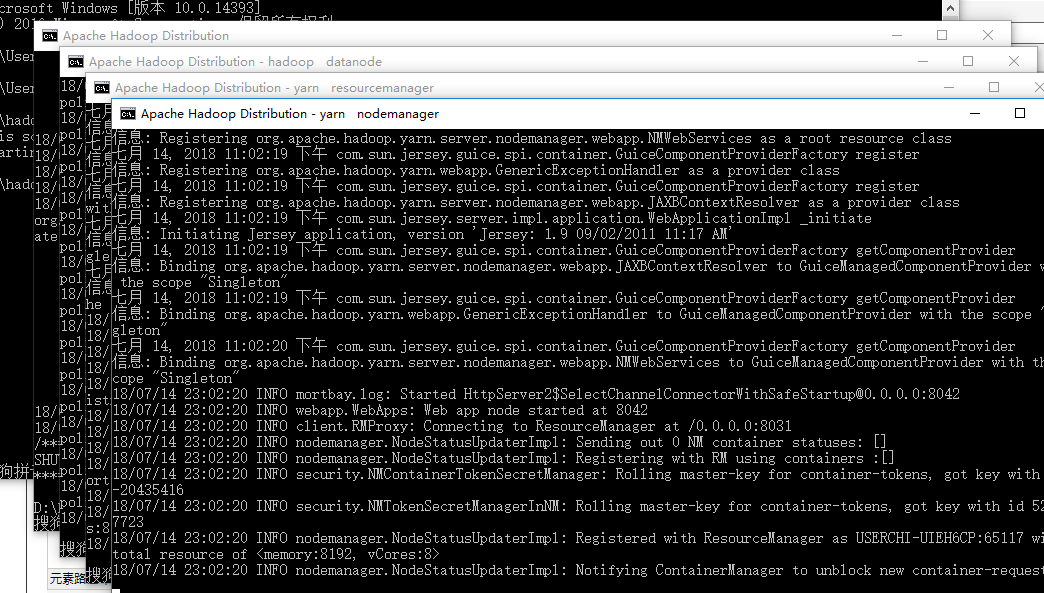
然后浏览器打开http://localhost:8088:

执行hadoop命令:hadoop fs -ls /
空的,新建一个文件夹:hadoop fs -mkdir /data
然后查看:hadoop fs -ls /
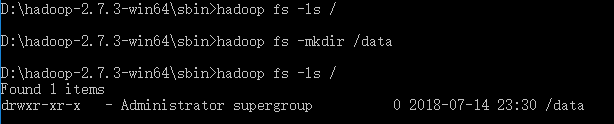
这样就hadoop的本地伪分布式环境就配置好了。
Windows配置本地Hadoop运行环境的更多相关文章
- Hadoop运行环境搭建
Hadoop运行环境搭建 更改为阿里的Centos7的yum源 #下载wget yum -y install wget #echo 下载阿里云的yum源配置 Centos-7.repo wget - ...
- Mac配置本地hadoop
Mac配置本地hadoop 这学期要学习大数据,于是在自己的mac上配置了hadoop环境.由于Mac是OSX系统,所以配置方法跟Linux类似 一.下载hadoop 从官网下载压缩包. $ll to ...
- 配置perl-cgi的运行环境,由于Active Perl安装在d:\perl
Apache 1.3.22 for Win32+PHP 4.0.6+Active Perl 5.006001+Zend Optimizer v1.1.0+mod_gzip 1.3.19.1a+MySQ ...
- macOS 使用Miniconda配置本地数据运算环境
目前,做数据分析工作,基本人手Numpy,pandas,scikit-learn.而这些计算程序包都是基于python平台的,所以搞数据的都得先装个python环境...(当然,你用R或Julia请忽 ...
- Windows上搭建Flume运行环境
1.如果没有安装过Java环境,则需首先安装JDK. 可参考<Windows上搭建Kafka运行环境>中的搭建环境安装JDK部分 2.官方下载Flume(当前为apache-flume-1 ...
- (转)Windows上搭建Kafka运行环境
转自:<Windows上搭建Kafka运行环境> 完整解决方案请参考: Setting Up and Running Apache Kafka on Windows OS 在环境搭建过 ...
- [转]Windows上搭建Kafka运行环境
[转]http://www.cnblogs.com/alvingofast/p/kafka_deployment_on_windows.html Windows上搭建Kafka运行环境 完整解决方 ...
- vsCode怎么为一个前端项目配置ts的运行环境
vsCode为一个前端项目配置ts的运行环境,ts文件保存的时候自动编译成js文件: 假设此前端项目名称为Web:文件结构如图 1. 在根目录中新建一个“.vscode”文件夹,里面建一个“tasks ...
- wampserver - windows服务器下php运行环境配置
之前一直在通过windows server IIS跑php程序,直到后来,发现了她 “wampserver", 一个法国的windows+apache+php+mysql部署包. 感觉挺好用 ...
随机推荐
- SQL语句分类和语法
DQL:Data QueryLanguage 数据查询语言 作用: 查询表中的字段 命令: select 查询 ⑦select 查询列表①from 表1 别名②连接类型 joi ...
- java i++与++i的区别
i++是先赋值,然后再自+1:++i是先自+1,后赋值. 用代码表示就是: 若 a = i++; 则等价于 a=i;i=i+1; 而 a = ++i; 则等价于 i=i+1;a=i; 例子: int ...
- Flink流处理(三)- 数据流操作
3. 数据流操作 流处理引擎一般会提供一组内置的操作,用于对流做消费.转换,以及输出.接下来我们介绍一下最常见的流操作. 操作分为无状态的(stateless)与有状态的(stateful).无状态的 ...
- Docker常用命令及脚本
1.常用命令 docker search centos #搜索镜像 pull centos ...
- RTMP 协议规范(中文版)
本文是为截至发稿时止最新 Adobe 官方公布的 RTMP 规范.本文包含 RTMP 规范的全部内容.是第一个比较全面的 RTMP 规范的中译本.由于成文时间仓促,加上作者知识面所限,翻译错误之处在所 ...
- 常用的MQ命令
删除队列管理器 dltmqm QmgrName 启动队列管理器 strmqm QmgrName 如果是启动默认的队列管理器,可以不带其名字 停止队列管理器 endmqm QmgrName 受控停止 e ...
- 第十八篇 Linux环境下常用软件安装和使用指南
提醒:如果之后要安装virtualenvwrapper的话,可以直接跳到安装virtualenvwrapper的方法,而不需要先安装好virtualenv 安装virtualenv和生 ...
- DataGridView编辑后立即更新到数据库的两种方法
DataGridView控件是微软预先写好的一个显示数据的控件,功能非常强大,可以显示来自数据库表的数据和XML等其他来源的数据. 方法一:基于DataAdapter对象创建一个CommandBuli ...
- 偏移分页器、游标分页器、Django-filter插件
复习 """ 1.drf-jwt签发与校验源码 签发token的请求 - 登录请求 - ObtainJSONWebToken - post - 将账号密码丢给序列化类处理 ...
- 前端——语言——Core JS——《The good part》读书笔记——第四章节(Function)
本章介绍Function对象,它是JS语言最复杂的内容. Java语言中没有Function对象,而是普通的方法,它的概念也比较简单,包含方法的重载,重写,方法签名,形参,实参等. JS语言中的Fun ...