
Spring Cloud Config(二):基于Git搭建配置中心
1、简述
本文选用Git作为配置仓库,新建两个环境的配置文件夹,dev 和 test,文件夹中分别存放 Config Client 端的配置文件,目录结构如下:
├ ─ ─ dev
└ ─ ─ config-client-dev.properties
├ ─ ─ test
└ ─ ─ config-client-test.properties
2、Config Server 搭建
2.1、Maven依赖
Config Server 是一个基于Spring Boot的web应用,我们首先需要做的就是在pom中引入Spring Cloud Config Server的依赖。
<dependency>

	<groupId>org.springframework.cloud</groupId>

	<artifactId>spring-cloud-config-server</artifactId>

</dependency>
2.2、Config Server配置
# 配置中心名称

spring.application.name=lkf-config-git

# 配置中心端口号

server.port=1000

# 配置git仓库地址

spring.cloud.config.server.git.uri=https://github.com/liukaifeng/lkf-cloud

# 配置文件查找路径

spring.cloud.config.server.git.search-paths=config-repo/dev

# 配置中心api前缀

spring.cloud.config.server.prefix=lkf
2.3、启用Config Server
最后就是启用Config Server,只需要加上@EnableConfigServer即可
@SpringBootApplication

@EnableConfigServer

public class GitConfigApplication {

	public static void main(String[] args) {

		SpringApplication.run(GitConfigApplication.class, args);

	}

}
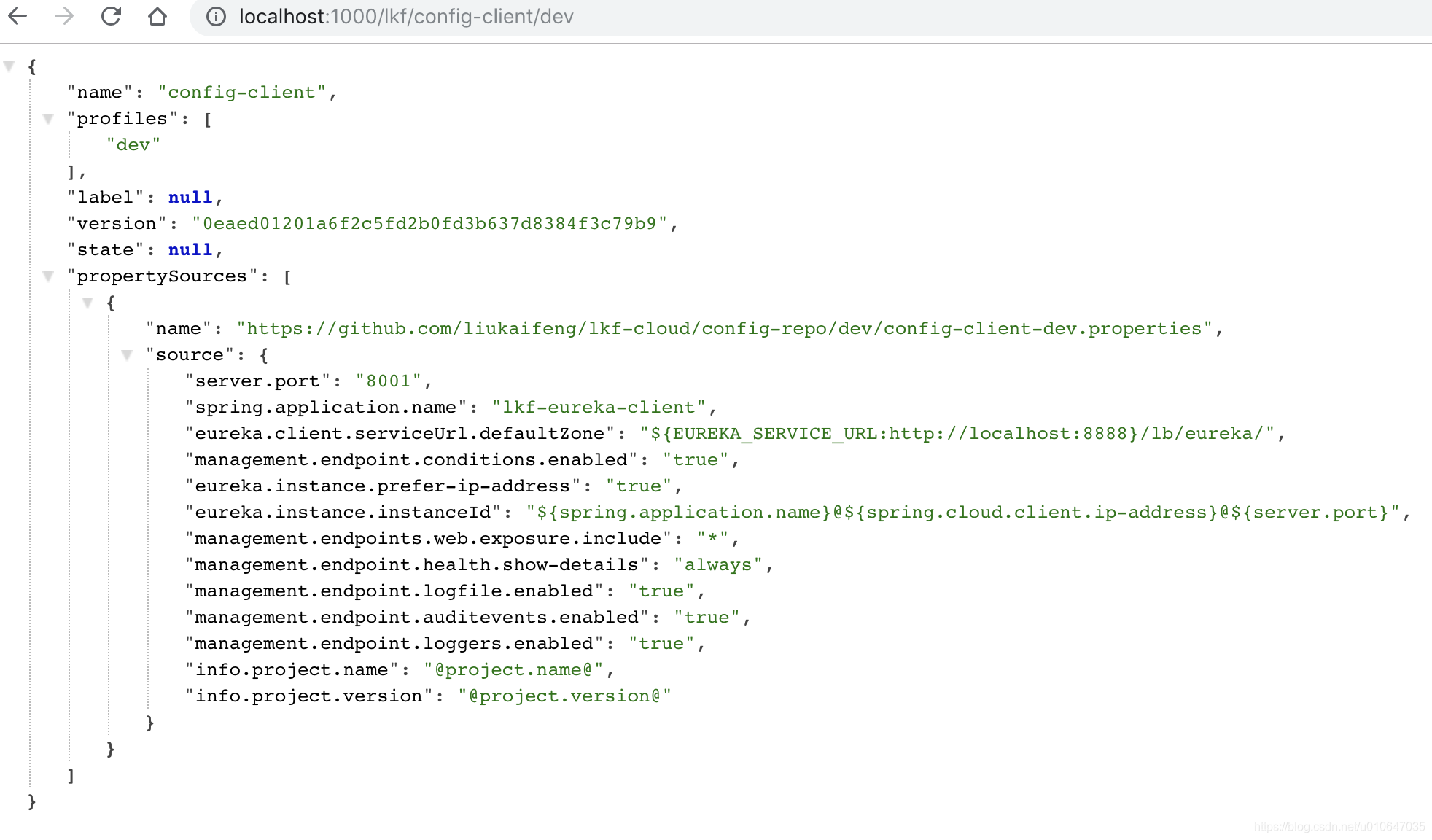
配置后完成后启动应用,Config Server就开始工作了,访问地址:
http://localhost:1000/lkf/config-client/dev 看到了刚刚配置文件中的配置信息,到此配置中心服务端搭建完成。
3、Config Client 使用
3.1、Maven依赖
Config Client 是一个基于Spring Boot的web应用,我们首先需要做的就是在pom中引入Spring Cloud Config Client的依赖。
<dependency>

    <groupId>org.springframework.cloud</groupId>

    <artifactId>spring-cloud-starter-config</artifactId>

</dependency>
3.2、Config Client配置
我们需要做一些配置使Config Client知道Config Server的地址,以及应用自身配置的信息,如:应用名字,环境,配置的版本等信息,以下是配置:
#配置环境

spring.cloud.config.profile=dev

#配置中心地址

spring.cloud.config.uri=http://localhost:1000/lkf

#配置文件名称

spring.cloud.config.name=config-client
配置完成后,启动应用,Config Client就会自动从Config Server获取配置,并注册到注册中心,访问注册中心地址:http://localhost:8888/

至此,Config Client 已成功从配置中心拉取并解析成功配置并注册到了注册中心。另外在应用启动日志中也可以看到拉取配置信息的日志:
Fetching config from server at : http://localhost:1000/lkf

2018-11-03 22:48:47.951 [main] DEBUG org.springframework.web.client.RestTemplate - Created GET request for "http://localhost:1000/lkf/config-client/dev"

2018-11-03 22:48:48.015 [main] DEBUG org.springframework.web.client.RestTemplate - Setting request Accept header to [application/json, application/*+json]

2018-11-03 22:48:49.130 [main] DEBUG org.springframework.web.client.RestTemplate - GET request for "http://localhost:1000/lkf/config-client/dev" resulted in 200 (null)

2018-11-03 22:48:49.132 [main] DEBUG org.springframework.web.client.RestTemplate - Reading [class org.springframework.cloud.config.environment.Environment] as "application/json;charset=UTF-8" using [org.springframework.http.converter.json.MappingJackson2HttpMessageConverter@273842a6]

2018-11-03 22:48:49.150 [main] INFO  o.s.c.c.client.ConfigServicePropertySourceLocator - Located environment: name=config-client, profiles=[dev], label=null, version=0eaed01201a6f2c5fd2b0fd3b637d8384f3c79b9, state=null

2018-11-03 22:48:49.150 [main] DEBUG o.s.c.c.client.ConfigServicePropertySourceLocator - Environment config-client has 1 property sources with 13 properties.

2018-11-03 22:48:49.150 [main] INFO  o.s.c.b.c.PropertySourceBootstrapConfiguration - Located property source: CompositePropertySource {name='configService', propertySources=[MapPropertySource@466319810 {name='configClient', properties={config.client.version=0eaed01201a6f2c5fd2b0fd3b637d8384f3c79b9}}, MapPropertySource@219812012 {name='https://github.com/liukaifeng/lkf-cloud/config-repo/dev/config-client-dev.properties', properties={server.port=8001, spring.application.name=lkf-eureka-client, eureka.client.serviceUrl.defaultZone=${EUREKA_SERVICE_URL:http://localhost:8888}/lb/eureka/, management.endpoint.conditions.enabled=true, eureka.instance.prefer-ip-address=true, eureka.instance.instanceId=${spring.application.name}@${spring.cloud.client.ip-address}@${server.port}, management.endpoints.web.exposure.include=*, management.endpoint.health.show-details=always, management.endpoint.logfile.enabled=true, management.endpoint.auditevents.enabled=true, management.endpoint.loggers.enabled=true, info.project.name=@project.name@, info.project.version=@project.version@}}]}

2018-11-03 22:48:49.150 [main] DEBUG o.s.core.env.PropertySourcesPropertyResolver - Could not find key 'logging.config:' in any property source
Spring Cloud Config(二):基于Git搭建配置中心的更多相关文章
- Spring Cloud Config、Apollo、Nacos配置中心选型及对比
Spring Cloud Config.Apollo.Nacos配置中心选型及对比 1.Nacos 1.1 Nacos主要提供以下四大功能 2.Spring Cloud Config 3.Apollo ...
- Spring Cloud Config 使用Bus的动态配置中心
server端配置 POM文件 <dependency> <groupId>org.springframework.boot</groupId> <artif ...
- Spring cloud config client获取不到配置中心的配置
Spring cloud client在配置的时候,配置文件要用 bootstrap.properties 贴几个说明的链接.但是觉得说的依然不够详细,得空详查. 链接1 链接2 链接3 原文地址:h ...
- Spring Cloud Config(三):基于JDBC搭建配置中心
1.简介 本文主要内容是基于jdbc搭建配置中心,使应用从配置中心读取配置信息并成功注册到注册中心,关于配置信息表结构仅供参考,大家可以根据具体需要进行扩展. 2.Config Server 搭建 2 ...
- 9.Spring Cloud Config统一管理微服务配置
Spring Cloud Config统一管理微服务配置 9.1. 为什么要统一管理微服务配置 9.2. Spring Cloud Config简介 Spring Cloud Config为分布式系统 ...
- 一起来学Spring Cloud | 第七章:分布式配置中心(Spring Cloud Config)
上一章节,我们讲解了服务网关zuul,本章节我们从git和本地两种存储配置信息的方式来讲解springcloud的分布式配置中心-Spring Cloud Config. 一.Spring Cloud ...
- Spring Cloud学习笔记【九】配置中心Spring Cloud Config
Spring Cloud Config 是 Spring Cloud 团队创建的一个全新项目,用来为分布式系统中的基础设施和微服务应用提供集中化的外部配置支持,它分为服务端与客户端两个部分.其中服务端 ...
- spring boot 2.0.3+spring cloud (Finchley)6、配置中心Spring Cloud Config
https://www.cnblogs.com/cralor/p/9239976.html Spring Cloud Config 是用来为分布式系统中的基础设施和微服务应用提供集中化的外部配置支持, ...
- Spring Cloud系列(六):配置中心
在使用Spring Boot的时候,我们往往会在application.properties配置文件中写一些值,供应用使用,这样做的好处是可以在代码中引用这些值,当这些值需要作出修改的时候,可以直接修 ...
随机推荐
- 奇妙的算法【4】-汉诺塔&哈夫曼编码
1,汉诺塔问题[还是看了源码才记起来的,记忆逐渐清晰] 汉诺塔:汉诺塔(又称河内塔)问题是源于印度一个古老传说的益智玩具.大梵天创造世界的时候做了三根金刚石柱子,在一根柱子上从下往上按照大小顺序摞着6 ...
- Django rest-framework框架-组件之分页
分页: a. 分页,看第n页, 每页显示n条数据 from rest_framework import serializers from api import models from rest_fra ...
- JVM学习笔记——类加载过程
JVM学习笔记——类加载过程 类加载模型——双亲委派模型(Parents Delegation Model)也可称为“溯源委派加载模型” Java的类加载器是一个运行时核心基础设施模块,主要是启动之初 ...
- S2-032
前言 S2-032漏洞的影响范围是Struts 2.3.20 - Struts Struts 2.3.28,当开启了动态方法调用时可RCE.这次的漏洞分析以及后面的漏洞分析都是使用的Struts 2. ...
- js获取地理位置
直接上代码: if(navigator.geolocation) { navigator.geolocation.getCurrentPosition( function (position) { v ...
- 4.NIO的非阻塞式网络通信
/*阻塞 和 非阻塞 是对于 网络通信而言的*/ /*原先IO通信在进行一些读写操作 或者 等待 客户机连接 这种,是阻塞的,必须要等到有数据被处理,当前线程才被释放*/ /*NIO 通信 是将这个阻 ...
- Cannot determine value type from string 'xxxxxx'
Cannot determine value type from string 'xxxxxx' 查了一下,意思就是字段和属性名没有对上. 反复查看代码,字段名和属性名一致. 最后翻阅资料得知是因为构 ...
- JavaScript展开操作符(Spread operator)介绍
本文介绍JavaScript的展开操作符(Spread operator)....本文适合ES6初学者. 你可以通过展开操作符(Spread operator)...扩展一个数组对象和字符串.展开运算 ...
- C# 开发的windows服务 不能调试——讨论整理
CSDN的标题:C# 开发的windows服务 不能调试 System.Diagnostics.Debugger.Launch();在想加断点的地方加入这行,是进入断点的,可以进行调试,我的是xp系统 ...
- 开启 clr enabled
'; GO RECONFIGURE; GO '; GO RECONFIGURE; '; GO