
在使用selenium时出现FileNotFoundError: [WinError 2] 系统找不到指定的文件。
今天在使用selenium出现这样的错:
Traceback (most recent call last):

  File "E:\python\lib\site-packages\selenium\webdriver\common\service.py", line 76, in start

    stdin=PIPE)

  File "E:\python\lib\subprocess.py", line 729, in __init__

    restore_signals, start_new_session)

  File "E:\python\lib\subprocess.py", line 1017, in _execute_child

    startupinfo)

FileNotFoundError: [WinError 2] 系统找不到指定的文件。
上网查了一下发现是找不到chromedriver。
然后使用下面的链接下载相应的chromedriver
http://npm.taobao.org/mirrors/chromedriver/
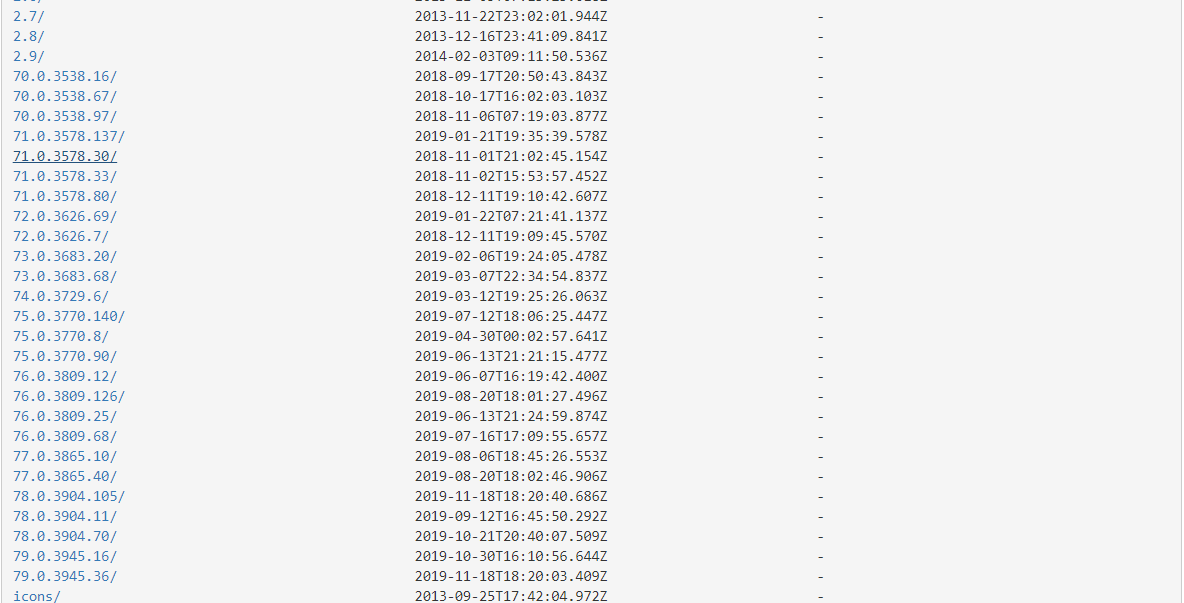
下载后解压出 chromedriver.exe的文件,将其粘贴到自己python安装的主目录下或者python安装目录下的Scripts里就大功告成
下载的时候看错了Chrom的版本,结果出现了如下错:
selenium.common.exceptions.SessionNotCreatedException: Message: session not created: This version of ChromeDriver only supports Chrome version 79
因为下载的chromedriver.exe版本比我的Chrom版本要高,解决办法:列如我使用的Chrom版本是 78.0.3904.108,下载了一个78.0.3904.70.结果也能用
在使用selenium时出现FileNotFoundError: [WinError 2] 系统找不到指定的文件。的更多相关文章
- python FileNotFoundError: [WinError 2] 系统找不到指定的文件。
D:\Test\TestSWP\Scripts\python.exe D:/Test/SWP/TestSWP/chorme/chorme.pyTraceback (most recent call l ...
- 路径不对 导致FileNotFoundError: [WinError 2] 系统找不到指定的文件, 问题解决办法
执行python + selenium 代码 from selenium import webdriver driver = webdriver.Chrome("D:\AutoConf\bi ...
- FileNotFoundError: [WinError 2] 系统找不到指定的文件
用Idle运行Python脚本的时候发现如下错误: Traceback (most recent call last): File "D:\Python\Python36-32\lib\s ...
- FileNotFoundError: [WinError 2] 系统找不到指定的文件。 解决方案
用Idle运行Python脚本的时候发现如下错误: Traceback (most recent call last): File "C:\Users\DangKai\Desktop\pyt ...
- [Python学习]错误篇二:切换当前工作目录时出错——FileNotFoundError: [WinError 3] 系统找不到指定的路径
REFERENCE:<Head First Python> ID:我的第二篇[Python学习] BIRTHDAY:2019.7.13 EXPERIENCE_SHARING:解决切换当前工 ...
- pytesseract.pytesseract.TesseractNotFoundError: tesseract is not installed or it's not in your path && FileNotFoundError: [WinError 2] 系统找不到指定的文件。
C:\Users\k\Desktop\test>python test.py Traceback (most recent call last): File , in run_tesseract ...
- 转换文件格式遭遇 FileNotFoundError:[WinError 2]系统找不到指定的文件
重启试试
- TextClip构造方法报OSError:MoviePy creation of None failed because of the following [WinError 2]系统找不到指定的文件
☞ ░ 前往老猿Python博文目录 ░ 在使用moviepy的构造方法创建实例时报错: "C:\Program Files\Python37\python.exe" F:/stu ...
- building '_mysql' extension error: [WinError 2] 系统找不到指定的文件。
D:\4yanjiiu\APIzidong\MySQL-python-1.2.5>py running install running bdist_egg running egg_info wr ...
随机推荐
- linux下编译利用CMakeLists.txt 编译C++写的opencv程序
https://hihozhou.com/blog/2017/05/11/linux-compile-opencv-c++-file.html cmake . make -j8
- C#_switch语句,for循环,do while循环,while循环
1:switch语句,代码如下: using System; using System.Collections.Generic; using System.Linq; using System.Tex ...
- JS的数据储存格式
javaScript有三种数据存储方式,分别是:sessionStoragelocalStoragecookier 相同点:都保存在浏览器端,同源的 不同点:①传递方式不同cookie数据始终在同源的 ...
- cache magic对pms模块的cache访问模式分析结果
其中43.184的命中率只有不到70%,是要分析的对象:3.189是命中率98%左右,是做参考的对象. 基本统计:可以知道43.184的update和delete操作占总操作的比例要比3.189打不少 ...
- 可插拔式后台管理系统(Django)
1.实现效果 研究了下django admin的功能,自己实现了一个简单的可插拔式后台管理系统,方便自定义特殊的功能,而且作为一个独立单独的django app,可以整体拷贝到其他项目中作为后台数据管 ...
- ubuntu16.04下如何安装mkimage工具?
答: sudo apt-get install u-boot-tools -y
- LC 738. Monotone Increasing Digits
Given a non-negative integer N, find the largest number that is less than or equal to N with monoton ...
- C#.net winform skin 皮肤大全
C#.net winform skin 皮肤大全 1. 东日IrisSkin IrisSkin 共有两个版本,一个是IrisSkin.dll 用于.Net Framework1.0/1.1 和Iris ...
- Java各种反射性能对比
对各种方法实现get方法的性能进行了一个测试. 总共有5个测试,,每个测试都是执行1亿次 1. 直接通过Java的get方法 2.通过高性能的ReflectAsm库进行测试 3.通过Java Clas ...
- Python-sympy科学计算与数据处理(求极限及其它功能)
极限 其它功能