
设置UITableView的separatorInset值为UIEdgeInsetsZero,分隔线不最左端显示的问题
一、问题描述
UITableView分割线要显示到最左端
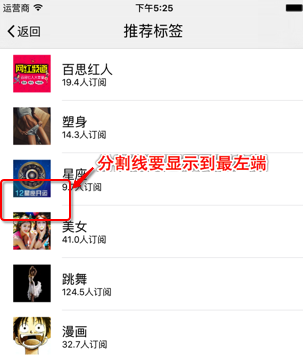
查看UITableView的属性,发现设置separatorInset的值可以自定义分割线的位置。
@property (nonatomic) UIEdgeInsets separatorInset NS_AVAILABLE_IOS(7_0) UI_APPEARANCE_SELECTOR; // allows customization of the frame of cell separators
打印separatorInset,其默认值{0, 15, 0, 0},上、左、下、右距离原位置分别为0、15、0、0,即左侧会有默认15像素的空白
全局设置每个cell的separatorInset值。在UITableViewController的-(void)viewDidLoad方法中设置UITableView分割线,UIEdgeInsetsZero相当于UIEdgeInsetsMake(0, 0, 0, 0)。
 -(void)viewDidLoad

 {

     //设置分割线距边界的距离

     //在iOS7之前没有separatorInset,运行会导致程序崩溃,所以要加下判断

     //if ([[[UIDevice currentDevice] systemVersion] floatValue] >= 7.0)

     //{

     //    self.tableView.separatorInset = UIEdgeInsetsZero;

     //}

     if([self.tableView respondsToSelector:@selector(setSeparatorInset:)])

     {

         self.tableView.separatorInset = UIEdgeInsetsZero;

     }

 }
或者单独每个cell的separatorInset值。在UITableViewController的-(void)tableView:(UITableView *)tableView willDisplayCell:(UITableViewCell *)cell forRowAtIndexPath:(NSIndexPath *)indexPath方法中设置UITableView分割线,UIEdgeInsetsZero相当于UIEdgeInsetsMake(0, 0, 0, 0)。
 -(void)tableView:(UITableView *)tableView willDisplayCell:(UITableViewCell *)cell forRowAtIndexPath:(NSIndexPath *)indexPath

 {

     //设置分割线距边界的距离

     //在iOS7之前没有separatorInset,运行会导致程序崩溃,所以要加下判断

     //if ([[[UIDevice currentDevice] systemVersion] floatValue] >= 7.0)

     //{

     //    cell.separatorInset = UIEdgeInsetsZero;

     //}

     if ([cell respondsToSelector:@selector(setSeparatorInset:)]){

         cell.separatorInset = UIEdgeInsetsZero;

     }

 }
运行,发现达不到我想要的效果,分割线只是距离最左端近了,但还是没显示到最左端,效果图如下:

二、问题分析
iOS7,想要设置cell的分割线显示到最左端,只需要设置separatorInset的值为UIEdgeInsetsZero。
iOS8,简单设置separatorInset的值为UIEdgeInsetsZero的方法已经无效了。UIView的layoutMargins 默认为{8, 8, 8, 8}。
cell的preservesSuperviewLayoutMargins默认为true时,可能会导致cell被其父UITableView的LayoutMargin影响。如果设置为false时,cell不被UITableView的LayoutMargin影响。
三、问题解决
1.方法一:
全局设置cell的separatorInset的值为UIEdgeInsetsZero,UITableView的layoutMargins设置为UIEdgeInsetsZero,并且cell的layoutMargins设置为UIEdgeInsetsZero。
 -(void)viewDidLoad

 {

     //设置分割线距边界的距离

     //在iOS7之前没有separatorInset,运行会导致程序崩溃,所以要加下判断

     //if ([[[UIDevice currentDevice] systemVersion] floatValue] >= 7.0)

     //{

     //    self.tableView.separatorInset = UIEdgeInsetsZero;

     //}

     if([self.tableView respondsToSelector:@selector(setSeparatorInset:)])

     {

         self.tableView.separatorInset = UIEdgeInsetsZero;

     }

     if([self.tableView respondsToSelector:@selector(setLayoutMargins:)])

     {

         self.tableView.layoutMargins = UIEdgeInsetsZero;

     }

 }
 -(void)tableView:(UITableView *)tableView willDisplayCell:(UITableViewCell *)cell forRowAtIndexPath:(NSIndexPath *)indexPath

 {

     if ([cell respondsToSelector:@selector(setLayoutMargins:)]) {

         cell.layoutMargins = UIEdgeInsetsZero;

     }

 }
2.方法二:
preservesSuperviewLayoutMargins默认为true,cell被UITableView的layoutMargins影响。
设置cell的separatorInset值为UIEdgeInsetsZero,cell的layoutMargins值为UIEdgeInsetsZero,并且cell的preservesSuperviewLayoutMargins为false时,避免cell被UITableView的layoutMargins影响。
 -(void)tableView:(UITableView *)tableView willDisplayCell:(UITableViewCell *)cell forRowAtIndexPath:(NSIndexPath *)indexPath

 {

     if ([cell respondsToSelector:@selector(setSeparatorInset:)]){

         cell.separatorInset = UIEdgeInsetsZero;

     }

     if ([cell respondsToSelector:@selector(setLayoutMargins:)]) {

         cell.layoutMargins = UIEdgeInsetsZero;

     }

     //preservesSuperviewLayoutMargins设置为false时,子view不被其父view的LayoutMargin影响

     if ([cell respondsToSelector:@selector(setPreservesSuperviewLayoutMargins:)]) {

         cell.preservesSuperviewLayoutMargins = false;

     }

 }
最终效果:

四、存在问题
该方法设置cell的分割线,在竖屏下显示正常,在横屏下会无效。网上查阅,发现解决cell分割线的方法都存在着这个问题

五、饮水思源
1.http://stackoverflow.com/questions/25770119/ios-8-uitableview-separator-inset-0-not-working
2.http://dev.classmethod.jp/smartphone/iphone/ios-8-uitableview-layoutmargins/
3.http://www.cnblogs.com/Alex-798-Dcr/p/5279920.html
4.http://www.skyfox.org/ios7-tableview-separatorinset-ajust.html
设置UITableView的separatorInset值为UIEdgeInsetsZero,分隔线不最左端显示的问题的更多相关文章
- iOS 中隐藏UITableView最后一条分隔线
如何优雅的隐藏UITableView中最后一条分割线? 这个问题是很常见,却又不太容易解决的. 可能通常的做法都是隐藏UITableView的分割线,自定义一条. 最近在使用弹出菜单的时候,同样遇到了 ...
- 快速设置UITableView不同section对应于不同种类的cell
快速设置UITableView不同section对应于不同种类的cell 本文主要是为了写明如何在UITableView中,一个section对应于一种类型的cell,写起来不凌乱. 在不封装任何类的 ...
- UITableView分隔线
问题1: 在ios中使用UITableView时,当行数较少是,可能一屏幕能显示完全所有行,这时候会出现下面的问题,显示多余的分隔线 图如下: 解决方案: //解决方案1 //添加如下代码 -(CGF ...
- 设置easyui input默认值
/*设置input 焦点*/ $(function () { //集体调用 $(".formTextBoxes input").each(function () { $(this) ...
- 给自定义cell设置分隔线的不同做法
1.给cell添加一个UIView,设置UIView的高度为1,并设置这个UIView的左.下.右约束. 2.不需要给cell添加任何控件,重写cell的- (void)setFrame:(CGRec ...
- 设置UITableView背景透明/监听cell左边的删除按钮的点击事件
_tableView = [[UITableView alloc] init]; _tableView.delegate = self; _tableView.dataSource = self; _ ...
- Linux 命令 - umask: 显示或设置文件模式掩码值
umask 命令控制着创建文件时指定给文件的默认权限.它使用八进制表示法从文件模式属性中删除一个位掩码. 参见下面的例子: [huey@huey-K42JE cmdline]$ rm -f foo.t ...
- 定义设置颜色的RGB值的宏
//定义设置颜色的RGB值的宏 #define RGBA(r,g,b,a) [UIColor colorWithRed:r/255.0 green:g/255.0 blue:b/255.0 alpha ...
- SharePoint 设置Lookup 字段的值
如何设置Lookup字段的值, 首先我们同样需要了解SPFieldLookupValueCollection和SPFieldLookupValue, 这2个类的原理和之前所讲解到SPFieldUser ...
随机推荐
- knockoutJS学习笔记06:ko数组与模板绑定
前面已经介绍了基本的绑定和模板相关知识,接下来就看ko里的数组和模板绑定,数组和模板绑定应该是实际项目中用得比较多的,ko提供了很好的支持. 一.observaleArray 前面的监控属性都是单个对 ...
- ECMAScript 6 Features 中文版
ECMAScript 6 Features 中文版 如词不达意,欢迎提 PR & issue 采用中英混排的方式进行译制,如不解请查看对应原文 本文档将与原作者的 文档 保持同步更新,欢迎关注 ...
- 一分钟读懂MySQL分布式消息的处理
在很多MYSQL环境中,对于MYSQL的分布式事物处理一直是个难题,在当前互联网环境中,大多数应用系统是基于SOA的很多复杂接口之间的调用,并且事物之间的处理优先级也是有先后的,所以对于实际入库的数据 ...
- python爬某个网站的图片
# _*_ coding: gbk _*_ import urllib import urllib2 import re class Spider: def getImage(self,html): ...
- zabbix告警使用sendEmail
1sendmail介绍 详细介绍见官网:http://caspian.dotconf.net/menu/Software/SendEmail/ 2使用sendEmail sendEmail是个十分优秀 ...
- MyEclipse建立SpringMVC入门HelloWorld项目
一.首先,建立空的web project项目: 1. 2. 3. 二.其次,导入先关jar包 1.将jar包导入SpringMVCHelloWorld\WebRoot\WEB-INF\lib目录下 三 ...
- java获取当天,前天,明天,本周,本月,本年的开始日期时间和结束日期时间
package demoone; import java.sql.Timestamp; import java.text.ParseException; import java.text.Simple ...
- Thinkphp中controller控制器根据curl函数请求数据
public function member(){ $url="http://aitequn.tjnit.com/UserAction_findAllUser"; $ch =cur ...
- 双守护进程(不死service)-5.0系统以下
上链接: http://files.cnblogs.com/files/andlp/DaemonProcess.zip 5.0以上 参考marsDaemon
- Storm 单机版环境搭建
1 需要安装的软件 要使用storm首先要安装以下工具:python.zookeeper.zeromq.jzmq.storm 1.1 安装zeromq wget http://download.zer ...