
【winform】主窗体多线程给子窗体传值
0.委托窗体传值

1.主窗体多线程给子窗体传值(多线程)
解决方案:主要使用委托,因为会出现跨线程错误
主窗体
        public FormMain()

        {

            InitializeComponent();

            //background thread running

            Action sAction = async () => await CallbackWorkItem();

            System.Threading.Tasks.Task task = System.Threading.Tasks.Task.Run(sAction);

            System.Threading.Tasks.Task.WaitAll(task);

        }

        private async Task CallbackWorkItem()

        {

            List<string> filesGuidList = new List<string>(); //the GUID to download

            while (true)

            {

                try

                {

                     int count = int.Parse(COUNT);

                    if (string.IsNullOrWhiteSpace(DOWNPATH))

                    {

                        MessageBox.Show("the config's key for DOWNPATH is empty.");

                        return;

                    }

                    if (!string.IsNullOrWhiteSpace(PROJECTID) && !string.IsNullOrWhiteSpace(HOID))

                    {

                        filesGuidList.Clear();

                        //1.Check

                        bool checkTask = await CheckIds(Guid.Parse(PROJECTID), Guid.Parse(HOID));

                        if (checkTask)

                        {

                            deliveryFile.SetMonitor(deliveryFile,"download begins.", COUNT);

                            //2.Load

                            var files = await LoadDeliveryFiles(Guid.Parse(PROJECTID), Guid.Parse(HOID), TEMPKEY, count);

                            if (count == 1)

                            {

                                deliveryFile.SetMonitor(deliveryFile,$"download the data: {files[0].Name}", COUNT);

                            }

                            else

                            {

                                deliveryFile.SetMonitor(deliveryFile,$"download the {COUNT} data.", COUNT);

                            }

                            foreach (var file in files)

                            {

                                filesGuidList.Add(file.Guid.ToString());

                            }

                            string fileZipName = string.Empty;

                            //3.download

                            if (DownloadFile(Guid.Parse(PROJECTID), filesGuidList, out fileZipName))

                            {

                                DeleteRedis(Guid.Parse(PROJECTID), filesGuidList, fileZipName, TEMPKEY);

                                deliveryFile.SetMonitor(deliveryFile,"end of download.", COUNT);

                            }

                        }

                        else

                        {

                            deliveryFile.SetMonitor(deliveryFile,"no download data.", COUNT);

                           await Task.Delay(1000);

                        }

                    }

                    deliveryFile.SetMonitor(deliveryFile,"rest 7 seconds...", COUNT);

                    await Task.Delay(7000);

                }

                catch (FormatException e)

                {

                    MessageBox.Show("the config's key for PROJECTID or HOID must be GUID,and COUNT must be number.");

                    await Task.Delay(60000); //if throw exception,re-execute after 60 seconds

                }

                catch (Exception e)

                {

                    MessageBox.Show(e.Message);

                    await Task.Delay(60000); //if throw exception,re-execute after 60 seconds

                }

            }

        }
FileDeliveryFile.cs
public partial class FormDeliveryFile : Form

{

	public delegate void FileUpdateStatus(Control control, string monitor, string count);

}

public void SetMonitor(Control control, string monitor, string count)

        {

            if (control.InvokeRequired)

            {

                //direct access to controls across threads-跨线程直接访问控件 - InvokeRequired

                FileUpdateStatus update = new FileUpdateStatus(SetMonitor);

                control.Invoke(update, new object[] { control, monitor, count });

            }

            else

            {

                this.txtMonitor.Text = monitor;

                this.txtMonitorSetCount.Text = count;

                this.txtMonitor.ForeColor = Color.Brown;

                this.txtMonitorSetCount.ForeColor = Color.Brown;

                this.dataGridView1.DataSource = LoadPath();

                this.dataGridView1.Columns[1].AutoSizeMode = DataGridViewAutoSizeColumnMode.AllCells;  //自适应列宽

                this.dataGridView1.Columns[1].DefaultCellStyle = new DataGridViewCellStyle() { ForeColor = Color.Blue, Font = new Font("Arial", 11F) }; //样式

                this.dataGridView1.SelectionMode = DataGridViewSelectionMode.FullRowSelect;

                this.dataGridView1.ReadOnly = true;

                if (this.dataGridView1.FirstDisplayedScrollingRowIndex > -1)

                {

                    this.dataGridView1.FirstDisplayedScrollingRowIndex = VerticalScrollIndex;//设置垂直滚动条位置

//                    this.dataGridView1.CurrentCell = this.dataGridView1.Rows[rowIndex].Cells[0];

                }

            }

        }
2.datagridview 滚动时位置不变
if (this.dataGridView1.FirstDisplayedScrollingRowIndex > -1)

                {

                    this.dataGridView1.FirstDisplayedScrollingRowIndex = VerticalScrollIndex;//设置垂直滚动条位置

                    this.dataGridView1.CurrentCell = this.dataGridView1.Rows[rowIndex].Cells[0];

                }
Scroll事件
 private void dataGridView1_Scroll(object sender, ScrollEventArgs e)

        {

            try

            {

                if (e.ScrollOrientation == ScrollOrientation.VerticalScroll)

                {

                    VerticalScrollIndex = e.NewValue;

                }

                else if (e.ScrollOrientation == ScrollOrientation.HorizontalScroll)

                {

                    HorizontalOffset = e.NewValue;

                }

            }

            catch { }

        }
3.datagridview 第1列点击打开文件并选择文件夹位置
		private void dataGridView1_CellContentClick(object sender, DataGridViewCellEventArgs e)

        {

			//第1列

            if (e.ColumnIndex == 1)

            {

                string file = DOWNPATH + this.dataGridView1.Rows[e.RowIndex].Cells[e.ColumnIndex].Value.ToString();

                System.Diagnostics.Process.Start(file); //打开文件

                //string v_OpenFolderPath = DOWNPATH;

                System.Diagnostics.Process.Start("explorer.exe", "/select," + file); //打开后选择文件

                //this.dataGridView2.Rows[e.RowIndex].Cells[e.ColumnIndex].Value.ToString());

            }

        }
4.鼠标移动到文字上显示"hand"按钮
      private void dataGridView1_CellMouseLeave(object sender, DataGridViewCellEventArgs e)

        {

            this.Cursor = Cursors.Default;

        }

        private void dataGridView1_CellMouseMove(object sender, DataGridViewCellMouseEventArgs e)

        {

            if (e.ColumnIndex == 1)

            {

                this.Cursor = Cursors.Hand;

            }

        }
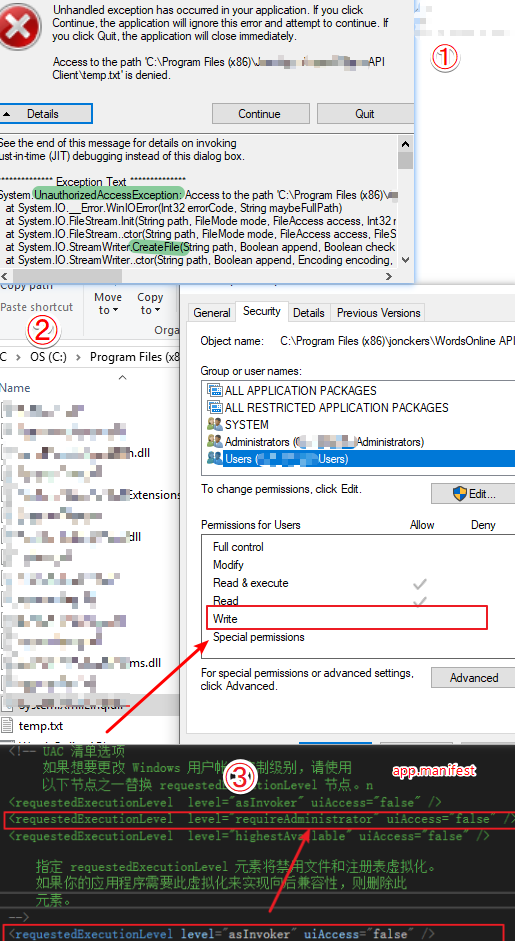
5.安全性问题,System.UnauthorizedAccessException异常
Advanced Installer打包Winform后安装在C盘权限不足的解决方法
解决方法:
(1)VS中右键项目=》属性=》安全性,勾选【启用ClickOne安全设置】;
(2)找到app.manifest,将
修改为
(3)再次找到项目属性的安全性,去掉【启用ClickOne安全设置】的勾选;
【winform】主窗体多线程给子窗体传值的更多相关文章
- winform里操作打开在panel里的form窗体,子窗体操作同级子窗体或者父窗体的方法
最近开始了一个winform项目,原先一直都是web项目.遇到个问题,就是在框架内,左侧和中间的main都是用panel来实现的form,就是把form窗体打开到panel里,实现左侧是导航,中间是操 ...
- 主窗体里面打开子窗体&&打印饼图《Delphi 6数据库开发典型实例》--图表的绘制
\Delphi 6数据库开发典型实例\图表的绘制 1.在主窗体里面打开子窗体:ShowForm(Tfrm_Print); procedure Tfrm_Main.ShowForm(AFormClass ...
- C#嵌入子窗体,判断子窗体是否打开了
/// <summary> /// 嵌入子窗体,判断子窗体是否打开了 /// </summary> public static Form1 f; public void For ...
- Winform中如何实现父窗体传递数据到子窗体并刷新子窗体
原理:利用委托和事件,本文将以图文并茂的例子讲述,告诉我们So Easy --------------------------------------------------------------- ...
- WinForm中如何实现在容器控件中嵌入form窗体(panel与子窗体)
今天在做项目时候遇到一个问题,窗体分为左右两部分,要求在左边栏点击按钮时,右边动态加载窗体最后想到用panel实现,经历几次失败,并查找资料后,终于搞定 说明:如果多次切换需加入 panel.clea ...
- Ribbon 窗体的 MDI 子窗体使用 TabbedMDIManager 切换时工具条闪屏问题的解决办法
补充说明: 此问题已经在新版本中解决(15.2.6),方法更加简单,只需要在 MDIChild 窗体的 Create 方法中,将 Ribbon 的 Visible 属性设置为 false 就可以了,且 ...
- js父窗体关闭,子窗体紧随
近来的.我们遇到了权限管理系统.由于权限管理系统与原系统的风格不符.打开一个全新的窗口.问题就来了.admin取消后,,权限管理形式不关闭.其他普通用户登录后.尚能经营权的管理形式. 简化问题:adm ...
- 父窗体的委托,子窗体注册,this.Owner是关键
//声明委托 public delegate void RefreshParentHandler<T>(T obj); //父窗体的委托 public RefreshParentHandl ...
- 【VC】Dialog 窗体随意切割子窗体。
用 Dialog 对话框来实现窗体的随意切割. 在资源中加入 Dialog 选择 IDD_FORMVIEW 资源..分别新建FormViewOne,FormViewTwo FormViewThre ...
随机推荐
- Node: Process模块 (Features of Process)
Process模块 (Features of Process) process is a global variable which indicates the current Node.js pro ...
- Oracle数据库入门到高薪培训教程(从Oracle 11g 到 Oracle 19c)
一.Oracle数据库入门到高薪培训视频教程(从 Oracle11g 到 Oracle19c) 本套Oracle视频教程学习地址: https://edu.51cto.com/course/18034 ...
- 【转】golang-defer坑的本质
本文节选自https://tiancaiamao.gitbooks.io/go-internals/content/zh/03.4.html 作者的分析非常透彻,从问题本质分析,就不会对defer产生 ...
- 树莓派配置samba服务器,实现linux、windows文件共享
一.安装samba服务器 输入如下命令: 二.配置文件smb.conf 找到[homes],将read only那里的yes改为no,允许读写 添加用户和设置密码 sudo smbpasswd -a ...
- Python标准库-数字的处理函数(math模块)
Python标准库-数字的处理函数(math模块) 作者:尹正杰 版权声明:原创作品,谢绝转载!否则将追究法律责任. #!/usr/bin/env python #_*_conding:utf-8_* ...
- 《Java程序设计实验》 软件工程18-1,3 OO实验2
- ThinkPHP模板之二
模板布局及变量比较,循环. controller <?php /** * Created by PhpStorm. * User: Sahara * Date: 2019/6/23 * Time ...
- poi读写doc和docx
https://www.cnblogs.com/always-online/p/4800131.html POI是 Apache 旗下一款读写计算机中的 word 以及 excel 文件的工具. po ...
- shortcuts for contructor 创建对象捷径
- ElementUI——报错汇总
前言 elementUI的报错汇总 错误 please transfer a valid prop path to form item! vue.esm.js?c5de:628 [Vue warn]: ...