
vue-cli3.0 脚手架搭建项目的过程详解
1.安装vue-cli 3.0
|
1
2
3
|
npm install -g @vue/cli# oryarn global add @vue/cli |
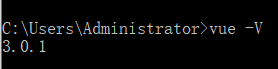
安装成功后查看版本:vue -V(大写的V)
2.命令变化
|
1
|
vue create --help |
用法:create [options] <app-name>
创建一个由 `vue-cli-service` 提供支持的新项目
选项:
-p, --preset <presetName> 忽略提示符并使用已保存的或远程的预设选项
-d, --default 忽略提示符并使用默认预设选项
-i, --inlinePreset <json> 忽略提示符并使用内联的 JSON 字符串预设选项
-m, --packageManager <command> 在安装依赖时使用指定的 npm 客户端
-r, --registry <url> 在安装依赖时使用指定的 npm registry (仅用于 npm 客户端)
-g, --git [message] 强制 / 跳过 git 初始化,并可选的指定初始化提交信息
-n, --no-git 跳过 git 初始化
-f, --force 覆写目标目录可能存在的配置
-c, --clone 使用 git clone 获取远程预设选项
-x, --proxy 使用指定的代理创建项目
-b, --bare 创建项目时省略默认组件中的新手指导信息
-h, --help 输出使用帮助信息
3.创建项目
去到指定目录下创建项目(project-name:项目名称)
|
1
|
vue create project-name |

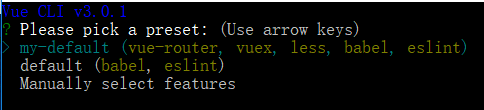
my-default 是 我原来保存好的模板;
default 是 使用默认配置
Manually select features 是 自定义配置
4.选择配置(自定义配置)
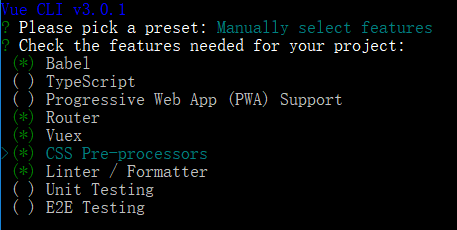
5.选择css预编译,这里我选择less
|
1
2
3
4
5
6
|
Please pick a preset: Manually select features Check the features needed for your project: Router, Vuex, CSS Pre-processors, Linter, Unit Pick a CSS pre-processor (PostCSS, Autoprefixer and CSS Modules are supported by default): SCSS/SASS > LESS Stylus |
6.语法检测工具,这里我选择ESLint + Standard config
|
1
2
3
4
5
6
7
8
|
Please pick a preset: Manually select features Check the features needed for your project: Router, Vuex, CSS Pre-processors, Linter, Unit Pick a CSS pre-processor (PostCSS, Autoprefixer and CSS Modules are supported by default): Stylus Pick a linter / formatter config: (Use arrow keys) ESLint with error prevention only ESLint + Airbnb config> ESLint + Standard config ESLint + Prettier |
7.选择语法检查方式,这里我选择保存就检测
|
1
2
3
4
5
6
7
|
Please pick a preset: Manually select features Check the features needed for your project: Router, Vuex, CSS Pre-processors, Linter, Unit Pick a CSS pre-processor (PostCSS, Autoprefixer and CSS Modules are supported by default): Stylus Pick a linter / formatter config: Prettier Pick additional lint features: (Press <space> to select, <a> to toggle all, <i> to invert selection)>( ) Lint on save // 保存就检测 ( ) Lint and fix on commit // fix和commit时候检查 |
8.接下来会问你把babel,postcss,eslint这些配置文件放哪,这里随便选,我选择放在独立文件夹
|
1
2
3
4
5
6
7
8
9
|
Please pick a preset: Manually select features Check the features needed for your project: Router, Vuex, CSS Pre-processors, Linter, Unit Pick a CSS pre-processor (PostCSS, Autoprefixer and CSS Modules are supported by default): Stylus Pick a linter / formatter config: Prettier Pick additional lint features: Lint on save Pick a unit testing solution: Jest Where do you prefer placing config for Babel, PostCSS, ESLint, etc.? (Use arrow keys)> In dedicated config files // 独立文件放置 In package.json // 放package.json里 |
9.键入N不记录,如果键入Y需要输入保存名字,如第一步所看到的我保存的名字为my-default
|
1
2
3
4
5
6
7
8
|
Please pick a preset: Manually select featuresCheck the features needed for your project: Router, Vuex, CSS Pre-processors, Linter, UnitPick a CSS pre-processor (PostCSS, Autoprefixer and CSS Modules are supported by default): StylusPick a linter / formatter config: PrettierPick additional lint features: Lint on savePick a unit testing solution: JestWhere do you prefer placing config for Babel, PostCSS, ESLint, etc.? In dedicated config filesSave this as a preset for future projects? (Y/n) // 是否记录一下以便下次继续使用这套配置。 |
10.确定后,等待下载依赖模块
11.项目创建好后
|
1
2
|
cd project-name // 进入项目根目录run serve // 运行项目 |
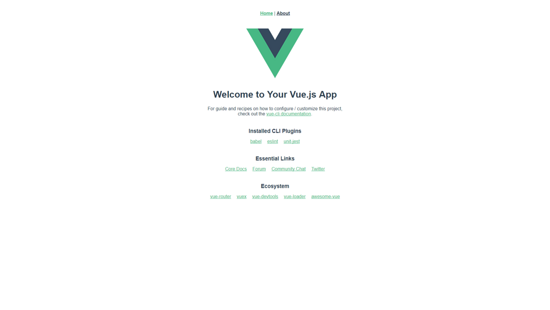
12.浏览器打开 http://localhost:8080
总结
以上所述是小编给大家介绍的vue-cli3.0 脚手架搭建项目的过程详解,希望对大家有所帮助,如果大家有任何疑问请给我留言,小编会及时回复大家的。在此也非常感谢大家对脚本之家网站的支持!
vue-cli3.0 脚手架搭建项目的过程详解的更多相关文章
- vue cli3.0快速搭建项目详解(强烈推荐)
这篇文章主要介绍下vue-cli3.0项目搭建,项目结构和配置等整理一下,分享给大家. 一.介绍 Vue CLI 是一个基于 Vue.js 进行快速开发的完整系统.有三个组件: CLI:@vue/cl ...
- 【vue】---- 新版脚手架搭建项目流程详解
一.概述 本文将介绍vue项目完整的搭建流程,在使用新版本的脚手架基础上,进行了一系列的完善和配置.主要内容如下: 1.项目初始化 安装脚手架 创建项目 项目结构 2.项目搭建配置 引入第三方插件 路 ...
- vue cli4.0 快速搭建项目详解
搭建项目之前,请确认好你自己已经安装过node, npm, vue cli.没安装的可以参考下面的链接安装. 如何安装node? 安装好node默认已经安装好npm了,所以不用单独安装了. 如何安装v ...
- 使用Vue-cli搭建项目与目录详解
1.介绍 vue-cli这个构建工具大大降低了webpack的使用难度,支持热重载,有webpack-dev-server的支持,相当于启动了一个请求服务器,给你搭建了一个测试环境,只关注开发就OK. ...
- vue-cli 3.0脚手架搭建项目
1.安装vue-cli 3.0 npm install -g @vue/cli # or yarn global add @vue/cli 安装成功后查看版本:vue -v 2.命令变化 vue cr ...
- vue简单的脚手架搭建项目
第一步 node环境安装 1.如果本机没有安装node运行环境,下载node安装包进行安装 下载地址:https://nodejs.org/en/或者http://nodejs.cn/ 第二步 nod ...
- vue-cli3.0 脚手架搭建项目
1.安装vue-cli 3.0 npm install -g @vue/cli # or yarn global add @vue/cli 安装成功后查看版本:vue -V(大写的V) 2.命令变化 ...
- 前端学习日记-vue cli3.0环境搭建
卸载老版本的 vue-cli : npm uninstall vue-cli -g 安装新版本的 : npm install -g @vue/cli --安装新版本cli 同时nodeJS 要更新至 ...
- Nginx搭建反向代理服务器过程详解
一.反向代理:Web服务器的“经纪人” 1.1 反向代理初印象 反向代理(Reverse Proxy)方式是指以代理服务器来接受internet上的连接请求,然后将请求转发给内部网络上的服务器,并将从 ...
随机推荐
- express下使用ES6
//环境切换配置 package.json scripts:{ "service": "NODE_ENV=production PORT=3000 npm start&q ...
- [LeetCode] 121. Best Time to Buy and Sell Stock 买卖股票的最佳时间
Say you have an array for which the ith element is the price of a given stock on day i. If you were ...
- Bat批处理之for/f详解
转自:https://www.cnblogs.com/zhangq/p/3988697.html 含有/F的for格式: FOR /F ["options"] %%i IN (fi ...
- windows server 守护进程nssm
安装nssm 下载程序 https://nssm.cc/ci/nssm-2.24-101-g897c7ad.zip 安装nssm,以管理员运行cmd.exe,执行如下: C:\Users\prolds ...
- k8s 修改节点角色和删除节点
修改节点角色: kubectl label nodes cn-thin05 node-role.kubernetes.io/node= 卸载节点: kubectl drain jupiter --de ...
- leetcode309 买卖股票
一.穷举框架 首先,还是一样的思路:如何穷举?这里的穷举思路和上篇文章递归的思想不太一样. 递归其实是符合我们思考的逻辑的,一步步推进,遇到无法解决的就丢给递归,一不小心就做出来了,可读性还很好.缺点 ...
- String字符串相关操作
.length 字符串长度.equals 比较字符串.equalIgnoreCase 比较字符串不区别大小写.charAt 获取字符串指定下标位置的字符.contains 判断字符串内是否包含某字符串 ...
- 讲解JavaScript中对闭包的理解
1.JS中变量的作用域 在理解闭包之前,我们得弄清楚JS中变量的作用域原理,它分为全局作用域和局部作用域,它有一个特点就是局部可以获取全局的声明变量,而全局却不能得到局部声明的变量,我们先来看一个小例 ...
- PMM--简介与部署
一.PMM架构 Percona Monitoring and Management是percona一款开源的用于管理和监控MySQL 和MongoDB性能的开源平台,通过PMM客户端收集到的DB监控数 ...
- 雪花算法,生成分布式唯一ID
2.3 基于算法实现 [转载] 这里介绍下Twitter的Snowflake算法——snowflake,它把时间戳,工作机器id,序列号组合在一起,以保证在分布式系统中唯一性和自增性. snowfla ...