
vim 安装Vundle.vim
1.下载
git clone https://github.com/VundleVim/Vundle.vim.git ~/.vim/bundle/Vundle.vim
2.配置vimrc
set nocompatible              " be iMproved, required

filetype off                  " required

" set the runtime path to include Vundle and initialize

set rtp+=~/.vim/bundle/Vundle.vim

call vundle#begin()

" alternatively, pass a path where Vundle should install plugins

"call vundle#begin('~/some/path/here')

" let Vundle manage Vundle, required

Plugin 'VundleVim/Vundle.vim'

" The following are examples of different formats supported.

" Keep Plugin commands between vundle#begin/end.

" plugin on GitHub repo

Plugin 'tpope/vim-fugitive'

" plugin from http://vim-scripts.org/vim/scripts.html

" Plugin 'L9'

" Git plugin not hosted on GitHub

Plugin 'git://git.wincent.com/command-t.git'

" Install L9 and avoid a Naming conflict if you've already installed a

" different version somewhere else.

" Plugin 'ascenator/L9', {'name': 'newL9'}

" All of your Plugins must be added before the following line

Plugin 'mzlogin/vim-markdown-toc'

call vundle#end()            " required

filetype plugin indent on    " required

" To ignore plugin indent changes, instead use:

"filetype plugin on

"

" Brief help

" :PluginList       - lists configured plugins

" :PluginInstall    - installs plugins; append `!` to update or just :PluginUpdate

" :PluginSearch foo - searches for foo; append `!` to refresh local cache

" :PluginClean      - confirms removal of unused plugins; append `!` to auto-approve removal

"

" see :h vundle for more details or wiki for FAQ

" Put your non-Plugin stuff after this line
3.重新加载vim,进行安装

4.安装vim-markdown-toc
只需要将
Plugin 'mzlogin/vim-markdown-toc'
放到配置上面
然后执行
:PluginInstall
5.使用vim-markdown-toc
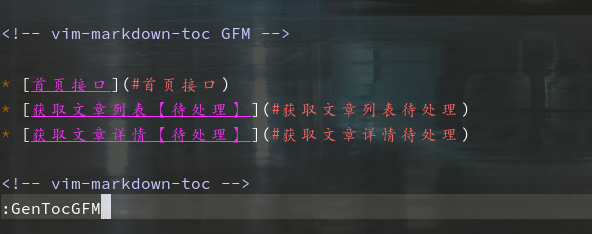
:GenTocGFM

Generate table of contents in GFM link style.

This command is suitable for Markdown files in GitHub repositories, like README.md, and Markdown files for GitBook.

:GenTocRedcarpet

Generate table of contents in Redcarpet link style.

This command is suitable for Jekyll or anywhere else use Redcarpet as its Markdown parser.

:GenTocGitLab

Generate table of contents in GitLab link style.

This command is suitable for GitLab repository and wiki.

:GenTocMarked

Generate table of contents for iamcco/markdown-preview.vim which use Marked markdown parser.
vim 安装Vundle.vim的更多相关文章
- vim 安装vundle 之curl
百度出来的博客文章,配置curl.cmd 的内容win7 x64 好像有误 贴下正确的 @rem Do not use "echo off" to not affect any c ...
- win下gvim或者linux下的vim安装vundle都适用的配置文件 - 在当前目录及其子目录下**, 的所有文件* 中, 搜索当前光标所在的单词
gvim下的普通配置: if v:lang =~ "utf8$" || v:lang =~ "UTF-8$" set fileencodings=utf-8,g ...
- Vim使用Vundle安装代码补全插件(YouCompleteMe)
安装 Vundle 它的使用方法很简单,安装一个插件只需要在 ~/.vimrc 按照规则中添加 Plugin 的名称,某些需要添加路径,之后在 Vim 中使用:PluginInstall既可以自动化安 ...
- vim实战:插件安装(Vundle,NerdTree)
一:插件管理器Vundle 1.简介 Vundle是vim的一个插件管理器, 同时它本身也是vim的一个插件.插件管理器用于方便.快速的安装.删除.Vim更新插件.vim Vundle插件官方地址:h ...
- vim添加Vundle插件
1.git clone https://github.com/VundleVim/Vundle.vim.git ~/.vim/bundle/Vundle.vim 2.vim /etc/vimrc se ...
- Vim安装使用和配置
卸载vim sudo apt-get remove --purge vim (--purge 是完全删除,会连配置文件一起删除) 也可以使用yum等其它方式安装 ,如果提示apt-get命令不存在可以 ...
- MAC vim安装gruvbox主题
gruvbox是一款优秀的vim配色方案,但是却不是vim自带的配色方案,这里记录一下安装过程. gruvbox官网:https://github.com/morhetz/gruvbox gruvbo ...
- Vim 安装 YouCompleteMe
Vim 下的自动补全,最好的工具莫过于 YouCompleteMe,官方文档在这里 http://valloric.github.io/YouCompleteMe/ 安装稍显复杂,以下记录我的过程. ...
- Linux基础(六) Vim之vundle插件
背景 Vim缺乏默认的插件管理器,所有插件的文件都散布在~/.vim下的几个文件夹中,插件的安装与更新与删除都需要自己手动来,既麻烦费事,又可能出现错误. Vundle简介 Vundle 是 Vim ...
随机推荐
- web站点检查简易shell脚本
1.web样式 <h4>THE STATUS OF RS:</h4> <meta http-equiv="> <table border=" ...
- Thinkphp --- 入口文件
通常入口文件是 index.php <?php define('APP_DEBUG',true); //define('BIND_MODULE','Home'); 这句代码会自动生成Home模块 ...
- jquery实现ajax跨域请求!亲测有效
在解决跨域的时候,我通常会用豆瓣api作为尝试. 下面是本地跨域请求豆瓣API:亲测有效: <script type="text/javascript"> var ur ...
- 170526、spring 执行定时任务
Spring 定时任务之 @Scheduled cron表达式 一.使用 Spring配置文件xmlns加入 xmlns:task="http://www.springframework.o ...
- Powerdesigner逆向工程从sql server数据库生成pdm【转】
Powerdesigner逆向工程从sql server数据库生成pdm 第一步:打开"控制面板"中的"管理工具" 第二步:点击"管理工具" ...
- CH1809匹配统计【KMP】
1809 匹配统计 0x18「基本数据结构」练习 描述 阿轩在纸上写了两个字符串,分别记为A和B.利用在数据结构与算法课上学到的知识,他很容易地求出了“字符串A从任意位置开始的后缀子串”与“字符串B” ...
- 【css a标签 鼠标悬浮时变手型】
<a href="#" style="cursor:pointer">
- HDU Today---hdu2112(最短路-_-坑在是无向图)
题目链接:http://acm.hdu.edu.cn/showproblem.php?pid=2112 spfa或者迪杰斯特拉都可以 注意公交车是有来回的--- #include <iostre ...
- 小米范工具系列之六:小米范 web查找器2.x版本发布
小米范web查找器是一款快速识别端口及服务的小工具. 此工具使用java 1.8以上版本运行. 下载地址:http://pan.baidu.com/s/1c1NDSVe 文件名web finder ...
- day14(编码实战-用户登录注册)
day14 案例:用户注册登录 要求:3层框架,使用验证码 功能分析 注册 登录 1.1 JSP页面 regist.jsp 注册表单:用户输入注册信息: 回显错误信息:当注册失败时,显示错误信 ...