
一个实现 手机端“输入验证码 ”效果Demo
之前在“掘金”上看到这样一个demo 我觉得很有意思,于是今天把它搬下来,记在自己的“小本本”里
也许会对以后的项目有点用,若要自己去实现这样一个案例也能实现,但是可能没有那么“妙”。
想法:
1、使用label标签做显示验证码的框,
2、然后每个label for属性指向同一个 id 为vcode 的input,
3、为了能够触发input焦点, 将input 改透明度样式隐藏,
4、这样就实现了 点击label触发 input焦点,调用键盘。
运行效果:
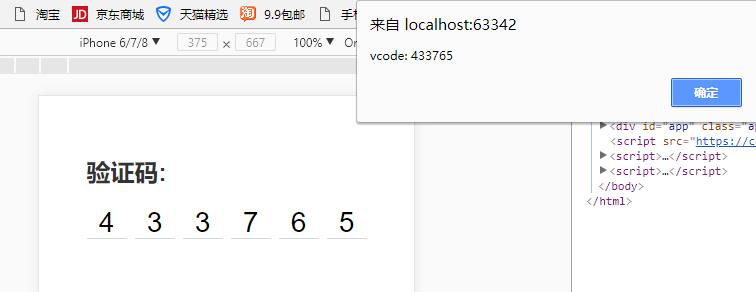
示例代码:
结构部分html:
<div id="app" class="app">

    <h2 class="heading-2">验证码:</h2>

    <div class="v-code">

        <input

                ref="vcode"

                id="vcode"

                type="tel"

                maxlength="6"

                v-model="code"

                @focus="focused = true"

                @blur="focused = false"

                :disabled="telDisabled">

        <label

                for="vcode"

                class="line"

                v-for="item,index in codeLength"

                :class="{'animated': focused && cursorIndex === index}"

                v-text="codeArr[index]"

        >

        </label>

    </div>

</div>
css部分:
<style>

        * {

            margin:;

            padding:;

            box-sizing: border-box;

        }

        body {

            background-color: #ffffff;

            font-family: -apple-system, PingFang SC, Hiragino Sans GB, Helvetica Neue, Arial;

            -webkit-tap-highlight-color: transparent;

        }

        .app {

            padding-left: 20px;

            padding-right: 20px;

            padding-top: 60px;

            max-width: 320px;

            margin-left: auto;

            margin-right: auto;

        }

        .heading-2 {

            color: #333333;

        }

        .v-code {

            margin-top: 20px;

            display: -webkit-box;

            display: -ms-flexbox;

            display: flex;

            -webkit-box-pack: justify;

            -ms-flex-pack: justify;

            justify-content: space-between;

            -webkit-box-align: center;

            -ms-flex-align: center;

            align-items: center;

            position: relative;

            width: 280px;

            margin-left: auto;

            margin-right: auto;

        }

        .v-code input {

            position: absolute;

            top: 200%;

            opacity:;

        }

        .v-code .line {

            position: relative;

            width: 40px;

            height: 32px;

            line-height: 32px;

            text-align: center;

            font-size: 28px;

        }

        .v-code .line::after {

            display: block;

            position: absolute;

            content: '';

            left:;

            width: 100%;

            bottom:;

            height: 1px;

            background-color: #aaaaaa;

            transform: scaleY(.5);

            transform-origin: 0 100%;

        }

        .v-code .line.animated::before {

            display: block;

            position: absolute;

            left: 50%;

            top: 20%;

            width: 1px;

            height: 60%;

            content: '';

            background-color: #333333;

            animation-name: coruscate;

            animation-duration: 1s;

            animation-iteration-count: infinite;

            animation-fill-mode: both;

        }

        @keyframes coruscate {

            0% {

                opacity: 0

            }

            25% {

                opacity: 0

            }

            50% {

                opacity: 1

            }

            75% {

                opacity: 1

            }

            to {

                opacity: 0

            }

        }

    </style>
Javascript部分
1、通过CDN引入vue.js
<script src="https://cdn.bootcss.com/vue/2.5.16/vue.min.js"></script>
2、代码
var app = new Vue({

        el: '#app',

        data: {

            code: '',

            codeLength: 6,

            telDisabled: false,

            focused: false

        },

        computed: {

            codeArr() {

                return this.code.split('')

            },

            cursorIndex() {

                return this.code.length

            }

        },

        watch: {

            code(newVal) {

                this.code = newVal.replace(/[^\d]/g,'')

                if (newVal.length > 5) {

                    // this.telDisabled = true

                    this.$refs.vcode.blur()

                    setTimeout(() => {

                        alert(`vcode: ${this.code}`)

                    }, 500)

                }

            }

        },

    })
此文章并非原创。。。。。
一个实现 手机端“输入验证码 ”效果Demo的更多相关文章
- slideToggle+slideup实现手机端折叠菜单效果
折叠菜单的效果,网上有很多的插件,比如bootstrap的 Collapse ,很好用也很简单,但是如果你使用的不是bootstrap框架,就会造成很多不必要的麻烦,比如默认样式被修改,代码冗余等等, ...
- html5 手机端 通讯录 touch 效果
不说那么多直接上代码. <html> <head> <meta http-equiv="Content-Type" content="tex ...
- 手机端3d旋转木马效果+保存图片到本地
<!DOCTYPE html> <html> <head> <title></title> <meta charset="U ...
- serverSpeed是一个android手机端到服务器间udp/tcp对比测速软件
https://github.com/eltld/serverSpeed https://github.com/c-wind/serverSpeed https://github.com/PeterK ...
- 适应手机端的jQuery图片滑块动画DEMO演示
在线预览 下载地址 实例代码 <!DOCTYPE html PUBLIC "-//W3C//DTD XHTML 1.0 Transitional//EN" "htt ...
- jQuery手机端触摸卡片切换效果
效果:http://hovertree.com/code/run/jquery/a1gr3gm9.html 可以用手机查看效果. 代码如下: <!doctype html> <htm ...
- bootstrap实现 手机端滑动效果,滑动到下一页,jgestures.js插件
bootstrap能否实现 手机端滑动效果,滑动到下一页 jgestures.js插件可以解决,只需要引入一个JS文件<script src="js/jgestures.min.js& ...
- 关于h5手机端上拉加载和下拉刷新效果-1
1.手机端目前很火的效果,上拉加载,和下拉刷新.目前主要使用 iscroll 框架来实现.先推荐一个iscroll中文学习的网站,不要感谢,我是雷锋. 2.https://iiunknown.gitb ...
- [UWP小白日记-15]在UWP手机端实时限制Textbox的输入
说实话重来没想到验证输入是如此的苦逼的一件事情. 网上好多验证都是在输入完成后再验证,我的想法是在输入的时候就限制输入,这样我就不用再写代码来验证了 应为是手机端,所以不用判断其他非法字符,直 ...
随机推荐
- Redis ,Memcached ,Mongodb 对比
memcached: 1.适合做内存缓存,对可靠性没有要求,不支持持久化:速度快.并发高.2.支持的数据结构单一,只支持Key-value,3.value最大支持1M3.在传统tomcat 部署war ...
- ThreeJS文字作为纹理贴图
文字作为纹理贴图 From:http://www.linhongxu.com/post/view?id=222 这里可以使用canvas作为纹理贴图,Three为我们提供里CanvasTexture ...
- jQuery轮播图(二)利用构造函数和原型创建对象以实现继承
本文是在我开始学习JavaScript继承时,对原型继承的一些理解和运用.文中所述的继承方式均是使用js特有的原型链方式,实际上有了ES6的类之后,实现继承的就变得十分简单了,所以这种写法现在也不在推 ...
- css中元素的auto属性值是什么意思,比如margin:0 auto表示什么?
auto 你可以理解为一种 自动/自适应 的概念 比如 现在项目需要一个宽度为960px的整体布局居中 根据用户浏览器大小不同你将需要使用margin:0 auto;来实现. 无论用户浏览器宽度为多少 ...
- 推荐下:开源ckplayer 网页播放器, 跨平台(html5, mobile),flv, f4v, mp4, rtmp协议. webm, ogg, m3u8 !
视频播放, 原本是想h5 自带视频播放,使用很简单,结果现实很骨感. <video controls="controls" preload="auto" ...
- Angular架构概览(截取部分)
原文链接:https://angular.cn/docs/ts/latest/guide/architecture.html 我们是这样写 Angular 应用的:用 Angular 扩展语法编写 H ...
- Centos 7配置docker-阿里云镜像加速
阿里云加速网址:https://cr.console.aliyun.com/cn-hangzhou/mirrors(自行注册账密码) sudo mkdir -p /etc/docker sudo vi ...
- SQL点点滴滴_查看所有存储过程或视图的位置及内容
代码:select a.name,a.[type],b.[definition] from sys.all_objects a,sys.sql_modules b where a.is_ms_ship ...
- 4 Dockerfile指令详解 && COPY 指令
COPY 指令将从构建上下文目录中 <源路径> 的文件/目录复制到新的一层的镜像内的 <目标路径> 位置.比如: COPY package.json /usr/src/app/ ...
- SSH端口三种转发方式
本地转发 假设有ssh服务器B,telnet服务器C被防火墙与外界隔离,此时外部主机A无法直接访问C服务器. 此时可以通过本地转发的方式让A与C借助B服务器通过ssh协议通信. client fire ...