
Spring boot中的定时任务(计划任务)
从Spring3.1开始,计划任务在Spring中实现变得异常的简单。首先通过配置类注解@EnableScheduling来开启对计划任务的支持,然后再要执行的计划任务的方法上注释@Scheduled,声明这是一个计划任务。
Spring通过@Scheduled支持多种类型的计划任务,包含cron、fixDelay、fixRate等。
写个栗子来看看:
1)定时任务执行类:
 package com.wj.test;

 import org.springframework.scheduling.annotation.Scheduled;

 import org.springframework.stereotype.Service;

 import java.text.SimpleDateFormat;

 import java.util.Date;

 /**

  * Created by wj on 2017/9/6.

  */

 @Service

 public class ScheduledTaskService {

     private static final SimpleDateFormat dateFormat = new SimpleDateFormat("HH:mm:ss");

     //每个2s执行一次任务

     @Scheduled(fixedRate = 2000)

     public void run(){

         System.out.println(dateFormat.format(new Date()) + " | " + "每隔2s执行一次任务");

     }

 //    每天15点29分执行该任务

     @Scheduled(cron = "0 29 15 ? * *")

     public void run1()

     {

         System.out.println(dateFormat.format(new Date()) + " | " + "每天在指定时间执行任务");

     }

 }
代码解释:
(1)通过@Scheduled声明该方法是计划任务,使用fixedRate属性每隔固定时间执行。
(2)使用cron属性可按照指定时间执行任务;cron是UNIX和Linux系统下的定时任务。
2)配置类:
 package com.wj.test;

 import org.springframework.context.annotation.ComponentScan;

 import org.springframework.context.annotation.Configuration;

 import org.springframework.scheduling.annotation.EnableScheduling;

 /**

  * Created by wj on 2017/9/6.

  */

 @Configuration

 @ComponentScan("com.wj.test")

 @EnableScheduling

 public class TaskSchedulerConfig {

 }
通过@EnableScheduling注解开启对计划任务的支持。
3)运行:
 package com.wj.test;

 import org.springframework.context.annotation.AnnotationConfigApplicationContext;

 /**

  * Created by wj on 2017/9/6.

  */

 public class TestMain {

     public static void main(String[] args){

         AnnotationConfigApplicationContext context = new AnnotationConfigApplicationContext(TaskSchedulerConfig.class);

     }

 }
结果如下图所示:
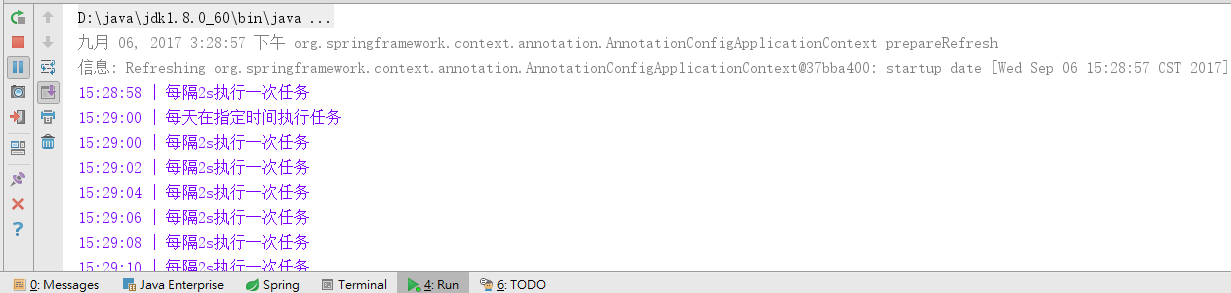
若在spring boot中使用@Scheduled定时任务,那么不需要写配置类,只需要在启动类application类中加入注解@EnableScheduling即可。
Spring boot中的定时任务(计划任务)的更多相关文章
- 【spring boot】spring boot中使用定时任务配置
spring boot中使用定时任务配置 =============================================================================== ...
- Spring Boot 中实现定时任务的两种方式
在 Spring + SpringMVC 环境中,一般来说,要实现定时任务,我们有两中方案,一种是使用 Spring 自带的定时任务处理器 @Scheduled 注解,另一种就是使用第三方框架 Qua ...
- Spring Boot中使用@Scheduled创建定时任务
我们在编写Spring Boot应用中经常会遇到这样的场景,比如:我需要定时地发送一些短信.邮件之类的操作,也可能会定时地检查和监控一些标志.参数等. 创建定时任务 在Spring Boot中编写定时 ...
- 【定时任务】Spring Boot 中如何使用 Quartz
这篇文章将介绍如何在Spring Boot 中使用Quartz. 一.首先在 pom.xml 中添加 Quartz 依赖. <!-- quartz依赖 --> <dependency ...
- 如何在Spring Boot 中动态设定与执行定时任务
本篇文章的目的是记录并实现在Spring Boot中,动态设定与执行定时任务. 我的开发项目是 Maven 项目,所以首先需要在 pom.xml 文件中加入相关的依赖.依赖代码如下所示: <de ...
- 在Spring Boot中动态实现定时任务配置
原文路径:https://zhuanlan.zhihu.com/p/79644891 在日常的项目开发中,往往会涉及到一些需要做到定时执行的代码,例如自动将超过24小时的未付款的单改为取消状态,自动将 ...
- 【spring boot】使用定时任务@Scheduled 报错:Encountered invalid @Scheduled method 'dealShelf': Cron expression must consist of 6 fields (found 7 in "0 30 14 * * ? *")
在spring boot中使用使用定时任务@Scheduled 报错: org.springframework.beans.factory.BeanCreationException: Error c ...
- spring boot 基础篇 -- 定时任务
在日常项目中,常常会碰到定时监控项目中某个业务的变化,下面是spring boot 集成的定时任务具体配置: @Component public class IndexWarningScheduled ...
- Spring Boot中@Scheduled注解的使用方法
Spring Boot中@Scheduled注解的使用方法 一.定时任务注解为@Scheduled,使用方式举例如下 //定义一个按时间执行的定时任务,在每天16:00执行一次. @Scheduled ...
随机推荐
- gif & tools
gif & tools https://www.cockos.com/licecap/ https://www.cockos.com/licecap/licecap128-install.ex ...
- 个人常用git命令
最近开始使用git,将自己常用git命令做一个简单归纳,便于记忆. 初始化及配置 git init:初始化资料库 git config --global user.name 'xxx':配置用户名 g ...
- Cocoa -- 添加和移除开机启动项
一 写plist到~/Library/LaunchAgents/ 目录下 // 配置开机默认启动 -(void)installDaemon{ NSString* launchFolder = [NSS ...
- kendo grid 报错:length
其实是:events中的{}Onsave的问题,把events整个注释掉就好了
- [bzoj4987]Tree_树形dp
Tree bzoj-4987 题目大意:给定一颗n个点的有边权的树,选出k个点,使得:$\sum\limits_{i=1}^{k-1}dis_idis_j$最小. 注释:$1\le n\le 3000 ...
- Ubuntu 16.04安装Synaptic Package Manager图形化APT管理工具
安装: sudo apt-get install synaptic 启动:
- [LeetCode] 035. Search Insert Position (Medium) (C++)
索引:[LeetCode] Leetcode 题解索引 (C++/Java/Python/Sql) Github: https://github.com/illuz/leetcode 035. Sea ...
- js滚轮换切屏
因为全项目不是自己写的,仅仅是帮别人写js滚轮代码,并且别人项目也还未上线.所以仅仅贴出自己写的那段部分代码, 效果:鼠标滚轮滚动时.网頁屏幕一屏一屏的上下切换 (下面代码在本地电脑的IE,chrom ...
- jenkins安装和使用
1 jenkins安装 直接下载deb包,离线安装. 2 plugin的安装 直接下载hpi包,离线安装. 我在一次安装的时候,在配置gitlab时,在test connection的时候,出现了nu ...
- 曼哈顿距离(坐标投影距离之和)d(i,j)=|X1-X2|+|Y1-Y2|.
曼哈顿距离(坐标投影距离之和)d(i,j)=|X1-X2|+|Y1-Y2|. 我们可以定义曼哈顿距离的正式意义为L1-距离或城市区块距离,也就是在欧几里德空间的固定直角坐标系上两点所形成的线段对轴产生 ...