
Elasticsearch (2) - 映射
常用映射类型
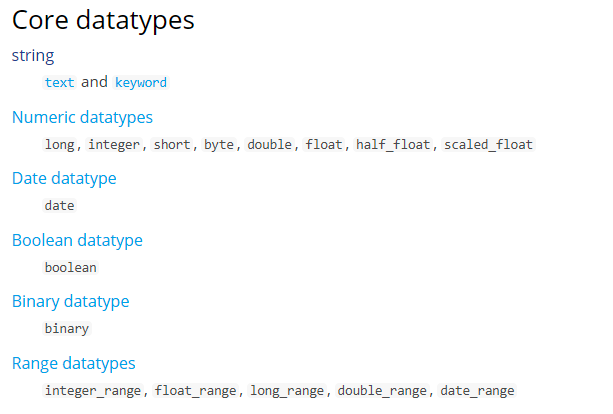
核心的字段类型如下:
String
字符串包括text和keyword两种类型:
1、text
analyzer
通过analyzer属性指定分词器。
下边指定name的字段类型为text,使用ik分词器的ik_max_word分词模式。
"name": {

    "type": "text",

    "analyzer":"ik_max_word"

}
上边指定了analyzer是指在索引和搜索都使用ik_max_word,如果单独想定义搜索时使用的分词器则可以通过search_analyzer属性。
对于ik分词器建议是索引时使用ik_max_word将搜索内容进行细粒度分词,搜索时使用ik_smart提高搜索精确性。
"name": {

    "type": "text",

    "analyzer":"ik_max_word",

    "search_analyzer":"ik_smart"

}
index
通过index属性指定是否索引。
默认为index=true,即要进行索引,只有进行索引才可以从索引库搜索到。
但是也有一些内容不需要索引,比如:商品图片地址只被用来展示图片,不进行搜索图片,此时可以将index设置为false。
删除索引,重新创建映射,将pic的index设置为false,尝试根据pic去搜索,结果搜索不到数据
"pic": {

    "type": "text",

    "index":false

}
store
是否在source之外存储,每个文档索引后会在 ES中保存一份原始文档,存放在"_source"中,一般情况下不需要设置store为true,因为在_source中已经有一份原始文档了。
测试
删除xc_course/doc下的映射
创建新映射:Post http://localhost:9200/xc_course/doc/_mapping
{

    "properties": {

        "name": {

            "type": "text",

            "analyzer": "ik_max_word",

            "search_analyzer": "ik_smart"

        },

        "description": {

            "type": "text",

            "analyzer": "ik_max_word",

            "search_analyzer": "ik_smart"

        },

        "pic": {

            "type": "text",

            "index": false

        },

        "studymodel": {

            "type": "text"

        }

    }

}
插入文档:
http://localhost:9200/xc_course/doc/4028e58161bcf7f40161bcf8b77c0000
{

    "name": "Bootstrap开发框架",

    "description": "Bootstrap是由Twitter推出的一个前台页面开发框架,在行业之中使用较为广泛。此开发框架包含了大量的CSS、 JS程序代码, 可以帮助开发者( 尤其是不擅长页面开发的程序人员) 轻松的实现一个不受浏览器限制的精美界面效果。 ",

    "pic": "group1/M00/00/01/wKhlQFqO4MmAOP53AAAcwDwm6SU490.jpg",

    "studymodel": ""

}
查询测试:
Get http://localhost:9200/xc_course/_search?q=name:开发

Get http://localhost:9200/xc_course/_search?q=description:开发

Get http://localhost:9200/xc_course/_search?

q=pic:group1/M00///wKhlQFqO4MmAOP53AAAcwDwm6SU490.jpg

Get http://localhost:9200/xc_course/_search?q=studymodel:201002

通过测试发现:name和description都支持全文检索,pic不可作为查询条件。
2、 keyword
keyword字段为关键字字段,通常搜索keyword是按照整体搜索,所以创建keyword字段的索引时是不进行分词的,比如:邮政编码、手机号码、身份证等。keyword字段通常用于过虑、排序、聚合等。
更改映射
{

    "properties": {

        "studymodel": {

            "type": "keyword"

        },

        "name": {

            "type": "keyword"

        }

    }

}
插入文档:
{

    "name": "java编程基础",

    "description": "java语言是世界第一编程语言,在软件开发领域使用人数最多。",

    "pic": "group1/M00/00/01/wKhlQFqO4MmAOP53AAAcwDwm6SU490.jpg",

    "studymodel": ""

}
根据studymodel查询文档
搜索:http://localhost:9200/xc_course/_search?q=name:java
name是keyword类型,所以查询方式是精确查询
date日期类型
日期类型不用设置分词器。通常日期类型的字段用于排序。
format
通过format设置日期格式
例如设置允许date字段存储年月日时分秒、年月日及毫秒三种格式。
{

    "properties": {

        "timestamp": {

            "type": "date",

            "format": "yyyy‐MM‐dd HH:mm:ss||yyyy‐MM‐dd"

        }

    }

}
插入文档
{

    "name": "spring开发基础",

    "description": "spring 在java领域非常流行,java程序员都在用。",

    "studymodel": "",

    "pic": "group1/M00/00/01/wKhlQFqO4MmAOP53AAAcwDwm6SU490.jpg",、

    "timestamp": "2018‐07‐04 18:28:58"

}
数值类型
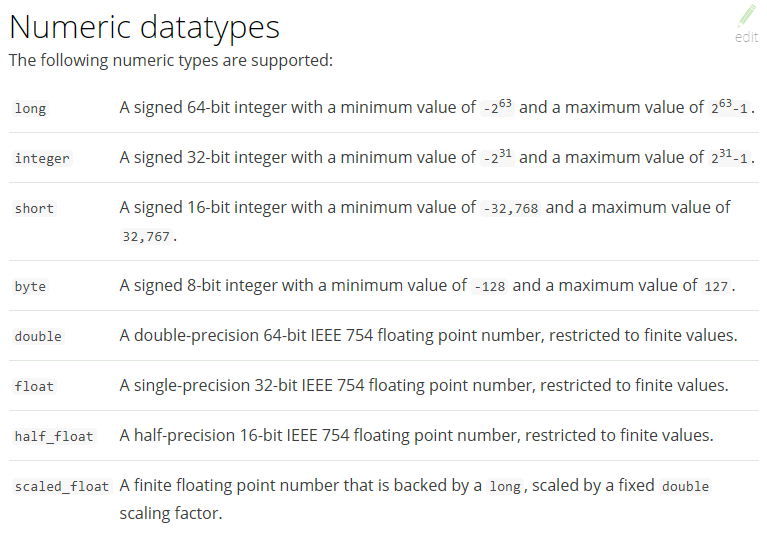
例如,创建如下映射
post:http://localhost:9200/xc_course/doc/_mapping
{

    "properties": {

        "description": {

            "type": "text",

            "analyzer": "ik_max_word",

            "search_analyzer": "ik_smart"

        },

        "name": {

            "type": "text",

            "analyzer": "ik_max_word",

            "search_analyzer": "ik_smart"

        },

        "pic": {

            "type": "text",

            "index": false

        },

        "price": {

            "type": "float"

        },

        "studymodel": {

            "type": "keyword"

        },

        "timestamp": {

            "type": "date",

            "format": "yyyy‐MM‐dd HH:mm:ss||yyyy‐MM‐dd||epoch_millis"

        }

    }

}
插入文档:
Post: http://localhost:9200/xc_course/doc/1
{

    "name": "Bootstrap开发",

    "description": "Bootstrap是由Twitter推出的一个前台页面开发框架, 是一个非常流行的开发框架, 此框架集成了多种页面效果。 此开发框架包含了大量的CSS、 JS程序代码, 可以帮助开发者( 尤其是不擅长页面开发的程序人员) 轻松的实现一个不受浏览器限制的精美界面效果。 ",

    "studymodel ": "201002 ",

    "price ":38.6,

    "timestamp ":"2019 - 05 - 07 19: 11: 35 ",

    "pic": "group1/M00/00/00/wKhlQFs6RCeAY0pHAA Jx5ZjNDEM428.jpg"

}
springboot客户端连接Demo
ES提供多种不同的客户端:
1、TransportClient
ES提供的传统客户端
2、RestClient
RestClient是官方推荐使用的,它包括两种:Java Low Level REST Client和 Java High Level REST Client。
添加依赖
<dependency>

    <groupId>org.elasticsearch.client</groupId>

    <artifactId>elasticsearch‐rest‐high‐level‐client</artifactId>

    <version>6.2.</version>

</dependency>

<dependency>

    <groupId>org.elasticsearch</groupId>

    <artifactId>elasticsearch</artifactId>

    <version>6.2.</version>

</dependency>
配置文件
server:

    port: ${port:}

spring:

    application:

        name: xc‐search‐service

xuecheng:

    elasticsearch:

        hostlist: ${eshostlist:127.0.0.1:} #多个结点中间用逗号分隔
配置类
public class ElasticsearchConfig {

    @Value("${xuecheng.elasticsearch.hostlist}")

    private String hostlist;

    @Bean

    public RestHighLevelClient restHighLevelClient(){

        //解析hostlist配置信息

        String[] split = hostlist.split(",");

        //创建HttpHost数组,其中存放es主机和端口的配置信息

        HttpHost[] httpHostArray = new HttpHost[split.length];

        for(int i=;i<split.length;i++){

            String item = split[i];

            httpHostArray[i] = new HttpHost(item.split(":")[], Integer.parseInt(item.split(":")[]), "http");

        }

        //创建RestHighLevelClient客户端

        return new RestHighLevelClient(RestClient.builder(httpHostArray));

    }

    @Bean

    public RestClient restClient(){

        //解析hostlist配置信息

        String[] split = hostlist.split(",");

        //创建HttpHost数组,其中存放es主机和端口的配置信息

        HttpHost[] httpHostArray = new HttpHost[split.length];

        for(int i=;i<split.length;i++){

            String item = split[i];

            httpHostArray[i] = new HttpHost(item.split(":")[], Integer.parseInt(item.split(":")[]), "http");

        }

        return RestClient.builder(httpHostArray).build();

    }

}
启动类
@EntityScan("com.xuecheng.framework.domain.search")//扫描实体类

@ComponentScan(basePackages={"com.xuecheng.api"})//扫描接口

@ComponentScan(basePackages={"com.xuecheng.search"})//扫描本项目下的所有类

@ComponentScan(basePackages={"com.xuecheng.framework"})//扫描common下的所有类

public class SearchApplication {

    public static void main(String[] args) throws Exception {

        SpringApplication.run(SearchApplication.class, args);

    }

}
Elasticsearch (2) - 映射的更多相关文章
- ElasticSearch 嵌套映射和过滤器及查询
ElasticSearch - 嵌套映射和过滤器 Because nested objects are indexed as separate hidden documents, we can’t q ...
- Elasticsearch mapping映射文件设置没有生效
Elasticsearch mapping映射文件设置没有生效 问题背景 我们一般会预先创建 Elasticsearch index的 mapping.properties 文件(类似于MySQL中的 ...
- Elasticsearch入门教程(三):Elasticsearch索引&映射
原文:Elasticsearch入门教程(三):Elasticsearch索引&映射 版权声明:本文为博主原创文章,遵循CC 4.0 BY-SA版权协议,转载请附上原文出处链接和本声明. 本文 ...
- elasticsearch的映射(mapping)和分析(analysis)
转发自:http://blog.csdn.net/hzrandd/article/details/47128895 分析和分析器 分析(analysis)是这样一个过程: 首先,表征化一个文本块为适用 ...
- ES 11 - 配置Elasticsearch的映射 (mapping)
目录 1 映射的相关概念 1.1 什么是映射 1.2 映射的组成 1.3 元字段 1.4 字段的类型 2 如何配置mapping 2.1 创建mapping 2.2 更新mapping 2.3 查看m ...
- 利用kibana插件对Elasticsearch进行映射
映射(mapping) 映射是创建索引的时候,可以预先定义字段的类型以及相关属性 Elasticsearch会根据JSON源数据的基础类型去猜测你想要的字段映射.将输入的数据变成可搜索的索引项.Map ...
- elasticsearch(6) 映射和分析
类似关系型数据库中每个字段都有对应的数据类型,例如nvarchar.int.date等等,elasticsearch也会将文档中的字段映射成对应的数据类型,这一映射可以使ES自动生成的,也是可以由我们 ...
- elasticsearch的映射
一.简介: 映射:在创建索引时,可以预先定义字段的类型(映射类型,也就是type,一个索引可以有一个或多个类型)及相关属性. Elasticsearch会根据JSON源数据的基础类型猜测你想要的字段映 ...
- Elasticsearch 自定义映射
尽管在很多情况下基本域数据类型 已经够用,但你经常需要为单独域自定义映射 ,特别是字符串域.自定义映射允许你执行下面的操作: 全文字符串域和精确值字符串域的区别 使用特定语言分析器 优化域以适应部分匹 ...
随机推荐
- Random 类生成随机数
Random类 (java.util) Random类中实现的随机算法是伪随机,也就是有规则的随机.在进行随机时,随机算法的起源数字称为种子数(seed),在种子数的基础上进行一定的变换,从而产生需要 ...
- POJ3680 Intervals —— 区间k覆盖问题(最小费用流)
题目链接:https://vjudge.net/problem/POJ-3680 Intervals Time Limit: 5000MS Memory Limit: 65536K Total S ...
- poj 1094 Sorting It All Out 解题报告
题目链接:http://poj.org/problem?id=1094 题目意思:给出 n 个待排序的字母 和 m 种关系,问需要读到第 几 行可以确定这些字母的排列顺序或者有矛盾的地方,又或者虽然具 ...
- hdu 1548 A strange lift 解题报告
题目链接:http://acm.hdu.edu.cn/showproblem.php?pid=1548 题目意思:给出 n 个 floor 你,每个floor 有一个数k,按下它可以到达 floor ...
- 老毛桃U盘启动盘,通过ghost创建xp系统蓝屏问题
新买的东芝笔记本只预安装了dos,找来一个老毛桃U盘启动盘,进入winpe用ghost恢复成xp系统:重启后,系统蓝屏,提示的主要报错代码 0x0000007B 与 要求“chkdsk /f”处理. ...
- 【HNOI 2002】 营业额统计
[题目链接] 点击打开链接 [算法] 观察式子 : 最小波动值 = min{|该天营业额 - 之前某天的营业额|} = min{该天营业额 - 该天营业额的前驱,该天营业额的后继 - 该天营业额} 用 ...
- 分享几篇文章(PDF版)
后天就要回老家了,除了团团年估计也没有其他好玩的,就琢磨下点经典文章带回去看看. Google一番找到了老赵很早以前的文章: http://www.cnblogs.com/JeffreyZhao/ar ...
- 洛谷P3195 [HNOI2008]玩具装箱TOY——斜率优化DP
题目:https://www.luogu.org/problemnew/show/P3195 第一次用斜率优化...其实还是有点云里雾里的: 网上的题解都很详细,我的理解就是通过把式子变形,假定一个最 ...
- vue项目中的路径别名
每次写引入组件的路径,如果路径嵌套比较深,那么会比较麻烦,我们可以在webpack.base.conf.js,中设置路径的别名,默认webpack设置src的别名为@ 建议配置src下一级目录的别名, ...
- Exception in thread "main" org.hibernate.MappingException: Unknown entity: com.mao.PersonSet
转自:https://blog.csdn.net/vipmao/article/details/51334743