
微服务日志之Spring Boot Kafka实现日志收集
前言
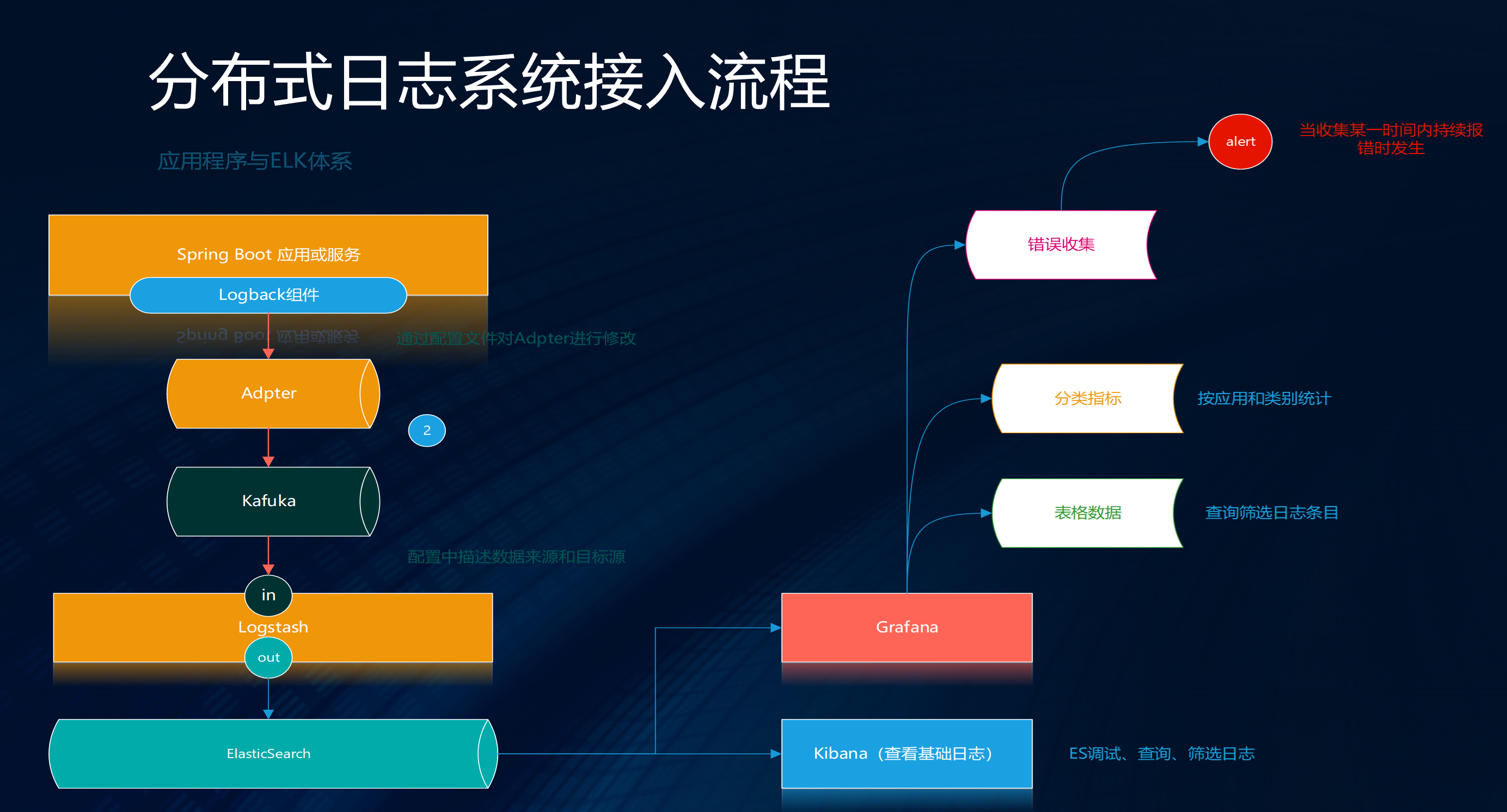
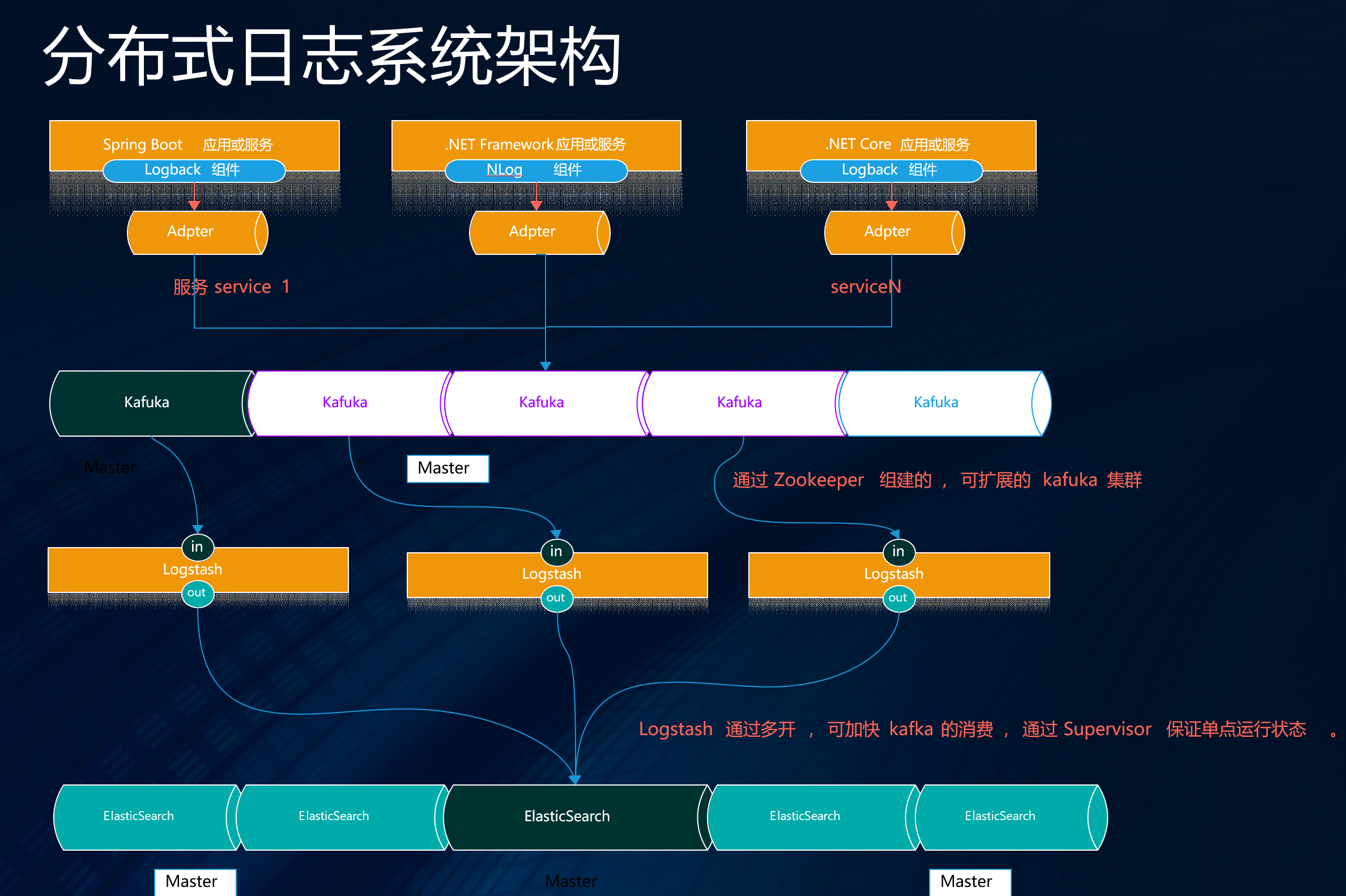
承接上文( 微服务日志之.NET Core使用NLog通过Kafka实现日志收集 https://www.cnblogs.com/maxzhang1985/p/9522017.html ).NET/Core的实现,我们的目地是为了让微服务环境中dotnet和java的服务都统一的进行日志收集。
Java体系下Spring Boot + Logback很容易就接入了Kafka实现了日志收集。
Spring Boot集成
Maven 包管理
<dependencyManagement>

  <dependencies>

     <dependency>

    <groupId>ch.qos.logback</groupId>

    <artifactId>logback-core</artifactId>

    <version>1.2.3</version>

    </dependency>

  </dependencies>

</dependencyManagement>
包依赖引用:
<dependency>

    <groupId>com.github.danielwegener</groupId>

    <artifactId>logback-kafka-appender</artifactId>

    <version>0.2.0-RC1</version>

</dependency>

<dependency>

    <groupId>ch.qos.logback</groupId>

    <artifactId>logback-classic</artifactId>

    <version>1.2.3</version>

    <scope>runtime</scope>

</dependency>

<dependency>

    <groupId>net.logstash.logback</groupId>

    <artifactId>logstash-logback-encoder</artifactId>

    <version>5.0</version>

</dependency>
logback-spring.xml
在Spring Boot项目resources目录下添加logback-spring.xml配置文件,注意:一定要修改 {"appname":"webdemo"},这个值也可以在配置中设置为变量。添加如下配置,STDOUT是在连接失败时,使用的日志输出配置。所以这每个项目要根据自己的情况添加配置。在普通日志输出中使用异步策略提高性能,内容如下:
 <appender name="kafkaAppender" class="com.github.danielwegener.logback.kafka.KafkaAppender">

        <encoder charset="UTF-8" class="net.logstash.logback.encoder.LogstashEncoder" >

            <customFields>{"appname":"webdemo"}</customFields>

            <includeMdc>true</includeMdc>

            <includeContext>true</includeContext>

            <throwableConverter class="net.logstash.logback.stacktrace.ShortenedThrowableConverter">

                <maxDepthPerThrowable>30</maxDepthPerThrowable>

                <rootCauseFirst>true</rootCauseFirst>

            </throwableConverter>

        </encoder>

        <topic>loges</topic>

        <keyingStrategy class="com.github.danielwegener.logback.kafka.keying.HostNameKeyingStrategy" />

        <deliveryStrategy class="com.github.danielwegener.logback.kafka.delivery.AsynchronousDeliveryStrategy" />

        <producerConfig>bootstrap.servers=127.0.0.1:9092</producerConfig>

        <!-- don't wait for a broker to ack the reception of a batch.  -->

        <producerConfig>acks=0</producerConfig>

        <!-- wait up to 1000ms and collect log messages before sending them as a batch -->

        <producerConfig>linger.ms=1000</producerConfig>

        <!-- even if the producer buffer runs full, do not block the application but start to drop messages -->

        <!--<producerConfig>max.block.ms=0</producerConfig>-->

        <producerConfig>block.on.buffer.full=false</producerConfig>

        <!-- kafka连接失败后,使用下面配置进行日志输出 -->

        <appender-ref ref="STDOUT" />

    </appender>
注意:一定要修改 {"appname":"webdemo"} , 这个值也可以在配置中设置为变量 。对于第三方框架或库的错误和异常信息如需要写入日志,错误配置如下:
<appender name="kafkaAppenderERROR" class="com.github.danielwegener.logback.kafka.KafkaAppender">

        <encoder charset="UTF-8" class="net.logstash.logback.encoder.LogstashEncoder" >

            <customFields>{"appname":"webdemo"}</customFields>

            <includeMdc>true</includeMdc>

            <includeContext>true</includeContext>

            <throwableConverter class="net.logstash.logback.stacktrace.ShortenedThrowableConverter">

                <maxDepthPerThrowable>30</maxDepthPerThrowable>

                <rootCauseFirst>true</rootCauseFirst>

            </throwableConverter>

        </encoder>

        <topic>ep_component_log</topic>

        <keyingStrategy class="com.github.danielwegener.logback.kafka.keying.HostNameKeyingStrategy" />

        <deliveryStrategy class="com.github.danielwegener.logback.kafka.delivery.AsynchronousDeliveryStrategy" />

        <deliveryStrategy class="com.github.danielwegener.logback.kafka.delivery.BlockingDeliveryStrategy">

            <!-- wait indefinitely until the kafka producer was able to send the message -->

            <timeout>0</timeout>

        </deliveryStrategy>

        <producerConfig>bootstrap.servers=127.0.0.1:9020</producerConfig>

        <!-- don't wait for a broker to ack the reception of a batch.  -->

        <producerConfig>acks=0</producerConfig>

        <!-- wait up to 1000ms and collect log messages before sending them as a batch -->

        <producerConfig>linger.ms=1000</producerConfig>

        <!-- even if the producer buffer runs full, do not block the application but start to drop messages -->

        <producerConfig>max.block.ms=0</producerConfig>

        <appender-ref ref="STDOUT" />

        <filter class="ch.qos.logback.classic.filter.LevelFilter"><!-- 只打印错误日志 -->

            <level>ERROR</level>

            <onMatch>ACCEPT</onMatch>

            <onMismatch>DENY</onMismatch>

        </filter>

    </appender>
在异常日志用使用了同步策略保证,错误日志的有效收集,当然可以根据实际项目情况进行配置。
LOG配置建议:
日志root指定错误即可输出第三方框架异常日志:
 <root level="INFO">

        <appender-ref ref="kafkaAppenderERROR" />

 </root>
建议只输出自己程序里的级别日志配置如下(只供参考):
<logger name="项目所在包" additivity="false">

    <appender-ref ref="STDOUT" />

    <appender-ref ref="kafkaAppender" />

</logger>
最后
GitHub:https://github.com/maxzhang1985/YOYOFx 如果觉还可以请Star下, 欢迎一起交流。
.NET Core 开源学习群:214741894
微服务日志之Spring Boot Kafka实现日志收集的更多相关文章
- 第二章 微服务构建:Spring Boot
此处介绍Spring Boot的目的除了它是Spring Cloud的基础外,也由于其自身的各项优点,如自动化配置.快速开发.轻松部署等,非常适合用作微服务架构中各项具体微服务的开发框架. 本章内容: ...
- 微服务构建: Spring Boot
在展开 Spring Cloud 的微服务架构部署之前, 我们先了解一下用于构建微服务的基础框架-Spring Boot. 由于 Spring Cloud 的构建基于 Spring Boot 实现, ...
- Spring Boot (九): 微服务应用监控 Spring Boot Actuator 详解
1. 引言 在当前的微服务架构方式下,我们会有很多的服务部署在不同的机器上,相互是通过服务调用的方式进行交互,一个完整的业务流程中间会经过很多个微服务的处理和传递,那么,如何能知道每个服务的健康状况就 ...
- 手撕面试官系列(三):微服务架构Dubbo+Spring Boot+Spring Cloud
文章首发于今日头条:https://www.toutiao.com/i6712696637623370248/ 直接进入主题 Dubbo (答案领取方式见侧边栏) Dubbo 中 中 zookeepe ...
- 微服务架构之spring boot admin
Spring boot admin是可视化的监控组件,依赖spring boot actuator收集各个服务的运行信息,通过spring boot actuator可以非常方便的查看每个微服务的He ...
- SpringCloud 微服务一:spring boot 基础项目搭建
spring cloud是建立在spring boot的基础上的,而之前虽然听说过,也随便看了一下spring boot,却没有真正使用,因此还必须先花时间学一下spring boot. spring ...
- 微服务学习笔记——Spring Boot特性
1. 创建独立的Spring应用程序 2. 嵌入的Tomcat,无需部署WAR文件 3. 简化Maven配置 4. 自动配置Spring 5. 提供生产就绪型功能,如指标,健康检查和外部配置 6. 开 ...
- 微服务架构-选择Spring Cloud,放弃Dubbo
Spring Cloud 在国内中小型公司能用起来吗?从 2016 年初一直到现在,我们在这条路上已经走了一年多. 在使用 Spring Cloud 之前,我们对微服务实践是没有太多的体会和经验的.从 ...
- Spring Cloud与微服务构建:Spring Cloud简介
Spring Cloud简介 微服务因该具备的功能 微服务可以拆分为"微"和"服务"二字."微"即小的意思,那到底多小才算"微&q ...
随机推荐
- .NET项目中使用PostSharp
PostSharp是一种Aspect Oriented Programming 面向切面(或面向方面)的组件框架,适用在.NET开发中,本篇主要介绍Postsharp在.NET开发中的相关知识,以及一 ...
- Django之Auth模块 实现登录,退出,自带session 与认证功能的一个重要的模块
Auth模板 1. 什么是Auth模块,有什么用? django的auth的模块的使用: auth 是集合注册,登录,注销,session 多个功能集合在一起的模块 2. 使用Auth组件的默认aut ...
- Innodb锁相关总结
一.InnoDB共有七种类型的锁: (1)共享/排它锁(Shared and Exclusive Locks) (2)意向锁(Intention Locks) (3)插入意向锁(Insert Inte ...
- 离线部署 pm2 管理node程序
在服务器不能联网的情况下: 在可以联网的机器上: npm install pm2 -g 全局安装pm2: 然后查看一下本地安装的默认路径: npm config get prefix, 在其 lib ...
- Jenkins安装时Web页面报错提示离线安装
先跳过所有. 方法1 先看它的提示:”参考离线Jenkins安装文档“发现链接点不开,我还以为是被墙了呢,FQ以后还是打不开.看来这个参考文档是没有用滴.点击配置HTTP代理跳出如下界面:安装Jenk ...
- Django 学生信息 添加 功能 遇到的问题.
1 添加 班级信息时的问题 (grade为外键) 原因是 grade 必需接收 一个 实例, 而我交是一个 str字符串, if request.method == 'POST': data = { ...
- nodejs 箭头函数
背景 箭头函数,出现于ES6规范中. 使用 就是lambda函数. 一般使用: (a, b) => { return a + b; } 简略模式: 当参数只有一个时,可以省略括号:当返回值只有一 ...
- 10.13 新版本go on~
上午1.5 终审 and 排期 合同管理那边又是切换选项时各种联动,我第一想法是 好麻烦,不想做这个...第二想法才是给我做吧 锻炼锻炼我 然后 分任务的时候 分给我了,,哈哈 开心 虽然我没想躲 但 ...
- 容器101:Docker基础
Docker如此受欢迎的一个原因是它提供了“一次开发,随处运行”的承诺.Docker提供了一种将应用程序及其运行时依赖性打包到单个容器中的简单方法.它还提供了一个运行时抽象,使容器能够跨不同版本的Li ...
- 用php获取js变量的值
<script type="text/javascript"> var t1 = "fff"; var t2 = "<?php ec ...