
通过PowerShell发送TCP请求
很多时候我们需要通过Socket发送特定的TCP请求给服务器的特定端口来实现探测服务器的指定端口所开启的服务。很多语言都有相应的方法实现上述需求,当然,PowerShell也不例外,比如我们要发送一个简单的http请求到指定的web服务器:
GET / HTTP/1.1
Host:cn.bing.com
这里我们想请求微软必应的中文首页,如果需要通过PowerShell向cn.bing.com服务器发送get请求,就需要创建一个System.Net.Sockets.TcpClient对象,向指定的服务器和端口发送请求。
具体代码如下:
        =====文件名:Send-TcpRequest.ps1=====

########################################

# Send-TcpRequest.ps1

## Send a TCP request to a remote computer, and return the response.

## If you do not supply input to this script (via either the pipeline, or the

## -InputObject parameter,) the script operates in interactive mode.

##

## Example:

##

## $http = @"

## GET / HTTP/1.1

## Host:cn.bing.com

## `n`n

## "@

##

## $http | .\Send-TcpRequest cn.bing.com  80

########################################

param(

        [string] $remoteHost = "localhost",

        [int] $port = 80,

        [switch] $UseSSL,

        [string] $inputObject,

        [int] $commandDelay = 100

     )

[string] $output = ""

## Store the input into an array that we can scan over. If there was no input,

## then we will be in interactive mode.

$currentInput = $inputObject

if(-not $currentInput)

{

    $SCRIPT:currentInput = @($input)

}

$scriptedMode = [bool] $currentInput

function Main

{

    ## Open the socket, and connect to the computer on the specified port

    if(-not $scriptedMode)

    {

        write-host "Connecting to $remoteHost on port $port"

    }

    trap { Write-Error "Could not connect to remote computer: $_"; exit }

    $socket = new-object System.Net.Sockets.TcpClient($remoteHost, $port)

    if(-not $scriptedMode)

    {

        write-host "Connected. Press ^D followed by [ENTER] to exit.`n"

    }

    $stream = $socket.GetStream()

    if($UseSSL)

    {

        $sslStream = New-Object System.Net.Security.SslStream $stream,$false

        $sslStream.AuthenticateAsClient($remoteHost)

        $stream = $sslStream

    }

    $writer = new-object System.IO.StreamWriter $stream

    while($true)

    {

        ## Receive the output that has buffered so far

        $SCRIPT:output += GetOutput

        ## If we're in scripted mode, send the commands,

        ## receive the output, and exit.

        if($scriptedMode)

        {

            foreach($line in $currentInput)

            {

                $writer.WriteLine($line)

                $writer.Flush()

                Start-Sleep -m $commandDelay

                $SCRIPT:output += GetOutput

            }

            break

        }

        ## If we're in interactive mode, write the buffered

        ## output, and respond to input.

        else

        {

            if($output)

            {

                foreach($line in $output.Split("`n"))

                {

                    write-host $line

                }

                $SCRIPT:output = ""

            }

            ## Read the user's command, quitting if they hit ^D

            $command = read-host

            if($command -eq ([char] 4)) { break; }

            ## Otherwise, Write their command to the remote host

            $writer.WriteLine($command)

            $writer.Flush()

        }

    }

    ## Close the streams

    $writer.Close()

    $stream.Close()

    ## If we're in scripted mode, return the output

    if($scriptedMode)

    {

        $output

    }

}

## Read output from a remote host

function GetOutput

{

    ## Create a buffer to receive the response

    $buffer = new-object System.Byte[] 1024

    $encoding = new-object System.Text.AsciiEncoding

    $outputBuffer = ""

    $foundMore = $false

    ## Read all the data available from the stream, writing it to the

    ## output buffer when done.

    do

    {

        ## Allow data to buffer for a bit

        start-sleep -m 1000

        ## Read what data is available

        $foundmore = $false

        $stream.ReadTimeout = 1000

        do

        {

            try

            {

                $read = $stream.Read($buffer, 0, 1024)

                if($read -gt 0)

                {

                    $foundmore = $true

                    $outputBuffer += ($encoding.GetString($buffer, 0, $read))

                }

            } catch { $foundMore = $false; $read = 0 }

        } while($read -gt 0)

    } while($foundmore)

    $outputBuffer

}

. Main
该脚本使用方法如下:
$http = @"
GET / HTTP/1.1
Host:cn.bing.com
`n`n
"@
$http | .\Send-TcpRequest cn.bing.com 80
执行效果如图所示:
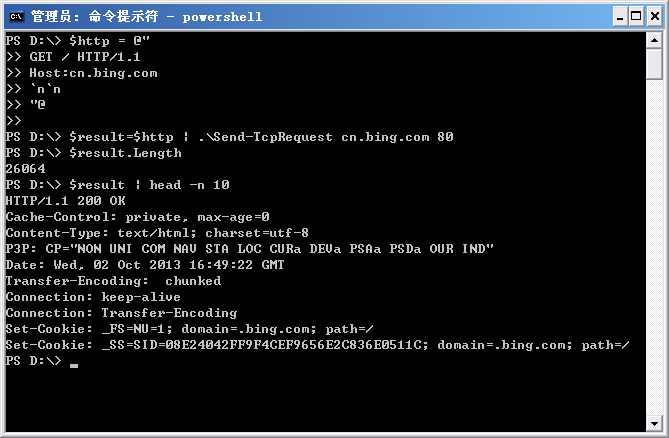
需要说明的是,由于页面返回的内容太长了,这里至少是将返回的内容缓存在一个变量里,并只输出了变量的头10行。
有了这个脚本,我们就可以向指定的web服务器发送特定的请求,来实现模拟登陆和操作的功能了。
作者: 付海军
出处:http://fuhj02.cnblogs.com
版权:本文版权归作者和博客园共有
转载:欢迎转载,为了保存作者的创作热情,请按要求【转载】,谢谢
要求:未经作者同意,必须保留此段声明;必须在文章中给出原文连接且保证内容完整!否则必究法律责任!
个人网站: http://www.fuhaijun.com/
通过PowerShell发送TCP请求的更多相关文章
- jmeter测试TCP服务器/模拟发送TCP请求
jmeter测试TCP服务器,使用TCP采样器模拟发送TCP请求. TCP采样器:打开一个到指定服务器的TCP / IP连接,然后发送指定文本并等待响应. jmeter模拟发送TCP请求的方法: 1. ...
- jmeter ---测试TCP服务器/模拟发送TCP请求
jmeter测试TCP服务器/模拟发送TCP请求 jmeter测试TCP服务器,使用TCP采样器模拟发送TCP请求. TCP采样器:打开一个到指定服务器的TCP / IP连接,然后发送指定文本并等待响 ...
- jmeter测试TCP服务器/模拟发送TCP请求 设置16进制发送(转)
转载留存:http://blog.sina.com.cn/s/blog_46d0362d0102v8ii.html 性能测试需要模拟多种场景,经常受制于资源限制,没办法建立贴近实际部署环境的场景.因而 ...
- PowerShell收发TCP消息包
PowerShell收发TCP消息包 https://www.cnblogs.com/fuhj02/archive/2012/10/16/2725609.html 在上篇文章中,我们在PSNet包中创 ...
- go tcp发送网络请求
//发送http请求 package main import ( "fmt" "net" "io" ) func main () { //使 ...
- Android系列之网络(一)----使用HttpClient发送HTTP请求(通过get方法获取数据)
[声明] 欢迎转载,但请保留文章原始出处→_→ 生命壹号:http://www.cnblogs.com/smyhvae/ 文章来源:http://www.cnblogs.com/smyhvae/p/4 ...
- shell脚本一条命令直接发送http请求(xjl456852原创)
我们知道nc命令是一个网络工具.可以连接tcp/udp.也能模拟发送http请求. 现在介绍通过shell脚本,一条命令直接发送http请求. 命令如下,可以对下面的地址等信息自行修改: #!/bin ...
- (一)----使用HttpClient发送HTTP请求(通过get方法获取数据)
(一)----使用HttpClient发送HTTP请求(通过get方法获取数据) 一.HTTP协议初探: HTTP(Hypertext Transfer Protocol)中文 “超文本传输协议”,是 ...
- 【ESP8266】发送HTTP请求
一.ESP8266简介 ESP8266 是深圳安信可科技有限公司开发的基于乐鑫ESP8266的超低功耗的UART-WIFI模块的模组,可以方便进行二次元开发,接入云端服务,实现手机3/4G全球随时随地 ...
随机推荐
- LinkedHashMap和HashMap的比较使用
由于现在项目中用到了LinkedHashMap,并不是太熟悉就到网上搜了一下. import java.util.HashMap; import java.util.Iterator; import ...
- GitLab:解决Merge Request中Commits不更新的问题
最近在使用 GitLab 的 Merge Requests 功能进行 Code Review .操作流程是这样的: 1)开发人员A要给一个项目增加一个新功能,先在这个项目上创建一个 Git 分支. 2 ...
- 从源代码的角度聊聊java中StringBuffer、StringBuilder、String中的字符串拼接
长久以来,我们被教导字符串的连接最好用StringBuffer.StringBuilder,但是我们却不知道这两者之间的区别.跟字符串相关的一些方法中总是有CharSequence.StringBuf ...
- HTTP权威指南阅读笔记二:URL与资源
URL中的限制字符: 在URL中,有几个字符被保留起来,有着特殊的含义.有些字符不在定义的US-ASCII可打印字符集中.还有些字符会与某些因特网网关和协议产生混淆,因此不赞成使用. 下面这些字符是U ...
- Nutz Dao实体中索引注解的使用(@TableIndexes@Index)
Nutz是一组轻便小型的框架的集合, 各个部分可以被独立使用,把SSH的精华封装在一个1M左右的jar包中,Nutz不对其他任何第三方库产生依赖,如果不考虑数据库链接和日志的话,创建完美的Web应用只 ...
- AngularJS快速入门指南10:DOM节点
AngularJS通过指令将application数据绑定到HTML DOM元素的属性上. ng-disabled指令 ng-disabled指令将AngularJS application数据绑定到 ...
- JfreeChart使用(转载)
http://www.cnblogs.com/xingyun/ http://www.huosen.net/archives/156.html(此篇除了struts2外,还介绍了servlet下Jfr ...
- paip.java UrlRewrite 的原理and实现 htaccess正则表达式转换
paip.java UrlRewrite 的原理and实现 htaccess正则表达式转换 #---KEYWORD #-正则表达式 正则表达式 表示 非指定字符串开头的正则 排除指定目录.. 作者 老 ...
- paip.Java Annotation注解的作用and 使用
paip.Java Annotation注解的作用and 使用 作者Attilax 艾龙, EMAIL:1466519819@qq.com 来源:attilax的专栏 地址:http://blog. ...
- 文件系统:Ext3和Ext4
一.ext3和ext4的区别: 1.与Ext3兼容:执行若干条命令,就能将Ext3在线迁移到Ext4,而无须重新格式化磁盘或者重新安装系统.原有Ext3数据结构照样保留, Ext4作用于新数据,当然, ...