
Winform_chart控件_心得
效果图:
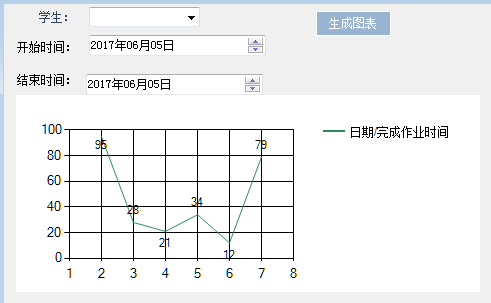
1.首先,在工具箱找到chart控件,拖到窗体中。
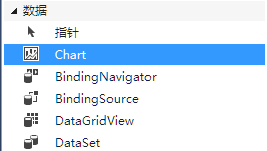
2.关于chart控件的细节设计:
series集合设计: chartType可以选择折线图、柱状图、圆饼图等等。
isValueShowAsLabel:设置是否显示数据点信息
3.数据绑定(datatable);
string sql = "";
string s1 = "";
string m1 = "";
sql = string.Format("select 作业时间,sum(作业用时) as 总作业用时 from 学生作业 a, 学生科目表 b where a.科目ID = b.ID and a.学生ID ={0} and 作业时间 between '{1}' and '{2}' group by 作业时间", cbx学生.SelectedValue,dtpstartTime.Value.ToLongDateString().ToString(),dtpendTime.Value.ToLongDateString().ToString());
OleDbDataAdapter sda = new OleDbDataAdapter(sql, objcnn);
// 2.创建数据集:
DataSet ds = new DataSet();
// 3.填充数据集:
sda.Fill(ds);
// 4.绑定:DataGridView
DataTable dt = ds.Tables[0];
if (dt != null && dt.Rows.Count > 0)
{
for (int i = 0; i < dt.Rows.Count; i++)
{
string s = dt.Rows[i]["作业时间"].ToString();
string m = dt.Rows[i]["总作业用时"].ToString();
s1 += s + ",";
m1 += m + ",";
//主要将dt中的数据串成一个字符串;
}
s1 = s1.Substring(0, s1.Length - 1);
m1 = m1.Substring(0, m1.Length - 1);
//主要字符串最后的逗号;
List<string> list = new List<string>(s1.Split(','));
List<string> x = new List<string>(s1.Split(new string[] { "," }, StringSplitOptions.RemoveEmptyEntries));
//主要将字符串转成list集合的形式;
List<string> listy = new List<string>(m1.Split(','));
List<string> y = new List<string>(m1.Split(new string[] { "," }, StringSplitOptions.RemoveEmptyEntries));
this.chart_时间.Series["日期/完成作业时间"].Points.DataBindXY(x, y); //x、y是设置x、y轴的数据
}
Winform_chart控件_心得的更多相关文章
- python开发_tkinter_窗口控件_自己制作的Python IDEL_博主推荐(二)
在上一篇blog:python开发_tkinter_窗口控件_自己制作的Python IDEL_博主推荐 中介绍了python中的tkinter的一些东西,你可能对tkinter有一定的了解了.这篇b ...
- Struts的FormFile与Commons-FileUpload控件使用心得
转自: http://www.iteye.com/topic/212566 前一段时间刚来公司,看到一个项目中以前有人写的struts代码.是使用了FormFile来处理关于文件上传的模块.但是用力一 ...
- C# WinForm 第一个项目控件使用心得
1.控件心得 1.1 基础控件 panel 作用:布局 难点:重绘边框改变颜色 重绘panel里如果有fill填充控件 panle的padding要改个值 private void pnlPaintB ...
- C# PropertyGrid控件应用心得
何处使用 PropertyGrid 控件 在应用程序中的很多地方,您都可以使用户与 PropertyGrid 进行交互,从而获得更丰富的编辑体验.例如,某个应用程序包含多个用户可以设置的“设置”或选项 ...
- Android控件_使用TextView实现跑马灯效果
一.第一种方式: 通过TextView控件的自身属性实现(但是有缺点就是当多个TextView要实现这种效果的时候,只有第一个才有效果) 实现方法加上下面四个属性: android:singleLi ...
- python开发_tkinter_窗口控件_自己制作的Python IDEL_博主推荐
在了解python中的tkinter模块的时候,你需要了解一些tkinter的相关知识 下面是python的API文档中的一个简单例子: import tkinter as tk class Appl ...
- C# PropertyGrid控件应用心得 【转】
源文 : http://blog.csdn.net/luyifeiniu/article/details/5426960 c#stringattributesobjectmicrosoftclass ...
- 在开发中使用GMap.Net 控件的心得一
首先必须先加载GMap.Net这个控件,先通过"添加引用"来加载相应的.dll文件,如果在工具箱中找不到GMapControl这个控件,也别心急. 点击"工具" ...
- AJ学IOS(29)UI之Quartz2D自定义下载控件_画各种图形
AJ分享,必须精品 效果 自定义控件过程 主要过程在上一篇里有介绍了,这里主要介绍下代码实现 先做好要放的view 然后实现呢主要就是四步: 1:获取上下文 2:拼接路径 3:把路径添加到上下文. 4 ...
随机推荐
- Appnium安装
Refer to https://blog.csdn.net/xgh1951/article/details/85124327
- pytorch-cifar10分类网络结构
cifar10主要是由32x32的三通道彩色图, 总共10个类别,这里我们使用残差网络构造网络结构 网络结构: 第一层:首先经过一个卷积,归一化,激活 32x32x16 -> 32x32x16 ...
- mysql授权指定ip远程登录
use user //更新用户表: UPDATE `user` SET `Host` = '175.6.6.230' where `Host` = '175.6.6.230'; //授权用户表: GR ...
- linux 下项目的发布
[wangq10@VM000001865 logs]$ [wangq10@VM000001865 ~]$ ls[wangq10@VM000001865 logs]$ apache-tomcat-7.0 ...
- Rsync数据同步工具及sersync同步工具
Rsync简介 Rsync英文全称Remote synchronization,从软件的名称就可以看出来,Rsync具有可使本地和远程两台主机之间的数据快速复制同步镜像,远程备份的功能,这个功能类似s ...
- LC 781. Rabbits in Forest
In a forest, each rabbit has some color. Some subset of rabbits (possibly all of them) tell you how ...
- NetUtils网络连接工具类
import android.app.Activity; import android.content.ComponentName; import android.content.Context; i ...
- flutter 常用plugins
搜索plugins flutter plugins搜索地址 谷歌官方plugins https://pub.dev/packages?q=http 到这个链接里面去搜索 https://github. ...
- ES 可视化工具
1.ElasticSearch Head 用途:展示ES(集群)数据信息 视图:https://mobz.github.io/elasticsearch-head/ 下载:https://github ...
- [windows] install cross-env with cnpm instead of yarn or npm
环境是 windows下通过vagrant运行虚拟机(ubuntu) Host:windows 10 Guest: ubuntu(vagrant) 根据之前的经验,不要在 Guest环境中执行npm ...