
AssetBundle资源打包与加载
AssetBundle资源打包
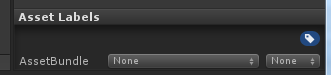
1.AssetLabels资源标签
文件名:资源打包成AssetBundle后的文件名,类似于压缩包的名字
后缀:自定义
文件名和后缀名都是小写格式(大写会自动转为小写)
2. BuildPipeline.BuildAssetBundles(string outputPath, BuildAssetBundleOptions assetBundleOptions, BuildTarget targetPlatform) 打包所有设置了AssetLabel的资源
outputPath:路径,打包出来的AssetBunlde文件存放的位置
BuildAssetBundleOptions:选项,设置AssetBundle打包过程中压缩方式
BuildAssetBundleOptions枚举选项:
None使用LZMA压缩算法进行压缩,打包后资源体积最小
UncompressedAssetBundle不压缩,打包后的AssetBundle体积最大,但是加载速度最快
ChunkBasedCompression使用LZ4压缩算法进行压缩,打包后的AssetBundle体积和加载速度介于上面二者之间
BuildTarget:平台,AssetBundle是平台之间不兼容的,IOS,Android是两套资源
在AssetLabels区域填写AssetBundle名称的时候,名称是可以分目录嵌套的:文件夹名/文件名
AssetBundle打包后的资源包,分两部分组成:
1.资源打包出来的AssetBundle文件
2.AssetBundle文件配套的manifest文本文件
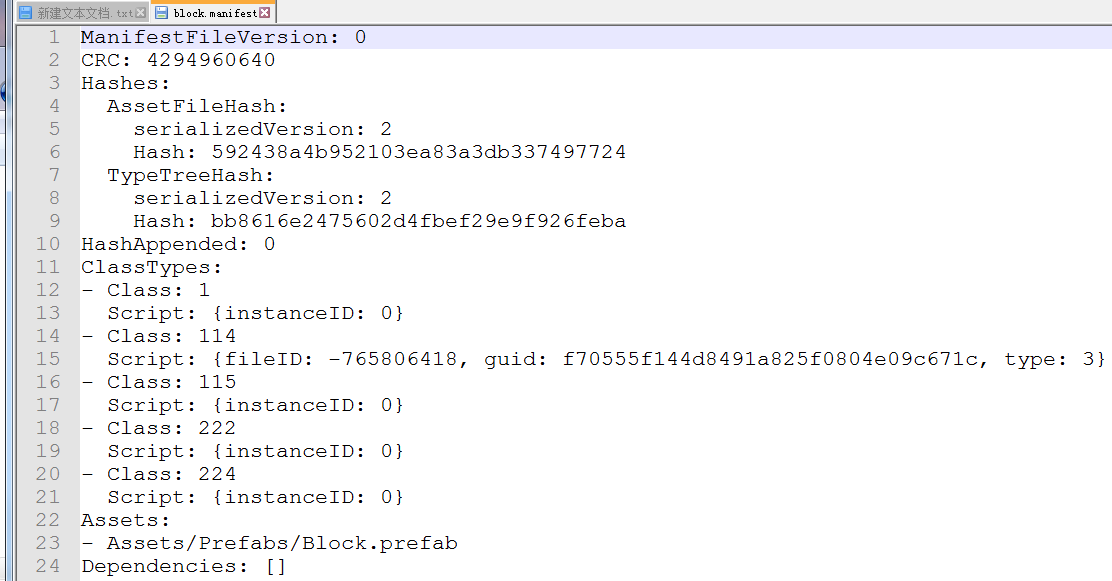
manifest文件
manifest文件用于专门存储打包后的AssetBundle文件的基本信息,主要包含:
CRC校验码:类似于MD5,用于计算出该资源的一个特殊信息标示
ClassTypes列表:当前资源关联使用到了Unity中的哪些类,这些类是以编号索引的形式存在的,每个编号都对应一个类文件
Assets:AssetsBundle里包含了哪些资源文件
Dependencies:依赖
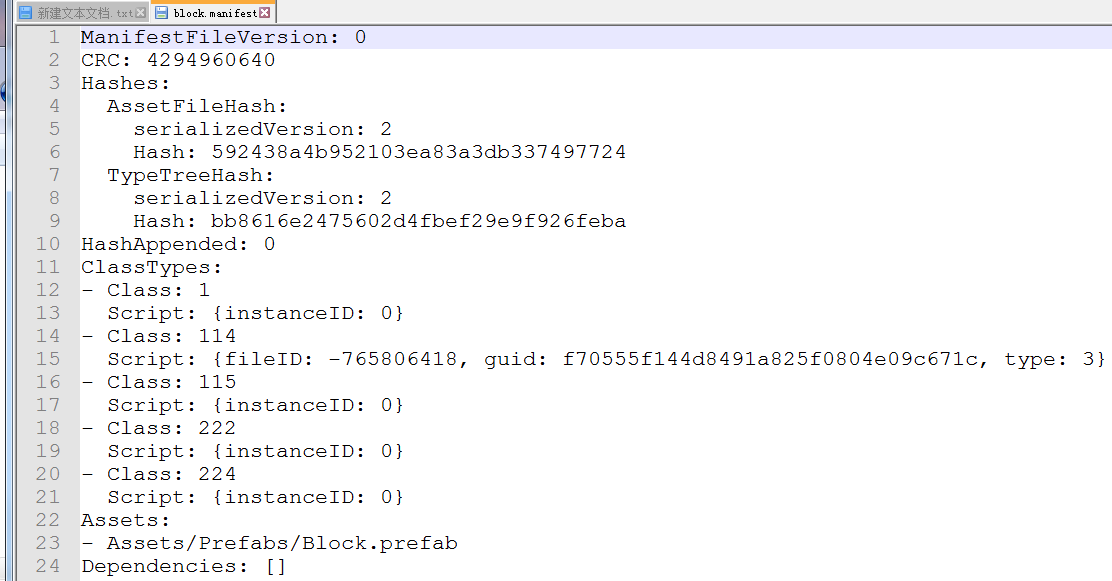
在打包出来的AssetBundle文件中,有一个特殊的manifest文件,和AssetBundle存放的文件夹同名,且只在根文件夹下有唯一的一个
这个manifest文件可以称作"AssetBundle目录文件",它存储了打包出来的所有AssetBundle的文件的索引信息
通过这个目录文件,可以找到所有的AssetBundle文件
AssetBundle资源加载
将项目资源打包成AssetBundle后,一般有两种操作
一.将这些AssetBundle留着项目工程中,当成普通资源使用
1.加载AssetBundle资源到内存
AssetBundle ab = AssetBundle.LoadFromFile("路径");加载AssetBundle资源到内存,返回一个AssetBundle对象
2.从AssetBundle中获取资源
T res = ab.LoadAsset<T>("资源名");
3.实例化
打包
[MenuItem("xx/xxx")]

public static void Build_WINDOWS64()

{

  string outputPath = Path.Combine(Application.streamingAssetsPath, "Data");

  if (!Directory.Exists(outputPath))

    Directory.CreateDirectory(outputPath);

  BuildPipeline.BuildAssetBundles(outputPath, BuildAssetBundleOptions.None, BuildTarget.StandaloneWindows64);//自己选择平台

  AssetDatabase.Refresh();

}
加载
using System.Collections;

using System.Collections.Generic;

public class AssetBundleManager

{

    private readonly string _path = UnityEngine.Application.streamingAssetsPath + "/Data/";

    private static AssetBundleManager _instance;

    private bool mIsLoadingEnd = false;

    public bool IsLoadingEnd { get { return mIsLoadingEnd; } }

    private List<string> mLoadingNames;

    private Dictionary<string, UnityEngine.Object> mAssets;

    private Dictionary<string, UnityEngine.Texture2D> mTexture2Ds;

    public static AssetBundleManager GetInstance()

    {

        if (_instance == null)

        {

            _instance = new AssetBundleManager();

        }

        return _instance;

    }

    private AssetBundleManager()

    {

        mLoadingNames = new List<string>(){

            //todo:要加载的资源名

        };

        mAssets = new Dictionary<string, UnityEngine.Object>();

        mTexture2Ds = new Dictionary<string, UnityEngine.Texture2D>();

    }

    /// <summary>

    /// 加载assetsbundle
   /// 记得先加载到内存StartCoroutine(AssetBundleManager.GetInstance().Loading());

    /// </summary>

    public IEnumerator Loading()

    {

        foreach (var nameAndType in mLoadingNames)

        {

            string filename = _path + nameAndType.ToLower();

            UnityEngine.AssetBundleCreateRequest request = UnityEngine.AssetBundle.LoadFromFileAsync(filename);

            yield return request;

            LoadAsset(request.assetBundle);

        }

        mIsLoadingEnd = true;

    }

    private UnityEngine.AssetBundle LoadAssetBundle(string fileName)

    {

        UnityEngine.AssetBundle AB = UnityEngine.AssetBundle.LoadFromFile(_path + fileName);

        return AB;

    }

    private void LoadAsset(UnityEngine.AssetBundle ab)

    {

        UnityEngine.Object[] assets = ab.LoadAllAssets();

        for (int i = ; i < assets.Length; i++)

        {

            //一张图片的AssetsBundle包含自身Texture2D和它里面全部Sprite,有可能重名

            if (!typeof(UnityEngine.Texture2D).Equals(assets[i].GetType()))

                mAssets.Add(assets[i].name, assets[i]);

            else

                mTexture2Ds.Add(assets[i].name, assets[i] as UnityEngine.Texture2D);

        }

    }

    /// <summary>

    /// 从assetbundle获取texture2d

    /// </summary>

    public UnityEngine.Texture2D GetTexture2D(string name)

    {

        UnityEngine.Texture2D obj;

        mTexture2Ds.TryGetValue(name, out obj);

        return obj;

    }

    /// <summary>

    /// 从assetbundle获取Object

    /// </summary>

    public UnityEngine.Object GetAsset(string name)

    {

        UnityEngine.Object obj;

        mAssets.TryGetValue(name, out obj);

        return obj;

    }

}
二.将这些AssetBundle上传服务器,客户端第一次运行时从服务器下载AssetBundle缓存到本地再使用(实现客户端的安装包与资源分离,降低客户端安装包的体积)
1.服务器端下载主文件
从服务器端下载AssetBundle需要web路径地址,每一个地址对应一个AssetBundle文件.我们不可能在代码中写几十上百个文件的web地址,所以我们需要先下载"目录AssetBundle文件",然后通过它来间接获取其他AssetBundle文件的下载路径地址.
需要引入命名空间using UnityEngine.Networking;
using System.Collections;

using System.IO;

using UnityEngine;

using UnityEngine.Networking;

public class TestAssetBundle : MonoBehaviour

{

    private string mainAssetBundleURL = @"http://www.xxx.com.xxx/AssetBundleFile";

    private string allAssetBundleURL =  @"http://www.xxx.com.xxx/";

    void Start()

    {

        StartCoroutine(DownloadMainAssetBundle());

    }

    /// <summary>

    /// 下载目录AssetBundle文件

    /// </summary>

    IEnumerator DownloadMainAssetBundle()

    {

        //创建一个获取AssetBundle文件的web请求

        UnityWebRequest request = UnityWebRequestAssetBundle.GetAssetBundle(mainAssetBundleURL);

        //发送web请求

        yield return request.SendWebRequest();

        //从请求中获取内容,返回AssetBundle类型的数据

        AssetBundle ab = DownloadHandlerAssetBundle.GetContent(request);

        //从"目录AssetBundle"中获取manifest数据

        AssetBundleManifest manifest = ab.LoadAsset<AssetBundleManifest>("AssetBundleManifest");

        //获取manifest文件中所有的AssetBundle的名称信息

        string[] names = manifest.GetAllAssetBundles();

        foreach (var name in names)

        {

            StartCoroutine(DownloadAssetBundleAndSave(allAssetBundleURL + name));

        }

    }

    /// <summary>

    /// 下载AssetBundle并保存到本地

    /// </summary>

    IEnumerator DownloadAssetBundleAndSave(string url)

    {

        UnityWebRequest request = UnityWebRequest.Get(url);

        yield return request.SendWebRequest();

        // 截取路径地址中的文件名(需要引入System.IO)

        string fileName = Path.GetFileName(url);

        SaveAssetBundle(fileName, request.downloadHandler.data);

    }

    /// <summary>

    /// 存储AssetBundle为本地文件

    /// </summary>

    private void SaveAssetBundle(string fileName, byte[] bytes)

    {

        //创建一个文件信息对象(System.IO)

        FileInfo fileInfo = new FileInfo(Application.streamingAssetsPath + "//" + fileName);

        //创建一个文件流对象

        FileStream fs = fileInfo.Create();

        //通过文件流对象,往文件内写入信息

        fs.Write(bytes, , bytes.Length);

        //文件写入存储到硬盘

        fs.Flush();

        //关闭文件流对象

        fs.Close();

        //销毁文件对象

        fs.Dispose();

    }

}
AssetBundle资源打包与加载的更多相关文章
- Unity3D AssetBundle的打包与加载
在Unity项目开发过程中,当要做热更新时常常使用一个叫做AssetBundle的东西,这里做一点个人的学习记录 步骤1: 设置打包标签:具体步骤----进入Unity,选择某一资源然后看右下角,在那 ...
- u3d外部资源 打包与加载的问题
被坑了一下午,调bug,u3d外部加载资源一会可以,一会不行,始终找不到问题,最后快下班的时候,重新试了一下,原来是资源打包之前的文件名,和之后的加载资源名必须一样 [MenuItem("C ...
- Unity5 AssetBundle 打包以及加载
using UnityEngine; using System.Collections; using System.Collections.Generic; using UnityEditor; us ...
- KEngine:Unity3D资源的打包、加载、调试监控
资源模块做什么? 资源模块——ResourceModule,是KEngine中最核心的模块,其他模块基本或多或少的对它有依赖,它主要的功能是:资源打包.路径定义.资源管理.资源调试. 资源模块对Uni ...
- [Unity] unity5.3 assetbundle打包及加载
Unity5.3更新了assetbundle的打包和加载api,下面简单介绍使用方法及示例代码. 在Unity中选中一个prefab查看Inspector窗口,有两个位置可以进行assetbundle ...
- 【Cocos2d-Js基础教学(5)资源打包工具的使用及资源的异步加载处理】
TexturePacker是纹理资源打包工具,支持Cocos2dx的游戏资源打包. 如果用过的同学可以直接看下面的资源的异步加载处理 首先为什么用TexturePacker? 1,节省图片资源实际大小 ...
- Unity3d Web3d资源的动态加载
Unity3d Web3d资源的动态加载 @灰太龙 参考了宣雨松的博客,原文出处http://www.xuanyusong.com/archives/2405,如果涉及到侵权,请通知我! Unity3 ...
- UNITY_资源路径与加载外部文件
UNITY_资源路径与加载外部文件 https://www.tuicool.com/articles/qMNnmm6https://blog.csdn.net/appppppen/article/de ...
- Unity5.4新版AssetBundle资源打包
(1)新版本 唯一打包API Buildpipeline.BuildAssetBundle (2)在资源的Inpector界面最下方可设置该资源的assetbundleName, 每个assetbun ...
随机推荐
- Mybatis一对一和一对多配置
作者:夕下奕林 问题描述 现在有三张数据表,表名为orders,orderdetail,items,分别表示订单,订单详情,商品. 其中一个订单包含多个订单详情,表示订单中的不同个具体的商品,订单详情 ...
- Spring boot连接3.03以上的mongodb 权限验证问题
由于3.0.3,mongodb加入了SCRAM-SHA-1校验方式,需要第三方工具配合进行验证,所有Spring boot连接MongoDB时会出现用户认证失败. 解决方法: > use adm ...
- HDU 6070 - Dirt Ratio | 2017 Multi-University Training Contest 4
比赛时会错题意+不知道怎么线段树维护分数- - 思路来自题解 /* HDU 6070 - Dirt Ratio [ 二分,线段树 ] | 2017 Multi-University Training ...
- Unable to copy file, Access to the path is denied
Unable to copy file, Access to the path is denied http://stackoverflow.com/questions/7130136/unable- ...
- 洛谷P4317 花神的数论题
洛谷题目链接 数位$dp$ 我们对$n$进行二进制拆分,于是就阔以像十进制一样数位$dp$了,基本就是套模板.. 接下来是美滋滋的代码时间~~~ #include<iostream> #i ...
- 我爱网络流之最大流Dinic
直接上大佬博客: Dinic算法详解及实现来自小菲进修中 Dinic算法(研究总结,网络流)来自SYCstudio 模板步骤: 第一步,先bfs把图划分成分成分层图网络 第二步,dfs多次找增广路 当 ...
- HGOI 20191107 题解
Problem A 树状数组 给出下列$C++$代码: 设区间加操作$modify(l,r)$为调用两次$update(r,1)$和$update(l-1,-1)$ 设$f(l,r)$表示在初始$cn ...
- js监听页面标签切换
var OriginTitile = document.title, titleTime; document.addEventListener('visibilitychange', function ...
- logstash6.5.4同步mysql数据到elasticsearch 6.4.1
下载logstash-6.5.4 ZIP解压和es 放到es根目录下 下载mysql jdbc的驱动 mysql-connector-java-8.0.12 放在任意目录下 以下方式采用动态模板,还有 ...
- mysql: error while loading shared libraries: libnuma.so
安装mysql后,执行初始化配置脚本,创建系统自带的数据库和表时报异常: [root@VM_0_12_centos mysql]# scripts/mysql_install_db --basedir ...