
Shodan全世界在线设备搜索引擎
reproduction from https://danielmiessler.com/study/shodan/
What is Shodan?
Shodan is a search engine for finding specific devices, and device types, that exist online. The most popular searches are for things like webcam, linksys, cisco, netgear, SCADA, etc.
It works by scanning the entire Internet and parsing the banners that are returned by various devices. Using that information, Shodan can tell you things like what web server (and version) is most popular, or how many anonymous FTP servers exist in a particular location, and what make and model the device may be.
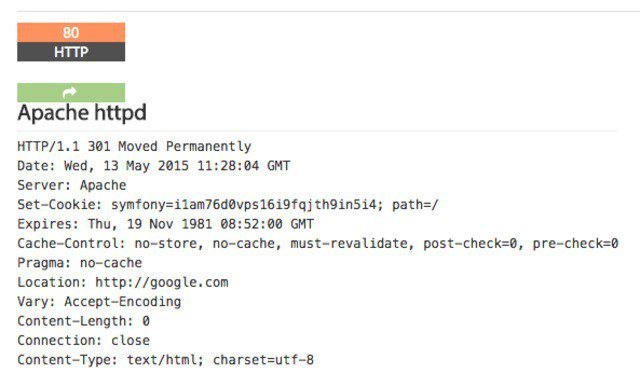
Shodan is of particular use for security research around the Internet of Things, since there will soon be billions of devices online that 1) have specific vulnerabilities that need to be fixed, and 2) can be identified quickly by their banner information.
Basic Usage
You start by navigating to the main page, and then entering into the search field, like you would any other search engine.
For this search, I looked for “VNC”.
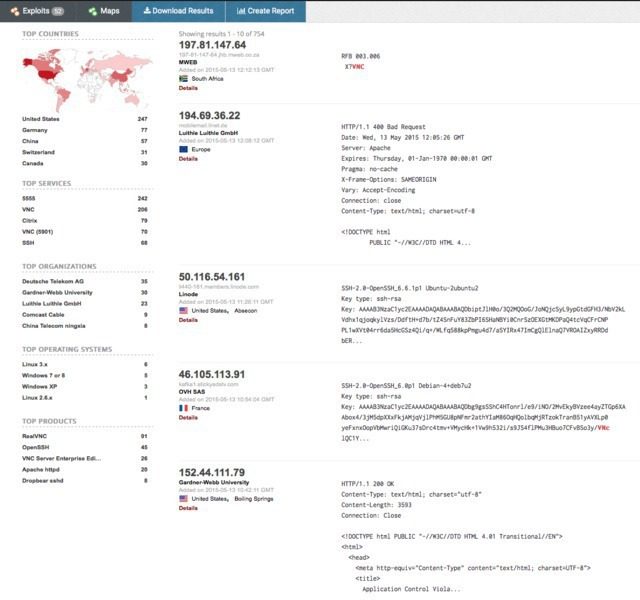
From there you can pivot to a few key areas in the results. Starting on the left sidebar, we see a good amount of summary data:
- Results map
- Top services (Ports)
- Top organizations (ISPs)
- Top operating systems
- Top products (Software name)
Then in the main section we get the full results list, including:
- IP address
- Hostname
- ISP
- When the entry was added to the database
- The country it’s located in
- The banner itself
Then, for even more information you can click details, which takes you into that host itself:
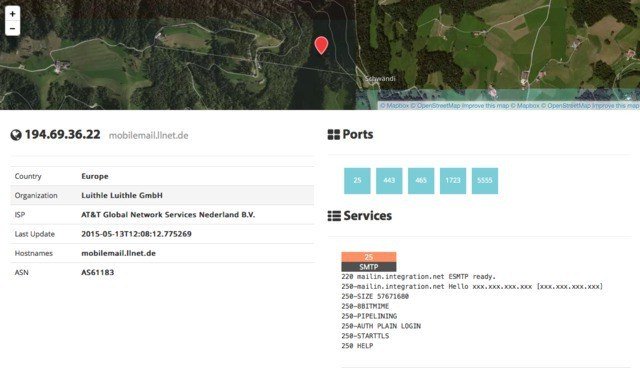
Here you see the data about the host on the left, the list of ports that were found at the top right, and then the individual port details and banners from each port as you go down the page. It’s a clean layout.
Using Filters
As with any search engine, Shodan works well with basic, single-term searches, but the real power comes with customized queries.
Here are the basic search filters you can use:
- city: find devices in a particular city
- country: find devices in a particular country
- geo: you can pass it coordinates
- hostname: find values that match the hostname
- net: search based on an IP or /x CIDR
- os: search based on operating system
- port: find particular ports that are open
- before/after: find results within a timeframe
search examples
Find Apache servers in San Francisco:
apache city:“San Francisco”
Find Nginx servers in Germany:
nginx country:“DE”
Find GWS (Google Web Server) servers:
“Server: gws” hostname:“google”
Find Cisco devices on a particular subnet:
cisco net:“216.219.143.0/24”
So you basically have some sort of base search term you’re looking for (shown in orange) and then you narrow down your search using the filters like we see above.
Use cases
You can use the “Explore” button on the main Shodan site to look at common searches and results, which are illuminating. You’ll find things like:
- Webcams
- SCADA
- Traffic lights
- Routers
- Default passwords
- Etc.
It’s interesting. It’s exciting. It’s frightening.
Combining filters
To combine filters, simply keep adding them on. You can also do this by clicking filters in the left sidebar for a given result set. So if you want to search for Nginx servers in San Francisco, that are running on port 8080, that are also running Tomcat, you could do the following:
Apache city:“San Francisco” port:“8080” product:“Apache Tomcat/Coyote JSP engine”
Advanced Usage
- Here are a few other cool things you can do with the service.
- Data Export: You can export your results in various formats using the top menu after you’ve performed a search.
- Browser Search: You can configure your browser to search Shodan when you search from the URL bar.
- Shodan Free Account: You should create and log in to your free account when you search, as the interface is pretty nerfed if you don’t, e.g. not being able to see host information, etc.
- Premium Accounts: A premium account is a one-time payment of $45 and it gives you increased access to the API. Full details and docs are available at https://developer.shodan.io.
Summary
I really love this project, and I hope this short introduction will get you using it as well.
Notes
- This resource is just an intro to what Shodan is and how to do the basics to what Shodan is and how to do the basics. You should also take a look at the help pages which are quite good.
- The project currently tests for around 200+ services.
- Shodan uses its own internally developed port scanner, not Nmap or Zmap.
- The system works off of banners, and banners can be modified, spoofed, and faked. What you see is what’s being presented, not necessarily what is real.
- You should also check out the blog at https://blog.shodan.io.
Shodan全世界在线设备搜索引擎的更多相关文章
- 预攻击 局域网 Windows 查看其它在线设备
环境:win10 首先我发现,一个常用的命令用不了,如图: net view 按理来说,按Enter键之后显示应该出局域网内所有正在运行的电脑:(截图来自百度) 那么我试一下另外一个办法: 首先ipc ...
- shodan 文档学习笔记
Table of Contents 1. Introduction 1.1. All About the Data 1.2. Data Collection 1.3. SSL in Depth 1.3 ...
- 黑暗世界的搜索引擎 https://fofa.so/ https://www.shodan.io https://www.zoomeye.org 查找设备漏洞
from:http://www.freebuf.com/sectool/121339.html 什么是 Shodan? 首先,Shodan 是一个搜索引擎,但它与 Google 这种搜索网址的搜索引擎 ...
- Shodan:黑客的物联网搜索引擎
记得看过一个电影.里面的科学家开发了一个超级系统,能够实时监控全部可用摄像头.让逃犯无处遁形. Shodan这个新型的搜索引擎可能会让这个想法变成现实. 和Google这些传统互联网信息搜索引擎不同. ...
- Shodan新手入坑指南
*本文原创作者:xiaix,本文属FreeBuf原创奖励计划,未经许可禁止转载 亲们~黑五 Shodan Membership 只要5刀,你剁手了没? 什么是 Shodan? 首先,Shodan 是一 ...
- 3. Shodan新手入坑指南
什么是 Shodan? 首先,Shodan 是一个搜索引擎,但它与 Google 这种搜索网址的搜索引擎不同,Shodan 是用来搜索网络空间中在线设备的,你可以通过 Shodan 搜索指定的设备,或 ...
- Kali中安装 Shodan
工具介绍 Shodan 是一个搜索引擎,但它与 Google 这种搜索网址的搜索引擎不同,Shodan 是用来搜索网络空间中在线设备的,你可以通过 Shodan 搜索指定的设备,或者搜索特定类型的设备 ...
- Shodan的使用
目录 Shodan Shodan工作原理 Shodan的使用 使用搜索过滤 Kali中安装 Shodan Kali中Shodan的使用 Shodan Shodan 是一个搜索引擎,但它与 Google ...
- Google Hacking 搜索引擎攻击与防范
Google Hacking,有时也会被称为 Google dorking,是一种利用谷歌搜索的高级使用方式进行信息收集的技术.这个概念最早在2000年由黑客 Johnny Long 提出并推广,一系 ...
随机推荐
- 【PHP】 php遍历文件夹文件,获取md5的值
方法: <?php //定义操作目录 $dir = 'D:\phpstudy\WWW\test'; function getDir2($dir) { foreach (glob($dir . ' ...
- Js获取file上传控件的文件路径总结
总结一个获取file上传控件文件路径的方法 firefox由于保护机制只有文件名,不能获取完整路径. document.getElementById('file').onchange = functi ...
- Java学习,从入门到放弃(一)SpringMVC+Maven+Mybits 多种数据库配置(mysql+sqlserver)AOP方式
多数据库配置需求有两种,一种是因为项目太大,访问量太高,不得不分布多个数据库减轻访问压力,比较多的应用就是读写分离:另一种就是原本不同的两个数据库业务现在要整合到一起,甚至连数据库都不一样,一个mys ...
- matlab绘制直方图的方法
直接上代码,利用hist绘制频次直方图和频率直方图... %rand Fs=1000;N=10000; t=0:1/Fs:(N-1)/Fs; X1=rand(1,length(t)); subplot ...
- Spring MVC如何获取请求中的参数
目录 一.获取URL中路径参数 1.1 @PathVariable 注解 1.2 @PathParam 注解 二.获取请求参数: 2.1 GET请求 2.1.1 获取请求中的单个参数:@Request ...
- 浅谈python反序列化漏洞
最近看到p神一篇讲python反序列化的文章,结合redis未授权访问组合漏洞,感觉在flask和redis的构架中比较常见,便记录下来. p神原文:https://www.leavesongs.co ...
- java8中常用的新功能
Lambda表达式的用法,并行流.Optional.循环.线程池等
- git config命令详解
Git有一个工具被称为git config,它允许你获得和设置配置变量:这些变量可以控制Git的外观和操作的各个方面. 一. 配置文件的存储位置 这些变量可以被存储在三个不同的位置: 1./etc/ ...
- 关于tomcat9的startup.bat闪退问题&乱码
1.打开apache-tomcat-9.0.22的bin目录 选择图中文件 记事本打开 2.更改文件 setclasspath.bat .0_172\jre 3.保存 startup ----- ...
- oracle 常用sql 经典sql函数使用 sql语法
各种树操作, 用来查询表中带有子父节点的信息 Oracle 树操作(select-start with-connect by-prior) select m.org_id from sm_organ ...