
Flutter easyrefresh示例 上拉加载+下拉刷新
官方示例,简单改了下,实现功能为主。
代码如下:
import 'dart:async';

import 'package:flutter/material.dart';

import 'package:flutter_easyrefresh/easy_refresh.dart';

class BasicPage extends StatefulWidget {

  @override

  _BasicPageState createState() => _BasicPageState();

}

class _BasicPageState extends State<BasicPage> {

  List<String> addStr = ["", "", "", "", "", "", "", "", "", ""];

  List<String> str = ["", "", "", "", "", "", "", "", "", ""];

  GlobalKey<EasyRefreshState> _easyRefreshKey = GlobalKey<EasyRefreshState>();

  @override

  Widget build(BuildContext context) {

    return Scaffold(

      appBar: AppBar(

        title: Text("EasyRefresh"),

      ),

      body: Center(

          child: new EasyRefresh(

            key: _easyRefreshKey,

            child: new ListView.builder(

              //ListView的Item

                itemCount: str.length,

                itemBuilder: (BuildContext context, int index) {

                  return new Container(

                      height: 70.0,

                      child: Card(

                        child: new Center(

                          child: new Text(

                            str[index],

                            style: new TextStyle(fontSize: 18.0),

                          ),

                        ),

                      ));

                }),

            onRefresh: () async {

              await new Future.delayed(const Duration(seconds: ), () {

                setState(() {

                  str.clear();

                  str.addAll(addStr);

                });

              });

            },

            loadMore: () async {

              await new Future.delayed(const Duration(seconds: ), () {

                if (str.length < ) {

                  setState(() {

                    str.addAll(addStr);

                  });

                }

              });

            },

          )),

    );

  }

}
特殊效果+底部按钮,代码如下:
import 'dart:async';

import 'package:flutter/material.dart';

import 'package:flutter_easyrefresh/easy_refresh.dart';

import 'package:flutter_easyrefresh/bezier_circle_header.dart';//如果要使用炫酷的样式需要引入,不同的样式引入不同的文件,详见官方api

import 'package:flutter_easyrefresh/bezier_bounce_footer.dart';//如果要使用炫酷的样式需要引入,不同的样式引入不同的文件,详见官方api

class BasicPage extends StatefulWidget {

  @override

  _BasicPageState createState() => _BasicPageState();

}

class _BasicPageState extends State<BasicPage> {

  List<String> addStr = ["", "", "", "", "", "", "", "", "", ""];

  List<String> str = ["", "", "", "", "", "", "", "", "", ""];

  GlobalKey<EasyRefreshState> _easyRefreshKey = new GlobalKey<EasyRefreshState>();

  GlobalKey<RefreshHeaderState> _headerKey = new GlobalKey<RefreshHeaderState>();

  GlobalKey<RefreshFooterState> _footerKey = new GlobalKey<RefreshFooterState>();

  @override

  Widget build(BuildContext context) {

    return Scaffold(

      appBar: AppBar(

        title: Text("EasyRefresh"),

      ),

      body: Center(

          child: new EasyRefresh(

            key: _easyRefreshKey,

            refreshHeader: BezierCircleHeader(

              key: _headerKey,

              color: Theme.of(context).scaffoldBackgroundColor,

            ),

            refreshFooter: BezierBounceFooter(

              key: _footerKey,

              color: Theme.of(context).scaffoldBackgroundColor,

            ),

            child: new ListView.builder(

              //ListView的Item

                itemCount: str.length,

                itemBuilder: (BuildContext context, int index) {

                  return new Container(

                      height: 70.0,

                      child: Card(

                        child: new Center(

                          child: new Text(

                            str[index],

                            style: new TextStyle(fontSize: 18.0),

                          ),

                        ),

                      ));

                }),

            onRefresh: () async {

              await new Future.delayed(const Duration(seconds: ), () {

                setState(() {

                  str.clear();

                  str.addAll(addStr);

                });

              });

            },

            loadMore: () async {

              await new Future.delayed(const Duration(seconds: ), () {

                if (str.length < ) {

                  setState(() {

                    str.addAll(addStr);

                  });

                }

              });

            },

          )),

      persistentFooterButtons: <Widget>[

        FlatButton(

            onPressed: () {

              _easyRefreshKey.currentState.callRefresh();

            },

            child: Text("refresh", style: TextStyle(color: Colors.black))),

        FlatButton(

            onPressed: () {

              _easyRefreshKey.currentState.callLoadMore();

            },

            child: Text("loadMore", style: TextStyle(color: Colors.black)))

      ],

    );

  }

}
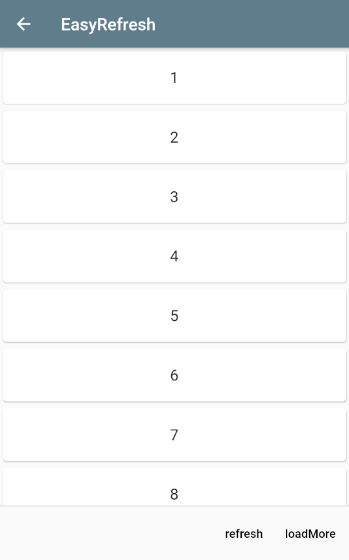
效果图:
Flutter easyrefresh示例 上拉加载+下拉刷新的更多相关文章
- Vue mint ui用在消息页面上拉加载下拉刷新loadmore 标记
之前总结过一个页面存在多个下拉加载的处理方式,今天再来说一下在消息页面的上拉加载和下拉刷新,基本上每个app都会有消息页面,会遇到这个需求 需求:每次加载十条数据,上拉加载下拉刷新,并且没有点击查看过 ...
- 上拉加载下拉刷新控件WaterRefreshLoadMoreView
上拉加载下拉刷新控件WaterRefreshLoadMoreView 效果: 源码: // // SRSlimeView // @author SR // Modified by JunHan on ...
- RecyclerView 上拉加载下拉刷新
RecyclerView 上拉加载下拉刷新 <android.support.v4.widget.SwipeRefreshLayout android:id="@+id/teach_s ...
- APICloud上啦加载下拉刷新模块
apicloud有自带的上啦加载下拉刷新,当让也可以用第三方或者在模块库里面找一个使用 一.下拉刷新,一下代码写在 apiready = function (){} 里面 apiready = fun ...
- 微信小程序上拉加载下拉刷新
微信小程序实现上拉加载下拉刷新 使用小程序默认提供方法. (1). 在xxx.json 中开启下拉刷新,需要设置backgroundColor,或者是backgroundTextStyle ,因为加载 ...
- mui scroll和上拉加载/下拉刷新
mui中 scroll和上拉加载/下拉刷新同时存在会出现两个滚动条 把/* */ /* //mui页面鼠标拖动代码: mui('.mui-scroll-wrapper').scroll({ dec ...
- Flutter上拉加载下拉刷新---flutter_easyrefresh
前言 Flutter默认不支持上拉加载,下拉刷新也仅仅支持Material的一种样式.Android开发使用过SmartRefreshLayout的小伙伴都知道这是一个强大的刷新UI库,集成了很多出色 ...
- 微信小程序 - 上拉加载下拉刷新
点击下载示例:小程序 - 上拉刷新下拉加载
- flutter 下拉加载+下拉加载
功能: 1.下拉加载 2.上拉加载 3.显示加载图标 4.更新列表数据,隐藏加载图标 flutter库: flutter_spinkit: ^3.1.0 加载图标 其他:加载列表需要列表,基于上一节的 ...
- SwipeRefreshLayout实现上拉加载下拉刷新
package com.example.swiperefreshlayoutdemo; import java.util.ArrayList;import java.util.HashMap; imp ...
随机推荐
- centos6.5 安装163yum源
1.下载yum源 http://mirrors.163.com/.help/CentOS6-Base-163.repo 2.把下载好的yum源放到/etc/yum.repos.d下 mv CentOS ...
- RabbitMQ消息队列+安装+工具介绍
1.MQ为Message Queue,消息队列是应用程序和应用程序之间的通信方法 2. 多种开发语言支持,其实就是一个驱动,如连接数据库的mysql驱动,oracle驱动等. 3. 4.采用以下语言开 ...
- java+上传一个文件夹
在web项目中上传文件夹现在已经成为了一个主流的需求.在OA,或者企业ERP系统中都有类似的需求.上传文件夹并且保留层级结构能够对用户行成很好的引导,用户使用起来也更方便.能够提供更高级的应用支撑. ...
- BST(二叉查找树)
https://songlee24.github.io/2015/01/13/binary-search-tree/ 二叉查找树(BST) 发表于 2015-01-13 | 分类于 Basic ...
- Codeforces Round #591 (Div. 2, based on Technocup 2020 Elimination Round 1)
Virtual participate 的,D题不会做,打了1:30就打不动了,过了ABCE. A - CME 题意:? 题解:? void test_case() { int n; scanf(&q ...
- PostgreSQL - 如何杀死被锁死的进程
前言 在一次系统迭代后用户投诉说无法成功登陆系统,经过测试重现和日志定位,最后发现是由于用户在ui上进行了某些操作后,触发了堆栈溢出异常,导致数据库里的用户登陆信息表的数据被锁住,无法释放.这个表里存 ...
- centos7 安装 Mysql 5.7.27,详细完整教程
1. 下载 MySQL yum包 wget http://repo.mysql.com/mysql57-community-release-el7-10.noarch.rpm 2.安装MySQL源 ...
- Highcharts 的使用(各种统计图)(难点:绑定数据)
1.我们先打开 官方下载的 文件包 打开 index.htm 页面 里面有非常多的 统计图. 我是用的是3D charts 中的 3D column 也就是 3D的柱状图. 选择一个 后 会有非常棒的 ...
- Docker实战笔记
好记性不如烂笔头,持续高产~ 0x01 Docker创建nginx容器 1.流程 docker info 显示Docker系统信息,包括镜像和容器数 示例: 使用镜像 nginx:latest 以交互 ...
- CF293E Close Vertice
如果没有边数限制就是裸的淀粉质,如果有了加上一个树状数组记边数就行了. #include<stdio.h> #include<stdlib.h> #include<str ...