
The superclass "javax.servlet.http.HttpServlet" was not found on the Java Build Path 解决方法
项目忽然出现 The superclass "javax.servlet.http.HttpServlet" was not found on the Java Build Path 解决方法
0.环境:
新装win8.1系统,Tomcat配置无误。
1.错误:
项目中某一.jps页面忽然出现错误,鼠标点上去为:The superclass "javax.servlet.http.HttpServlet" was not found on the Java Build Path.
忽视错误,在Eclipse下启动tomcat的时候,报错为:Eclipse下启动tomcat报错:The archive: D:/Program Files/apache-tomcat-7.0.52/bin/bootstrap.jar which is referenced by the classpath, does not exist.
2.查找原因:
原本我的Tomcat路径为:D:\Program Files\apache-tomcat-7.0.52\,后来由于重装系统,改为:D:\ProgramFiles\apache-tomcat-7.0.52\,在报错中可以发现是缺少servlet-api.jar,也即tomcat路径问题。
3.尝试解决:
①.
1.右键点击项目->build path->configure build path->add library->server runtime->apache tomcat
无果,无法添加。
②.
1.打开Eclipse中tomcat配置,就是双击server选项卡中的tomcat,然后选择openlaunch configuration,如下图所示: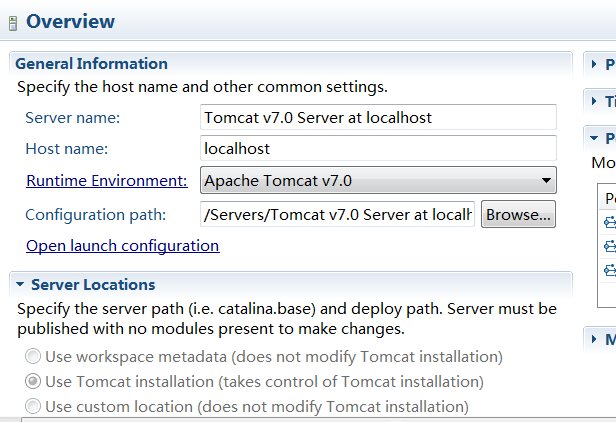
2.打开以后会出现如下界面:

3.如上图所示,将错误路径删除,并保证正确配置tomcat-juli.jar和bootstrap.jar这两个jar包的路径。
无果,修改后仍启动不了Tomcat。
③.
1.在server选项卡中删除所有server,新建tomcat。
无果,无法新建。
④.
1.退出 eclipse
2.到[工程目录下]/.metadata/.plugins/org.eclipse.core.runtime
3.把org.eclipse.wst.server.core.prefs和 org.eclipse.jst.server.tomcat.core.prefs这两个文件去掉
4.重启eclipse
无果,没找到org.eclipse.wst.server.core.prefs和 org.eclipse.jst.server.tomcat.core.prefs这两个文件。
⑤.
1.在Eclipse中,Window-->preference --> servers --> runtime --> environments --> 全部删除
2.Add-->Browse-->选择本地tomcat文件夹所在位置-->确定 --> finish-->OK
成功!
4.结论:
实际上是preference中路径错误的问题,直接删除掉server再重建的方法不行。
以后在移动相关资源或者依赖资源的时候会对原有的依赖它的项目产生影响。尽量将自己的IDE和相关的环境固定,少做更改,减少那些隐藏的错误出现的几率。
5.后续疑问:(未解)
重装系统后Tomcat、Eclipse都是重新解压配置的,为何Eclipse会记住重装系统前的路径?
The superclass "javax.servlet.http.HttpServlet" was not found on the Java Build Path 解决方法的更多相关文章
- 项目忽然出现 The superclass "javax.servlet.http.HttpServlet" was not found on the Java Build Path 解决方法
0.环境: 新装win8.1系统,Tomcat配置无误. 1.错误: 项目中某一.jps页面忽然出现错误,鼠标点上去为:The superclass "javax.servlet.http. ...
- 项目出现 The superclass "javax.servlet.http.HttpServlet" was not found on the Java Build Path 解决方法
1. The superclass "javax.servlet.http.HttpServlet" was not found on the Java Build Path ①项 ...
- java eclipse maven The superclass "javax.servlet.http.HttpServlet" was not found on the Java Build Path 解决方法
在eclipse 中使用maven 创建java web项目,启动服务器遇到提示:The superclass "javax.servlet.http.HttpServlet" w ...
- The superclass "javax.servlet.http.HttpServlet" was not found on the Java Build Path 解决办法
♦ 未在 Java构建路径中 找到父类 "javax.servlet.http.HttpServlet" ♦ 解决办法: 项目右击 → Build Path → 右侧 Add L ...
- 新建jsp文件,The superclass "javax.servlet.http.HttpServlet" was not found on the Java Build Path错误解决方法
新建一个jsp文件后,有一个错误,The superclass "javax.servlet.http.HttpServlet" was not found on the Java ...
- HttpServletRequest cannot be resolved to a type The superclass "javax.servlet.http.HttpServlet" was not found on the Java Build Path
HttpServletRequest cannot be resolved to a type The superclass "javax.servlet.http.HttpServlet& ...
- jsp页面提示“Multiple annotations found at this line: - The superclass "javax.servlet.http.HttpServlet" was not found on the Java Build Path”解决方案
Multiple annotations found at this line: - The superclass "javax.servlet.http.HttpServlet" ...
- The superclass "javax.servlet.http.HttpServlet" was not found on the Java Build Path解决方案
0.环境: win7系统,Tomcat9配置无误. 1.错误: 项目中某一.jps页面忽然出现错误,鼠标点上去为:The superclass "javax.servlet.http.Htt ...
- The superclass "javax.servlet.http.HttpServlet" was not found on the Java Build Path。问题
JSP页面顶端出现“红色”的报错信息:The superclass "javax.servlet.http.HttpServlet" was not found on the Ja ...
随机推荐
- git使用简单指南
参考: https://www.fengerzh.com/git-reset/?utm_source=tool.lu git建库小结 (一)远端:1.在git网站上建设一个远程仓库复制git远程仓库地 ...
- android 本地字符串存取
存 // data 指定的文件名 SharedPreferences.Editor editor = getSharedPreferences("data",MODE_PRIVAT ...
- Oracle Golden Gate原理简介
Oracle Golden Gate原理简介 http://www.askoracle.org/oracle/HighAvailability/20140109953.html#6545406-tsi ...
- 十天精通CSS3(8)
变形--旋转 rotate() 旋转rotate()函数通过指定的角度参数使元素相对原点进行旋转.它主要在二维空间内进行操作,设置一个角度值,用来指定旋转的幅度.如果这个值为正值,元素相对原点中心顺时 ...
- POJ:2528(Mayor's posters)离散化成段更新+简单哈希
http://poj.org/problem?id=2528 Description The citizens of Bytetown, AB, could not stand that the ca ...
- ListView列宽自适应,设置ListView.Column[0].Width := -1;
使用TListView列表显示内容,如果列内容过长,就会显示成‘XXX…’形式,此时如果双击列标题,列宽将变为自适应.用代码设置如下: 1.设置ListView.Column[0].Width := ...
- swoole线程和进程
pstree -a | grep php | | `-php server.php 主进程 | | |-php server.php 管理线程 ...
- php中in_array使用注意
可能会导致长耗时: http://www.jb51.net/article/41446.htm
- VCS中的覆盖率分析
VCS在仿真过程中,也可以收集Coverage Metric.其中覆盖率类型有: 1)Code Coverage:包括control_flow和value两部分的coverage,line_cover ...
- UNIX历史
一.Multics计划 1965年,AT&T贝尔电话实验室.通用电气公司.麻省理工学院MAC课题组一起联合开发一个称为Multics的新操作系统. Multics 系统的目标是要向大的用户团体 ...