
使用Python SDK管理Azure Load Balancer
概述
下面将演示如何使用Python SDK管理中国区Azure Load balancer。关于Azure负载均衡器的详细功能介绍,请参考官方文档。
Code Sample
import os

from azure.common.credentials import ServicePrincipalCredentials

from azure.mgmt.resource import ResourceManagementClient

from azure.mgmt.storage import StorageManagementClient

from azure.mgmt.network import NetworkManagementClient

from azure.mgmt.compute import ComputeManagementClient

from haikunator import Haikunator

haikunator = Haikunator()

# Azure Datacenter

LOCATION = 'China North2'

# Resource Group

GROUP_NAME = 'azure-sample-group-loadbalancer'

# Network

VNET_NAME = 'azure-sample-vnet'

SUBNET_NAME = 'azure-sample-subnet'

DOMAIN_LABEL_NAME = 'testdns'+haikunator.haikunate()

PUBLIC_IP_NAME = 'azure-sample-publicip'

# Load balancer

LB_NAME = 'azure-sample-loadbalancer'

FIP_NAME = 'azure-sample-frontendipname'

ADDRESS_POOL_NAME = 'azure-sample-addr-pool'

PROBE_NAME = 'azure-sample-probe'

LB_RULE_NAME = 'azure-sample-lb-rule'

NETRULE_NAME_1 = 'azure-sample-netrule1'

NETRULE_NAME_2 = 'azure-sample-netrule2'

FRONTEND_PORT_1 = 21

FRONTEND_PORT_2 = 23

BACKEND_PORT = 22

# VM

AVAILABILITY_SET_NAME = 'azure-sample-availabilityset'

OS_DISK_NAME = 'azure-sample-osdisk'

STORAGE_ACCOUNT_NAME = haikunator.haikunate(delimiter='')

IP_CONFIG_NAME = 'azure-sample-ip-config'

VMS_INFO = {

    1: {

        'name': 'Web1',

        'nic_name': 'azure-sample-nic1',

        'username': 'notadmin1',

        'password': 'Pa$$w0rd91'

    },

    2: {

        'name': 'Web2',

        'nic_name': 'azure-sample-nic2',

        'username': 'notadmin2',

        'password': 'Pa$$w0rd92'

    }

}

# Ubuntu config

PUBLISHER = 'Canonical'

OFFER = 'UbuntuServer'

SKU = '16.04-LTS'

VERSION = 'latest'

# Manage resources and resource groups - create, update and delete a resource group,

# deploy a solution into a resource group, export an ARM template. Create, read, update

# and delete a resource

#

# This script expects that the following environment vars are set:

#

# AZURE_TENANT_ID: with your Azure Active Directory tenant id or domain

# AZURE_CLIENT_ID: with your Azure Active Directory Application Client ID

# AZURE_CLIENT_SECRET: with your Azure Active Directory Application Secret

# AZURE_SUBSCRIPTION_ID: with your Azure Subscription Id

def run_example():

    """Resource Group management example."""

    #

    # Create all clients with an Application (service principal) token provider

    #

    subscription_id = "ecf1d1be-9348-434c-86ef-f903f7bb7111"

    # your Azure Subscription Id

    client_id = '42c02c81-eff8-4df6-8884-4e43b6ea8111'

    client_secret = '111111'

    tenant_id = 'b388b808-0ec9-4a09-a414-a7cbbd8b7111'

    credentials = ServicePrincipalCredentials(client_id, client_secret, tenant=tenant_id, china='true')

    resource_client = ResourceManagementClient(credentials, subscription_id, base_url='https://management.chinacloudapi.cn')

    compute_client = ComputeManagementClient(credentials, subscription_id, base_url='https://management.chinacloudapi.cn')

    storage_client = StorageManagementClient(credentials, subscription_id, base_url='https://management.chinacloudapi.cn')

    network_client = NetworkManagementClient(credentials, subscription_id, base_url='https://management.chinacloudapi.cn')

    # Create Resource group

    print('Create Resource Group')

    resource_client.resource_groups.create_or_update(GROUP_NAME, {'location': LOCATION})

    # Create PublicIP

    print('Create Public IP')

    public_ip_parameters = {

        'location': LOCATION,

        'public_ip_allocation_method': 'static',

        'dns_settings': {

            'domain_name_label': DOMAIN_LABEL_NAME

        },

        'idle_timeout_in_minutes': 4

    }

    async_publicip_creation = network_client.public_ip_addresses.create_or_update(

        GROUP_NAME,

        PUBLIC_IP_NAME,

        public_ip_parameters

    )

    public_ip_info = async_publicip_creation.result()

    # Building a FrontEndIpPool

    print('Create FrontEndIpPool configuration')

    frontend_ip_configurations = [{

        'name': FIP_NAME,

        'private_ip_allocation_method': 'Dynamic',

        'public_ip_address': {

            'id': public_ip_info.id

        }

    }]

    # Building a BackEnd address pool

    print('Create BackEndAddressPool configuration')

    backend_address_pools = [{

        'name': ADDRESS_POOL_NAME

    }]

    # Building a HealthProbe

    print('Create HealthProbe configuration')

    probes = [{

        'name': PROBE_NAME,

        'protocol': 'Http',

        'port': 80,

        'interval_in_seconds': 15,

        'number_of_probes': 4,

        'request_path': 'healthprobe.aspx'

    }]

    # Building a LoadBalancer rule

    print('Create LoadBalancerRule configuration')

    load_balancing_rules = [{

        'name': LB_RULE_NAME,

        'protocol': 'tcp',

        'frontend_port': 80,

        'backend_port': 80,

        'idle_timeout_in_minutes': 4,

        'enable_floating_ip': False,

        'load_distribution': 'Default',

        'frontend_ip_configuration': {

            'id': construct_fip_id(subscription_id)

        },

        'backend_address_pool': {

            'id': construct_bap_id(subscription_id)

        },

        'probe': {

            'id': construct_probe_id(subscription_id)

        }

    }]

    # Building InboundNATRule1

    print('Create InboundNATRule1 configuration')

    inbound_nat_rules = [{

        'name': NETRULE_NAME_1,

        'protocol': 'tcp',

        'frontend_port': FRONTEND_PORT_1,

        'backend_port': BACKEND_PORT,

        'enable_floating_ip': False,

        'idle_timeout_in_minutes': 4,

        'frontend_ip_configuration': {

            'id': construct_fip_id(subscription_id)

        }

    }]

    # Building InboundNATRule2

    print('Create InboundNATRule2 configuration')

    inbound_nat_rules.append({

        'name': NETRULE_NAME_2,

        'protocol': 'tcp',

        'frontend_port': FRONTEND_PORT_2,

        'backend_port': BACKEND_PORT,

        'enable_floating_ip': False,

        'idle_timeout_in_minutes': 4,

        'frontend_ip_configuration': {

            'id': construct_fip_id(subscription_id)

        }

    })

    # Creating Load Balancer

    print('Creating Load Balancer')

    lb_async_creation = network_client.load_balancers.create_or_update(

        GROUP_NAME,

        LB_NAME,

        {

            'location': LOCATION,

            'frontend_ip_configurations': frontend_ip_configurations,

            'backend_address_pools': backend_address_pools,

            'probes': probes,

            'load_balancing_rules': load_balancing_rules,

            'inbound_nat_rules' :inbound_nat_rules

        }

    )

    lb_info = lb_async_creation.result()

    ##############################################################

    # From here, we create the VM and link the LB inside the NIC #

    ##############################################################

    # Create VNet

    print('Create Vnet')

    async_vnet_creation = network_client.virtual_networks.create_or_update(

        GROUP_NAME,

        VNET_NAME,

        {

            'location': LOCATION,

            'address_space': {

                'address_prefixes': ['10.0.0.0/16']

            }

        }

    )

    async_vnet_creation.wait()

    # Create Subnet

    async_subnet_creation = network_client.subnets.create_or_update(

        GROUP_NAME,

        VNET_NAME,

        SUBNET_NAME,

        {'address_prefix': '10.0.0.0/24'}

    )

    subnet_info = async_subnet_creation.result()

    # Creating NIC

    print('Creating NetworkInterface 1')

    back_end_address_pool_id = lb_info.backend_address_pools[0].id

    inbound_nat_rule_1_id = lb_info.inbound_nat_rules[0].id

    async_nic1_creation = network_client.network_interfaces.create_or_update(

        GROUP_NAME,

        VMS_INFO[1]['nic_name'],

        create_nic_parameters(subnet_info.id, back_end_address_pool_id, inbound_nat_rule_1_id)

    )

    inbound_nat_rule_2_id = lb_info.inbound_nat_rules[1].id

    print('Creating NetworkInterface 2')

    async_nic2_creation = network_client.network_interfaces.create_or_update(

        GROUP_NAME,

        VMS_INFO[2]['nic_name'],

        create_nic_parameters(subnet_info.id, back_end_address_pool_id, inbound_nat_rule_2_id)

    )

    nic1_info = async_nic1_creation.result()

    nic2_info = async_nic2_creation.result()

    # Create availability set

    print('Create availability set')

    availability_set_info = compute_client.availability_sets.create_or_update(

        GROUP_NAME,

        AVAILABILITY_SET_NAME,

        {'location': LOCATION}

    )

    # Create a storage account

    print('Create a storage account')

    storage_async_operation = storage_client.storage_accounts.create(

        GROUP_NAME,

        STORAGE_ACCOUNT_NAME,

        {

            'sku': {'name': 'standard_lrs'},

            'kind': 'storage',

            'location': LOCATION

        }

    )

    storage_async_operation.wait()

    # Create VMs

    print('Creating Virtual Machine 1')

    vm_parameters1 = create_vm_parameters(nic1_info.id, availability_set_info.id, VMS_INFO[1])

    async_vm1_creation = compute_client.virtual_machines.create_or_update(

        GROUP_NAME, VMS_INFO[1]['name'], vm_parameters1)

    async_vm1_creation.wait()

    print('Creating Virtual Machine 2')

    vm_parameters2 = create_vm_parameters(nic2_info.id, availability_set_info.id, VMS_INFO[2])

    async_vm2_creation = compute_client.virtual_machines.create_or_update(

        GROUP_NAME, VMS_INFO[2]['name'], vm_parameters2)

    async_vm2_creation.wait()

    provide_vm_login_info_to_user(1, public_ip_info, FRONTEND_PORT_1, VMS_INFO[1])

    provide_vm_login_info_to_user(2, public_ip_info, FRONTEND_PORT_2, VMS_INFO[2])

    input("Press enter to delete this Resource Group.")

    # Delete Resource group and everything in it

    print('Delete Resource Group')

    delete_async_operation = resource_client.resource_groups.delete(GROUP_NAME)

    delete_async_operation.wait()

    print("\nDeleted: {}".format(GROUP_NAME))

def construct_fip_id(subscription_id):

    """Build the future FrontEndId based on components name.

    """

    return ('/subscriptions/{}'

            '/resourceGroups/{}'

            '/providers/Microsoft.Network'

            '/loadBalancers/{}'

            '/frontendIPConfigurations/{}').format(

                subscription_id, GROUP_NAME, LB_NAME, FIP_NAME

            )

def construct_bap_id(subscription_id):

    """Build the future BackEndId based on components name.

    """

    return ('/subscriptions/{}'

            '/resourceGroups/{}'

            '/providers/Microsoft.Network'

            '/loadBalancers/{}'

            '/backendAddressPools/{}').format(

                subscription_id, GROUP_NAME, LB_NAME, ADDRESS_POOL_NAME

            )

def construct_probe_id(subscription_id):

    """Build the future ProbeId based on components name.

    """

    return ('/subscriptions/{}'

            '/resourceGroups/{}'

            '/providers/Microsoft.Network'

            '/loadBalancers/{}'

            '/probes/{}').format(

                subscription_id, GROUP_NAME, LB_NAME, PROBE_NAME

            )

def provide_vm_login_info_to_user(num, public_ip_info, frontend_port, vm_info):

    """Print on the console the connection information for a given VM.

    """

    print('\n\nLogin information for the {} VM: {}'.format(num, vm_info['name']))

    print('-------------------------------------------')

    print('ssh to ip:port - {}:{}'.format(public_ip_info.ip_address, frontend_port))

    print('username       - {}'.format(vm_info['username']))

    print('password       - {}'.format(vm_info['password']))

def create_nic_parameters(subnet_id, address_pool_id, natrule_id):

    """Create the NIC parameters structure.

    """

    return {

        'location': LOCATION,

        'ip_configurations': [{

            'name': IP_CONFIG_NAME,

            'subnet': {

                'id': subnet_id

            },

            'load_balancer_backend_address_pools': [{

                'id': address_pool_id

            }],

            'load_balancer_inbound_nat_rules': [{

                'id': natrule_id

            }]

        }]

    }

def create_vm_parameters(nic_id, availset_id, vm_info):

    """Create the VM parameters structure.

    """

    return {

        'location': LOCATION,

        'os_profile': {

            'computer_name': vm_info['name'],

            'admin_username': vm_info['username'],

            'admin_password': vm_info['password']

        },

        'hardware_profile': {

            'vm_size': 'Standard_A1'

        },

        'storage_profile': {

            'image_reference': {

                'publisher': PUBLISHER,

                'offer': OFFER,

                'sku': SKU,

                'version': VERSION

            },

            'os_disk': {

                'name': OS_DISK_NAME,

                'caching': 'None',

                'create_option': 'fromImage',

                'vhd': {

                    'uri': 'https://{}.blob.core.chinacloudapi.cn/vhds/{}.vhd'.format(

                        STORAGE_ACCOUNT_NAME, vm_info['name'])

                }

            },

        },

        'network_profile': {

            'network_interfaces': [{

                'id': nic_id,

                'primary': True

            }]

        },

        'availability_set': {

            'id': availset_id

        }

    }

if __name__ == "__main__":

    run_example()
关于认证信息的获取,可以参考链接方式二: 通过 PowerShell 获取认证凭据部分。
注意: 示例代码修改了部分参数,如sku,因为区域的问题,某些vm size可能会出现不支持的情况;镜像及api-version也可能出现不支持的情况,具体需要结合报错信息调整代码。
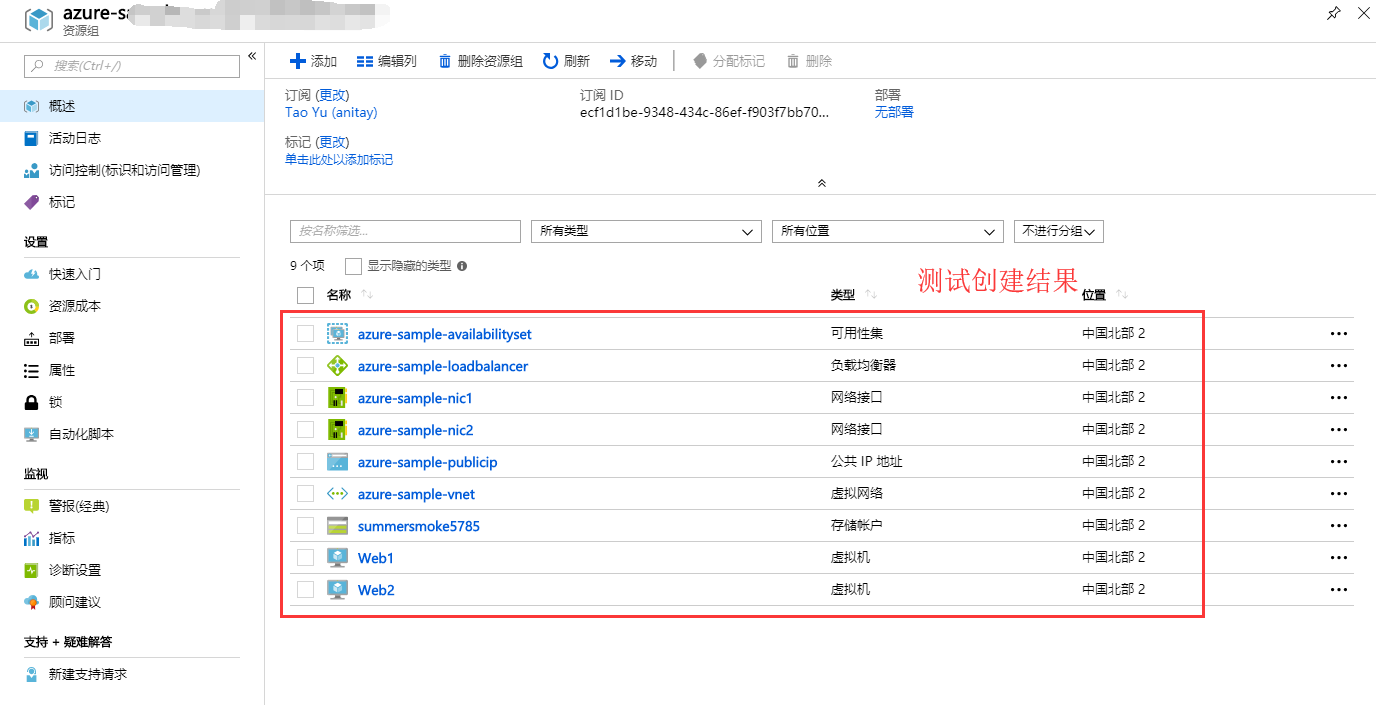
测试结果
参考链接
Getting Started with Azure Resource Manager for load balancers in Python
network-python-manage-loadbalancer
使用Python SDK管理Azure Load Balancer的更多相关文章
- Azure Load Balancer : 动态扩展
笔者在前文<Azure Load Balancer : 支持 IPv6>中介绍了如何通过 PowerShell 脚本创建支持 IPv6 的 Load Balancer.本文我们接着介绍如何 ...
- Azure Load Balancer : 支持 IPv6
越来越多的网站开始支持 IPv6,即使是哪些只提供 api 服务的站点也需要支持 IPv6,比如苹果应用商店中的 app 早就强制要求服务器端支持 IPv6 了.笔者在前文<Azure Load ...
- Azure Load Balancer : 简介
Azure 提供的负载均衡服务叫 Load Balancer,它工作在 ISO 七层模型的第四层,通过分析 IP 层及传输层(TCP/UDP)的流量实现基于 "IP + 端口" 的 ...
- Azure Load Balancer(二) 基于内部的负载均衡来转发为访问请求
一,引言 上一节,我们使用 Azure Load Balancer 类型为外部的,来转发我们的 Web 服务.今天我们看看另一种类型为 “Internal” 的 Azure Load Balancer ...
- 【Azure Developer】使用 Python SDK连接Azure Storage Account, 计算Blob大小代码示例
问题描述 在微软云环境中,使用python SDK连接存储账号(Storage Account)需要计算Blob大小?虽然Azure提供了一个专用工具Azure Storage Explorer可以统 ...
- Azure Load Balancer(一) 为我们的Web项目提供负载均衡
一,引言 上节,我们讲到使用 Azure Traffic Manager 为我们的 Demo 项目提供负载均衡,以及流量转发的功能.但是Azure 提供类似的功能的服务远远不止这一个,今天我们就来讲一 ...
- 使用阿里云Python SDK管理ECS安全组
准备工作 本机操作系统:CentOS7 python版本:python2.7.5 还需要准备如下信息: 一个云账号.Access Key ID.Access Key Secret.安全组ID.Regi ...
- 使用 Azure Active Directory 管理 Azure 中的 HPC Pack 群集
Microsoft HPC Pack 2016 支持在 Azure 中部署 HPC Pack 群集的管理员将其与 Azure Active Directory (Azure AD) 集成. 请按照本文 ...
- 使用 Load Balancer,Corosync,Pacemaker 搭建 Linux 高可用集群
由于网络架构的原因,在一般虚拟机或物理环境中常见的用 VIP 来实现双机高可用方案,无法照搬到 Azure 平台.但利用 Azure 平台提供的负载均衡或者内部负载均衡功能,可以达到类似的效果. 本文 ...
随机推荐
- Java学习笔记(8)
static修饰方法(静态的成员方法): 访问方式: 可以使用对象进行访问 对象.静态函数名(): 可以使用类名进行访问 类名. ...
- [漏洞检测]Proxpy Web Scan设计与实现(未完待续)
Proxpy Web Scan设计与实现 1.简介: Proxpy Web Scan是基于开源的python漏洞扫描框架wapiti改造的web漏洞扫描器,其主要解决以下几个问题而生 ...
- NHibernate官方文档中文版——事务和并发(Transactions And Concurrency)
NHibernate本身并不是一个数据库.它是一个轻量级的对象-关系映射工具.因此,它的事务管理代理给对应的数据库连接.如果这个连接代理了一个分布式的事务,ISession管理的操作就会自动成为整个分 ...
- Eclipse环境安装C/C++插件CDT和Eclipse安装的插件卸载(删除)
http://blog.csdn.net/typa01_kk/article/details/49252513
- node webkit (nw.js) 无法调试的结局方案之一
之前做过nw项目,当时主要内容是由别人做的!过后回到家中,自己研究了下这方面.结果发现我自己写的nw 客户端不可以调试!在网上各种找办法,没找到,深感绝望,突然看到 (https://github.c ...
- 修改activityMQ的登录账与密码
登录下管理员页面,ip根据实际的来 URL : http://127.0.0.1:8161/admin/ 默认账户密码都是admin 账户密码修改在conf文件夹下的jetty-realm.prope ...
- Afreechart很强大的图表库,支持股票曲线图,饼图,曲线
Afreechart是一个很强大的图表库,支持股票曲线图,饼图,曲线等.源码下载:http://www.23code.com/afreechart/
- [Android Pro] 关于BitmapFactory.decodeStream(is)方法无法正常解码为Bitmap对象的解决方法
在android sdk 1.6版本API帮助文档中,其中关于BitmapFactory.decodeFactory.decodeStream(InputStream is)的帮助文档是这么说明的: ...
- 如何获取gcr等镜像
在cloud.docker.com上注册一个用户,然后登录 然后在github.com上注册一个用户 通过github Desktop建立一个repository,同时加入一个Dockerfile,然 ...
- Hive 内建操作符与函数开发——深入浅出学Hive
第一部分:关系运算 Hive支持的关系运算符 •常见的关系运算符 •等值比较: = •不等值比较: <> •小于比较: < •小于等于比较: <= •大于比较: > •大 ...