
Spring Cloud Data Flow用Shell来操作,方便建立CICD
1 前言
欢迎访问南瓜慢说 www.pkslow.com获取更多精彩文章!
之前我们用两篇文章讲解了Spring Cloud Data Flow,例子都是用UI操作的,但我们在Linux系统上经常是无法提供界面来操作,集成在Jenkins上也无法使用UI。好在官方提供了Data Flow Shell工具,可以在命令行模式下进行操作,非常方便。
相关文章可参考:
Spring Cloud Data Flow初体验,以Local模式运行
把Spring Cloud Data Flow部署在Kubernetes上,再跑个任务试试
Spring Cloud Data Flow Server提供了可操作的REST API,所以这个Shell工具的本质还是通过调用REST API来交互的。
2 常用操作
2.1 启动
首先要确保我们已经安装有Java环境和下载了可执行的jar包:spring-cloud-dataflow-shell-2.5.3.RELEASE.jar
然后启动如下:
$ java -jar spring-cloud-dataflow-shell-2.5.3.RELEASE.jar
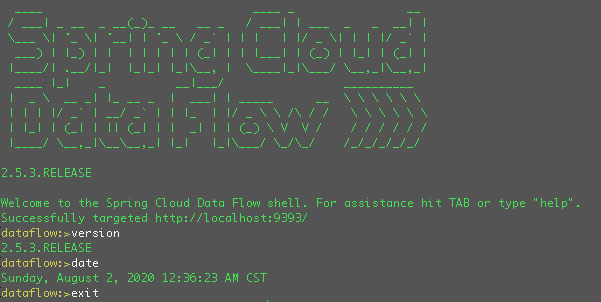
默认是连接了http://localhost:9393的Server,可以通过--dataflow.uri=地址来指定。如果需要认证信息,需要加上--dataflow.username=用户 --dataflow.password=密码。
比如我们连接之前安装在Kubernetes上的Server如下:
$ java -jar spring-cloud-dataflow-shell-2.5.3.RELEASE.jar --dataflow.uri=http://localhost:30093
2.2 Application操作
介绍一下Application相关操作:
列出所有目前注册的app:
dataflow:>app list

╔═══╤══════╤═════════╤════╤════════════════════╗

║app│source│processor│sink│        task        ║

╠═══╪══════╪═════════╪════╪════════════════════╣

║   │      │         │    │composed-task-runner║

║   │      │         │    │timestamp-batch     ║

║   │      │         │    │timestamp           ║

╚═══╧══════╧═════════╧════╧════════════════════╝
查看某个app的信息:
dataflow:>app info --type task timestamp
清除app注册信息:
dataflow:>app unregister --type task timestamp

Successfully unregistered application 'timestamp' with type 'task'.
清除所有app注册信息:
dataflow:>app all unregister

Successfully unregistered applications.

dataflow:>app list

No registered apps.

You can register new apps with the 'app register' and 'app import' commands.
注册一个app:
dataflow:>app register --name timestamp-pkslow --type task --uri docker:springcloudtask/timestamp-task:2.1.1.RELEASE

Successfully registered application 'task:timestamp-pkslow'

dataflow:>app list

╔═══╤══════╤═════════╤════╤════════════════╗

║app│source│processor│sink│      task      ║

╠═══╪══════╪═════════╪════╪════════════════╣

║   │      │         │    │timestamp-pkslow║

╚═══╧══════╧═════════╧════╧════════════════╝
批量导入app,可以从一个URL或一个properties文件导入:
dataflow:>app import https://dataflow.spring.io/task-docker-latest

Successfully registered 3 applications from [task.composed-task-runner, task.timestamp.metadata, task.composed-task-runner.metadata, task.timestamp-batch.metadata, task.timestamp-batch, task.timestamp]
需要注意的是,在注册或导入app时,如果重复的话,默认是无法导入的,不会覆盖。如果想要覆盖,可以加参数--force。
dataflow:>app register --name timestamp-pkslow --type task --uri docker:springcloudtask/timestamp-task:2.1.1.RELEASE

Command failed org.springframework.cloud.dataflow.rest.client.DataFlowClientException: The 'task:timestamp-pkslow' application is already registered as docker:springcloudtask/timestamp-task:2.1.1.RELEASE

The 'task:timestamp-pkslow' application is already registered as docker:springcloudtask/timestamp-task:2.1.1.RELEASE

dataflow:>app register --name timestamp-pkslow --type task --uri docker:springcloudtask/timestamp-task:2.1.1.RELEASE --force

Successfully registered application 'task:timestamp-pkslow'
2.3 Task操作
列出task:
dataflow:>task list

╔════════════════╤════════════════════════════════╤═══════════╤═══════════╗

║   Task Name    │        Task Definition         │description│Task Status║

╠════════════════╪════════════════════════════════╪═══════════╪═══════════╣

║timestamp-pkslow│timestamp                       │           │COMPLETE   ║

║timestamp-two   │<t1: timestamp || t2: timestamp>│           │ERROR      ║

║timestamp-two-t1│timestamp                       │           │COMPLETE   ║

║timestamp-two-t2│timestamp                       │           │COMPLETE   ║

╚════════════════╧════════════════════════════════╧═══════════╧═══════════╝
删除一个task,这里我们删除的是一个组合task,所以会把子task也一并删除了:
dataflow:>task destroy timestamp-two

Destroyed task 'timestamp-two'
删除所有task,会有风险提示:
dataflow:>task all destroy

Really destroy all tasks? [y, n]: y

All tasks destroyed

dataflow:>task list

╔═════════╤═══════════════╤═══════════╤═══════════╗

║Task Name│Task Definition│description│Task Status║

╚═════════╧═══════════════╧═══════════╧═══════════╝
创建一个task:
dataflow:>task create timestamp-pkslow-t1 --definition "timestamp --format=\"yyyy\"" --description "pkslow timestamp task"

Created new task 'timestamp-pkslow-t1'
启动一个task并查看状态,启动时需要记录执行ID,然后通过执行ID来查询状态:
dataflow:>task launch timestamp-pkslow-t1

Launched task 'timestamp-pkslow-t1' with execution id 8

dataflow:>task execution status 8
查看所有task执行并查看执行日志:
dataflow:>task execution list

dataflow:>task execution log 8

  .   ____          _            __ _ _

 /\\ / ___'_ __ _ _(_)_ __  __ _ \ \ \ \

( ( )\___ | '_ | '_| | '_ \/ _` | \ \ \ \

 \\/  ___)| |_)| | | | | || (_| |  ) ) ) )

  '  |____| .__|_| |_|_| |_\__, | / / / /

 =========|_|==============|___/=/_/_/_/

 :: Spring Boot ::       (v2.1.13.RELEASE)

2020-08-01 17:20:51.626  INFO 1 --- [       Thread-5] com.zaxxer.hikari.HikariDataSource       : HikariPool-1 - Shutdown initiated...

2020-08-01 17:20:51.633  INFO 1 --- [       Thread-5] com.zaxxer.hikari.HikariDataSource       : HikariPool-1 - Shutdown completed.
2.4 Http请求
可以进行http请求:
dataflow:>http get https://www.pkslow.com

dataflow:>http post --target https://www.pkslow.com --data "data"

> POST (text/plain) https://www.pkslow.com data

> 405 METHOD_NOT_ALLOWED

Error sending data 'data' to 'https://www.pkslow.com'
2.5 读取并执行文件
先准备一个脚本文件,用来放Data Flow Shell命令,文件名为pkslow.shell,内容如下:
version

date

app list
执行与结果如下:
dataflow:>script pkslow.shell

version

2.5.3.RELEASE

date

Sunday, August 2, 2020 1:59:34 AM CST

app list

╔═══╤══════╤═════════╤════╤════════════════════╗

║app│source│processor│sink│        task        ║

╠═══╪══════╪═════════╪════╪════════════════════╣

║   │      │         │    │timestamp-pkslow    ║

║   │      │         │    │composed-task-runner║

║   │      │         │    │timestamp-batch     ║

║   │      │         │    │timestamp           ║

╚═══╧══════╧═════════╧════╧════════════════════╝

Script required 0.045 seconds to execute

dataflow:>
但其实我们在CI/CD的pipeline中,并不想先启动一个shell命令行,然后再执行一个脚本。我们想一步到位,直接执行,执行完毕后退出shell命令行。这也是有办法的,可以在启动的时候通过 --spring.shell.commandFile指定文件,如果有多个文件则用逗号,分隔。如下所示:
$ java -jar spring-cloud-dataflow-shell-2.5.3.RELEASE.jar --dataflow.uri=http://localhost:30093 --spring.shell.commandFile=pkslow.shell

Successfully targeted http://localhost:30093

2020-08-02T02:03:49+0800 INFO main o.s.c.d.s.DataflowJLineShellComponent:311 - 2.5.3.RELEASE

2020-08-02T02:03:49+0800 INFO main o.s.c.d.s.DataflowJLineShellComponent:311 - Sunday, August 2, 2020 2:03:49 AM CST

2020-08-02T02:03:49+0800 INFO main o.s.c.d.s.DataflowJLineShellComponent:309 -

╔═══╤══════╤═════════╤════╤════════════════════╗

║app│source│processor│sink│        task        ║

╠═══╪══════╪═════════╪════╪════════════════════╣

║   │      │         │    │timestamp-pkslow    ║

║   │      │         │    │composed-task-runner║

║   │      │         │    │timestamp-batch     ║

║   │      │         │    │timestamp           ║

╚═══╧══════╧═════════╧════╧════════════════════╝

$
执行完毕后,不会在shell命令行模式里,而是退回linux的终端。这正是我们所需要的。
我们来准备一个注册应用——创建任务——执行任务的脚本试试:
version

date

app register --name pkslow-app-1 --type task --uri docker:springcloudtask/timestamp-task:2.1.1.RELEASE

task create pkslow-task-1 --definition "pkslow-app-1"

task launch pkslow-task-1
执行与结果如下:
$ java -jar spring-cloud-dataflow-shell-2.5.3.RELEASE.jar --dataflow.uri=http://localhost:30093 --spring.shell.commandFile=pkslow.shell

Successfully targeted http://localhost:30093

2020-08-02T02:06:41+0800 INFO main o.s.c.d.s.DataflowJLineShellComponent:311 - 2.5.3.RELEASE

2020-08-02T02:06:41+0800 INFO main o.s.c.d.s.DataflowJLineShellComponent:311 - Sunday, August 2, 2020 2:06:41 AM CST

2020-08-02T02:06:41+0800 INFO main o.s.c.d.s.DataflowJLineShellComponent:311 - Successfully registered application 'task:pkslow-app-1'

2020-08-02T02:06:42+0800 INFO main o.s.c.d.s.DataflowJLineShellComponent:311 - Created new task 'pkslow-task-1'

2020-08-02T02:06:51+0800 INFO main o.s.c.d.s.DataflowJLineShellComponent:311 - Launched task 'pkslow-task-1' with execution id 9
这样,我们就可以实现自动化打包与部署运行了。
3 一些使用技巧
强大的shell工具提供了许多命令,其实不用一一记住,可以通过help命令查看所有命令:
dataflow:>help
如果只对特定的一类命令感兴趣,可以通过help xxx的方式获取帮助:
dataflow:>help version

* version - Displays shell version

dataflow:>help app

* app all unregister - Unregister all applications

* app default - Change the default application version

* app import - Register all applications listed in a properties file

* app info - Get information about an application

* app list - List all registered applications

* app register - Register a new application

* app unregister - Unregister an application
shell还支持tab键补全命令。
4 总结
本文的命令比较多,不想造成冗长,部分执行结果就不贴出来了,原文可到官网参考。
欢迎关注微信公众号<南瓜慢说>,将持续为你更新...

多读书,多分享;多写作,多整理。
Spring Cloud Data Flow用Shell来操作,方便建立CICD的更多相关文章
- Spring Cloud Data Flow整合Cloudfoundry UAA服务做权限控制
我最新最全的文章都在南瓜慢说 www.pkslow.com,欢迎大家来喝茶! 1 前言 关于Spring Cloud Data Flow这里不多介绍,有兴趣可以看下面的文章.本文主要介绍如何整合Dat ...
- Spring Cloud Data Flow整合UAA使用外置数据库和API接口
我最新最全的文章都在南瓜慢说 www.pkslow.com,欢迎大家来喝茶! 1 前言 之前的文章<Spring Cloud Data Flow整合Cloudfoundry UAA服务做权限控制 ...
- Spring Cloud Data Flow整合UAA之使用LDAP进行账号管理
我最新最全的文章都在南瓜慢说 www.pkslow.com,欢迎大家来喝茶! 1 前言 Spring Cloud Data Flow整合UAA的文章已经写了两篇,之前的方案是把用户信息保存在数据库中: ...
- Spring Cloud Data Flow 中的 ETL
Spring Cloud Data Flow 中的 ETL 影宸风洛 程序猿DD 今天 来源:SpringForAll社区 1 概述 Spring Cloud Data Flow是一个用于构建实时数据 ...
- 【SFA官方译文】:Spring Cloud Data Flow中的ETL
原创: 影宸风洛 SpringForAll社区 昨天 原文链接:https://www.baeldung.com/spring-cloud-data-flow-etl 作者:Norberto Ritz ...
- Spring Cloud Data Flow初体验,以Local模式运行
1 前言 欢迎访问南瓜慢说 www.pkslow.com获取更多精彩文章! Spring Cloud Data Flow是什么,虽然已经出现一段时间了,但想必很多人不知道,因为在项目中很少有人用.不仅 ...
- 把Spring Cloud Data Flow部署在Kubernetes上,再跑个任务试试
1 前言 欢迎访问南瓜慢说 www.pkslow.com获取更多精彩文章! Spring Cloud Data Flow在本地跑得好好的,为什么要部署在Kubernetes上呢?主要是因为Kubern ...
- Spring Cloud探路(一) Erueka服务器的建立
组件名:Netflix Eureka 作用:支撑微服务的自注册.自发现,提供负载均衡能力 开发环境使用IDEA 1.新建Eureka Server,新建maven项目,配置pom.xml <p ...
- Spring Cloud探路(二) Erueka客户端的建立
接上篇 1.pom.xml与上篇一致 2.新建包及Application启动类 @Configuration @ComponentScan @EnableEurekaClient @EnableAut ...
随机推荐
- Spring IoC 公共注解详解
前言 本系列全部基于 Spring 5.2.2.BUILD-SNAPSHOT 版本.因为 Spring 整个体系太过于庞大,所以只会进行关键部分的源码解析. 什么是公共注解?公共注解就是常见的Java ...
- NameNode是如何存储元数据的?
1.NN的作用 保存HDFS上所有文件的元数据! 接受客户端的请求! 接受DN上报的信息,给DN分配任务(维护副本数)! 2.元数据的存储 元数据存储在fsiamge文件+edits文件中! fsim ...
- 浅谈.Net Core DependencyInjection源码探究
前言 相信使用过Asp.Net Core开发框架的人对自带的DI框架已经相当熟悉了,很多刚开始接触.Net Core的时候觉得不适应,主要就是因为Core默认集成它的原因.它是Asp.Net ...
- 三种存储方式DAS、NAS、SAN
------------恢复内容开始------------ 一.DAS.NAS.SAN在存储领域的位置 随着主机.磁盘.网络等技术的发展,数据存储的方式和架构也在一直不停改变,本文主要介绍目前主流的 ...
- Python并发编程05 /死锁现象、递归锁、信号量、GIL锁、计算密集型/IO密集型效率验证、进程池/线程池
Python并发编程05 /死锁现象.递归锁.信号量.GIL锁.计算密集型/IO密集型效率验证.进程池/线程池 目录 Python并发编程05 /死锁现象.递归锁.信号量.GIL锁.计算密集型/IO密 ...
- ajax配合art-template模板引擎的使用
最近才接触js的模板引擎听说相比以前使用的js foreach加载后台返回的json数据简便很多而且效率方面也很不错.今天自己玩了一下 后台使用的是.net mvc,数据库脚本就不提供了,返回的Jso ...
- Python Ethical Hacking - BACKDOORS(5)
File Download: A file is a series of characters. Therefore to transfer a file we need to: 1. Read th ...
- 中介者模式(c++实现)
中介者模式 目录 中介者模式 模式定义 模式动机 UML类图 源码实现 优点 缺点 模式定义 中介者模式(Mediator),用一个中介对象来封装一系列的对象交互.中介者使各对象不需要显示地相互引用, ...
- 硬核干货:5W字17张高清图理解同步器框架AbstractQueuedSynchronizer
前提 并发编程大师Doug Lea在编写JUC(java.util.concurrent)包的时候引入了java.util.concurrent.locks.AbstractQueuedSynchro ...
- Python程序设计(第3版)PDF高清完整版免费下载|百度网盘
百度网盘:Python程序设计(第3版)PDF高清完整版免费下载 提取码:48u4 内容简介 本书是面向大学计算机科学专业第一门程的教材.本书以Python语言为工具,采用相当传统的方法,强调解决问题 ...