
Java之定时任务全家桶
定时任务应用非常广泛,Java提供的现有解决方案有很多。
本次主要讲schedule、quartz、xxl-job、shedlock等相关的代码实践。
一、SpringBoot使用Schedule
核心代码:
@Component

public class ScheduleTask {

    private Logger logger = LoggerFactory.getLogger(ScheduleTask.class);

    @Scheduled(cron = "0/1 * * * * ? ")

    public void one() {

        logger.info("one:" + new Date());

    }

    @Scheduled(cron = "0/1 * * * * ? ")

    public void two() {

        logger.info("two:" + new Date());

    }

    @Scheduled(cron = "0/1 * * * * ? ")

    public void three() {

        logger.info("three:" + new Date());

    }

}
运行效果如下: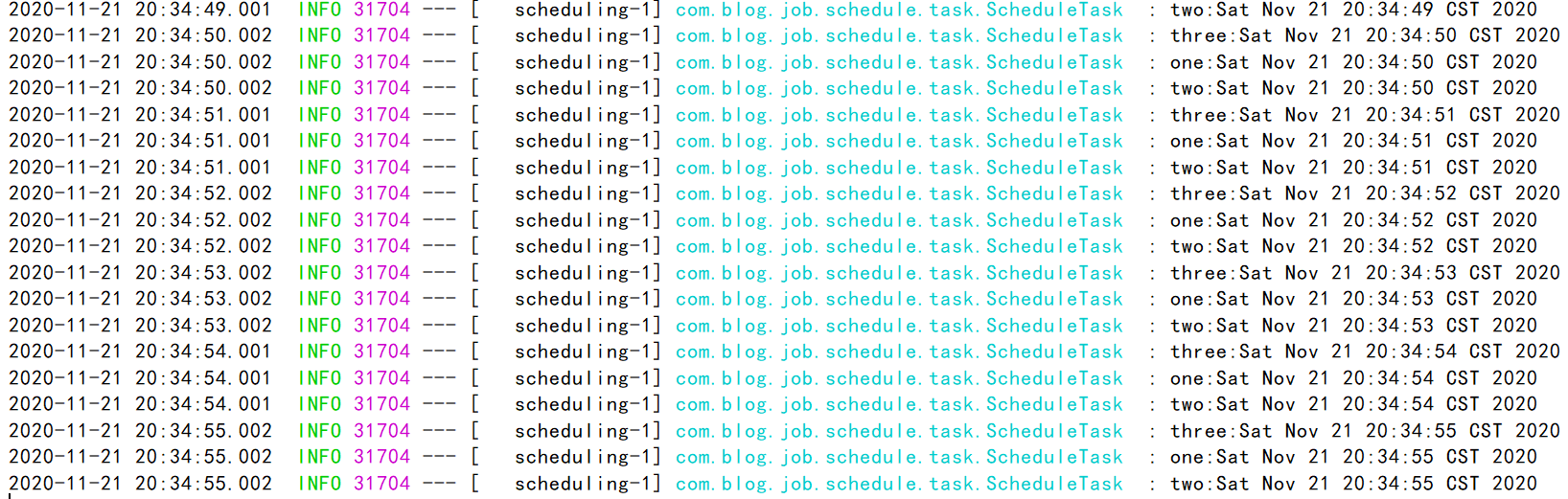
除此之外还可以这样实现,核心代码:
@PropertySource(value = {

        "classpath:task.properties",

}, encoding = "utf-8")

@Component("scheduleTask")

public class ScheduleTask implements SchedulingConfigurer {

    @Value("${TEST_JOB_TASK_CRON}")

    private String cron;

    @Override

    public void configureTasks(ScheduledTaskRegistrar scheduledTaskRegistrar) {

        scheduledTaskRegistrar.addTriggerTask(new Runnable() {

            @Override

            public void run() {

                System.out.println("执行任务:" + DateUtil.date());

            }

        }, new Trigger() {

            @Override

            public Date nextExecutionTime(TriggerContext triggerContext) {

                return new CronTrigger(cron).nextExecutionTime(triggerContext);

            }

        });

    }

    public void setCron(String cron) {

        this.cron = cron;

    }

}
有朋友或许很疑惑,为什么要写这么一大堆,这个与前面的代码又有何区别呢?
区别是多线程并行。其实多线程并行也可以不用这么写,只需写一段核心配置类代码即可。
定时任务多线程配置类:
@Configuration

public class ScheduleConfig implements SchedulingConfigurer {

    public void configureTasks(ScheduledTaskRegistrar scheduledTaskRegistrar) {

        scheduledTaskRegistrar.setScheduler(Executors.newScheduledThreadPool(5));

    }

}
再次启动,查看效果,如下: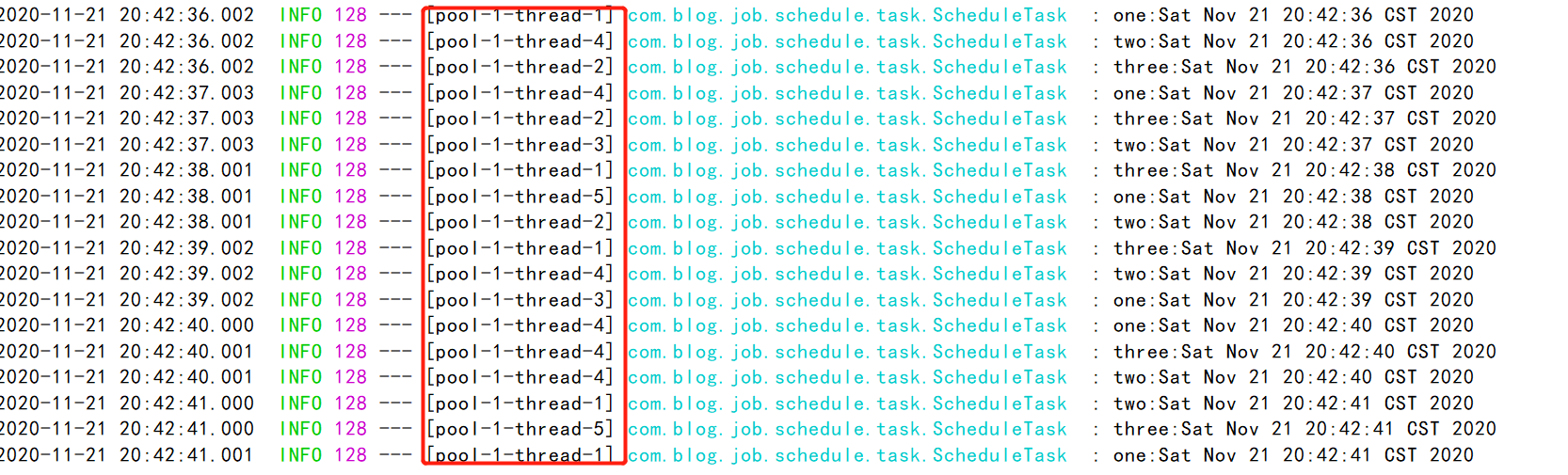
由此看出走不同的线程执行,不同的线程执行的好处是,如果某一个线程挂掉后,并不会阻塞导致其它定时任务无法执行。
另外如果要想并发执行,前面的配置可以不要,直接用SpringBoot提供的现成注解即可,核心代码如下:
@Component

@EnableAsync

public class ScheduleAsyncTask {

    private Logger logger = LoggerFactory.getLogger(ScheduleAsyncTask.class);

    @Scheduled(cron = "0/1 * * * * ? ")

    @Async

    public void one() {

        logger.info("one Async:" + new Date());

    }

    @Scheduled(cron = "0/1 * * * * ? ")

    @Async

    public void two() {

        logger.info("two Async:" + new Date());

    }

    @Scheduled(cron = "0/1 * * * * ? ")

    @Async

    public void three() {

        logger.info("three Async:" + new Date());

    }

}
除此外,还有基于schedule动态定时任务(所谓动态只不过是指cron表达式放在对应的数据表里),简单示例代码:
@Configuration

public class DynamicScheduleTask implements SchedulingConfigurer {

    @Autowired

    @SuppressWarnings("all")

    CronMapper cronMapper;

    @Mapper

    public interface CronMapper {

        @Select("select cron from cron limit 1")

        public String getCron();

    }

    /**

     * 执行定时任务.

     */

    public void configureTasks(ScheduledTaskRegistrar taskRegistrar) {

        taskRegistrar.addTriggerTask(

                //1.添加任务内容(Runnable)

                () -> System.out.println("执行动态定时任务: " + LocalDateTime.now().toLocalTime()),

                //2.设置执行周期(Trigger)

                triggerContext -> {

                    //2.1 从数据库获取执行周期

                    String cron = cronMapper.getCron();

                    //2.2 合法性校验.

                    if (StringUtils.isEmpty(cron)) {

                        // Omitted Code ..

                    }

                    //2.3 返回执行周期(Date)

                    return new CronTrigger(cron).nextExecutionTime(triggerContext);

                }

        );

    }

}
核心配置文件(application.yml):
spring:

  datasource:

    url: jdbc:mysql://127.0.0.1:3306/test

    username: root

    password: 1234
SQL脚本:
DROP DATABASE IF EXISTS `test`;

CREATE DATABASE `test`;

USE `test`;

DROP TABLE IF EXISTS `cron`;

CREATE TABLE `cron`  (

  `cron_id` varchar(30) NOT NULL PRIMARY KEY,

  `cron` varchar(30) NOT NULL

);

INSERT INTO `cron` VALUES ('1', '0/5 * * * * ?');
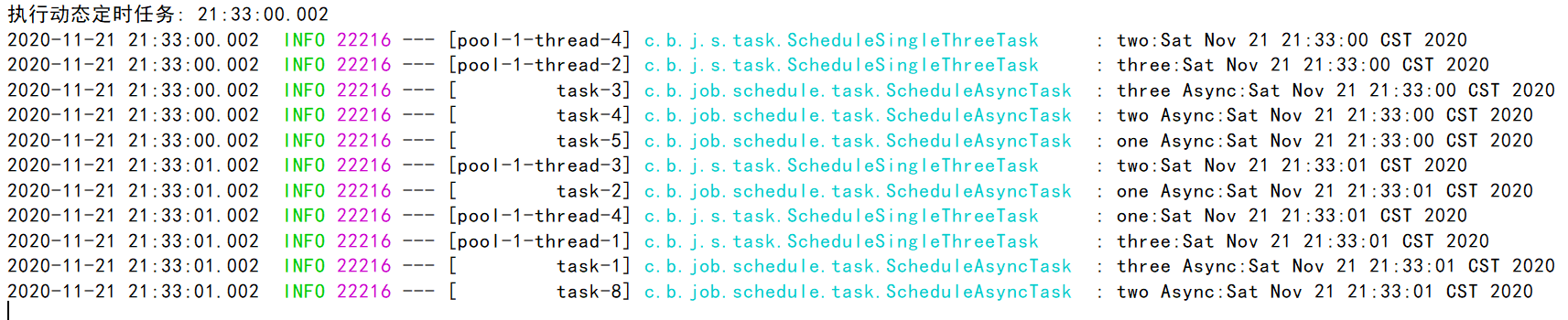
运行效果如下:
二、SpringBoot使用Quartz
1.Maven依赖
<!--引入quartz定时框架-->

<dependency>

    <groupId>org.springframework.boot</groupId>

    <artifactId>spring-boot-starter-quartz</artifactId>

</dependency>
2.配置文件
spring:

  quartz:

    #相关属性配置

    properties:

      org:

        quartz:

          scheduler:

            instanceName: clusteredScheduler

            instanceId: AUTO

          jobStore:

            class: org.quartz.impl.jdbcjobstore.JobStoreTX

            driverDelegateClass: org.quartz.impl.jdbcjobstore.StdJDBCDelegate

            tablePrefix: QRTZ_

            isClustered: true

            clusterCheckinInterval: 10000

            useProperties: false

          threadPool:

            class: org.quartz.simpl.SimpleThreadPool

            threadCount: 10

            threadPriority: 5

            threadsInheritContextClassLoaderOfInitializingThread: true

    #数据库方式

    job-store-type: jdbc

    #初始化表结构

    jdbc:

      initialize-schema: always

  datasource:

    url: jdbc:mysql://127.0.0.1:3306/test

    username: root

    password: 1234
3.启动类
@SpringBootApplication

@EnableScheduling

public class BlogQuartzApplication {

    public static void main(String[] args) {

        SpringApplication.run(BlogQuartzApplication.class, args);

    }

}
4.配置类
@Configuration

public class QuartzConfiguration {

    // 使用jobDetail包装job

    @Bean

    public JobDetail myCronJobDetail() {

        return JobBuilder.newJob(CouponTimeOutJob.class).withIdentity("couponTimeOutJob").storeDurably().build();

    }

    // 把jobDetail注册到Cron表达式的trigger上去

    @Bean

    public Trigger CronJobTrigger() {

        CronScheduleBuilder cronScheduleBuilder = CronScheduleBuilder.cronSchedule("0/1 * * * * ?");

        return TriggerBuilder.newTrigger()

                .forJob(myCronJobDetail())

                .withIdentity("CouponTimeOutJobTrigger")

                .withSchedule(cronScheduleBuilder)

                .build();

    }

}
5.定时任务类
public class CouponTimeOutJob extends QuartzJobBean {

    @Override

    protected void executeInternal(JobExecutionContext jobExecutionContext) throws JobExecutionException {

        System.out.println("定时任务执行");

    }

}
6.启动成功不报错
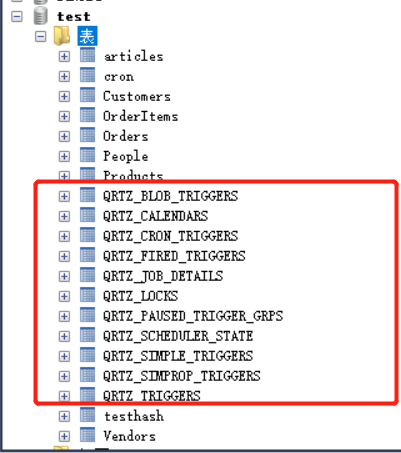
(1)对应的数据库会生成定时任务相关的数据表
(2)控制台不断输出定时任务执行日志

三、SpringBoot使用xxl-job
之前写过一样的例子,如今简化了下。
关于xxl-job使用详情,可以参考我的这篇文章:
SpringBoot整合Xxl-Job
1.Maven依赖
<dependency>

    <groupId>com.xuxueli</groupId>

    <artifactId>xxl-job-core</artifactId>

    <version>2.2.0</version>

</dependency>
2.配置类
@Configuration

public class XxlJobConfig {

    private Logger logger = LoggerFactory.getLogger(XxlJobConfig.class);

    @Value("${xxl.job.admin.addresses}")

    private String adminAddresses;

    @Value("${xxl.job.executor.appname}")

    private String appName;

    @Value("${xxl.job.executor.ip}")

    private String ip;

    @Value("${xxl.job.executor.port}")

    private int port;

    @Value("${xxl.job.accessToken}")

    private String accessToken;

    @Value("${xxl.job.executor.logpath}")

    private String logPath;

    @Value("${xxl.job.executor.logretentiondays}")

    private int logRetentionDays;

    @Bean(initMethod = "start", destroyMethod = "destroy")

    public XxlJobSpringExecutor xxlJobExecutor() {

        logger.info(">>>>>>>>>>> xxl-job config init.");

        XxlJobSpringExecutor xxlJobSpringExecutor = new XxlJobSpringExecutor();

        xxlJobSpringExecutor.setAdminAddresses(adminAddresses);

        xxlJobSpringExecutor.setAppname(appName);

        xxlJobSpringExecutor.setIp(ip);

        xxlJobSpringExecutor.setPort(port);

        xxlJobSpringExecutor.setAccessToken(accessToken);

        xxlJobSpringExecutor.setLogPath(logPath);

        xxlJobSpringExecutor.setLogRetentionDays(logRetentionDays);

        return xxlJobSpringExecutor;

    }

}
3.配置文件内容
# web port

server.port=8081

# no web

#spring.main.web-environment=false

### xxl-job admin address list, such as "http://address" or "http://address01,http://address02"

xxl.job.admin.addresses=http://127.0.0.1:8080/xxl-job-admin

### xxl-job, access token

xxl.job.accessToken=

### xxl-job executor appname

xxl.job.executor.appname=blog-job-xxl-job

### xxl-job executor registry-address: default use address to registry , otherwise use ip:port if address is null

xxl.job.executor.address=

### xxl-job executor server-info

xxl.job.executor.ip=

xxl.job.executor.port=8888

### xxl-job executor log-path

xxl.job.executor.logpath=/data/applogs/xxl-job/jobhandler

### xxl-job executor log-retention-days

xxl.job.executor.logretentiondays=30
4.定时任务类
@Component

public class XxlJobTaskExample {

    @XxlJob("blogJobHandler")

    public ReturnT<String> blogJobHandler(String param) throws Exception {

        System.out.println("执行");

        XxlJobLogger.log("XXL-JOB, Hello World.");

        for (int i = 0; i < 5; i++) {

            XxlJobLogger.log("beat at:" + i);

            TimeUnit.SECONDS.sleep(2);

        }

        return ReturnT.SUCCESS;

    }

}
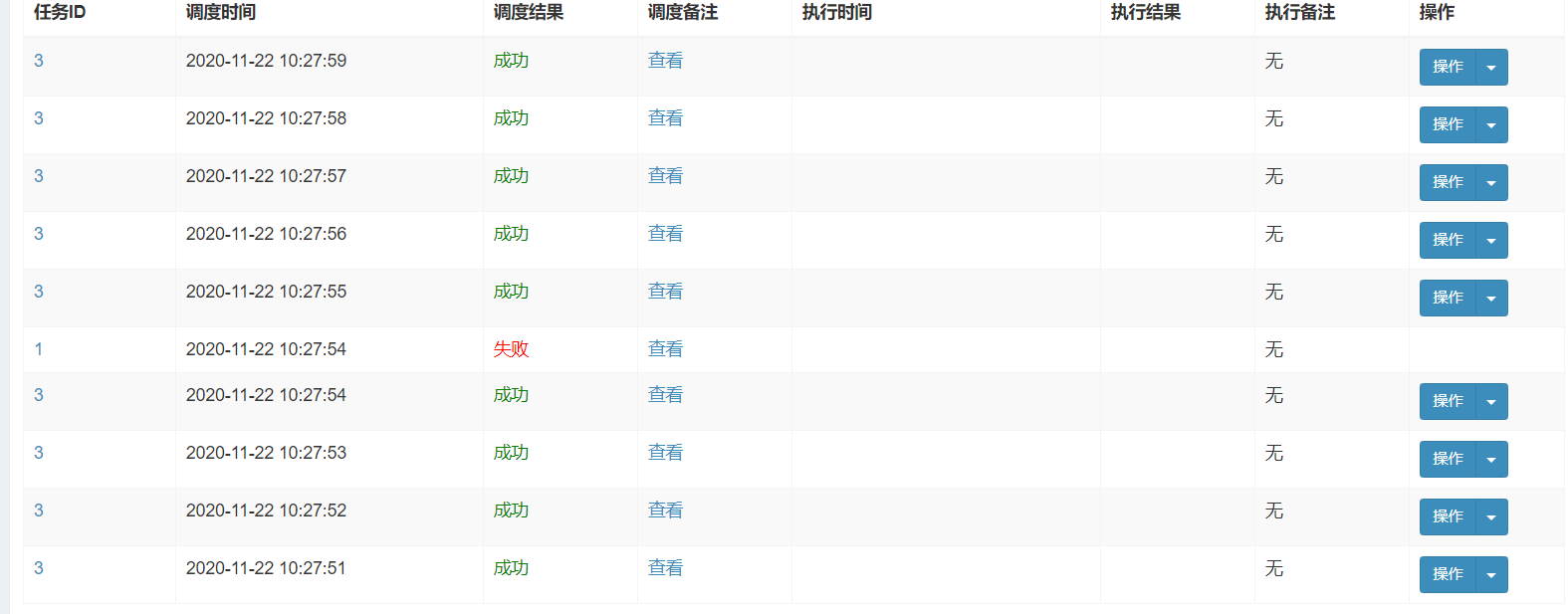
5.执行效果
分别如下所示:
四、SpringBoot使用ShedLock
1.导入Maven依赖
<!-- 分布式定时任务锁 -->

   <!-- https://mvnrepository.com/artifact/net.javacrumbs.shedlock/shedlock-spring -->

   <dependency>

       <groupId>net.javacrumbs.shedlock</groupId>

       <artifactId>shedlock-spring</artifactId>

       <version>4.0.4</version>

   </dependency>

   <!-- 使用redis做分布式任务 -->

   <dependency>

       <groupId>net.javacrumbs.shedlock</groupId>

       <artifactId>shedlock-provider-redis-spring</artifactId>

       <version>2.5.0</version>

   </dependency>

   <!-- redis组件 -->

   <dependency>

       <groupId>org.springframework.boot</groupId>

       <artifactId>spring-boot-starter-data-redis</artifactId>

   </dependency>
2.编写配置类
@Configuration

@EnableSchedulerLock(defaultLockAtMostFor = "PT30M")

public class ShedLockConfig {

    @Bean

    public LockProvider lockProvider(RedisTemplate redisTemplate) {

        return new RedisLockProvider(redisTemplate.getConnectionFactory());

    }

}
3.编写具体的定时任务
@Component

public class TaskSchedule {

    /**

     * 每分钟执行一次

     * [秒] [分] [小时] [日] [月] [周] [年]

     */

    @Scheduled(cron = "1 * * * * ?")

    @SchedulerLock(name = "synchronousSchedule")

    public void SynchronousSchedule() {

        System.out.println("Start run schedule to synchronous data:" + new Date());

    }

}
4.编写启动类
@SpringBootApplication

@EnableScheduling

public class ShedLockRedisApplication {

    public static void main(String[] args) {

        SpringApplication.run(ShedLockRedisApplication.class);

    }

}
5.配置文件
server:

  tomcat:

    uri-encoding: UTF-8

    max-threads: 1000

    min-spare-threads: 30

  port: 8083

spring:

  redis:

    database: 0

    host: localhost

    port: 6379

    password:      # 密码(默认为空)

    timeout: 6000ms  # 连接超时时长(毫秒)

    jedis:

      pool:

        max-active: 1000  # 连接池最大连接数(使用负值表示没有限制)

        max-wait: -1ms      # 连接池最大阻塞等待时间(使用负值表示没有限制)

        max-idle: 10      # 连接池中的最大空闲连接

        min-idle: 5       # 连接池中的最小空闲连接
6.测试
我之所以用shedlock是因为确保在集群环境下各微服务的定时任务只执行一个,而不是全部都运行相同的定时任务。
本次测试效果如下:
本次代码例子已放至我的GitHub:
https://github.com/developers-youcong/blog-job
Java之定时任务全家桶的更多相关文章
- Java秋招面试复习大纲(二):Spring全家桶+MyBatis+MongDB+微服务
前言 对于那些想面试高级 Java 岗位的同学来说,除了算法属于比较「天方夜谭」的题目外,剩下针对实际工作的题目就属于真正的本事了,热门技术的细节和难点成为了面试时主要考察的内容. 这里说「天方夜谭」 ...
- 最全最新java面试题系列全家桶(带答案)
最全最新java面试题系列全家桶(带答案) 置顶 2019年04月06日 22:40:28 青春季风暴 阅读数 14082 文章标签: java面试题技术栈 更多 分类专栏: 面试 版权声明:本文 ...
- 10分钟详解Spring全家桶7大知识点
Spring框架自2002年诞生以来一直备受开发者青睐,它包括SpringMVC.SpringBoot.Spring Cloud.Spring Cloud Dataflow等解决方案.有人亲切的称之为 ...
- 使用教育邮箱激活JetBrains全家桶
如果你还有在校时的邮箱,比如your_name@xxx.edu或者your_name@xxx.edu.cn的邮箱,那么你可以免费激活JetBrains全家桶. JetBrains Toolbox 专业 ...
- ①小姐,来桶全家桶不?(Servlet)
一.前言 小生不才,大二下半学期第二个星期,近11月博客园.星期六闲来看看经典书.重温下Serlvet. 二.温故而知新:超文本转移协议HTTP HTTP协议是通过互联网(internet)或企业内部 ...
- JetBrains全家桶破解思路(最新更新:2019-04-17)
JetBrains全家桶破解思路(以DataGrip为例) 2019-04-17 add new key 2019-01-24 add new key and code 2018-12-24 add ...
- Spring全家桶–SpringBoot Rest API
Spring Boot通过提供开箱即用的默认依赖或者转换来补充Spring REST支持.在Spring Boot中编写RESTful服务与SpringMVC没有什么不同.总而言之,基于Spring ...
- Spring全家桶系列–SpringBoot之AOP详解
//本文作者:cuifuan //本文将收录到菜单栏:<Spring全家桶>专栏中 面向方面编程(AOP)通过提供另一种思考程序结构的方式来补充面向对象编程(OOP). OOP中模块化的关 ...
- Spring全家桶系列–SpringBoot渐入佳境
//本文作者:cuifuan //本文将收录到菜单栏:<Spring全家桶>专栏中 首发地址:https://www.javazhiyin.com/20913.html 萌新:小哥,我在实 ...
随机推荐
- 第九章 nginx基础之搭建小游戏
一.nginx部署 1.epel源安装 [root@web01 ~]# yum install -y nginx 2.官方源安装 1.配置官方源[root@web02 ~]# vim /etc/yum ...
- Windows下mysql5.6升级到5.7的方法
Mysql的升级方式分为两种:原地升级和逻辑升级.这两种升级方式,本质没有什么区别的. 只是在对数据文件的处理上有些区别而已.原地升级是直接将数据文件进行拷贝,而逻辑升级对数据文件的处理方式是通过逻辑 ...
- Redis 入门与 ASP.NET Core 缓存
目录 基础 Redis 库 连接 Redis 能用 redis 干啥 Redis 数据库存储 字符串 订阅发布 RedisValue ASP.NET Core 缓存与分布式缓存 内存中的缓存 ASP. ...
- Hexo相关配置
date: 2018-11-16 18:27:14 updated: 2018-11-16 20:06:16 1.配置Hexo基本信息 title: 猫熊小才天の书院 #博客标题 subtitle: ...
- javascript常见面试题之一:数组的冒泡排序;
var arr=[32,2,7,78,90,10]; //外层循环控制轮数: for (var i = 0; i < arr.length; i++) { //内层循环控制次数: for (va ...
- 统计学与R语言
书籍推荐 文末见下载链接. 主要有 :统计学习方法.R语言实战.统计学(贾俊平) 链接:百度网盘 提取码:提取码
- Go--关于 goroutine、channel
Go--关于 goroutine.channel goroutine 协程是一种轻量化的线程,由Go编译器进行优化. Go协程具有以下特点: 有独立的栈空间 共享程序堆中的空间 调度由用户控制 如果主 ...
- 20200725_java爬虫_项目创建及log4j配置
0. 摘要 0.1 添加log4j依赖 <dependency> <groupId>org.slf4j</groupId> <artifactId>sl ...
- Git的介绍及使用
一.配置用户信息: 配置用户名和邮箱: $ git config --global user.name "chunyu" $ git config --global user.em ...
- Centos中部署NetCore项目(一)
前言 本文是基于centos8,dotnetcore3.1. (为了服务器安全使用,程序部署最好不要直接root账号进行操作.) 如果使用sudo命令时候,提示用户不在sudoers文件中的解决方法. ...