
.net core Wpf中使用cefsharp加载本地html网页,并且cefsharp支持any cpu
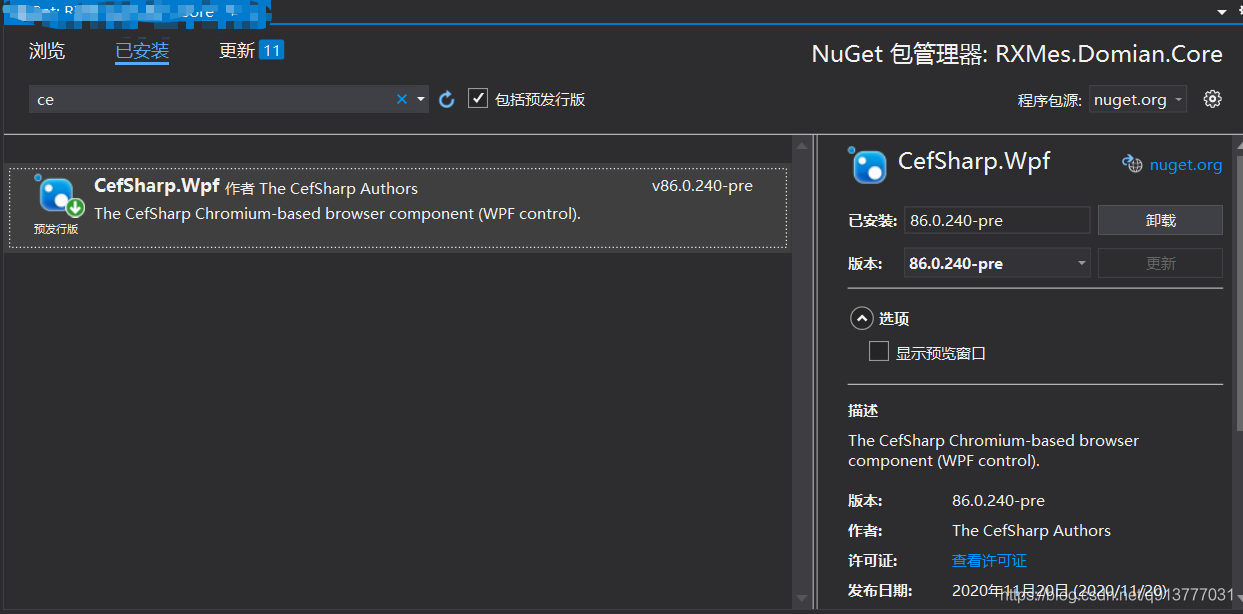
第一步,在程序包管理器安装 cefsharp.wpf
第二步
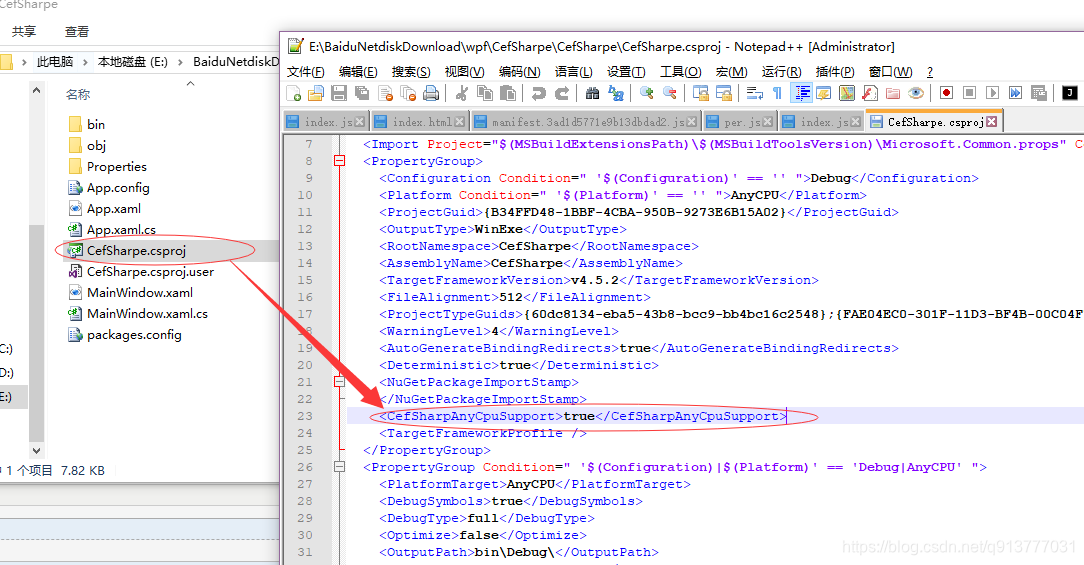
您必须在项目的第一个 < propertygroup > 中添加
< cefsharpanycpusupport > true </cefsharpanycpusupport > (例如. csproj 文件)。
第三步,上代码
public partial class App : Application

{

    public App()

    {

        //Add Custom assembly resolver

        AppDomain.CurrentDomain.AssemblyResolve += Resolver;

        //Any CefSharp references have to be in another method with NonInlining

        // attribute so the assembly rolver has time to do it's thing.

        InitializeCefSharp();

    }

    [MethodImpl(MethodImplOptions.NoInlining)]

    private static void InitializeCefSharp()

    {

        var settings = new CefSettings();

        // Set BrowserSubProcessPath based on app bitness at runtime

        settings.BrowserSubprocessPath = Path.Combine(AppDomain.CurrentDomain.SetupInformation.ApplicationBase,

                                               Environment.Is64BitProcess ? "x64" : "x86",

                                               "CefSharp.BrowserSubprocess.exe");

        // Make sure you set performDependencyCheck false

        Cef.Initialize(settings, performDependencyCheck: false, browserProcessHandler: null);

    }

    // Will attempt to load missing assembly from either x86 or x64 subdir

    // Required by CefSharp to load the unmanaged dependencies when running using AnyCPU

    private static Assembly Resolver(object sender, ResolveEventArgs args)

    {

        if (args.Name.StartsWith("CefSharp"))

        {

            string assemblyName = args.Name.Split(new[] { ',' }, 2)[0] + ".dll";

            string archSpecificPath = Path.Combine(AppDomain.CurrentDomain.SetupInformation.ApplicationBase,

                                                   Environment.Is64BitProcess ? "x64" : "x86",

                                                   assemblyName);

            return File.Exists(archSpecificPath)

                       ? Assembly.LoadFile(archSpecificPath)

                       : null;

        }

        return null;

    }

}
第四步 xaml
<Window x:Class="Sample1.MainWindow"

        xmlns="http://schemas.microsoft.com/winfx/2006/xaml/presentation"

        xmlns:x="http://schemas.microsoft.com/winfx/2006/xaml"

        xmlns:cefSharp="clr-namespace:CefSharp.Wpf;assembly=CefSharp.Wpf"

        Title="MainWindow" Height="550" Width="625">

    <Grid>

        <cefSharp:ChromiumWebBrowser Grid.Row="0"

        Address="https://baidu.com" />

  </Grid>

</Window>
.net core Wpf中使用cefsharp加载本地html网页,并且cefsharp支持any cpu的更多相关文章
- wpf中使用cefsharp加载本地html网页并实现cs和js的交互,并且cefsharp支持any cpu
废话少说,直接上代码: 第一步: 第二步: 第三步: 第四步: App.xaml.cs对应的代码: using CefSharp; using CefSharp.Wpf; using System; ...
- WPF 中图片的加载 ,使用统一资源标识符 (URI)
在wpf中,设置图片路径有2种方法: 1.xaml文件中,指定路径 <Button Name=" HorizontalAlignment="Right" Verti ...
- WP8.1程序开发中,如何加载本地文件资源或安装在程序包中的资源。
Web 要访问来自 Web 的文件,你可以使用标准的绝对 HTTP URI: <img src="http://www.contoso.com/images/logo.png" ...
- 详解web.xml中元素的加载顺序
一.背景 最近在项目中遇到了启动时出现加载service注解注入失败的问题,后来经过不懈努力发现了是因为web.xml配置文件中的元素加载顺序导致的,那么就抽空研究了以下tomcat在启动时web.x ...
- [翻译 EF Core in Action 2.4] 加载相关数据
Entity Framework Core in Action Entityframework Core in action是 Jon P smith 所著的关于Entityframework Cor ...
- .Net Core 程序集管理说明(加载)
.NET CORE 的程序集加载管理和以前的 .NET 发生了很大的变化, 在 .NET CORE 里, 程序集的加载, 依赖了 xx.deps.json 文件, deps.json 文件里,定义了程 ...
- Android什么时候进行View中Background的加载
对大多数Android的开发者来说,最经常的操作莫过于对界面进行布局,View中背景图片的加载是最经常做的.但是我们很少关注这个过程,这篇文章主要解析view中背景图片加载的流程.了解view中背景图 ...
- CLR中的程序集加载
CLR中的程序集加载 本次来讨论一下基于.net平台的CLR中的程序集加载的机制: [注:由于.net已经开源,可利用vs2015查看c#源码的具体实现] 在运行时,JIT编译器利用程序集的TypeR ...
- 重新想象 Windows 8.1 Store Apps (81) - 控件增强: WebView 之加载本地 html, 智能替换 html 中的 url 引用, 通过 Share Contract 分享 WebView 中的内容, 为 WebView 截图
[源码下载] 重新想象 Windows 8.1 Store Apps (81) - 控件增强: WebView 之加载本地 html, 智能替换 html 中的 url 引用, 通过 Share Co ...
随机推荐
- 阿里巴巴java开发手册-嵩山版 下载
引言 今天阿里巴巴开发手册嵩山版又发布了,距离上次泰山版发布才仅仅几个月.是不是有的同学又要感叹下这速度也太快了点吧.我泰山版还没看完,嵩山版直接来了.没看完不要紧,我们直接看嵩山版本就好了.一次性把 ...
- 基于SpringBoot的博客项目
SpringBoot 博客系统 后端: 框架:SpringBoot 安全框架:shiro 数据库:mysql ORM:mybaits mybaits-plus 插件:lombok 模板引擎:thyme ...
- JavaDailyReports10_08
------------恢复内容开始------------ AWT组件 1.1Frame组件与Panel组件 1.1.1显示框架窗口 1 package awt; 2 3 import java.a ...
- linux学习之--虚拟机安装linux【centerOS】
计划把学习中的软件安装使用记录下来,以下是使用VMware 按照 Linux 使用桥接网络虚拟机和windows中都有不同的ip地址
- SpringBoot异常处理(二)
参数校验机制 JSR-303 Hibernate 参数接收方式: URL路径中的参数 {id} (@PathVariable(name="id") int-whatever) UR ...
- 论JAVA实现MYSQL 行级锁(分布式锁实现方案一)
@Override @Transactional public String getCustomerId() { // return String.valueOf(getSequenceId(SEQ_ ...
- devops持续集成
目录 Devops 版本控制系统 Git安装 Git使用 git四种状态 git基础命令 git分支 git合并冲突 git标签 git命令总结 Github使用 创建仓库 HTTP协议 SSH协议 ...
- C++编译过程概述
一 ---导读 想象成工厂要产出一个产品的过程,经过流水线上一步一步,不同的人的操作,然后经过整合,就得到了一个完整可用的产品. 二---编译过程图解 三---在linux中编程详解编译过程 当我们在 ...
- jdbc事务、连接池概念、c3p0、Driud、JDBC Template、DBUtils
JDBC 事务控制 什么是事务:一个包含多个步骤或者业务操作.如果这个业务或者多个步骤被事务管理,则这多个步骤要么同时成功,要么回滚(多个步骤同时执行失败),这多个步骤是一个整体,不可分割的. 操作: ...
- 【原创】中断子系统-ARM GPIO中断处理流程
目录 第一部分 GIC中断控制器的注册 1. GIC驱动分析 2.GIC驱动流程分析 第二部分 device node转化为platform_device 第三部分:platform_device注册 ...