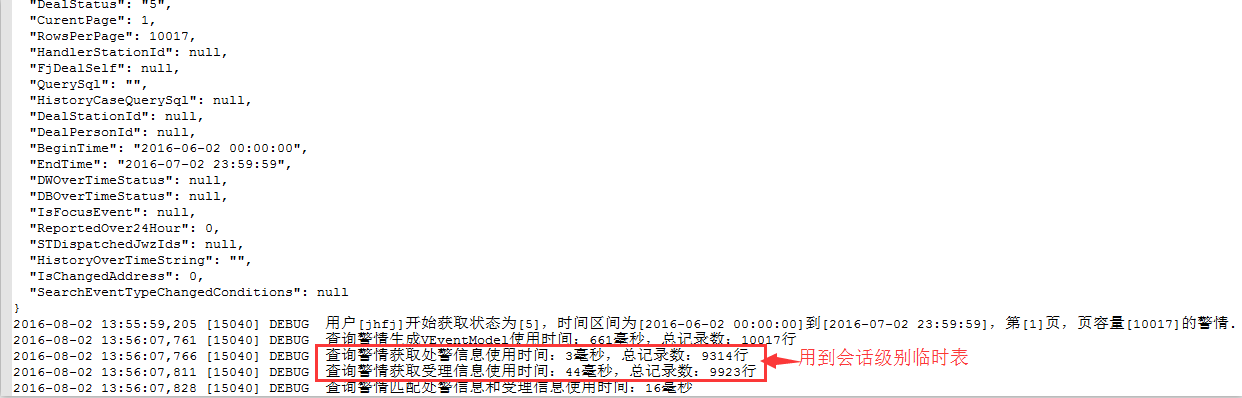
最近的一个项目中,由于界面查询的数据量比较大,关联的表比较多,有些数据查出来需要临时保存起来供后面的查询使用,于是想到了用oracle的临时表来实现这个需求。大家都知道,oracle的临时表有两种:事务级别临时表和会话级别临时表,我这里使用的是会话级别的临时表。当时把功能时候后就以为万事大吉了,没想到就在这里买下了一个坑。
坑的浮现:之后在为系统加调试日志时偶然发现了临时表的数据没有像oracle临时表的定义那样“不同会话独享临时表,临时表的数据在会话结束后被自动清空”。首先看第一次查询的日志记录截图,第一次的查询数据量是10017行,红色框圈住的地方使用到临时表:
第二次查询的日志记录截图,第二次查询的数据量比第一次少,15行:
从这前后两次的查询结果来看,得到的结论是:使用到的oracle会话级别临时表没有像它定义那样,在会话结束后没有把临时表的数据清空?不过很明显不是因为这个原因了,最有可能的就是原因应该是,前后两次查询都是同一个Session,所以才导致临时表的数据没有被清空了。有了这个思路,接下来就是找到为什么前后两次的查询会是同一个Session。
追究坑出现的原因:
首先,系统环境:
1、使用的ADO.NET是默认启用了连接池,连接池配置使用默认的配置;
2、连接oracle数据库的驱动是:
3、每次查询都是新建一个Connection,然后都是在查询完后调用Close()、Dispose();
查找坑出现的思路:
1、启用连接池后,前后两次查询使用的连接都是同一个连接;
2、查询完毕后,Connection调用Close()、Dispose()方法后并没有真正关闭Session;
验证过程:
首先看看oracle官方文档对Connection Pool的解释:
With connection pooling enabled (the default), the Open and Close methods of the OracleConnection object implicitly use the connection pooling service. In the preceding code, the Open call uses the connection pooling service, which is responsible for returning a connection to the application.
Connection pools are created by the connection pooling service using the ConnectionString as a signature to uniquely identify a pool.
If no pool with the exact attribute values in the ConnectionString exists, the connection pooling service creates a new connection pool. If a pool already exists with the requested signature, a connection is returned to the application from that
pool.
When a connection pool is created, the connection-pooling service initially creates the number of connections defined by the Min Pool Size attribute of the ConnectionString. This number of connections is always maintained by the connection pooling service for the connection pool.
At any given time, these connections are available in the pool or used by the application.
The Incr Pool Size attribute of the ConnectionString defines the number of new connections to be created by the connection pooling service when more connections are needed in the connection pool.
When the application closes a connection, the connection pooling service determines whether the connection lifetime has exceeded the Connection Lifetime attribute; if so, the connection pooling service closes the connection; otherwise, the connection goes back to the connection pool. The connection pooling service only enforces the Connection Lifetime when a connection is going back
to the connection pool.
The Max Pool Size attribute of the ConnectionString sets the maximum number of connections for a connection pool. If a new connection is requested, no connections are available, and Max Pool Size has been reached, then the connection pooling service waits for the time defined by Connection Timeout. If the Connection Timeout has been reached and there are still no connections
available in the pool, the connection pooling service raises an exception indicating that the pooled connection request has timed-out.
The connection pooling service closes connections when they are not used; connections are closed every three minutes. The Decr Pool Size attribute of the ConnectionString provides connection pooling service for the maximum number of connections that can be closed in one run.
Connection调用Open()方法时,以下是oracle官方文档描述:
The connection is obtained from the pool if connection pooling is enabled. Otherwise, a new connection is established.
It is possible that the pool does not contain any unused connections when the Open() method is invoked. In this case, a new connection is established.
Connection调用Close()方法时,以下是oracle官方文档描述:
Rolls back any pending transactions.
Places the connection to the connection pool if connection pooling is enabled. Even if connection pooling is enabled, the connection can be closed if it exceeds the connection lifetime specified in the connection string. If connection pooling is disabled, the connection is closed.
Closes the connection to the database.
The connection can be reopened using Open().
从oracle官方文档对于Connection Pool和Connection的Open、Close方法的描述和结合当前系统环境(查询请求只有一个客户端)来看,我们不难可以得到这么一个场景:第一次查询的时候,Connection Pool创建了一个连接返回给Connection对象,查询完后返回给连接池;在第二次查询时,由于跟第一次查询时间间隔小于默认的Connection LifeTime,Connection Pool就返回了第一次查询所用的连接给Connection对象用于查询,结果第一次和第二次用的连接都是同一个。再有,由Close()方法的描述来看,Connection调用Close方法时,并没有把连接的Session信息等数据清除掉(只有在连接真正从连接池移除掉之后,Session才没有)。
目前想到的解决办法有两个(最终决定使用第一个):
1、在每次使用临时表之前先truncate一下临时表;
2、不使用Connection Pool;
第一次发文,主要是今天看了博主农码一生的博文
《我们为什么应该坚持写博客》,然后顺便记录一下这个坑,请教园中各位前辈,有没有其他解决方法,或者是说,我解决问题的方向错了。请多多指教~~~
- Mybatis 搭配 阿里druid连接池 连接 oracle 或 mysql
DRUID介绍 DRUID是阿里巴巴开源平台上一个数据库连接池实现,它结合了C3P0.DBCP.PROXOOL等DB池的优点,同时加入了日志监控,可以很好的监控DB池连接和SQL的执行情况,可以说是针 ...
- node 连接MySQL及其分装, 连接池连接
const mysql = require('mysql') const config = require('./../../config/config.default') var connectio ...
- JNDI连接池连接Oracle数据库
今天做了一个评论的小功能,要求用JNDI连接池连接Oracle数据库,以前只是测试了是否连接的上,现在没想到一个JNDI连接池连接Oracle数据库,纠结了好久,原来都是Oracle数据库的问题,这是 ...
- python通过连接池连接redis,操作redis队列
在每次使用redis都进行连接的话会拉低redis的效率,都知道redis是基于内存的数据库,效率贼高,所以每次进行连接比真正使用消耗的资源和时间还多.所以为了节省资源,减少多次连接损耗,连接池的作用 ...
- spring boot配置druid连接池连接mysql
Spring Boot 集成教程 Spring Boot 介绍 Spring Boot 开发环境搭建(Eclipse) Spring Boot Hello World (restful接口)例子 sp ...
- FIREDAC FDConnection 连接池 连接串
一.FDConnection 连接池 http://docs.embarcadero.com/products/rad_studio/firedac/frames.html?frmname=topic ...
- Java创建连接池连接不同数据库
在一个应用里面,可能涉及到连接多个不同数据库进行操作,而每次连接写不同的实现会很麻烦.前面已经会了用JDBC连接数据库,那么利用反射和工厂模式,可以实现连接不同的数据库,这样处理起来将会很方便.同时建 ...
- 有关.NET链接Oracle数据库,使用连接池pooling=true时问题
.net链接oracle数据库时,当链接字符串中pooling=true时,视图结构变更时程序报错问题,还请高手指教 现象: 链接字符串: 注意:这里pooling=true: 测试视图: 执行的SQ ...
- 使用BasicDataSource连接池连接oracle数据库报错ORA-12505
先看连接池配置: <bean id="dataSource" class="org.apache.commons.dbcp.BasicDataSource" ...
随机推荐
- [POJ1012]Joseph
Time Limit: 1000MS Memory Limit: 10000K Total Submissions: 50596 Accepted: 19239 Description T ...
- vim配置vimrc详解
vimrc的存放位置: 系统 vimrc 文件: "$VIM/vimrc" 用户 vimrc 文件: "$HOME/.vimrc" 用户 exrc 文件: &q ...
- #pragma once
这是一个比较常用的C/C++杂注,只要在头文件的最开始加入这条杂注,就能够保证头文件只被编译一次. #pragma once是编译器相关的,就是说即使这个编译系统上有效,但在其他编译系统也不一定可以, ...
- [一]初识Poi
示例代码: package com.lxl.poi; import java.io.FileOutputStream; import org.apache.poi.hssf.usermodel.HSS ...
- C#中异步和多线程的区别
C#中异步和多线程的区别是什么呢?异步和多线程两者都可以达到避免调用线程阻塞的目的,从而提高软件的可响应性.甚至有些时候我们就认为异步和多线程是等同的概念.但是,异步和多线程还是有一些区别的.而这些区 ...
- Junit中常用的注解说明
Java注解((Annotation)的使用方法是@注解名 ,能通过简单的词语来实现一些功能.在junit中常用的注解有@Test.@Ignore.@BeforeClass.@AfterClass.@ ...
- Java 动态生成 复杂 .doc文件
阅读目录 1.word 里面调整好排版,包括你想生成的动态部分,还有一些不用生成的规则性的文字 2. 将 word 文档保存为 xml 3.用 Firstobject free XML edito 打 ...
- 总结swift语言常见的20个问题和回答
1.假设我是个刚入门的iOS开发人员,选swift学习呢,还是选objective-c学习,还是两个都学? 这个能够依据两种情况来决定:1.我想进入公司担任iOS开发的职位 2.我仅仅想做个独立 ...
- android内存优化发展——使用软引用
整个Android开发者一定是遇到了内存溢出这个头疼的问题,一旦这个问题.很难直接决定我们的应用程序是哪里出了问题,为了找到问题的解决方案,必须累积发行通过一些内存分析工具高速定位和强大的体验,现在详 ...
- HBase中的备份和故障恢复方法
本文将对Apache HBase可用的数据备份机制和大量数据的故障恢复/容灾机制做简要介绍. 随着HBase在重要的商业系统中应用的大量添加,很多企业须要通过对它们的HBase集群建立健壮的备份和故障 ...