
python之用unittest实现接口参数化示例
示例中获取参数的方法有三种:
1. 从文件(txt)中读取参数
2. 从Excel中读取参数
3. 在代码中直接写参数
def login(username,password):

    return 'ok'

import unittest

from parameterized import parameterized

import BeautifulReport as bf

import xlrd,xlwt

def file_to_list(file_name): #从文件中读取参数

    l = []

    with open(file_name,encoding='utf-8') as fr:

        for line in fr:

            line_list = line.strip().split(',')

            l.append(line_list)

    return l

def excel_to_list(file_name): #从Excel中读取参数

    l=[]

    book=xlrd.open_workbook(file_name)

    sheet=book.sheet_by_index(0)

    for row in range(1,sheet.nrows):#从第一行开始取值,取到最后一行

        l.append(sheet.row_values(row))#将每行的数据存入大列表中,每行数据都是一个list

    return l

class TestLogin(unittest.TestCase): #在代码中写入参数

    @parameterized.expand([

        ['admin','','ok'],

        ['admin','','ok'],

        ['admin','','success'],

        ['admin','','success'],

        ])

    def test_login1(self,username,password,hope):

        '''登录'''

        result = login(username,password)

        self.assertEqual(hope,result)

    @parameterized.expand(file_to_list('register_data.txt')) #从文件中读取参数

    def test_reg(self,username,password):

        '文件注册'

        print(username,password)

    @parameterized.expand(excel_to_list('reg_data.xls')) #从Excel中读取数据

    def test_reg1(self,username,password):

        'Excel注册'

        print(username,password)

# unittest.main()

runner = bf.BeautifulReport(unittest.makeSuite(TestLogin))

runner.report(description='登录测试用例',filename='login.html')
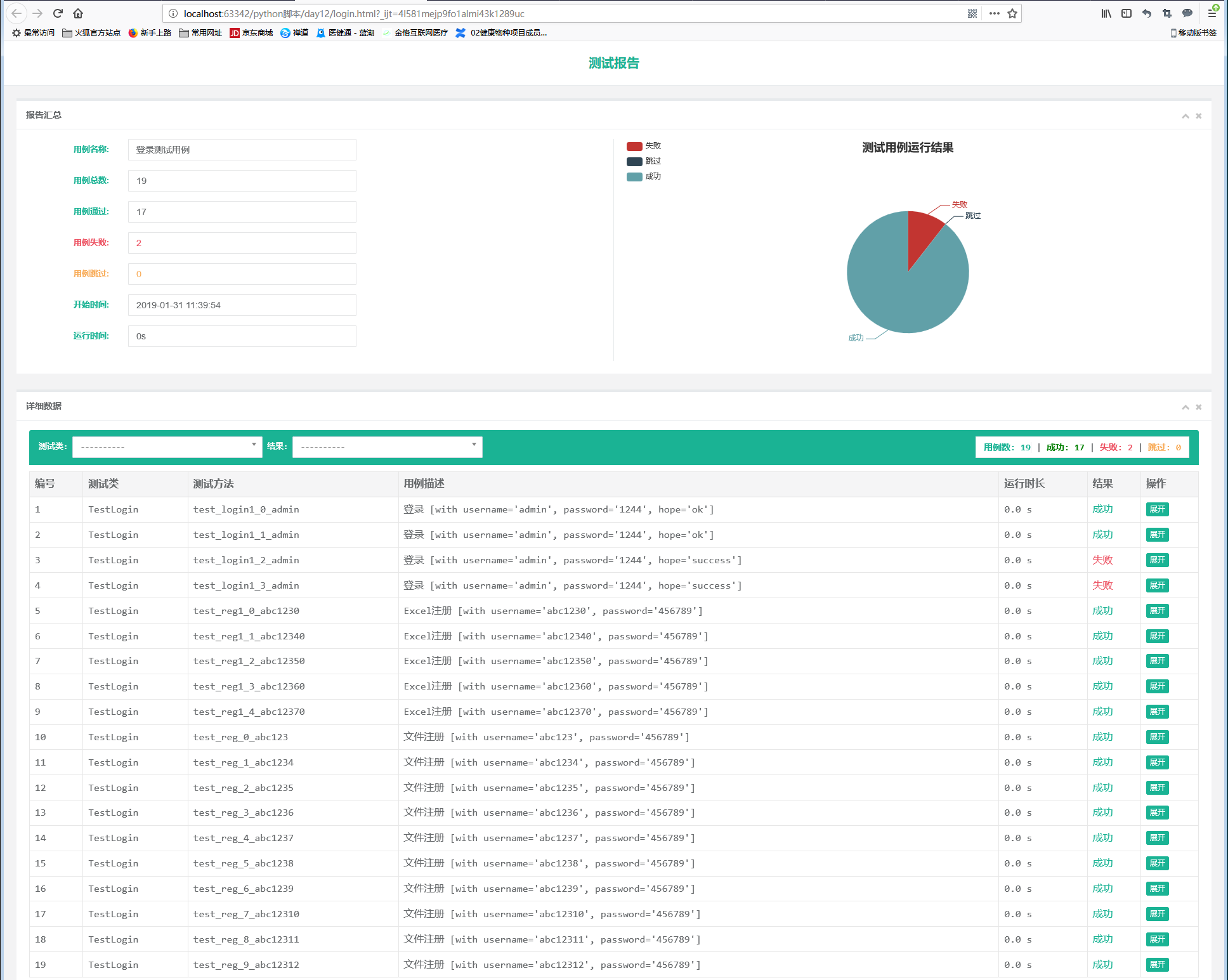
以上代码执行结果:
..FF...............

测试已全部完成, 可前往E:\Python学习\pycharm\python脚本\day12查询测试报告
生成的报告如入:
python之用unittest实现接口参数化示例的更多相关文章
- python+requests+excel+unittest+ddt接口自动化数据驱动并生成html报告
1.环境准备: python3.6 requests xlrd openpyxl HTMLTestRunner_api 2.目前实现的功能: 封装requests请求方法 在excel填写接口请求参数 ...
- python+requests+excel+unittest+ddt接口自动化数据驱动并生成html报告(二)
可以参考 python+requests接口自动化完整项目设计源码(一)https://www.cnblogs.com/111testing/p/9612671.html 原文地址https://ww ...
- python+requests+excel+unittest+ddt接口自动化数据驱动并生成html报告(已弃用)
前言 1.环境准备: python3.6 requests xlrd openpyxl HTMLTestRunner_api 2.目前实现的功能: 封装requests请求方法 在excel填写接口请 ...
- python selenium 使用unittest 示例
python selenium 使用unittest 示例 并等待某个元素示例 from selenium.webdriver.support.ui import WebDriverWait from ...
- 对比3种接口测试的工具:jmeter+ant;postman;python的requests+unittest或requests+excel
这篇随笔主要是对比下笔者接触过的3种接口测试工具,从实际使用的角度来分析下3种工具各自的特点 分别为:jmeter.postman.python的requests+unittest或requests+ ...
- python 单元测试(unittest)
自动化测试在各大互联网公司全面铺开,那么针对于自动化测试好的设计思想有哪些呢?.....今天我们共同探讨下Unittest之数据驱动(DDT是 “Data-Driven Tests”的缩写). 对于接 ...
- unittest同时支持参数化和生成html报告
最近在用python3.6+unittest+requests做自动化接口测试.发现一个问题,unittest中使用第3方插件parameterized进行参数化,再生成html报告时,运行就会失败. ...
- 接口自动化 [授客]基于python+Testlink+Jenkins实现的接口自动化测试框架V3.0
基于python+Testlink+Jenkins实现的接口自动化测试框架V3.0 by:授客 QQ:1033553122 博客:http://blog.sina.com.cn/ishou ...
- 基于python+Testlink+Jenkins实现的接口自动化测试框架V3.0
基于python+Testlink+Jenkins实现的接口自动化测试框架V3.0 目录 1. 开发环境2. 主要功能逻辑介绍3. 框架功能简介 4. 数据库的创建 5. 框架模块详细介绍6. Tes ...
随机推荐
- jsplumb 中文基础教程
jsplumb 中文基础教程 https://github.com/wangduanduan/jsplumb-chinese-tutorial
- JavaScript-创建日志调试对象(面向对象实例)
参考自http://www.2cto.com/kf/201312/261990.html IC.js文件 自己封装的js类库 /** * * @authors Your Name (you@examp ...
- Ubuntu 下重启网络的方法
命令是: sudo /etc/init.d/networking restart 但是可能会遇到下面的提示: Running /etc/init.d/networking restart is dep ...
- Mac中安装git后,终端运行git出错,提示安装Xcode
mac用户不使用Xcode安装git之后,默认安装路径是: /usr/local/git 但是在终端运行 git 命令时候的路径是: /usr/bin/git 当我们输入 git 命令时出现如下错误, ...
- tcp的连接数量
转载 单机最大tcp连接数 网络编程 在tcp应用中,server事先在某个固定端口监听,client主动发起连接,经过三路握手后建立tcp连接.那么对单机,其最大并发tcp连接数是多少? 如何标识一 ...
- 如何将多个C文件链接在一起----Makefile编写及make指令
需使用GCC编译器,关于MinGW的安装指南:https://people.eng.unimelb.edu.au/ammoffat/teaching/20005/Install-MinGW.pdf 单 ...
- Windows 虚拟机 忘记密码的处理
说明 经过验证 没法用这种方式处理 之前的系统够可以 2016的方法 稍后在写一个. 1. 修改虚拟机的配置界面: 2. 增加windows的安装盘 作为启动盘 3 bios 里面设置CD启动 比较简 ...
- vue路由嵌套,vue動態路由
https://www.cnblogs.com/null11/p/7486735.html https://www.cnblogs.com/goloving/p/9271501.html https: ...
- [模板] 动态树/LCT
简介 LCT是一种数据结构, 可以维护树的动态加边, 删边, 维护链上信息(满足结合律), 单次操作时间复杂度 \(O(\log n)\).(不会证) 思想类似树链剖分, 因为splay可以换根, 用 ...
- Git冲突:You have not concluded your merge
You have not concluded your merge. (MERGE_HEAD exists) Git本地有修改如何强制更新 我尝试过用git pull -f,总是提示 You have ...