
How to get Timer Job History
1. Get Timer Job internal name with id.
Job ID can be found in SharePoint CA.

Below PowerShell can help you retrieve all jobs’ Internal Name by keywords.
Get-SPTimerJob | Sort-Object name | where {$_.Name -like "*Profile*"} | ft id,name
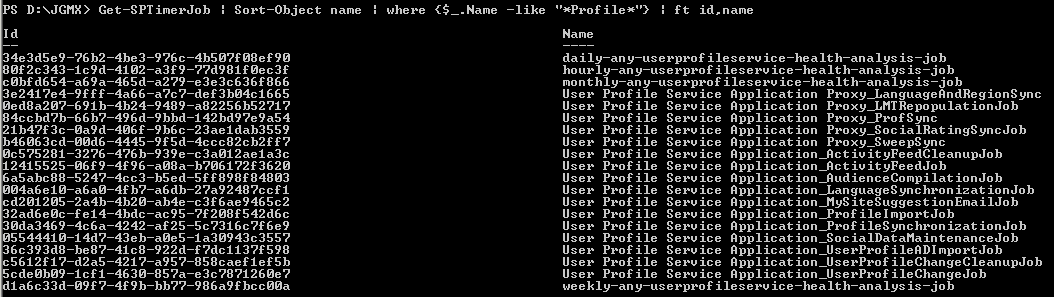
2. Using script in attachment, you can get the history of specific Timer Job

The result will be like this.

PowerShell
$LogTime = Get-Date -Format yyyy-MM-dd_hh-mm

$LogFile = ".\TimerJobReportPatch-$LogTime.rtf"

# Add SharePoint PowerShell Snapin

if ( (Get-PSSnapin -Name Microsoft.SharePoint.PowerShell -ErrorAction SilentlyContinue) -eq $null ) {

    Add-PSSnapin Microsoft.SharePoint.Powershell

}

$scriptBase = split-path $SCRIPT:MyInvocation.MyCommand.Path -parent

Set-Location $scriptBase

#Deleting any .rtf files in the scriptbase location

$FindRTFFile = Get-ChildItem $scriptBase\*.* -include *.rtf

if($FindRTFFile)

{

    foreach($file in $FindRTFFile)

        {

            remove-item $file

        }

}

start-transcript $logfile

Function TimerJobReport()

{

    $Output = $scriptBase + "\" + "TimerJobReport.csv";

"Name" + "," + "Status" + ","  + "LastRun" + "," + "Schedule"  | Out-File -Encoding Default -FilePath $Output;

    write-host "Generating TimerJob generic report" -fore yellow

    $TimerJobs = get-sptimerjob

    foreach($TimerJob in $Timerjobs)

    {

$TimerJob.name + "," + $TimerJob.status + "," + $TimerJob.lastruntime + "," + $TimerJob.schedule  | Out-File -Encoding Default  -Append -FilePath $Output;

    }

    write-host "TimerJob genric report collected and placed under " $Output -fore green

}

Function TimerJobHistory()

{

    $Output1 = $scriptBase + "\" + "TimerJobHistoryReport.csv";

"Name" + "," + "Status" + ","  + "ServerName" + "," + "WebApplicationName" + "," + "ErrorMessage"  | Out-File -Encoding Default -FilePath $Output1;

    write-host "Generating TimerJob history report" -fore yellow

    $TimerJobs = get-sptimerjob

    foreach($TimerJob in $Timerjobs)

    {

        $JobHistories = $TimerJob.historyentries

        foreach($Jobhistory in $JobHistories)

        {

            if($TimerJob.lastruntime.ToUniversalTime() -eq $JobHistory.starttime)

            {

$TimerJob.Name + "," + $Jobhistory.status + "," + $Jobhistory.servername + "," + $Jobhistory.WebApplicationName + "," + $Jobhistory.ErrorMessage | Out-File -Encoding Default  -Append -FilePath $Output1;

            }

        }

    }

    write-host "TimerJob history report generated and placed under " $output1 -fore green

}

Function SpecificTimerJob()

{

    $Output2 = $scriptBase + "\" + "SpecificTimerJobHistoryReport.csv";

"Name" + "," + "Status" + ","  + "ServerName" + "," + "TimerJobStartTime" + "," + "WebApplicationName" + "," + "ErrorMessage"  | Out-File -Encoding Default -FilePath $Output2;

    $TimerJobName = read-host "Enter the timer job name "

    $Timerjob = get-sptimerjob -identity $TimerJobName

    $jobHistories = @($timerjob.historyentries)

$HowManyHistory = read-host "Please enter the number of histories that you want to return for this timerjob "

    for($i = 0 ; $i -le $HowManyHistory; $i++)

    {

$TimerJob.Name + "," + $jobHistories[$i].status + "," + $jobHistories[$i].servername + "," + $jobHistories[$i].StartTime + "," + $jobHistories[$i].WebApplicationName + "," + $jobHistories[$i].ErrorMessage | Out-File -Encoding Default  -Append -FilePath $Output2;

    }

    break;

}

write-host "########################################################################################################" -fore cyan

write-host "Enter 1 to get SP Timer job generic reports" -fore green

write-host "Enter 2 to get specific SP Timer job report " -fore green

write-host "########################################################################################################" -fore cyan

$option = read-host "Enter the option "

switch($option)

{

    1{

        TimerJobReport

        TimerJobHistory

     }

    2{

        SpecificTimerJob

     }

}

write-host "SCRIPT COMPLETED" -fore green

stop-transcript
How to get Timer Job History的更多相关文章
- 如何收缩超大的SharePoint_Config数据库
前言 在已经运行了2年多的SharePoint服务器上,发现SharePoint_Config的数据库文件越来越大,已经达到90几个GB,收缩可以减小20几个GB,但是一周以后又会恢复到90几个GB大 ...
- 怎样收缩超大的SharePoint_Config数据库
前言 在已经执行了2年多的SharePointserver上,发现SharePoint_Config的数据库文件越来越大,已经达到90几个GB,收缩能够减小20几个GB,可是一周以后又会恢复到90几个 ...
- Azure WebJob-Custom Schedule for Azure Web Job Timer Triggers
如果想实现Azure Schedule WebJob,有两种方法: 1. 配置CRON Expression,网上有在线CRON配置工具,根据业务需要配置即可 注意:Azure的CRON Expres ...
- JavaScript(JS)之Javascript对象BOM,History,Location,Function...(二)
https://www.cnblogs.com/haiyan123/p/7594046.html 在JavaScript中除了null和undefined以外其他的数据类型都被定义成了对象,也可以用创 ...
- JS BOM基础 全局对象 window location history screen navigator
全局变量声明的两种方式:1,window.变量名=值;2,var 变量名=值; 全局函数声明的两种方式:1,window.函数名=function(){}2,function 函数名=function ...
- History API与浏览器历史堆栈管理
移动端开发在某些场景中有着特殊需求,如为了提高用户体验和加快响应速度,常常在部分工程采用SPA架构.传统的单页应用基于url的hash值进行路由,这种实现不存在兼容性问题,但是缺点也有--针对不支持o ...
- 使用backbone的history管理SPA应用的url
本文介绍如何使用backbone的history模块实现SPA应用里面的URL管理.SPA应用的核心在于使用无刷新的方式更改url,从而引发页面内容的改变.从实现上来看,url的管理和页面内容的管理是 ...
- 使用h5的history改善ajax列表请求体验
信息比较丰富的网站通常会以分页显示,在点“下一页”时,很多网站都采用了动态请求的方式,避免页面刷新.虽然大家都是ajax,但是从一些小的细节还是 可以区分优劣.一个小的细节是能否支持浏览器“后退”和“ ...
- HTML5学习笔记之History API
这系列文章主要是学习Html5相关的知识点,以学习API知识点为入口,由浅入深的引入实例,让大家一步一步的体会"h5"能够做什么,以及在实际项目中如何去合理的运用达到使用自如,完美 ...
随机推荐
- android ANR产生原因和解决办法
转自http://blog.sina.com.cn/s/blog_618199e60101kvbl.html ANR (Application Not Responding) ANR定义:在Andro ...
- 应用程序框架实战十五:DDD分层架构之领域实体(验证篇)
在应用程序框架实战十四:DDD分层架构之领域实体(基础篇)一文中,我介绍了领域实体的基础,包括标识.相等性比较.输出实体状态等.本文将介绍领域实体的一个核心内容——验证,它是应用程序健壮性的基石.为了 ...
- 关于SubSonic3.0插件使用实体进行更新操作时(执行T.Update()或T.Save()),某些列无法进行修改操作的问题处理
SubSonic3.0插件在创建实体后,对实体进行赋值操作时,为了去除一些不必要更新的字段,减少更新的内容,会将更新内容与默认值进行比较,如果默认值与当前更新的内容相等时,则不提交更新本列,这主要是为 ...
- [c++] Operator overloading
c++的操蛋属性:自己为一档,空一档,其他随意. UB_stack a; UB_stack b = a; // copy auto c = a; auto d {a}; // (or auto d = ...
- 使用普通用户替代root来管理IEE
环境:RHEL 6.4 + IEE 4.0.6 需求:IEE数据库之前是使用root用户部署和管理的,现在安全加固,将数据库交给普通用户iee来管理. 一.当前环境 二.安全加固 1.创建iee用户 ...
- Front End Developer Questions 前端开发人员问题(三)JavaScript部分
问题来源:http://markyun.github.io/2015/Front-end-Developer-Questions/ 三.javascript1.介绍JavaScript的基本数据类型. ...
- iOS-LaunchImage启动页
一. 目标: 设置一个漂亮的启动页. 二.步骤 1. 先创建LaunchImage 2. 进一步设置需要适配的启动页机型 3. 设置完成的效果 4.往里面拖图片,如图是适配的图片的配置 5. 在项目中 ...
- JavaScriptSerializer 序列化json 时间格式
利用JavaScriptSerializer 序列化json 时间格式,得到的DateTime值值显示为“/Date(700000+0500)/”形式的JSON字符串,显然要进行转换 1.利用字符串直 ...
- [Java 基础]方法
方法的定义 Java方法是语句的集合,它们在一起执行一个功能. 方法是解决一类问题的步骤的有序组合 方法包含于类或对象中 方法在程序中被创建,在其他地方被引用 语法 修饰符 返回值类型 方法名 (参数 ...
- sql server实现自定义分割月功能
本文目录列表: 1.为何出现自定义分割月需求 2.sql server实现自定义分割月功能 3.测试验证效果 4.总结语 5.参考清单列表 1.为何出现自定义分割月的需求 今天梳理一个平台的所 ...