
maven项目创建5 service层整合
创建service相关文件
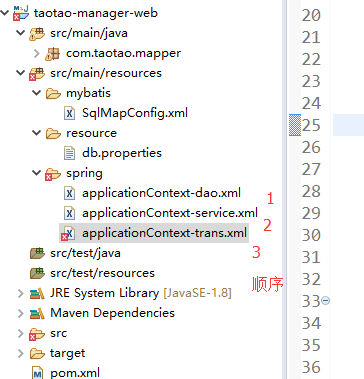
创建applicationContext-service.xml文件
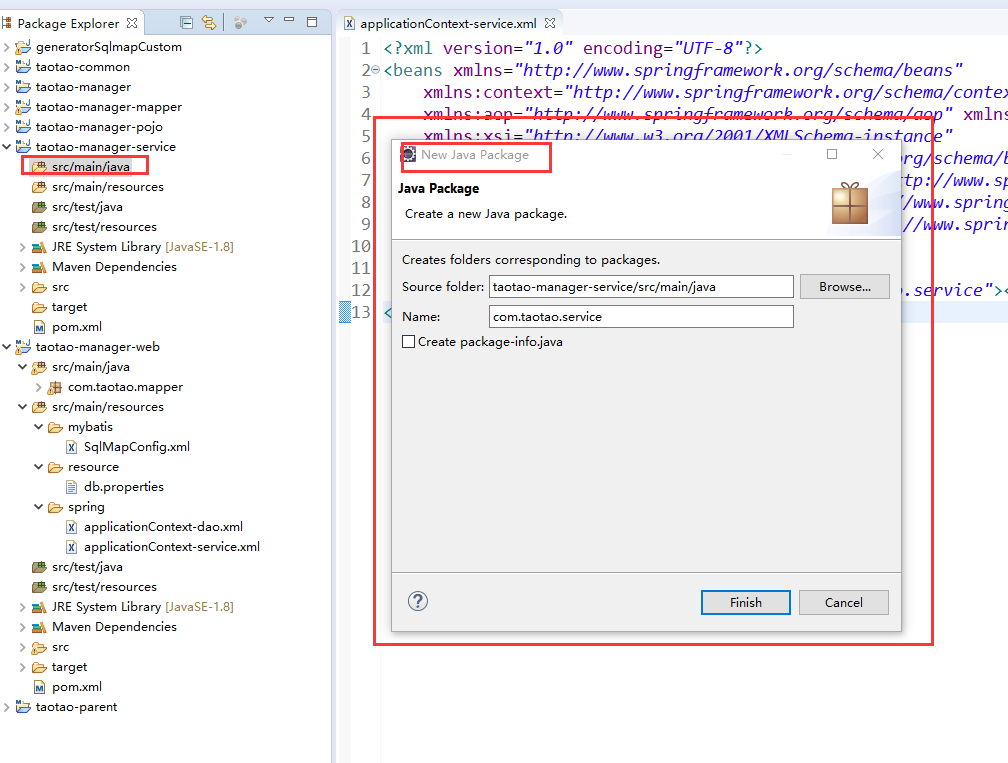
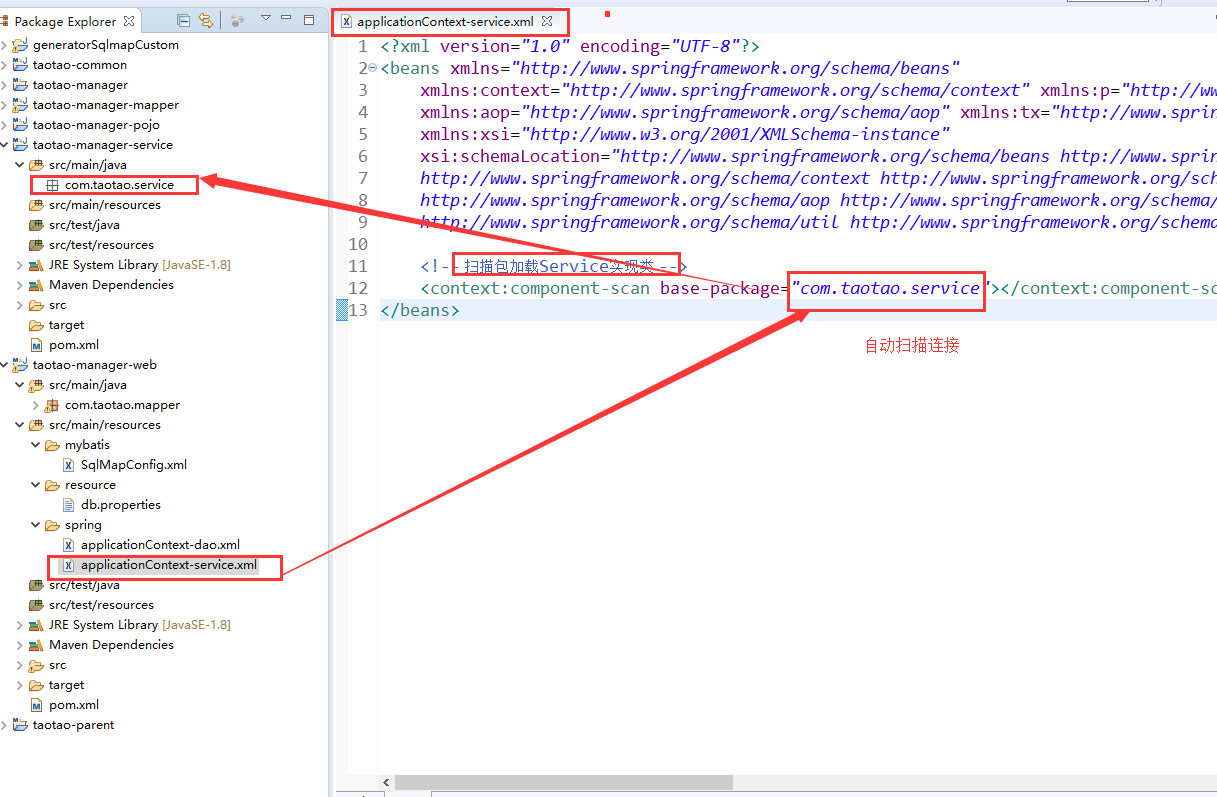
<?xml version="1.0" encoding="UTF-8"?>

<beans xmlns="http://www.springframework.org/schema/beans"

    xmlns:context="http://www.springframework.org/schema/context" xmlns:p="http://www.springframework.org/schema/p"

    xmlns:aop="http://www.springframework.org/schema/aop" xmlns:tx="http://www.springframework.org/schema/tx"

    xmlns:xsi="http://www.w3.org/2001/XMLSchema-instance"

    xsi:schemaLocation="http://www.springframework.org/schema/beans http://www.springframework.org/schema/beans/spring-beans-4.0.xsd

    http://www.springframework.org/schema/context http://www.springframework.org/schema/context/spring-context-4.0.xsd

    http://www.springframework.org/schema/aop http://www.springframework.org/schema/aop/spring-aop-4.0.xsd http://www.springframework.org/schema/tx http://www.springframework.org/schema/tx/spring-tx-4.0.xsd

    http://www.springframework.org/schema/util http://www.springframework.org/schema/util/spring-util-4.0.xsd">

    <!-- 扫描包加载Service实现类 -->

    <context:component-scan base-package="com.taotao.service"></context:component-scan>

</beans>
配置事务
applicationContext-trans.xml

<?xml version="1.0" encoding="UTF-8"?>

<beans xmlns="http://www.springframework.org/schema/beans"

    xmlns:context="http://www.springframework.org/schema/context" xmlns:p="http://www.springframework.org/schema/p"

    xmlns:aop="http://www.springframework.org/schema/aop" xmlns:tx="http://www.springframework.org/schema/tx"

    xmlns:xsi="http://www.w3.org/2001/XMLSchema-instance"

    xsi:schemaLocation="http://www.springframework.org/schema/beans http://www.springframework.org/schema/beans/spring-beans-4.0.xsd

    http://www.springframework.org/schema/context http://www.springframework.org/schema/context/spring-context-4.0.xsd

    http://www.springframework.org/schema/aop http://www.springframework.org/schema/aop/spring-aop-4.0.xsd http://www.springframework.org/schema/tx http://www.springframework.org/schema/tx/spring-tx-4.0.xsd

    http://www.springframework.org/schema/util http://www.springframework.org/schema/util/spring-util-4.0.xsd">

    <!-- 事务管理器 -->

    <bean id="transactionManager"

        class="org.springframework.jdbc.datasource.DataSourceTransactionManager">

        <!-- 数据源 -->

        <property name="dataSource" ref="dataSource" />

    </bean>

    <!-- 通知 -->

    <tx:advice id="txAdvice" transaction-manager="transactionManager">

        <tx:attributes>

            <!-- 传播行为 -->

            <tx:method name="save*" propagation="REQUIRED" />

            <tx:method name="insert*" propagation="REQUIRED" />

            <tx:method name="add*" propagation="REQUIRED" />

            <tx:method name="create*" propagation="REQUIRED" />

            <tx:method name="delete*" propagation="REQUIRED" />

            <tx:method name="update*" propagation="REQUIRED" />

            <tx:method name="find*" propagation="SUPPORTS" read-only="true" />

            <tx:method name="select*" propagation="SUPPORTS" read-only="true" />

            <tx:method name="get*" propagation="SUPPORTS" read-only="true" />

        </tx:attributes>

    </tx:advice>

    <!-- 切面 -->

    <aop:config>

        <aop:advisor advice-ref="txAdvice"

            pointcut="execution(* com.taotao.service.*.*(..))" />

    </aop:config>

</beans>
报错先不用管
maven项目创建5 service层整合的更多相关文章
- maven项目创建4 dao层整合
项目配置文件要放在打包成war包的web项目中 创建文件步骤 1 SqlMapConfig.xml <?xml version="1.0" encoding=" ...
- maven项目创6 表现层整合
springmvc.xm创建l 和 web.xml配置 ,报错先不管 springmvc.xml com.taotao.controller 空包 其中 资源映射 是等 web.x ...
- ssm框架整合+maven项目创建
在引入外部maven插件后就可以创建一个maven项目了,这篇文章主要介绍ssm框架的整合和如何创建一个maven项目 1.在开发工具的项目空白区单击右键,依次选择New.Other,会出现如下界面, ...
- Maven学习 五 Maven项目创建(1)jar项目
第一步:Maven项目的创建 File->new->Maven project. 点击下一步 上方的两个多选框选上,第一个是不使用archetype 原型模板,第二个是使用默认工作空间 点 ...
- IntelliJ IDEA 进行Maven项目创建build
IntelliJ IDEA 进行Maven项目创建build 1,文件-新建-maven 项目:2,编写pom.xml文件:3,鼠标放到左下,然后选择Maven Projects,然后可以查看项目信息 ...
- Eclipse+Maven 项目创建
★:jar包下载不了的话可能是镜像里没有这个版本,换个低版本的就行 ★:eclipse工程validating很慢,可以先关掉验证(一般对项目没什么影响) ★:eclipse工程pom.xml文件报错 ...
- 详解Maven项目利用java service wrapper将Java程序生成Windows服务
在项目的开发中,有时候需要将Java应用程序打包成Windows服务,我们就直接可以通过windows的服务来启动和关闭java程序了. 本博文将通过有两种方法实现该功能,手动创建法和Maven自动打 ...
- Maven学习 七 Maven项目创建(2)war项目
一.web项目的目录结构 如果手动创建一个java web项目,其基本的目录结构包括:METE-INF,WEB-INF,以及WEB-INF下必须包含一个web.xml文件 二.使用Maven创建wa ...
- springmvc 项目完整示例09 maven项目创建
需求表均同springmvc案例 此处只是使用maven 注意,以下所有需要建立在你的eclipse等已经集成配置好了maven了,说白了就是新建项目的时候已经可以找到maven了 没有的话需要安装m ...
随机推荐
- ssh配置互信不成功,两台服务器有一台需要输入密码
在客户现场,某国产平台,配置机器互信时发现,A可以免密访问B,而B不能免密访问A,且B不能免密访问B,进行了下面的几个处理后搞定. 1)确定目录权限:/root/ 755/root/.ssh 700/ ...
- sql server之批量数据导入
实际应用场景中,有时会需要把一批数据导入数据库.这批数据可能来源于另一个数据源.比较常规的做法是先读取到dataset,然后跑一个循环,每一行拼一句insert into语句,执行之.用过的人会知道, ...
- CentOS7安装rabbitMQ,并实现浏览器访问
第一.安装wget yum install wget 第二.下载erlang和rabbitmq-server的rpm (1)在/usr/local下创建目录rabbitMQ,并进入该目录 (2)下载 ...
- spring依赖注入三种方式
一.构造器注入 构造器注入是在程序中实现构造器,可以注入任意类型,如自定义类,集合,String等,注:构造器所有有final修饰的变量都必须在构造方法中注入. 二.设值注入(setter方式注入) ...
- PageObject 页面对象模式
一.PageObject 页面对象设计模式 (一个页面建一个类,即对象,页面对象) 每个页面都建对应的class,类中包含了页面的输入框.标题.元素等元素,测试代码中测试这个页面时,只需要调用这个页 ...
- 第二章 单表查询 T-SQL语言基础(1)
单表查询(1) 本章:逻辑查询处理,特定的SELECT查询生成正确的结果集而要经历的一系列逻辑阶段;单表查询的其他方面,包括:运算符,空值(NULL),字符的处理和临时数据,分级(ranking),C ...
- 把两个object对象合并成一个对象 属性名称相同的变为后面对象的值
object.assign(from,obj)------object.assign(目标对象,被合并的对象)
- jQuery制作弹出窗(模态框)
来源:(二少)在南极 ##index.html <!DOCTYPE html><html lang="zh"><head> <meta c ...
- golang连接activemq,发送接收数据
介绍 使用golang连接activemq发送数据的话,需要使用一个叫做stomp的包,直接go get github.com/go-stomp/stomp即可 代码 生产者 package main ...
- On Java 8
On Java 8本书原作者为 [美] Bruce Eckel,即<Java 编程思想>的作者.本书是事实上的 <Java 编程思想>第五版.<Java 编程思想> ...