
SpringCloud 2020.0.4 系列之 Sleuth + Zipkin
1. 概述
老话说的好:安全不能带来财富,但盲目的冒险也是不可取的,大胆筹划,小心实施才是上策。
言归正传,微服务的特点就是服务多,服务间的互相调用也很复杂,就像一张关系网,因此为了更好的定位故障和优化性能,我们需要有工具帮我们很快的梳理出服务间上下游的调用关系。Sleuth 就可以很好的帮我们解决这个问题。
但 Sleuth 只是做了后台工作,没有展示页面,不方便我们对调用链进行分析。因此需要 Zipkin 去把数据展示出来,方便我们进行分析。
闲话不多说,直接上代码。
2. Zipkin 服务的搭建
2.1 Zipkin 服务的搭建方式
我们打开Zipkin的官网地址:https://zipkin.io/pages/quickstart.html
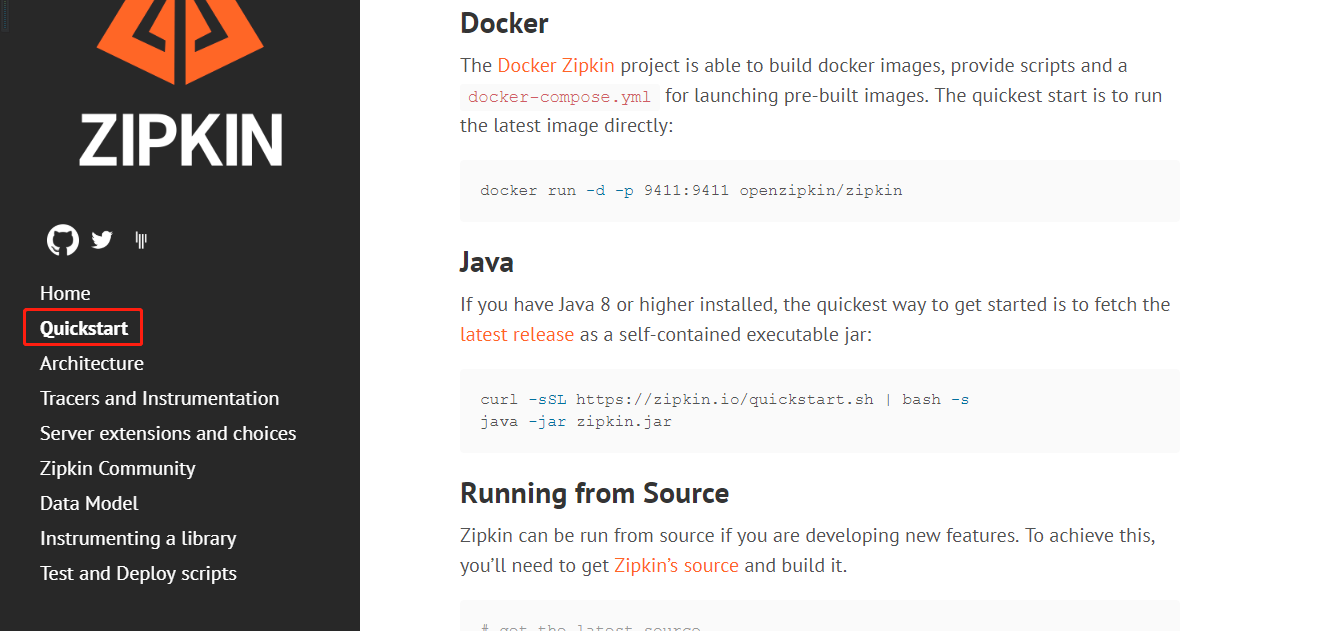
如图所示,Zipkin Server 支持 Docker方式启动,Java 运行 Jar 包方式启动,以及编译源码的方式启动。
2.2 Java 运行 jar 包方式启动
大家可以根据自己的喜好选择启动方式,这里我们选择 Java 运行 jar 包的方式启动。
1)下载 zipkin.jar
# curl -sSL https://zipkin.io/quickstart.sh | bash -s
2)启动 Zipkin Server
# java -jar zipkin.jar
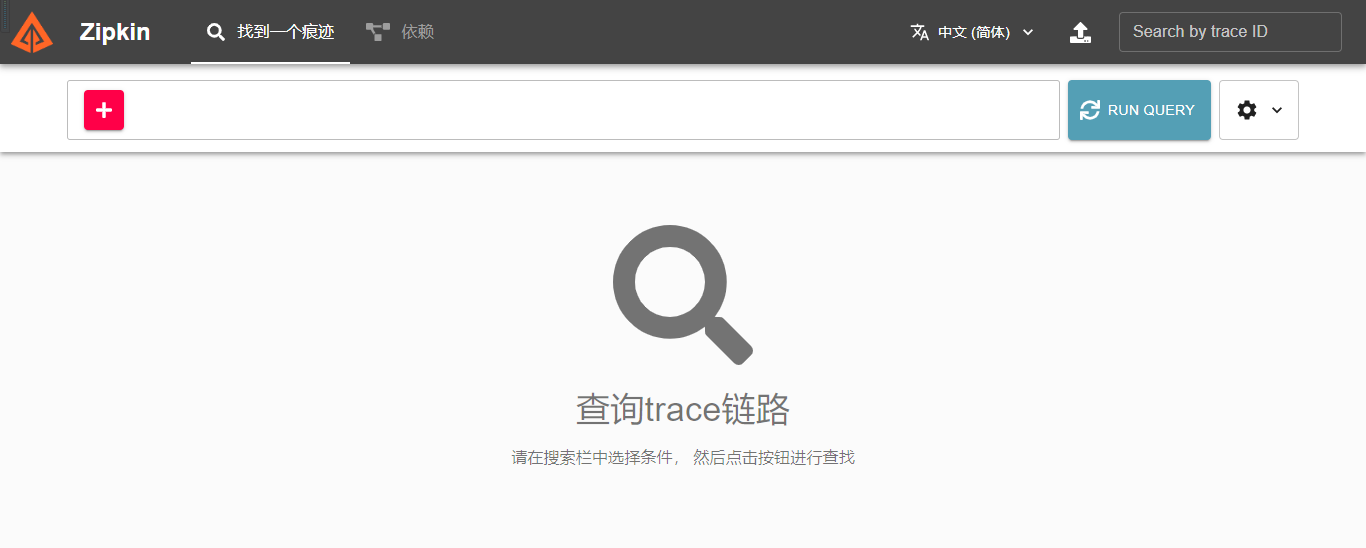
2.3 访问 Zipkin Server
http://IP:9411/zipkin/
3. Demo 服务的搭建
3.1 概述
这里我们搭建两个有调用关系的服务作为 Demo。
两个服务都依赖 Sleuth 和 Zipkin。
3.2 my-sleuth-A 的搭建
3.2.1 主要依赖
        <dependency>

            <groupId>org.springframework.cloud</groupId>

            <artifactId>spring-cloud-starter-netflix-eureka-client</artifactId>

        </dependency>

        <dependency>

            <groupId>org.springframework.boot</groupId>

            <artifactId>spring-boot-starter-web</artifactId>

        </dependency>

        <!-- 健康检查 -->

        <dependency>

            <groupId>org.springframework.boot</groupId>

            <artifactId>spring-boot-starter-actuator</artifactId>

        </dependency>

        <dependency>

            <groupId>org.springframework.cloud</groupId>

            <artifactId>spring-cloud-starter-sleuth</artifactId>

        </dependency>

        <dependency>

            <groupId>org.springframework.cloud</groupId>

            <artifactId>spring-cloud-starter-zipkin</artifactId>

            <version>2.2.8.RELEASE</version>

        </dependency>
3.2.2 主要配置
server:

  port: 46000

spring:

  application:

    name: my-sleuth-A

  sleuth:

    sampler:

      probability: 1  # 采样率100%

  zipkin:

    base-url: http://192.168.1.22:9411  # Zipkin Server 地址

eureka:

  client:

    service-url:

      defaultZone: http://zhuifengren1:35000/eureka/,http://zhuifengren2:35001/eureka/    # Eureka Server的地址
3.2.3 启动类
@SpringBootApplication

@EnableDiscoveryClient

public class MySleuthAApplication {

    @LoadBalanced

    @Bean

    public RestTemplate lb() {

        return new RestTemplate();

    }

    public static void main(String[] args) {

        SpringApplication.run(MySleuthAApplication.class, args);

    }

}
3.2.4 Demo Controller
@RestController

@Slf4j

public class Controller {

    @Autowired

    private RestTemplate restTemplate;

    @GetMapping("/traceA")

    public String traceA() {

        log.info("-------- traceA -------");

        return restTemplate.getForEntity

                        ("http://my-sleuth-B/traceB", String.class).getBody();

    }

}
3.3 my-sleuth-B 的搭建
3.3.1 主要依赖
        <dependency>

            <groupId>org.springframework.cloud</groupId>

            <artifactId>spring-cloud-starter-netflix-eureka-client</artifactId>

        </dependency>

        <dependency>

            <groupId>org.springframework.boot</groupId>

            <artifactId>spring-boot-starter-web</artifactId>

        </dependency>

        <!-- 健康检查 -->

        <dependency>

            <groupId>org.springframework.boot</groupId>

            <artifactId>spring-boot-starter-actuator</artifactId>

        </dependency>

        <dependency>

            <groupId>org.springframework.cloud</groupId>

            <artifactId>spring-cloud-starter-sleuth</artifactId>

        </dependency>

        <dependency>

            <groupId>org.springframework.cloud</groupId>

            <artifactId>spring-cloud-starter-zipkin</artifactId>

            <version>2.2.8.RELEASE</version>

        </dependency>
3.3.2 主要配置
server:

  port: 46001

spring:

  application:

    name: my-sleuth-B

  sleuth:

    sampler:

      probability: 1  # 采样率100%

  zipkin:

    base-url: http://192.168.1.22:9411  # Zipkin Server 地址

eureka:

  client:

    service-url:

      defaultZone: http://zhuifengren1:35000/eureka/,http://zhuifengren2:35001/eureka/    # Eureka Server的地址
3.3.3 启动类
@SpringBootApplication

@EnableDiscoveryClient

public class MySleuthBApplication {

    @LoadBalanced

    @Bean

    public RestTemplate lb() {

        return new RestTemplate();

    }

    public static void main(String[] args) {

        SpringApplication.run(MySleuthBApplication.class, args);

    }

}
3.3.4 Demo Controller
@RestController

@Slf4j

public class Controller {

    @Autowired

    private RestTemplate restTemplate;

    @GetMapping("/traceB")

    public String traceB() {

        log.info("-------- traceB -------");

        return "traceB";

    }

}
4. Zipkin 的简单使用
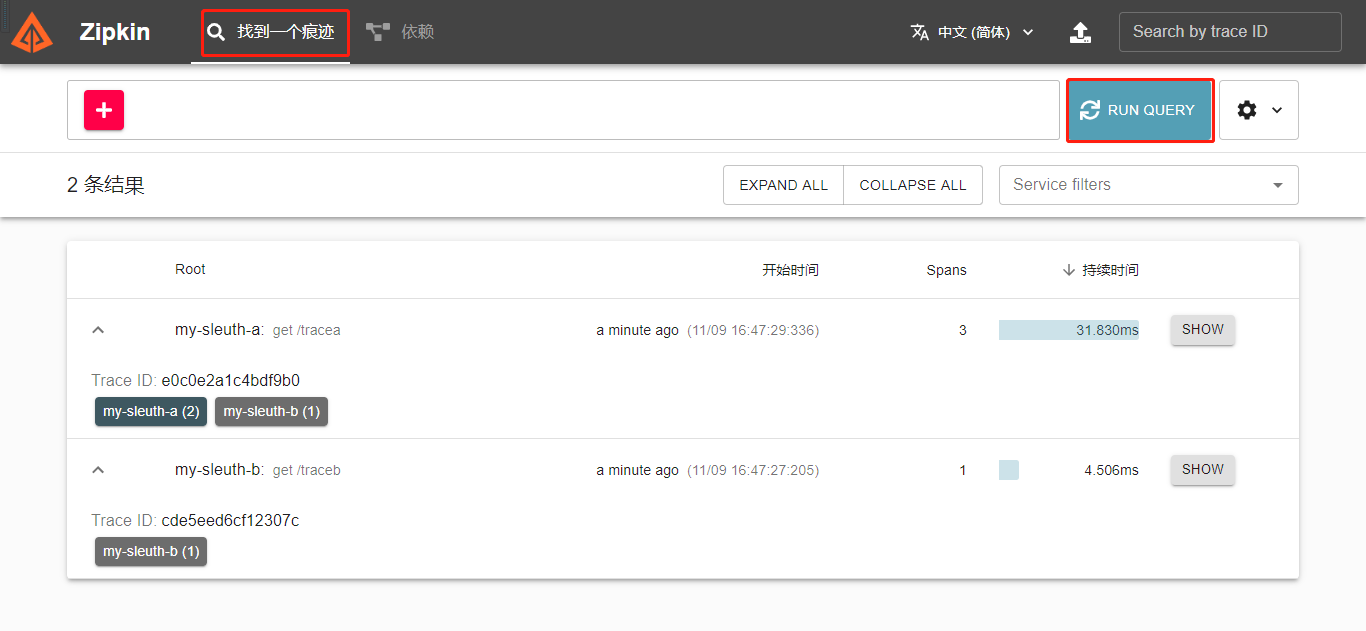
4.1 调用 Demo 接口
调用两个Demo工程的接口
GET http://localhost:46001/traceB
GET http://localhost:46000/traceA
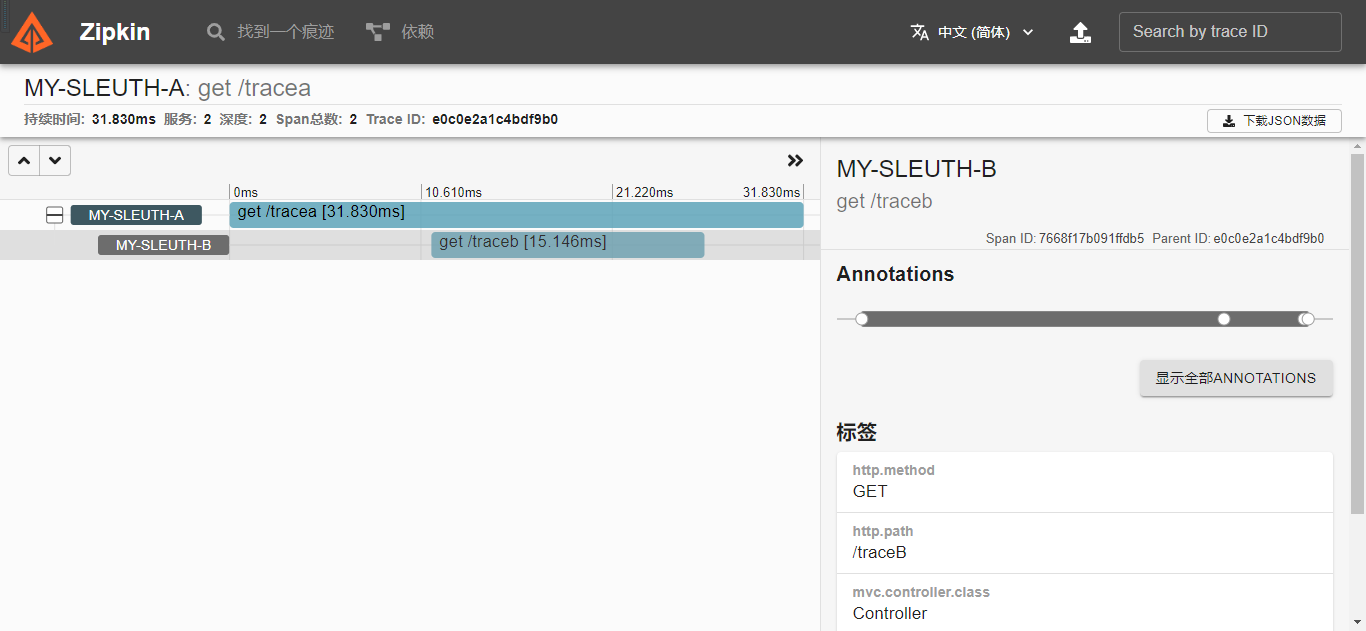
4.2 打开 zipkin 查看
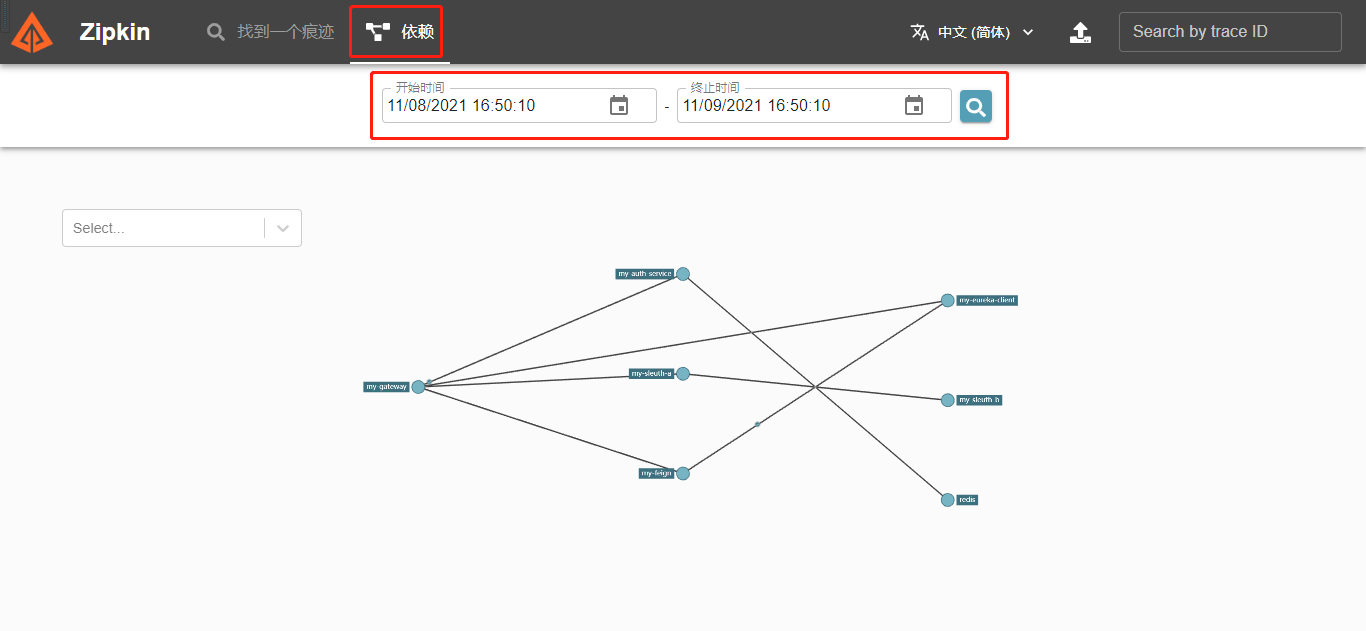
4.3 依赖关系图查看
5. 综述
今天聊了一下 调用链追踪 Sleuth + Zipkin ,希望可以对大家的工作有所帮助。
欢迎帮忙点赞、评论、转发、加关注 :)
关注追风人聊Java,每天更新Java干货。
6. 个人公众号
追风人聊Java,欢迎大家关注

SpringCloud 2020.0.4 系列之 Sleuth + Zipkin的更多相关文章
- SpringCloud 2020.0.4 系列之 Feign
1. 概述 老话说的好:任何问题都有不止一种的解决方法,当前的问题没有解决,只是还没有发现解决方法,而并不是无解. 言归正传,之前我们聊了 SpringCloud 的服务治理组件 Eureka,今天我 ...
- SpringCloud 2020.0.4 系列之 Stream 消息广播 与 消息分组 的实现
1. 概述 老话说的好:事情太多,做不过来,就先把事情记在本子上,然后理清思路.排好优先级,一件一件的去完成. 言归正传,今天我们来聊一下 SpringCloud 的 Stream 组件,Spring ...
- SpringCloud 2020.0.4 系列之 Stream 延迟消息 的实现
1. 概述 老话说的好:对待工作要有责任心,不仅要完成自己的部分,还要定期了解整体的进展. 言归正传,我们在开发产品时,常常会遇到一段时间后检查状态的场景,例如:用户下单场景,如果订单生成30分钟后, ...
- SpringCloud 2020.0.4 系列之 Stream 消息出错重试 与 死信队列 的实现
1. 概述 老话说的好:出错不怕,怕的是出了错,却不去改正.如果屡次出错,无法改对,就先记下了,然后找援军解决. 言归正传,今天来聊一下 Stream 组件的 出错重试 和 死信队列. RabbitM ...
- SpringCloud 2020.0.4 系列之Eureka
1. 概述 老话说的好:遇见困难,首先要做的是积极的想解决办法,而不是先去泄气.抱怨或生气. 言归正传,微服务是当今非常流行的一种架构方式,其中 SpringCloud 是我们常用的一种微服务框架. ...
- SpringCloud 2020.0.4 系列之服务降级
1. 概述 老话说的好:做人要正直,做事要正派,胸怀坦荡.光明磊落,才会赢得他人的信赖与尊敬. 言归正传,之前聊了服务间通信的组件 Feign,今天我们来聊聊服务降级. 服务降级简单的理解就是给一个备 ...
- SpringCloud 2020.0.4 系列之 Bus
1. 概述 老话说的好:会休息的人才更会工作,身体是革命的本钱,身体垮了,就无法再工作了. 言归正传,之前我们聊了 SpringCloud 的 分布式配置中心 Config,文章里我们聊了config ...
- SpringCloud 2020.0.4 系列之 Gateway入门
1. 概述 老话说的好:做人要有幽默感,懂得幽默的人才会活的更开心. 言归正传,今天我们来聊聊 SpringCloud 的网关组件 Gateway,之前我们去访问 SpringCloud 不同服务的接 ...
- SpringCloud 2020.0.4 系列之 JWT用户鉴权
1. 概述 老话说的好:善待他人就是善待自己,虽然可能有所付出,但也能得到应有的收获. 言归正传,之前我们聊了 Gateway 组件,今天来聊一下如何使用 JWT 技术给用户授权,以及如果在 Gate ...
随机推荐
- javascript 无限分类
* 根据php无限分类实现js版本的 /** * 根节点 parentid=0, 每个节点都有id, parentid字段 * @param items * @returns {*} */ funct ...
- turtle setup和screensize
关于setup有明确的定义,它包括4个参数width,height,startx,starty, setup定义窗体的大小和相对位置,并隐含定义了画布的位置,缺省是居中占整个屏幕的一半[setup() ...
- CF1322B-Present【双指针】
正题 题目链接:https://www.luogu.com.cn/problem/CF1322B 题目大意 给出\(n\)个数字\(a_i\)求 \[\bigoplus _{i=1}^n\bigopl ...
- Java 使用 Socket 实现客户端和服务器的信息交互
服务器 public class Server{ private ServerSocket serverSocket; private Socket socket; private BufferedR ...
- Edit Step Ladders - UVA 10029
题意 题目链接(Virtual Judge):Edit Step Ladders - UVA 10029 题意: 如果单词 \(x\) 能通过添加.删除或修改一个字母变换为单词 \(y\),则称单词 ...
- Git学习笔记03-原理
在Git中,算上远程Git仓库有四个工作区域 Git本地有三个区域(工作区域.暂存区,资源区,远程Git仓库) 工作区域:就是你本机写好的代码,你可以看到的 暂存区:你写好的代码上传后被git管理的内 ...
- vue基础-动态样式&表单绑定&vue响应式原理
动态样式 作用:使用声明式变量来控制class和style的值 语法: :class/:style 注意:尽可能不要把动态class和静态class一起使用,原因动态class起作用的时间会比较晚,需 ...
- '\r'(回车符),'\n'(换行符)与"\r\n"
一.'\n','\r'和"\r\n" 回车\r本义是光标重新回到本行开头,r的英文return,控制字符可以写成CR,即Carriage Return(回车,carriage有&q ...
- MySQL:提高笔记-5
MySQL:提高笔记-5 学完基础的语法后,进一步对 MySQL 进行学习,前几篇为: MySQL:提高笔记-1 MySQL:提高笔记-2 MySQL:提高笔记-3 MySQL:提高笔记-4 MySQ ...
- 记一个非常诡异的关于 shared_ptr 的 bug
问题描述 今天写项目的时候遇见一个特别诡异的 bug,体现在在执行某条语句时,程序会莫名崩溃,并且给出的错误信息也非常难懂,只有一个malloc(): invalid size (unsorted)错 ...