
WPF---数据模板(一)
一、场景模拟
假设我们现在有如下需求:
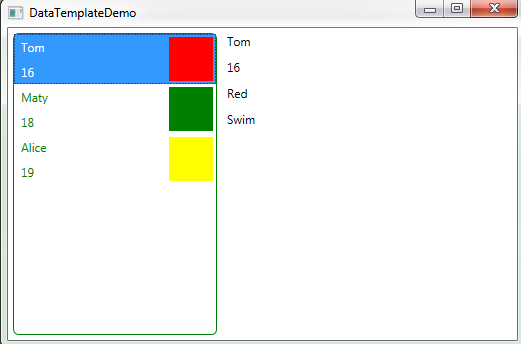
我们需要在ListBox中的每个Item中显示某个成员的姓名、年龄以及喜欢的颜色,点击Item的时候,会在右边显示详细信息,同时也想让ListBox的样式变得好看一些,比如带有绿色边框等。
为了实现以上需求,我们可以使用控件模板来修改ListBox的默认样式,使之变得生动有趣,使用数据模板来改变ListBoxItem的数据呈现形式。
二、Demo
为了改变ListBoxItem的外观,我们在资源里定义一个名字为listBoxItemTemplate的数据模板,模板中使用Binding将数据进行关联,然后为ListBox的ItemTemplate属性进行赋值。
当我们点击左面ListBoxItem的时候,为了能在右面显示详细信息,我们定义四个Label,绑定左侧选中的ListBoxItem。
为了绑定方便,我们为四个Label加个父容器StackPanel,并将它的DataContext属性绑定到选中的ListBoxItem上(四个Label的DataContext就会继承StackPanel的DataContext属性)。
具体代码以及运行截图参见以下:
 1 using System.Collections.ObjectModel;

 2 using System.Windows;

 3

 4 namespace DataTemplateDemo1

 5 {

 6     /// <summary>

 7     /// Interaction logic for MainWindow.xaml

 8     /// </summary>

 9

10     public partial class MainWindow : Window

11     {

12         private ObservableCollection<Student> observableCollection = new ObservableCollection<Student>();

13         public  ObservableCollection<Student> ObservableCollection

14         {

15             get { return observableCollection; }

16             set { observableCollection = value; }

17         }

18         public MainWindow()

19         {

20             InitializeComponent();

21             this.DataContext = this;

22             observableCollection.Add(new Student() {Name = "Tom", Age= 16, FavorColor="Red",Hobby="Swim" });

23             observableCollection.Add(new Student() { Name = "Maty", Age = 18, FavorColor = "Green" ,Hobby="Football"});

24             observableCollection.Add(new Student() { Name = "Alice", Age = 19, FavorColor = "Yellow" ,Hobby="Running"});

25         }

26     }

27

28     public class Student

29     {

30         public int Age { get; set; }

31         public string Name { get; set; }

32         public string FavorColor { get; set; }

33         public string Hobby { get; set; }

34     }

35

36 }
 1 <Window x:Class="DataTemplateDemo1.MainWindow"

 2         xmlns="http://schemas.microsoft.com/winfx/2006/xaml/presentation"

 3         xmlns:x="http://schemas.microsoft.com/winfx/2006/xaml"

 4         xmlns:d="http://schemas.microsoft.com/expression/blend/2008"

 5         xmlns:mc="http://schemas.openxmlformats.org/markup-compatibility/2006"

 6         xmlns:local="clr-namespace:DataTemplateDemo1"

 7         mc:Ignorable="d"

 8         Title="DataTemplateDemo" Height="350" Width="525">

 9     <Window.Resources>

10

11         <ControlTemplate x:Key="ListBoxControlTemplate" TargetType="ListBox">

12             <Grid>

13                 <Border BorderBrush="Green" BorderThickness="1" CornerRadius="5" >

14                     <Grid>

15                         <ItemsPresenter TextBlock.Foreground="Green"></ItemsPresenter>

16                     </Grid>

17                 </Border>

18             </Grid>

19         </ControlTemplate>

20

21         <DataTemplate x:Key="listBoxItemTemplate">

22             <Grid Height="50">

23                 <Grid.ColumnDefinitions>

24                     <ColumnDefinition Width="150"/>

25                     <ColumnDefinition Width="50"/>

26                 </Grid.ColumnDefinitions>

27                 <Grid.RowDefinitions>

28                     <RowDefinition/>

29                     <RowDefinition/>

30                 </Grid.RowDefinitions>

31                 <TextBlock  Name="textbox1" Text="{Binding Name}" Grid.Row="0" Margin="5"/>

32                 <TextBlock  Name="textbox2" Text="{Binding Age}" Grid.Row="1" Margin="5"/>

33                 <Rectangle Fill="{Binding FavorColor}" Grid.Column="1" Grid.Row="0" Grid.RowSpan="2" Margin="3"></Rectangle>

34

35             </Grid>

36         </DataTemplate>

37     </Window.Resources>

38     <Grid>

39         <StackPanel Orientation="Horizontal">

40

41             <ListBox Margin="5" Name="stuList"

42                  Template="{StaticResource ListBoxControlTemplate}"

43                  ItemsSource="{Binding ObservableCollection}"

44                  ItemTemplate="{StaticResource listBoxItemTemplate}">

45             </ListBox>

46             <StackPanel DataContext="{Binding Path=SelectedItem,ElementName=stuList}">

47                 <Label Content="{Binding Name}"></Label>

48                 <Label Content="{Binding Age}"></Label>

49                 <Label Content="{Binding FavorColor}"></Label>

50                 <Label Content="{Binding Hobby}"></Label>

51             </StackPanel>

52         </StackPanel>

53

54     </Grid>

55 </Window>
WPF---数据模板(一)的更多相关文章
- WPF数据模板和控件模板
WPF中有控件模板和数据模板,控件模板可以让我们自定义控件的外观,而数据模板定义了数据的显示方式,也就是数据对象的可视结构,但是这里有一个问题需要考虑,数据是如何显示出来的?虽然数据模板定义了数 ...
- WPF数据模板样式选择器
在使用数据模板样式选择器时,不能设置ItemContainerStyle的属性值,如果设置了该值,那么数据模板样式选择器会失去作用. 在使用数据模板样式选择器时,首先要创建数据模板样式选择器对象,此对 ...
- WPF数据模板(7)
数据模板常用在3种类型的控件, 下图形式: 1.Grid这种列表表格中修改Cell的数据格式, CellTemplate可以修改单元格的展示数据的方式. 2.针对列表类型的控件, 例如树形控件,下拉列 ...
- WPF数据模板中绑定事件不触发问题
今天比较闲,做一个练手的项目,结果在xaml中写了一个用户的数据模板后,在其中的某个Canvas上绑定了一个鼠标左击的事件,结果调试的时候,无论怎么点击都不跳到断点那里,百思不得其解. 之后尝试不绑定 ...
- WPF数据模板的数据触发器的使用
<Window x:Class="CollectionBinding.MainWindow" xmlns="http://schemas.micros ...
- WPF 数据模板使用值转换器
<Window x:Class="CollectionBinding.MainWindow" xmlns="http://schemas.micros ...
- WPF 数据模板DataType属性的使用,不用指定ItemTemplate
<Window x:Class="CollectionBinding.MainWindow" xmlns="http://schemas.micros ...
- WPF 数据模板的使用
<Window x:Class="CollectionBinding.MainWindow" xmlns="http://schemas.micros ...
- WPF的ComboBox 数据模板自定义
WPF的ComboBox 有些时候不能满足用户需求,需要对数据内容和样式进行自定义,下面就简要介绍一下用数据模板(DataTemplate)的方式对ComboBox 内容进行定制: 原型设计如下: 步 ...
- WPF中的数据模板(DataTemplate)(转)
原文地址 http://www.cnblogs.com/zhouyinhui/archive/2007/03/30/694388.html WPF中的数据模板(DataTemplate) ...
随机推荐
- mpvue开发小程序项目遇到的问题
mpvue项目 最近用mpvue开发了一个家庭私人医生签约的小程序项目.记录总结一下,开发过程中遇到的一些问题. 关于页面进栈出栈的状态值问题 页面进出栈,会触发onLoad/unLoad事件.出栈不 ...
- Pytorch系列:(七)模型初始化
为什么要进行初始化 首先假设有一个两层全连接网络,第一层的第一个节点值为 \(H_{11}= \sum_{i=0}^n X_i*W_{1i}\), 这个时候,方差为 \(D(H_{11}) = \su ...
- 第2天 第一个程序&IDEA安装&Java基础语法
第一个程序 Hello,World! 随便新建一个文件夹,存放代码 新建一个Java文件 文件后缀名为java Hello.java [注意点]系统可能没有显示后缀名,必须手动打开 编写代码 publ ...
- python里面的==,is的区别
python中对象的三个要素:id(身份标示),type(数据类型).value(值) == 比较操作符:用来比较两个对象值是否相等. is 同一性运算符:比较两个对象的id值是否相等,即是否是同 ...
- Python自动化测试面试题-Linux篇
目录 Python自动化测试面试题-经验篇 Python自动化测试面试题-用例设计篇 Python自动化测试面试题-Linux篇 Python自动化测试面试题-MySQL篇 Python自动化测试面试 ...
- 第一篇 -- 下载并安装IDEA
此篇讲的是安装IDEA企业版,社区版是免费的,就不多说了. 参考链接:https://www.exception.site/essay/how-to-free-use-intellij-idea-20 ...
- VM安装kali操作系统
工具:VMware Workstation 15 Pro(15.5.6 build-16341506),kali-linux-2020.2-installer-amd64.iso vm15下载链接:h ...
- 旧VC项目dpiAware支持
起因 工作原因,需要维护一款VS2008 SP1开发的MFC项目, 发现WIN10高分辨率下显示模糊,不考虑升级VC版本情况下尝试解决 尝试 新版本VC中Manifest Tool>Input ...
- ondblclick="return showCodeList 分析思路
<Div id="divApproveRejectReasonInput" style="display:none"><input class ...
- memcache(11211)未授权访问
1.安装Memcache服务端 sudo apt-get install memcached 2.启动服务 sudo memcached -d -m 128 -p 11211 -u root 3.ap ...