
cocos2d 3.0自定义事件答疑解惑
疑惑一:在事件分发中修改订阅者
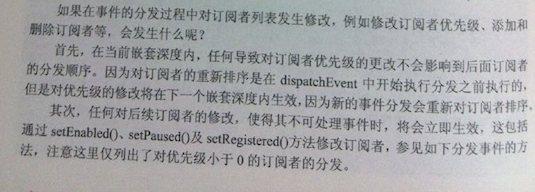 ,对于这个的理解。
事件的分发是可以嵌套的,cocos2dx使用_inDispatch来保存当前嵌套的深度,当调用第一个dispatchEvent的时候,_inDispatch=0,表示之前没有事件在分发,这是第一次
进行事件的分发。先看一下
dispatchEvent(Event* event)的源码,这个方法就是开始分发事件的时候的方法

代码的大体步骤就是
1
updateDirtyFlagForSceneGraph();,这个我也没研究,暂时不用管它,不影响理解
2
DispatchGuard guard(_inDispatch);
这个就是对_inDispatch的加一,也就是每次调用
dispatchEvent,就加一,dispatchEvent运行完之后,因为guard是局部变量,会自动释放,_inDispatch会自动减一。
3.
if (event->getType() == Event::Type::TOUCH)
{
dispatchTouchEvent(static_cast<EventTouch*>(event));
return;
}
对于最复杂的触摸,另外写了一个方法,这里也不说
4
auto listenerID = __getListenerID(event);
sortEventListeners(listenerID);
找到对应event事件的名字,就是个字符串名,他是作为一个key,是唯一的,他的值是一个数组,数组里是订阅了这个key事件的listener,
sort,对这个事件的所有订阅者进行排序,确定谁先分发,谁后分发
5
if (iter != _listenerMap.end())
{
auto listeners = iter->second;
auto onEvent = [&event](EventListener* listener) -> bool{
event->setCurrentTarget(listener->getAssociatedNode());
listener->_onEvent(event);
return event->isStopped();
};
dispatchEventToListeners(listeners, onEvent);
}
遍历该事件的所有订阅者,进行事件分发
6,
updateListeners(event);
在分发的最后,重新对事件的订阅者进行排序
下面这个图片,就是解释了他的作用,进行排序的前提是_inDispatch必须为0
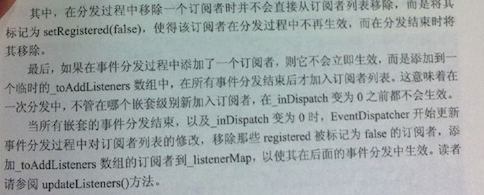
上面是对分发事件方法的解释也就是 dispatchEvent方法
下面再说说订阅事件的方法,这里只说自定义的,系统事件也是一个道理的,就不说了
_eventDispatcher->addEventListenerWithFixedPriority(listenerA, 1);
看源码:
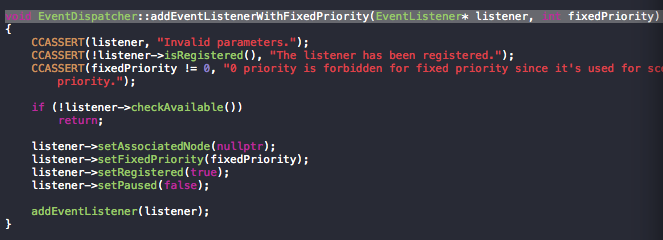
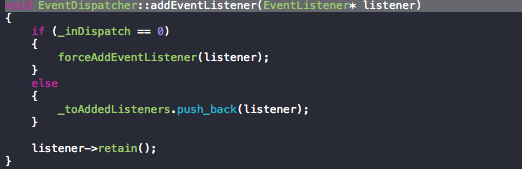
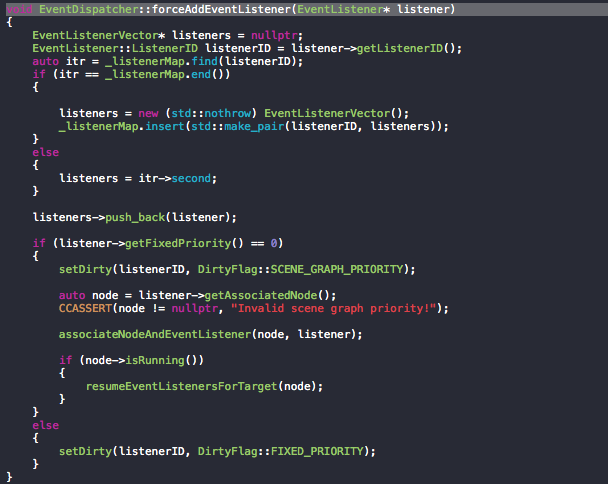
大体上就这三块代码
addEventListener方法中,分两种情况
当嵌套为0的时候,走第三个方法,就是吧listener加入到订阅者字典里
_listenerMap,key为listnerID,也就是事件的名字,比如触摸事件的onBegan或者onEnded,value就是对这个事件的所有订阅者。
当嵌套不为0的时候,加入到
_toAddedListeners.push_back(listener);
这个可以看做是一个临时的储存订阅者的数组,当所有嵌套事件分发结束,_indispatch=0, updateListeners(event)这个方法把这个
数组里的订阅者都加到_listenerMap中。
这里什么时候把_toAddedListeners里的订阅者加到_listenerMap中,这个顺序会引发一些问题和疑惑,下面通过设置几个场景,对其进行分析
情景一:注册了事件A和事件B,而且每一个事件都有一个订阅者,然后在事件A的分发中的回调函数中,分发B,看代码
 EventListenerCustom*  listenerA = EventListenerCustom::create("game_custom_eventA", [=](EventCustom* event){

        printf("game_custom_eventA\n");

        EventCustom event2("game_custom_eventB");

        _eventDispatcher->dispatchEvent(&event2);

     });

     EventListenerCustom*  listenerB  = EventListenerCustom::create("game_custom_eventB", [=](EventCustom* event){

        printf("game_custom_eventB\n");

    });

    _eventDispatcher->addEventListenerWithFixedPriority(listenerA, );

    _eventDispatcher->addEventListenerWithFixedPriority(listenerB, );

    EventCustom event("game_custom_eventA");

    _eventDispatcher->dispatchEvent(&event);
运行结果:
game_custom_eventA
game_custom_eventB
分析:这个很明显了
先把listnerA加入到_listenerMap,再把listnerB加入到_listenerMap,然后先触发eventA,在A的回调中在dispatch B,
dispatchEvent方法中只对_listenerMap进行查找,然后派发,等全部派发完毕之后,才
updateListeners(event);并且还要保证_indispatch为0.
因为listnerA和B已经在开始加到了 _listnermap中,所以这样调用没有问题。
情景二:先注册了事件A,A有一个订阅者,然后在事件A的分发中的回调函数中,注册B,并分发B,代码
  EventListenerCustom*  listenerB  = EventListenerCustom::create("game_custom_eventB", [=](EventCustom* event){

        printf("game_custom_eventB\n");

    });

    EventListenerCustom*  listenerA = EventListenerCustom::create("game_custom_eventA", [=](EventCustom* event){

        printf("game_custom_eventA\n");

         _eventDispatcher->addEventListenerWithFixedPriority(listenerB, );

        EventCustom event2("game_custom_eventB");

        _eventDispatcher->dispatchEvent(&event2);

     });

    _eventDispatcher->addEventListenerWithFixedPriority(listenerA, );

    EventCustom event("game_custom_eventA");

    _eventDispatcher->dispatchEvent(&event);
运行结果:
game_custom_eventA
为什么这次eventB没有执行呢。通过调试分析得出原因:
在eventA的回调函数执行的时候,dispatcheventA这个方法还没有执行完毕,所以_dispatch还没有减一,所以肯定是大于0的,所以在此之前的
updateListeners(event);,_listenerMap里面不会有eventB的listener,所以
EventCustom event2("game_custom_eventB");

 _eventDispatcher->dispatchEvent(&event2);
中,不会检索到eventB,自然也就不会派发事件给订阅者了。
要想listnerB的回调函数起作用,只能是EventA的disptch全部派发完毕,
情景三:在事件分发过程中修改订阅者优先级。注册了一个事件EventA,然后有三个订阅者,顺序为1,2,3,然后在1的回调函数在修改2,3的优先级,看看是否会改变派发顺序
    EventListenerCustom*  listenerB  = EventListenerCustom::create("game_custom_eventA", [=](EventCustom* event){

        printf("game_custom_eventB\n");

    });

    EventListenerCustom*  listenerC= EventListenerCustom::create("game_custom_eventA", [=](EventCustom* event){

        printf("game_custom_eventC\n");

    });

    EventListenerCustom*  listenerA = EventListenerCustom::create("game_custom_eventA", [=](EventCustom* event){

        printf("game_custom_eventA\n");

         _eventDispatcher->setPriority(listenerB, );

        _eventDispatcher->setPriority(listenerC, );

    });

    _eventDispatcher->addEventListenerWithFixedPriority(listenerA, );

    _eventDispatcher->addEventListenerWithFixedPriority(listenerB, );

    _eventDispatcher->addEventListenerWithFixedPriority(listenerC, );

    EventCustom event("game_custom_eventA");

    _eventDispatcher->dispatchEvent(&event);
结果
game_custom_eventA
game_custom_eventB
game_custom_eventC
看来改变优先级对这次并没有起作用.是在当前嵌套深度内,任何导致对订阅者优先级的修改不会影响到后面订阅者的分发顺序。因为对订阅者的重新排序是在disaptchEvent
中开始执行分发之前进行的。
但是,对优先级的修改将在下一个嵌套深度内生效,因为新的事件分发会对订阅者重新排序,注意这里情形二不同,虽然都是在嵌套内进行的,但是情形二是重新注册事件,而情形三是针对优先级的,注意区别。
看看修改了的代码:
    EventListenerCustom*  listenerB  = EventListenerCustom::create("game_custom_eventA", [=](EventCustom* event){

        printf("game_custom_eventB\n");

    });

    EventListenerCustom*  listenerC= EventListenerCustom::create("game_custom_eventA", [=](EventCustom* event){

        printf("game_custom_eventC\n");

    });

    EventListenerCustom*  listenerA = EventListenerCustom::create("game_custom_eventA", [=](EventCustom* event){

        printf("game_custom_eventA\n");

         _eventDispatcher->setPriority(listenerB, );

        _eventDispatcher->setPriority(listenerC, );

    });

    EventListenerCustom*  listenerD= EventListenerCustom::create("game_custom_eventA", [=](EventCustom* event){

        printf("game_custom_eventD\n");

        _eventDispatcher->removeEventListener(listenerA);

        _eventDispatcher->dispatchEvent(event);

    });

    _eventDispatcher->addEventListenerWithFixedPriority(listenerA, );

    _eventDispatcher->addEventListenerWithFixedPriority(listenerB, );

    _eventDispatcher->addEventListenerWithFixedPriority(listenerC, );

    _eventDispatcher->addEventListenerWithFixedPriority(listenerD, );

    EventCustom event("game_custom_eventA");

    _eventDispatcher->dispatchEvent(&event);
运行结果:
game_custom_eventA
game_custom_eventB
game_custom_eventC
game_custom_eventD
game_custom_eventC
game_custom_eventB
。。。。
死循环
因为实在举不出合适的例子了,我在这里主要表达的是对优先级的修改将在下个个嵌套层次深度内生效,即使最开始的那个dispatchEvent没有结束,里面在进行的dispatchEvent,也会体现出改变后的优先级效果。
目前就先添加这几种令人疑惑的情形,以后如果在遇到新的问题,会持续更新,关键是要去看懂源码,知道分发原理,这样在遇到各种奇怪的分发问题的时候,都能找到原因和解决方案。正所谓 敌有千变万化 我有一定之规
cocos2d 3.0自定义事件答疑解惑的更多相关文章
- vue2.0自定义事件
我们知道父组件是使用props传递数据给子组件,如果子组件要把数据传递回去,怎么办? 那就是要自定义事件!使用v-on绑定自定义事件 每个Vue实例都实现了事件接口(Events interface) ...
- vue2.0中v-on绑定自定义事件
vue中父组件通过prop传递数据给子组件,而想要将子组件的数据传递给父组件,则可以通过自定义事件的绑定. 每个Vue实例都实现了[事件接口],即: 1.使用 $on(eventName) 监听事件 ...
- vue2.0中v-on绑定自定义事件的理解
vue中父组件通过prop传递数据给子组件,而想要将子组件的数据传递给父组件,则可以通过自定义事件的绑定. 每个Vue实例都实现了[事件接口],即: 1.使用 $on(eventName) 监听事件 ...
- cocos2d JS 自定义事件分发器(接收与传递数据) eventManager
简而言之,它不是由系统自动触发,而是人为的干涉 较多情况用于传递数据 var _listener1 = cc.EventListener.create({ event: cc.EventListene ...
- 【转】Flash AS3.0 中的自定义事件
原文 http://www.cnblogs.com/acpp/archive/2010/10/19/1855670.html package { import flash.events.Event; ...
- 谈谈JS的观察者模式(自定义事件)
呼呼...前不久参加了一个笔试,里面有一到JS编程题,当时看着题目就蒙圈...后来研究了一下,原来就是所谓的观察者模式.就记下来...^_^ 题目 [附加题] 请实现下面的自定义事件 Event 对象 ...
- Javascript之自定义事件
Javascript自定义事件,其本质就是观察者模式(又称订阅/发布模式),它的好处就是将绑定事件和触发事件相互隔离开,并且可以动态的添加.删除事件. 下面通过实例,一步一步构建一个具体的Javasc ...
- javascript事件之:谈谈自定义事件(转)
http://www.cnblogs.com/pfzeng/p/4162951.html 对于JavaScript自定义事件,印象最深刻的是用jQuery在做图片懒加载的时候.给需要懒加载的图片定义一 ...
- javascript和jquey的自定义事件小结
“通过事件机制,可以将类设计为独立的模块,通过事件对外通信,提高了程序的开发效率.” 可以把多个关联但逻辑复杂的操作利用自定义事件的机制灵活地控制好 对象之间通过直接方法调用来交互 1)对象A直接调用 ...
随机推荐
- [转]Linux环境下查看线程数的几种方法
1.cat /proc/${pid}/status 2.pstree -p ${pid} 3.top -p ${pid} 再按H,或者直接输入 top -bH -d 3 -p ${pid} top ...
- 【Spring学习笔记-MVC-3.1】SpringMVC返回Json数据-方式1-扩展
<Spring学习笔记-MVC>系列文章,讲解返回json数据的文章共有3篇,分别为: [Spring学习笔记-MVC-3]SpringMVC返回Json数据-方式1:http://www ...
- bzoj3743 Kamp
Description 一颗树n个点,n-1条边,经过每条边都要花费一定的时间,任意两个点都是联通的. 有K个人(分布在K个不同的点)要集中到一个点举行聚会. 聚会结束后需要一辆车从举行聚会的这点出发 ...
- JSP里的c:url中的/代表站点根目录还是WEB根目录?(待解答)
<c:url/>使用格式: <c:url var="<string>" scope="<string>" value= ...
- Env:autojump安装使用
注:这里只介绍我使用的方式,当然不是唯一方式 作用:autojump可以快速进行路径导航,具备记忆历史路径:不仅仅是可以进入当前路径下的某个路径,也可以是其他历史路径 1. 下载 首先,$ git c ...
- ios5 中文键盘高度变高覆盖现有ui问题的解决方案(获取键盘高度的方法)(转载)
背景: ios5之前,iphone上的键盘的高度是固定为216.0px高的,中文汉字的选择框是悬浮的,所以不少应用都将此高度来标注键盘的高度(包括米聊也是这么做的). 可是在ios5中,键盘布局变了, ...
- 黄聪:C#禁止Webbrowser中的脚本错误提示,自动屏蔽弹出窗口
using System; using System.Collections.Generic; using System.Text; using System.Windows.Forms; using ...
- 从千分位格式化谈JS性能优化
所谓的千分位形式,即从个位数起,每三位之间加一个逗号.例如“10,000”.针对这个需求,我起初写了这样一个函数: // 方法一function toThousands(num) {var resul ...
- JAVA 单选按钮、复选按钮
//单选按钮和复选按钮 import java.awt.*; import javax.swing.*; public class Jiemian6 extends JFrame{ JPanel mb ...
- 如何让div水平居中
代码实例: <!DOCTYPE html PUBLIC "-//W3C//DTD XHTML 1.0 Transitional//EN" "http://www.w ...