
[Unity] Shader(着色器)之纹理贴图
在Shader中,我们除了可以设定各种光线处理外,还可以增加纹理贴图。
使用 settexture 命令可以为着色器指定纹理。
示例代码:
Shader "Sbin/ff2" {

    // 贴图采样

    properties {

        // 变量名("描述名",类型)=值

        _Color("主体", color)=(,,,)

        _Ambient("环境光", color)=(0.3,0.3,0.3,0.3)

        _Specular("高光", color)=(,,,)

        // 变量名("描述名",range(区域最小值,区域最大值)=默认值

        _Shininess("高光强度",range(,))=

        _Emission("自发光", color)=(,,,)

        _Constant("透明通道", color)=(,,,0.3)

        _MainTex("纹理", 2d)=""

        _SecondTex("第二张纹理",2d)=""

    }

    SubShader {

Tags { "Queue" = "Transparent" }

        pass {

            Blend SrcAlpha OneMinusSrcAlpha

            material {

                diffuse[_Color]

                ambient[_Ambient]

                specular[_Specular]

                shininess[_Shininess]

                emission[_Emission]

            }

            lighting on // 启用光照

            separatespecular on  // 镜面高光

            // 纹理属性

            settexture[_MainTex] {

                // 合并 当前纹理 * 前面所有材质和关照的颜色

                // primary 代表顶点光照后的颜色

                // double 颜色*2

                // quad 颜色*4

                combine texture * primary double

            }

            // 第二张纹理

            settexture[_SecondTex] {

                // 用当前采用到的纹理与之前所有采样到的结果进行混合

                //combine texture * previous double

                // , 号后面的参数,它只是取了纹理alpha通道, 前面所有的颜色alpha值失效

                constantcolor[_Constant]

                combine texture * previous double, texture * constant

            }

        }

    }

    // FallBack "Diffuse"

}
效果图:

默认渲染顺序图:
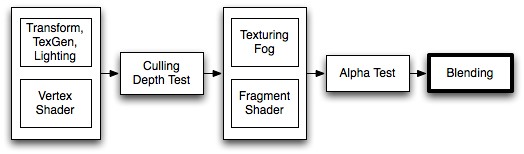
指令说明:
settexture 应用纹理
combine 纹理混合时使用的计算方式
Shader "Examples/2 Alpha Blended Textures" {

    Properties {

        _MainTex ("Base (RGB)", 2D) = "white" {}

        _BlendTex ("Alpha Blended (RGBA) ", 2D) = "white" {}

    }

    SubShader {

        Pass {

            // Apply base texture

            SetTexture [_MainTex] {

                combine texture

            }

            // Blend in the alpha texture using the lerp operator

            SetTexture [_BlendTex] {

                combine texture lerp (texture) previous

            }

        }

    }

}
constantColor 透明通道
Blend 进行阿尔法最后的混合,制作透明的游戏对象
Tags 控制渲染顺序
【官方文档中的一些说明】
Blend operations (混合操作)
可以使用的混合方式:
| Add | Add source and destination together. 源和目标叠加在一起 |
| Sub | Subtract destination from source. 从源上减去 |
| RevSub | Subtract source from destination. |
| Min | Use the smaller of source and destination. |
| Max | Use the larger of source and destination. |
| LogicalClear | Logical operation: Clear (0) DX11.1 only. |
| LogicalSet | Logical operation: Set (1) DX11.1 only. |
| LogicalCopy | Logical operation: Copy (s) DX11.1 only. |
| LogicalCopyInverted | Logical operation: Copy inverted (!s) DX11.1 only. |
| LogicalNoop | Logical operation: Noop (d) DX11.1 only. |
| LogicalInvert | Logical operation: Invert (!d) DX11.1 only. |
| LogicalAnd | Logical operation: And (s & d) DX11.1 only. |
| LogicalNand | Logical operation: Nand !(s & d) DX11.1 only. |
| LogicalOr | Logical operation: Or (s | d) DX11.1 only. |
| LogicalNor | Logical operation: Nor !(s | d) DX11.1 only. |
| LogicalXor | Logical operation: Xor (s ^ d) DX11.1 only. |
| LogicalEquiv | Logical operation: Equivalence !(s ^ d) DX11.1 only. |
| LogicalAndReverse | Logical operation: Reverse And (s & !d) DX11.1 only. |
| LogicalAndInverted | Logical operation: Inverted And (!s & d) DX11.1 only. |
| LogicalOrReverse | Logical operation: Reverse Or (s | !d) DX11.1 only. |
| LogicalOrInverted | Logical operation: Inverted Or (!s | d) DX11.1 only. |
Blend factors (混合因子)
All following properties are valid for both SrcFactor & DstFactor in the Blend command.Source refers to the calculated color, Destination is the color already on the screen. The blend factors are ignored if BlendOp is using logical operations.
所有指令都是使用 SrcFactor & DstFactor 的方式进行混合。 源是指要计算的颜色, 目的地是指当前已经要显示在屏幕上的颜色。 如果忽略了逻辑运算符则使用 BlendOp 方式。
| One | The value of one - use this to let either the source or the destination color come through fully. |
| Zero | The value zero - use this to remove either the source or the destination values. |
| SrcColor | The value of this stage is multiplied by the source color value. |
| SrcAlpha | The value of this stage is multiplied by the source alpha value. |
| DstColor | The value of this stage is multiplied by frame buffer source color value. |
| DstAlpha | The value of this stage is multiplied by frame buffer source alpha value. |
| OneMinusSrcColor | The value of this stage is multiplied by (1 - source color). |
| OneMinusSrcAlpha | The value of this stage is multiplied by (1 - source alpha). |
| OneMinusDstColor | The value of this stage is multiplied by (1 - destination color). |
| OneMinusDstAlpha | The value of this stage is multiplied by (1 - destination alpha). |
Details (详情)
下面是最常用的混合类型:
Blend SrcAlpha OneMinusSrcAlpha // 透明通道混合

Blend One One // Additive 叠加

Blend OneMinusDstColor One // Soft Additive 柔性叠加

Blend DstColor Zero // Multiplicative 相乘

Blend DstColor SrcColor // 2x Multiplicative 2倍乘法
Example (示例)
Shader "Simple Additive" {

    Properties {

        _MainTex ("Texture to blend", 2D) = "black" {}

    }

    SubShader {

        Tags { "Queue" = "Transparent" }

        Pass {

            Blend One One

            SetTexture [_MainTex] { combine texture }

        }

    }

}
Tags 语法
Tags { "TagName1" = "Value1" "TagName2" = "Value2" }
Subshader 语法
Subshader { [Tags] [CommonState] Passdef [Passdef ...] }
[Unity] Shader(着色器)之纹理贴图的更多相关文章
- Unity Shader着色器优化
https://mp.weixin.qq.com/s?__biz=MzU5MjQ1NTEwOA==&mid=2247493518&idx=1&sn=c51b92e9300bcf ...
- [Unity] Shader(着色器)输入输出和语义
在Unity5.x后, 已经支持了基于物理的光照模型,也就是常说的次时代引擎所必须具备的功能. 如果在Properties使用2D,CG里要用sampler2D,代表使用的是2维纹理 如果在Prope ...
- [Unity] Shader(着色器)之固定管线
在Unity中,固定管线Shader的性能是最好的. 什么是固定管线呢? 固定渲染管线 —— 这是标准的几何&光照(T&L)管线,功能是固定的,它控制着世界.视.投影变换及固定光照控制 ...
- Unity3D学习笔记(三十四):Shader着色器(1)
一.GPU:图形处理器,Graphics Processing Unit 显卡的处理器就是图形处理器.与CPU类似. GPU和CPU的区别? 1.CPU主要是为了串行指令设计,GPU则是为了大规模 ...
- Unity 5着色器系统代码介绍(上)
http://forum.china.unity3d.com/thread-25724-1-10.html Unity 5着色器系统代码介绍(上) Unity在着色器开发方面提供了很大的灵活性.有些工 ...
- Unity 几何着色器
Unity 几何着色器 shaderGeometry Shader几何着色器 Unity 几何着色器 如果学习不能带来价值,那将毫无意义 简介 在顶点和片段着色器之间有一个可选的着色器,叫做几 ...
- Unity3D学习笔记(三十五):Shader着色器(2)- 顶点片元着色器
Alpha测试 AlphaTest Great:大于 AlphaTest Less:小于 AlphaTest Equal:等于 AlphaTest GEqual:大于等于 AlphaTest LEqu ...
- Unity 5着色器系统代码介绍(下)
http://forum.china.unity3d.com/thread-25738-1-10.html 上一篇对着色器系统的工作原理做了介绍,现在我们将继续深入,将目光聚焦在标准着色器的光照函数. ...
- Unity 光照着色器
光照着色器需要考虑光照的分类,一般分为漫反射和镜面反射. 漫反射计算基本光照: float brightness=dot(normal,lightDir) 将法线和光的入射方向进行点积运算,求出 ...
随机推荐
- 【转】jquery 中scrollTop在Firefox下不起作用
原文链接:http://stackoverflow.com/questions/8149155/animate-scrolltop-not-working-in-firefox Animate scr ...
- C# 记录错误日志
程序的错误日志如何记录下来? 可以在遇到异常时,Catch异常,然后把异常的信息输出到txt文件中即可 /// <summary> /// 错误日志 /// </summary> ...
- 看php手册2015-03-19版后备注
类与对象->基本概念:1,#############################::class 自 PHP 5.5 起,关键词 class 也可用于类名的解析.使用 ClassName::c ...
- Java程序性能优化——让你的java程序更快、更稳定
1.Java性能调优概述 1.1.Web服务器,响应时间.吞吐量是两个重要的性能参数. 1.2.程序性能的几个表现: 执行速度:程序的反映是否迅速,响应时间是否足够短 内存分配:分配是否合理,是否过多 ...
- 《InsideUE4》-8-GamePlay架构(七)GameMode和GameState
我的世界,我做主 引言 上文我们说到在Actor层次,UE用Controller来充当APawn的逻辑控制者,也有了可以接受玩家输入的PlayerController,和能自行行动的AIControl ...
- 谈谈Java中的ThreadLocal
什么是ThreadLocal ThreadLocal一般称为线程本地变量,它是一种特殊的线程绑定机制,将变量与线程绑定在一起,为每一个线程维护一个独立的变量副本.通过ThreadLocal可以将对象的 ...
- 如何用ZBrush快速绘制身体
Fisker老师用了5节课详细讲解了僵尸的头部制作过程,用了大量时间完善细节部分,在ZBrush3D图形绘制软件中雕刻模型就是这样,需要反复调整与修改,每一个细节都做到极致才是最理想的状态.头部雕刻好 ...
- 使用JS实现前端缓存
在前端浏览器中,有些数据(比如数据字典中的数据),可以在第一次请求的时候全部拿过来保存在js对象中,以后需要的时候就不用每次都去请求服务器了.对于那些大量使用数据字典来填充下拉框的页面,这种方法可以极 ...
- jquery用一个事件控制另一个事件是否执行(不是删除事件)
想用click事件控制mouseover事件的执行,如果用删除绑定mouseover事件以后就不能再使用mouseover了,于是只需要设置一个全局变量,并赋值false,当点击click事件,将全局 ...
- flex引起height:100%失效
<!DOCTYPE html> <html> <head> <meta http-equiv="Content-Type" content ...