
Regression:Generalized Linear Models
作者:桂。
时间:2017-05-22 15:28:43
链接:http://www.cnblogs.com/xingshansi/p/6890048.html

前言
主要记录python工具包:sci-kit learn的基本用法。
本文主要是线性回归模型,包括:
1)普通最小二乘拟合
2)Ridge回归
3)Lasso回归
4)其他常用Linear Models.
一、普通最小二乘
通常是给定数据X,y,利用参数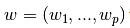 进行线性拟合,准则为最小误差:

该问题的求解可以借助:梯度下降法/最小二乘法,以最小二乘为例:
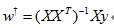
基本用法:
from sklearn import linear_model

reg = linear_model.LinearRegression()

reg.fit ([[0, 0], [1, 1], [2, 2]], [0, 1, 2]) #拟合

reg.coef_#拟合结果

reg.predict(testdata) #预测
给出一个利用training data训练模型,并对test data预测的例子:
# -*- coding: utf-8 -*-

"""

Created on Mon May 22 15:26:03 2017

@author: Nobleding

"""

print(__doc__)

# Code source: Jaques Grobler

# License: BSD 3 clause

import matplotlib.pyplot as plt

import numpy as np

from sklearn import datasets, linear_model

from sklearn.metrics import mean_squared_error, r2_score

# Load the diabetes dataset

diabetes = datasets.load_diabetes()

# Use only one feature

diabetes_X = diabetes.data[:, np.newaxis, 2]

# Split the data into training/testing sets

diabetes_X_train = diabetes_X[:-20]

diabetes_X_test = diabetes_X[-20:]

# Split the targets into training/testing sets

diabetes_y_train = diabetes.target[:-20]

diabetes_y_test = diabetes.target[-20:]

# Create linear regression object

regr = linear_model.LinearRegression()

# Train the model using the training sets

regr.fit(diabetes_X_train, diabetes_y_train)

# Make predictions using the testing set

diabetes_y_pred = regr.predict(diabetes_X_test)

# The coefficients

print('Coefficients: \n', regr.coef_)

# The mean squared error

print("Mean squared error: %.2f"

      % mean_squared_error(diabetes_y_test, diabetes_y_pred))

# Explained variance score: 1 is perfect prediction

print('Variance score: %.2f' % r2_score(diabetes_y_test, diabetes_y_pred))

# Plot outputs

plt.scatter(diabetes_X_test, diabetes_y_test,  color='black')

plt.plot(diabetes_X_test, diabetes_y_pred, color='blue', linewidth=3)

plt.xticks(())

plt.yticks(())

plt.show()
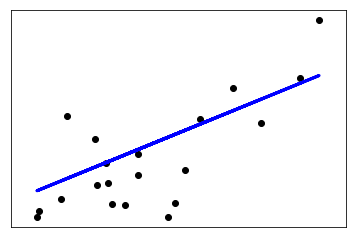
二、Ridge回归
Ridge是在普通最小二乘的基础上添加正则项:

同样可以利用最小二乘求解:
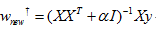
基本用法:
from sklearn import linear_model

reg = linear_model.Ridge (alpha = .5)

reg.fit ([[0, 0], [0, 0], [1, 1]], [0, .1, 1])
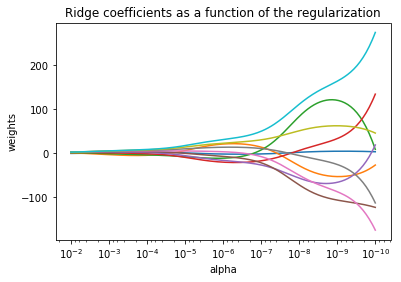
给出一个W随α变化的例子:
print(__doc__)

import numpy as np

import matplotlib.pyplot as plt

from sklearn import linear_model

# X is the 10x10 Hilbert matrix

X = 1. / (np.arange(1, 11) + np.arange(0, 10)[:, np.newaxis])

y = np.ones(10)

n_alphas = 200

alphas = np.logspace(-10, -2, n_alphas)

coefs = []

for a in alphas:

    ridge = linear_model.Ridge(alpha=a, fit_intercept=False)

    ridge.fit(X, y)

    coefs.append(ridge.coef_)

ax = plt.gca()

ax.plot(alphas, coefs)

ax.set_xscale('log')

ax.set_xlim(ax.get_xlim()[::-1])  # reverse axis

plt.xlabel('alpha')

plt.ylabel('weights')

plt.title('Ridge coefficients as a function of the regularization')

plt.axis('tight')

plt.show()
可以看出alpha越小,w越大:
由于存在约束,何时最优呢?一个有效的方式是利用较差验证进行选取,利用Generalized Cross-Validation (GCV):
from sklearn import linear_model

reg = linear_model.RidgeCV(alphas=[0.1, 1.0, 10.0])

reg.fit([[0, 0], [0, 0], [1, 1]], [0, .1, 1])

reg.alpha_
三、Lasso回归
其实添加约束项可以推而广之:

p = 2就是Ridge回归,p = 1就是Lasso回归。
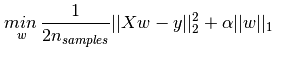
给出Lasso的准则函数:
基本用法:
from sklearn import linear_model

reg = linear_model.Lasso(alpha = 0.1)

reg.fit([[0, 0], [1, 1]], [0, 1])

reg.predict([[1, 1]])
四、ElasticNet
其实就是Lasso与Ridge的折中:

基本用法:
from sklearn.linear_model import ElasticNet

enet = ElasticNet(alpha=alpha, l1_ratio=0.7)

y_pred_enet = enet.fit(X_train, y_train).predict(X_test)
给出信号有Lasso以及ElasticNet回归的对比:
"""

========================================

Lasso and Elastic Net for Sparse Signals

========================================

Estimates Lasso and Elastic-Net regression models on a manually generated

sparse signal corrupted with an additive noise. Estimated coefficients are

compared with the ground-truth.

"""

print(__doc__)

import numpy as np

import matplotlib.pyplot as plt

from sklearn.metrics import r2_score

###############################################################################

# generate some sparse data to play with

np.random.seed(42)

n_samples, n_features = 50, 200

X = np.random.randn(n_samples, n_features)

coef = 3 * np.random.randn(n_features)

inds = np.arange(n_features)

np.random.shuffle(inds)

coef[inds[10:]] = 0  # sparsify coef

y = np.dot(X, coef)

# add noise

y += 0.01 * np.random.normal(size=n_samples)

# Split data in train set and test set

n_samples = X.shape[0]

X_train, y_train = X[:n_samples // 2], y[:n_samples // 2]

X_test, y_test = X[n_samples // 2:], y[n_samples // 2:]

###############################################################################

# Lasso

from sklearn.linear_model import Lasso

alpha = 0.1

lasso = Lasso(alpha=alpha)

y_pred_lasso = lasso.fit(X_train, y_train).predict(X_test)

r2_score_lasso = r2_score(y_test, y_pred_lasso)

print(lasso)

print("r^2 on test data : %f" % r2_score_lasso)

###############################################################################

# ElasticNet

from sklearn.linear_model import ElasticNet

enet = ElasticNet(alpha=alpha, l1_ratio=0.7)

y_pred_enet = enet.fit(X_train, y_train).predict(X_test)

r2_score_enet = r2_score(y_test, y_pred_enet)

print(enet)

print("r^2 on test data : %f" % r2_score_enet)

plt.plot(enet.coef_, color='lightgreen', linewidth=2,

         label='Elastic net coefficients')

plt.plot(lasso.coef_, color='gold', linewidth=2,

         label='Lasso coefficients')

plt.plot(coef, '--', color='navy', label='original coefficients')

plt.legend(loc='best')

plt.title("Lasso R^2: %f, Elastic Net R^2: %f"

          % (r2_score_lasso, r2_score_enet))

plt.show()
Lasso比Elastic是要稀疏一些的:
五、Lasso回归求解
实际应用中,Lasso求解是一类问题——稀疏重构(Sparse reconstrction),顺便总结一下。
对于欠定方程: 其中
其中 ,且
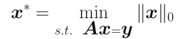
,且 ,此时存在无穷多解,希望求解最稀疏的解:
大牛们已经证明:当矩阵A满足限制等距属性(Restricted isometry propety, RIP)条件时,上述问题可松弛为:

RIP条件(更多细节点击这里):

若y存在加性白噪声: ,则上述问题可以有三种处理形式(某种程度等效,未研究):
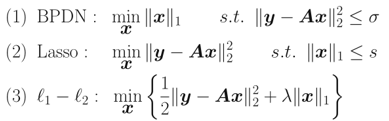
就是这几个问题都可以互相转化求解,以Lasso为例:这类方法很多,如投影梯度算法(Gradient Projection)、最小角回归(LARS)算法。
六、几种回归的联系
事实上,对于线性回归模型:
y = Wx + ε
ε为估计误差。
A-W为均匀分布(最小均方误差)

也就是:

B-W服从高斯分布(Ridge回归)
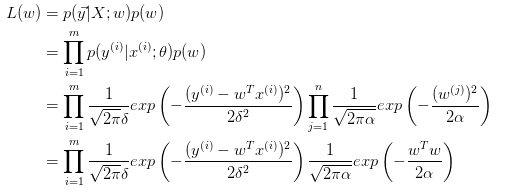
取对数:

等价于:

C-W服从拉普拉斯分布(Lasso回归)
与Ridge推导类似,得出:

三种情况对应的约束边界:

最小二乘:均匀分布就是无约束的情况。
Ridge:
Lasso:
这样对应图形来看就更明显了,可以看出对W的约束是越来越严格的。ElasticNet的情况虽然没有分析,也容易理解:它的限定条件一定介于菱形与圆形两边界之间。
七、其他
更多的拟合可以看链接,用到了补充了,这里列几个以前见过的。
A-最小角回归(Least Angle Regressive,LARS)
LARS算法点击这里。
基本用法:
from sklearn import linear_model

clf = linear_model.Lars(n_nonzero_coefs=1)

clf.fit([[-1, 1], [0, 0], [1, 1]], [-1.1111, 0, -1.1111])

print(clf.coef_)
B-正交匹配追踪(orthogonal matching pursuit, OMP)
OMP思路:
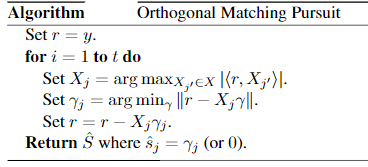
对应准则函数:

也可以写为:

本质上是对重建信号,不断从字典中找出最匹配的基,然后进行表达,表达后的残差:再从字典中找基进行表达,循环往复。
停止的基本条件通常有三类:1)达到指定的迭代次数;2)残差小于给定的门限;3)字典的任意基与残差的相关性小于给定的门限.
基本用法:
"""

===========================

Orthogonal Matching Pursuit

===========================

Using orthogonal matching pursuit for recovering a sparse signal from a noisy

measurement encoded with a dictionary

"""

print(__doc__)

import matplotlib.pyplot as plt

import numpy as np

from sklearn.linear_model import OrthogonalMatchingPursuit

from sklearn.linear_model import OrthogonalMatchingPursuitCV

from sklearn.datasets import make_sparse_coded_signal

n_components, n_features = 512, 100

n_nonzero_coefs = 17

# generate the data

###################

# y = Xw

# |x|_0 = n_nonzero_coefs

y, X, w = make_sparse_coded_signal(n_samples=1,

                                   n_components=n_components,

                                   n_features=n_features,

                                   n_nonzero_coefs=n_nonzero_coefs,

                                   random_state=0)

idx, = w.nonzero()

# distort the clean signal

##########################

y_noisy = y + 0.05 * np.random.randn(len(y))

# plot the sparse signal

########################

plt.figure(figsize=(7, 7))

plt.subplot(4, 1, 1)

plt.xlim(0, 512)

plt.title("Sparse signal")

plt.stem(idx, w[idx])

# plot the noise-free reconstruction

####################################

omp = OrthogonalMatchingPursuit(n_nonzero_coefs=n_nonzero_coefs)

omp.fit(X, y)

coef = omp.coef_

idx_r, = coef.nonzero()

plt.subplot(4, 1, 2)

plt.xlim(0, 512)

plt.title("Recovered signal from noise-free measurements")

plt.stem(idx_r, coef[idx_r])

# plot the noisy reconstruction

###############################

omp.fit(X, y_noisy)

coef = omp.coef_

idx_r, = coef.nonzero()

plt.subplot(4, 1, 3)

plt.xlim(0, 512)

plt.title("Recovered signal from noisy measurements")

plt.stem(idx_r, coef[idx_r])

# plot the noisy reconstruction with number of non-zeros set by CV

##################################################################

omp_cv = OrthogonalMatchingPursuitCV()

omp_cv.fit(X, y_noisy)

coef = omp_cv.coef_

idx_r, = coef.nonzero()

plt.subplot(4, 1, 4)

plt.xlim(0, 512)

plt.title("Recovered signal from noisy measurements with CV")

plt.stem(idx_r, coef[idx_r])

plt.subplots_adjust(0.06, 0.04, 0.94, 0.90, 0.20, 0.38)

plt.suptitle('Sparse signal recovery with Orthogonal Matching Pursuit',

             fontsize=16)

plt.show()
结果图:

C-贝叶斯回归(Bayesian Regression)
其实就是将最小二乘的拟合问题转化为概率问题:

上面分析几种回归关系的时候,概率的部分就是贝叶斯回归的思想。
为什么贝叶斯回归可以避免overfitting?MLE对应最小二乘拟合,Bayessian Regression对应有约束的拟合,这个约束也就是先验概率 。
。
基本用法:
clf = BayesianRidge(compute_score=True)

clf.fit(X, y)
代码示例:
"""

=========================

Bayesian Ridge Regression

=========================

Computes a Bayesian Ridge Regression on a synthetic dataset.

See :ref:`bayesian_ridge_regression` for more information on the regressor.

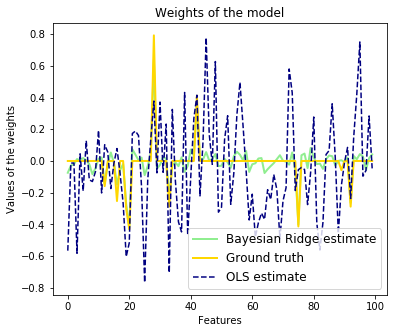
Compared to the OLS (ordinary least squares) estimator, the coefficient

weights are slightly shifted toward zeros, which stabilises them.

As the prior on the weights is a Gaussian prior, the histogram of the

estimated weights is Gaussian.

The estimation of the model is done by iteratively maximizing the

marginal log-likelihood of the observations.

We also plot predictions and uncertainties for Bayesian Ridge Regression

for one dimensional regression using polynomial feature expansion.

Note the uncertainty starts going up on the right side of the plot.

This is because these test samples are outside of the range of the training

samples.

"""

print(__doc__)

import numpy as np

import matplotlib.pyplot as plt

from scipy import stats

from sklearn.linear_model import BayesianRidge, LinearRegression

###############################################################################

# Generating simulated data with Gaussian weights

np.random.seed(0)

n_samples, n_features = 100, 100

X = np.random.randn(n_samples, n_features)  # Create Gaussian data

# Create weights with a precision lambda_ of 4.

lambda_ = 4.

w = np.zeros(n_features)

# Only keep 10 weights of interest

relevant_features = np.random.randint(0, n_features, 10)

for i in relevant_features:

    w[i] = stats.norm.rvs(loc=0, scale=1. / np.sqrt(lambda_))

# Create noise with a precision alpha of 50.

alpha_ = 50.

noise = stats.norm.rvs(loc=0, scale=1. / np.sqrt(alpha_), size=n_samples)

# Create the target

y = np.dot(X, w) + noise

###############################################################################

# Fit the Bayesian Ridge Regression and an OLS for comparison

clf = BayesianRidge(compute_score=True)

clf.fit(X, y)

ols = LinearRegression()

ols.fit(X, y)

###############################################################################

# Plot true weights, estimated weights, histogram of the weights, and

# predictions with standard deviations

lw = 2

plt.figure(figsize=(6, 5))

plt.title("Weights of the model")

plt.plot(clf.coef_, color='lightgreen', linewidth=lw,

         label="Bayesian Ridge estimate")

plt.plot(w, color='gold', linewidth=lw, label="Ground truth")

plt.plot(ols.coef_, color='navy', linestyle='--', label="OLS estimate")

plt.xlabel("Features")

plt.ylabel("Values of the weights")

plt.legend(loc="best", prop=dict(size=12))
D-多项式回归(Polynomial regression)
上文的最小二乘拟合可以理解成多元回归问题。多项式回归可以转化为多元回归问题。
对于

令

则

这就是多元回归问题了。
基本用法(阶数需指定):
print(__doc__)

# Author: Mathieu Blondel

#         Jake Vanderplas

# License: BSD 3 clause

import numpy as np

import matplotlib.pyplot as plt

from sklearn.linear_model import Ridge

from sklearn.preprocessing import PolynomialFeatures

from sklearn.pipeline import make_pipeline

def f(x):

    """ function to approximate by polynomial interpolation"""

    return x * np.sin(x)

# generate points used to plot

x_plot = np.linspace(0, 10, 100)

# generate points and keep a subset of them

x = np.linspace(0, 10, 100)

rng = np.random.RandomState(0)

rng.shuffle(x)

x = np.sort(x[:20])

y = f(x)

# create matrix versions of these arrays

X = x[:, np.newaxis]

X_plot = x_plot[:, np.newaxis]

colors = ['teal', 'yellowgreen', 'gold']

lw = 2

plt.plot(x_plot, f(x_plot), color='cornflowerblue', linewidth=lw,

         label="ground truth")

plt.scatter(x, y, color='navy', s=30, marker='o', label="training points")

for count, degree in enumerate([3, 4, 5]):

    model = make_pipeline(PolynomialFeatures(degree), Ridge())

    model.fit(X, y)

    y_plot = model.predict(X_plot)

    plt.plot(x_plot, y_plot, color=colors[count], linewidth=lw,

             label="degree %d" % degree)

plt.legend(loc='lower left')

plt.show()
E-罗杰斯特回归(Logistic regression)
这个之前有梳理过。
L2约束(就是softmax衰减的情况):

也可以是L1约束:

基本用法:
"""

==============================================

L1 Penalty and Sparsity in Logistic Regression

==============================================

Comparison of the sparsity (percentage of zero coefficients) of solutions when

L1 and L2 penalty are used for different values of C. We can see that large

values of C give more freedom to the model.  Conversely, smaller values of C

constrain the model more. In the L1 penalty case, this leads to sparser

solutions.

We classify 8x8 images of digits into two classes: 0-4 against 5-9.

The visualization shows coefficients of the models for varying C.

"""

print(__doc__)

# Authors: Alexandre Gramfort <alexandre.gramfort@inria.fr>

#          Mathieu Blondel <mathieu@mblondel.org>

#          Andreas Mueller <amueller@ais.uni-bonn.de>

# License: BSD 3 clause

import numpy as np

import matplotlib.pyplot as plt

from sklearn.linear_model import LogisticRegression

from sklearn import datasets

from sklearn.preprocessing import StandardScaler

digits = datasets.load_digits()

X, y = digits.data, digits.target

X = StandardScaler().fit_transform(X)

# classify small against large digits

y = (y > 4).astype(np.int)

# Set regularization parameter

for i, C in enumerate((100, 1, 0.01)):

    # turn down tolerance for short training time

    clf_l1_LR = LogisticRegression(C=C, penalty='l1', tol=0.01)

    clf_l2_LR = LogisticRegression(C=C, penalty='l2', tol=0.01)

    clf_l1_LR.fit(X, y)

    clf_l2_LR.fit(X, y)

    coef_l1_LR = clf_l1_LR.coef_.ravel()

    coef_l2_LR = clf_l2_LR.coef_.ravel()

    # coef_l1_LR contains zeros due to the

    # L1 sparsity inducing norm

    sparsity_l1_LR = np.mean(coef_l1_LR == 0) * 100

    sparsity_l2_LR = np.mean(coef_l2_LR == 0) * 100

    print("C=%.2f" % C)

    print("Sparsity with L1 penalty: %.2f%%" % sparsity_l1_LR)

    print("score with L1 penalty: %.4f" % clf_l1_LR.score(X, y))

    print("Sparsity with L2 penalty: %.2f%%" % sparsity_l2_LR)

    print("score with L2 penalty: %.4f" % clf_l2_LR.score(X, y))

    l1_plot = plt.subplot(3, 2, 2 * i + 1)

    l2_plot = plt.subplot(3, 2, 2 * (i + 1))

    if i == 0:

        l1_plot.set_title("L1 penalty")

        l2_plot.set_title("L2 penalty")

    l1_plot.imshow(np.abs(coef_l1_LR.reshape(8, 8)), interpolation='nearest',

                   cmap='binary', vmax=1, vmin=0)

    l2_plot.imshow(np.abs(coef_l2_LR.reshape(8, 8)), interpolation='nearest',

                   cmap='binary', vmax=1, vmin=0)

    plt.text(-8, 3, "C = %.2f" % C)

    l1_plot.set_xticks(())

    l1_plot.set_yticks(())

    l2_plot.set_xticks(())

    l2_plot.set_yticks(())

plt.show()
8X8的figure,不同C取值:

F-随机梯度下降(Stochastic Gradient Descent, SGD)
基本用法:
from sklearn.linear_model import SGDClassifier

X = [[0., 0.], [1., 1.]]

y = [0, 1]

clf = SGDClassifier(loss="hinge", penalty="l2")

clf.fit(X, y)
其中涉及到:SGDClassifier,Linear classifiers (SVM, logistic regression, a.o.) with SGD training.提供了分类与回归的应用:
The classes
SGDClassifierandSGDRegressorprovide functionality to fit linear models for classification and regression using different (convex) loss functions and different penalties. E.g., withloss="log",SGDClassifierfits a logistic regression model, while withloss="hinge"it fits a linear support vector machine (SVM).
以分类为例:
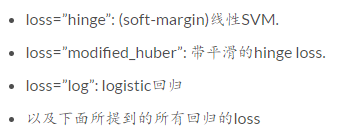
clf = SGDClassifier(loss="log").fit(X, y)
其中loss:
 'hinge', 'log', 'modified_huber', 'squared_hinge',\

                'perceptron', or a regression loss: 'squared_loss', 'huber',\

                'epsilon_insensitive', or 'squared_epsilon_insensitive'
应用实例:
print(__doc__)

import numpy as np

import matplotlib.pyplot as plt

from sklearn import datasets

from sklearn.linear_model import SGDClassifier

# import some data to play with

iris = datasets.load_iris()

X = iris.data[:, :2]  # we only take the first two features. We could

                      # avoid this ugly slicing by using a two-dim dataset

y = iris.target

colors = "bry"

# shuffle

idx = np.arange(X.shape[0])

np.random.seed(13)

np.random.shuffle(idx)

X = X[idx]

y = y[idx]

# standardize

mean = X.mean(axis=0)

std = X.std(axis=0)

X = (X - mean) / std

h = .02  # step size in the mesh

clf = SGDClassifier(alpha=0.001, n_iter=100).fit(X, y)

# create a mesh to plot in

x_min, x_max = X[:, 0].min() - 1, X[:, 0].max() + 1

y_min, y_max = X[:, 1].min() - 1, X[:, 1].max() + 1

xx, yy = np.meshgrid(np.arange(x_min, x_max, h),

                     np.arange(y_min, y_max, h))

# Plot the decision boundary. For that, we will assign a color to each

# point in the mesh [x_min, x_max]x[y_min, y_max].

Z = clf.predict(np.c_[xx.ravel(), yy.ravel()])

# Put the result into a color plot

Z = Z.reshape(xx.shape)

cs = plt.contourf(xx, yy, Z, cmap=plt.cm.Paired)

plt.axis('tight')

# Plot also the training points

for i, color in zip(clf.classes_, colors):

    idx = np.where(y == i)

    plt.scatter(X[idx, 0], X[idx, 1], c=color, label=iris.target_names[i],

                cmap=plt.cm.Paired)

plt.title("Decision surface of multi-class SGD")

plt.axis('tight')

# Plot the three one-against-all classifiers

xmin, xmax = plt.xlim()

ymin, ymax = plt.ylim()

coef = clf.coef_

intercept = clf.intercept_

def plot_hyperplane(c, color):

    def line(x0):

        return (-(x0 * coef[c, 0]) - intercept[c]) / coef[c, 1]

    plt.plot([xmin, xmax], [line(xmin), line(xmax)],

             ls="--", color=color)

for i, color in zip(clf.classes_, colors):

    plot_hyperplane(i, color)

plt.legend()

plt.show()
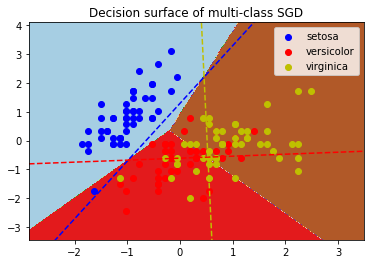
G-感知器(Perceptron)
之前梳理过。SGDClassifier中包含Perceptron。
H-随机采样一致(Random sample consensus, RANSAC)
之前梳理过。Ransac是数据预处理的操作。
基本用法:
ransac = linear_model.RANSACRegressor()

ransac.fit(X, y)
应用实例:
import numpy as np

from matplotlib import pyplot as plt

from sklearn import linear_model, datasets

n_samples = 1000

n_outliers = 50

X, y, coef = datasets.make_regression(n_samples=n_samples, n_features=1,

                                      n_informative=1, noise=10,

                                      coef=True, random_state=0)

# Add outlier data

np.random.seed(0)

X[:n_outliers] = 3 + 0.5 * np.random.normal(size=(n_outliers, 1))

y[:n_outliers] = -3 + 10 * np.random.normal(size=n_outliers)

# Fit line using all data

lr = linear_model.LinearRegression()

lr.fit(X, y)

# Robustly fit linear model with RANSAC algorithm

ransac = linear_model.RANSACRegressor()

ransac.fit(X, y)

inlier_mask = ransac.inlier_mask_

outlier_mask = np.logical_not(inlier_mask)

# Predict data of estimated models

line_X = np.arange(X.min(), X.max())[:, np.newaxis]

line_y = lr.predict(line_X)

line_y_ransac = ransac.predict(line_X)

# Compare estimated coefficients

print("Estimated coefficients (true, linear regression, RANSAC):")

print(coef, lr.coef_, ransac.estimator_.coef_)

lw = 2

plt.scatter(X[inlier_mask], y[inlier_mask], color='yellowgreen', marker='.',

            label='Inliers')

plt.scatter(X[outlier_mask], y[outlier_mask], color='gold', marker='.',

            label='Outliers')

plt.plot(line_X, line_y, color='navy', linewidth=lw, label='Linear regressor')

plt.plot(line_X, line_y_ransac, color='cornflowerblue', linewidth=lw,

         label='RANSAC regressor')

plt.legend(loc='lower right')

plt.xlabel("Input")

plt.ylabel("Response")

plt.show()

参考:
- http://scikit-learn.org/dev/supervised_learning.html#supervised-learning
- https://www.zhihu.com/question/23536142
Regression:Generalized Linear Models的更多相关文章
- [Scikit-learn] 1.1 Generalized Linear Models - from Linear Regression to L1&L2
Introduction 一.Scikit-learning 广义线性模型 From: http://sklearn.lzjqsdd.com/modules/linear_model.html#ord ...
- [Scikit-learn] 1.5 Generalized Linear Models - SGD for Regression
梯度下降 一.亲手实现“梯度下降” 以下内容其实就是<手动实现简单的梯度下降>. 神经网络的实践笔记,主要包括: Logistic分类函数 反向传播相关内容 Link: http://pe ...
- [Scikit-learn] 1.1 Generalized Linear Models - Logistic regression & Softmax
二分类:Logistic regression 多分类:Softmax分类函数 对于损失函数,我们求其最小值, 对于似然函数,我们求其最大值. Logistic是loss function,即: 在逻 ...
- Popular generalized linear models|GLMM| Zero-truncated Models|Zero-Inflated Models|matched case–control studies|多重logistics回归|ordered logistics regression
============================================================== Popular generalized linear models 将不同 ...
- [Scikit-learn] 1.5 Generalized Linear Models - SGD for Classification
NB: 因为softmax,NN看上去是分类,其实是拟合(回归),拟合最大似然. 多分类参见:[Scikit-learn] 1.1 Generalized Linear Models - Logist ...
- 广义线性模型(Generalized Linear Models)
前面的文章已经介绍了一个回归和一个分类的例子.在逻辑回归模型中我们假设: 在分类问题中我们假设: 他们都是广义线性模型中的一个例子,在理解广义线性模型之前需要先理解指数分布族. 指数分布族(The E ...
- Andrew Ng机器学习公开课笔记 -- Generalized Linear Models
网易公开课,第4课 notes,http://cs229.stanford.edu/notes/cs229-notes1.pdf 前面介绍一个线性回归问题,符合高斯分布 一个分类问题,logstic回 ...
- Generalized Linear Models
作者:桂. 时间:2017-05-22 15:28:43 链接:http://www.cnblogs.com/xingshansi/p/6890048.html 前言 主要记录python工具包:s ...
- [Scikit-learn] 1.1 Generalized Linear Models - Lasso Regression
Ref: http://blog.csdn.net/daunxx/article/details/51596877 Ref: https://www.youtube.com/watch?v=ipb2M ...
随机推荐
- python 爬取w3shcool的JQuery的课程并且保存到本地
最近在忙于找工作,闲暇之余,也找点爬虫项目练练手,写写代码,知道自己是个菜鸟,但是要多加练习,书山有路勤为径.各位爷有测试坑可以给我介绍个啊,自动化,功能,接口都可以做. 首先呢,我们明确需求,很多同 ...
- JavascriptS中的各结构的嵌套和函数
各位朋友大家好,上周更新给大家分享了JavaScript的入门知识及各种常用结构的用法,那么,本次更新博主就跟大家更深入的聊一聊JS各结构的嵌套用法,及JS中及其常用的一种结构--函数.以下为函数和循 ...
- python的MySQLdb模块在linux环境下的安装
开始学习python数据库编程后,在了解了基本概念,打算上手试验一下时,卡在了MYSQLdb包的安装上,折腾了半天才解决.记录一下我在linux中安装此包遇到的问题.系统是ubuntn15.04. 1 ...
- MapReduce中一次reduce方法的调用中key的值不断变化分析及源码解析
摘要:mapreduce中执行reduce(KEYIN key, Iterable<VALUEIN> values, Context context),调用一次reduce方法,迭代val ...
- 简单的后台数据和前台数据交互.net
最近忙着做POS项目,心血来来潮写了点小项目. 更具要求是随机显示数据并且产生的数据是可以控制的.前台交互显示能够倒叙,切每次只显示一条,页面不能超过20条超过的部分做删除. 我先展示一下前台的代码, ...
- Windows 和 Mac 系统下安装git 并上传,修改项目
首先在MAC上怎么操作. 在gitHub创立一个账户,在创立一个项目,这就不用我说了对吧. 创建完之后是这样的: 接下来,我们打开https://brew.sh 这是下载homebrew的网站,hom ...
- C语言结构体中字符数组的问题
第一个程序 #include <stdio.h> #include <string.h> typedef struct student { char name[10]; int ...
- shell 分割字符串存至数组
shell 分割字符串存至数组 shell编程中,经常需要将由特定分割符分割的字符串分割成数组,多数情况下我们首先会想到使用awk但是实际上用shell自带的分割数组功能会更方便.假如a=”one,t ...
- jmeter导入DB数据再再优化
前言:分享和规定命名规范后,各位测试人员一致认为这样jmeter的jmx文件限制太死,主要体现六方面: 第一:规定了一个jmx文件只能录入一个接口,这样会导致jmx文件很多 第二:导入DB的jmx文件 ...
- yum安装网络配置图形界面
实战:为了方便使用网络配置我们安装插件tui 操作如下: [root@localhost ~]# yum install NetworkManager-tui已加载插件:fastestmirror, ...