
Django REST framework+Vue 打造生鲜超市(五)
目录
生鲜超市(十) 生鲜超市(十一) 生鲜超市(十二) 生鲜超市(十三)
代码下载
教程
学习自慕课网-前端vue结合后端DjangoFramework的在线生鲜超市
六、商品类别数据展示
6.1. 商品类别数据接口
(1)商品分类有两个接口:
一种是全部分类:一级二级三级
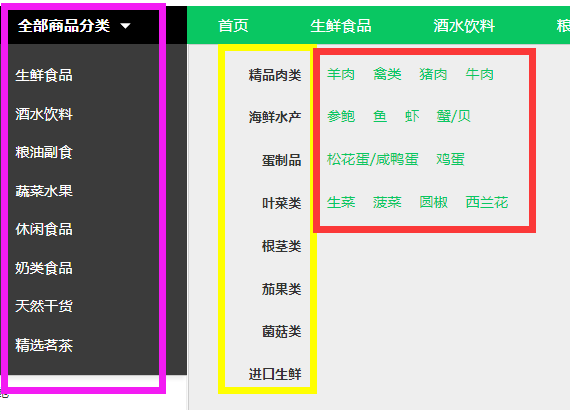
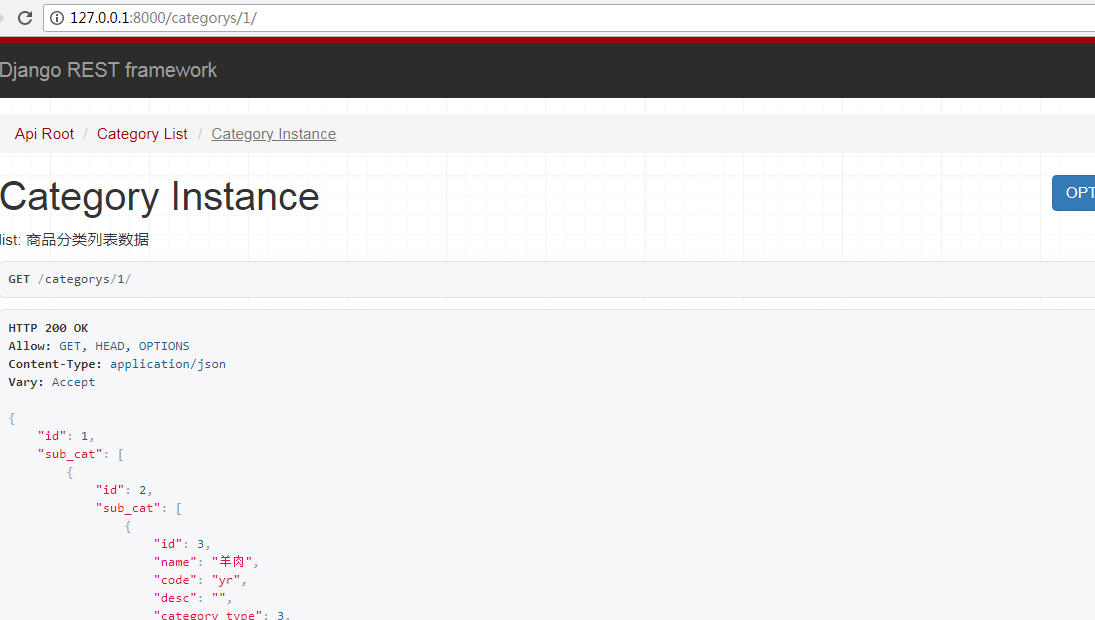
一种是某一类的分类以及商品详细信息:

开始写商品分类的接口
(2)序列化
给分类添加三级分类的serializer
goods/serializers.py
from rest_framework import serializers

from .models import Goods,GoodsCategory

class CategorySerializer3(serializers.ModelSerializer):

    '''三级分类'''

    class Meta:

        model = GoodsCategory

        fields = "__all__"

class CategorySerializer2(serializers.ModelSerializer):

    '''

    二级分类

    '''

    #在parent_category字段中定义的related_name="sub_cat"

    sub_cat = CategorySerializer3(many=True)

    class Meta:

        model = GoodsCategory

        fields = "__all__"

class CategorySerializer(serializers.ModelSerializer):

    """

    商品一级类别序列化

    """

    sub_cat = CategorySerializer2(many=True)

    class Meta:

        model = GoodsCategory

        fields = "__all__"
(3)views.py
class CategoryViewSet(mixins.ListModelMixin, mixins.RetrieveModelMixin, viewsets.GenericViewSet):

    '''

    list:

        商品分类列表数据

    '''

    queryset = GoodsCategory.objects.filter(category_type=1)
serializer_class = CategorySerializer
说明:
- 注释的内容,在后面生成drf文档的时候会显示出来,所有要写清楚
- 要想获取某一个商品的详情的时候,继承 mixins.RetrieveModelMixin 就可以了
(4)url配置
# 配置Category的url

router.register(r'categorys', CategoryViewSet, base_name="categorys")
6.2.vue展示商品分类数据
接口相关代码都放在src/api/api.js里面,调试接口的时候我们首先需要新建一个自己的host,然后替换要调试的host
(1)新建local_host
let local_host = 'http://127.0.0.1:8000'
(2)替换商品类别默认的host
//获取商品类别信息

export const getCategory = params => {

  if('id' in params){

    return axios.get(`${local_host}/categorys/`+params.id+'/');

  }

  else {

    return axios.get(`${local_host}/categorys/`, params);

  }

};
这个时候访问 http://127.0.0.1:8080/#/app/home/index
发现不显示商品分类了,是因为这涉及到了跨域问题,接下来就解决跨域的问题

drf跨域问题
后端服务器解决跨域问题的方法
(1)安装模块
pip install django-cors-headers
django-cors-headers 使用说明:https://github.com/ottoyiu/django-cors-headers
(2)添加到INSTALL_APPS中
INSTALLED_APPS = (

    ...
'coreschema',
... )
(3)添加中间件
下面添加中间件的说明:
CorsMiddleware should be placed as high as possible, especially before any middleware that can generate responses such as Django's CommonMiddleware or Whitenoise's WhiteNoiseMiddleware. If it is not before, it will not be able to add the CORS headers to these responses.
Also if you are using CORS_REPLACE_HTTPS_REFERER it should be placed before Django's CsrfViewMiddleware (see more below).
意思就是 要放的尽可能靠前,必须在CsrfViewMiddleware之前。我们直接放在第一个位置就好了
MIDDLEWARE = [

    'corsheaders.middleware.CorsMiddleware',

    'django.middleware.security.SecurityMiddleware',

    'django.contrib.sessions.middleware.SessionMiddleware',

    'django.middleware.common.CommonMiddleware',

    'django.middleware.csrf.CsrfViewMiddleware',

    'django.contrib.auth.middleware.AuthenticationMiddleware',

    'django.contrib.messages.middleware.MessageMiddleware',

    'django.middleware.clickjacking.XFrameOptionsMiddleware',

]
(4)设置为True
CORS_ORIGIN_ALLOW_ALL = True
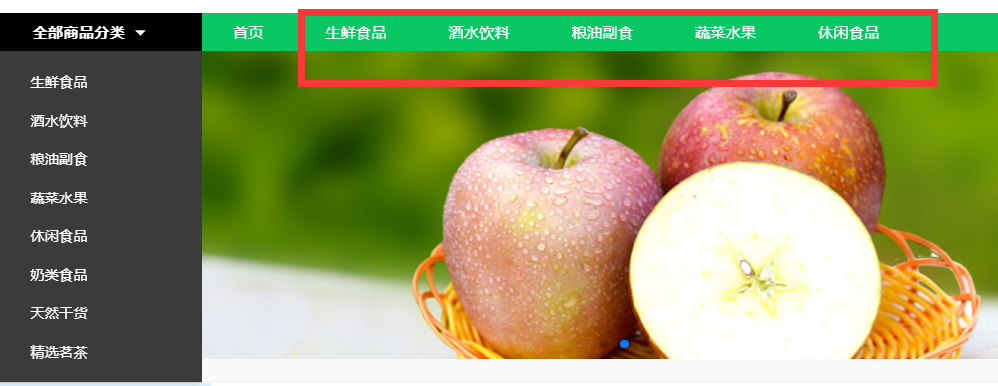
现在再访问 http://127.0.0.1:8080/#/app/home/index 数据就可以填充进来了
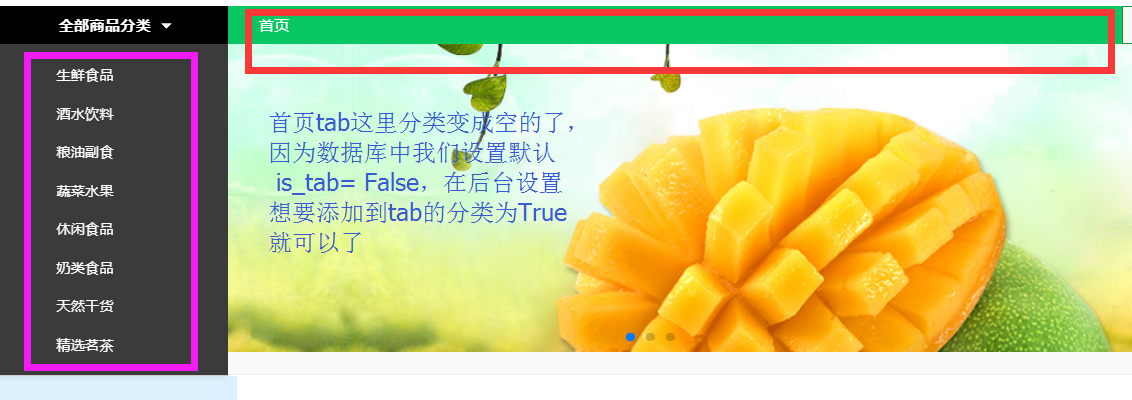
在一级分类中设置为True
6.3.vue展示商品列表页数据
商品列表页会判断我们是serach还是getGoods
getListData() {

                if(this.pageType=='search'){

                  getGoods({

                    search: this.searchWord, //搜索关键词

                  }).then((response)=> {

                    this.listData = response.data.results;

                    this.proNum = response.data.count;

                  }).catch(function (error) {

                    console.log(error);

                  });

                }else {

                  getGoods({

                    page: this.curPage, //当前页码

                    top_category: this.top_category, //商品类型

                    ordering: this.ordering, //排序类型

                    pricemin: this.pricemin, //价格最低 默认为‘’ 即为不选价格区间

                    pricemax: this.pricemax // 价格最高 默认为‘’

                  }).then((response)=> {

                    this.listData = response.data.results;

                    this.proNum = response.data.count;

                  }).catch(function (error) {

                    console.log(error);

                  });

                }

            },
说明:
(1)page分页
page_size数量与前端一致
页码参数与起前端一致"page"
class GoodsPagination(PageNumberPagination):

    '''

    商品列表自定义分页

    '''

    #默认每页显示的个数

    page_size = 12

    #可以动态改变每页显示的个数

    page_size_query_param = 'page_size'

    #页码参数

    page_query_param = 'page'

    #最多能显示多少页

    max_page_size = 100
(2)过滤
top_category是商品的一级分类,需要传入参数:一级分类的id
pricemin和pricemax与前端保持一致
获取一级分类下的所有商品
# goods/filters.py

import django_filters

from .models import Goods

from django.db.models import Q

class GoodsFilter(django_filters.rest_framework.FilterSet):

    '''

    商品过滤的类

    '''

    #两个参数,name是要过滤的字段,lookup是执行的行为,‘小与等于本店价格’

    pricemin = django_filters.NumberFilter(name="shop_price", lookup_expr='gte')

    pricemax = django_filters.NumberFilter(name="shop_price", lookup_expr='lte')

    top_category = django_filters.NumberFilter(name="category", method='top_category_filter')

    def top_category_filter(self, queryset, name, value):

        # 不管当前点击的是一级分类二级分类还是三级分类,都能找到。

        return queryset.filter(Q(category_id=value) | Q(category__parent_category_id=value) | Q(

            category__parent_category__parent_category_id=value))

    class Meta:

        model = Goods

        fields = ['pricemin', 'pricemax']
(3)排序
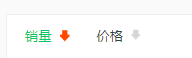
GoodsListViewSet中ording与前端要一致
   #排序

    ordering_fields = ('sold_num', 'shop_price')
(4)替换为local_host
//获取商品列表

export const getGoods = params => { return axios.get(`${local_host}/goods/`, { params: params }) }
(5)搜索
   #搜索

    search_fields = ('name', 'goods_brief', 'goods_desc')
现在就可以从后台获取商品的数据了,主要功能
- 分类过滤
- 价格区间过滤
- 显示商品数量
- 分页
- 搜索

所有代码:
# MxShop/urls.py

__author__ = 'derek'

from django.urls import path,include,re_path

import xadmin

from django.views.static import serve

from MxShop.settings import MEDIA_ROOT

# from goods.view_base import GoodsListView

from rest_framework.documentation import include_docs_urls

from goods.views import GoodsListViewSet,CategoryViewSet

from rest_framework.routers import DefaultRouter

router = DefaultRouter()

#配置goods的url

router.register(r'goods', GoodsListViewSet,base_name='goods')

# 配置Category的url

router.register(r'categorys', CategoryViewSet, base_name="categorys")

urlpatterns = [

    path('xadmin/', xadmin.site.urls),

    path('api-auth/',include('rest_framework.urls')),

    path('ueditor/',include('DjangoUeditor.urls' )),

    #文件

    path('media/<path:path>',serve,{'document_root':MEDIA_ROOT}),

    #drf文档,title自定义

    path('docs',include_docs_urls(title='仙剑奇侠传')),

    #商品列表页

    re_path('^', include(router.urls)),

]
MxShop/urls.py
# goods/filters.py

import django_filters

from .models import Goods

from django.db.models import Q

class GoodsFilter(django_filters.rest_framework.FilterSet):

    '''

    商品过滤的类

    '''

    #两个参数,name是要过滤的字段,lookup是执行的行为,‘小与等于本店价格’

    pricemin = django_filters.NumberFilter(name="shop_price", lookup_expr='gte')

    pricemax = django_filters.NumberFilter(name="shop_price", lookup_expr='lte')

    top_category = django_filters.NumberFilter(name="category", method='top_category_filter')

    def top_category_filter(self, queryset, name, value):

        # 不管当前点击的是一级分类二级分类还是三级分类,都能找到。

        return queryset.filter(Q(category_id=value) | Q(category__parent_category_id=value) | Q(

            category__parent_category__parent_category_id=value))

    class Meta:

        model = Goods

        fields = ['pricemin', 'pricemax']
goods/filters.py
# goods/serializers.py

from rest_framework import serializers

from .models import Goods,GoodsCategory

class CategorySerializer3(serializers.ModelSerializer):

    '''三级分类'''

    class Meta:

        model = GoodsCategory

        fields = "__all__"

class CategorySerializer2(serializers.ModelSerializer):

    '''

    二级分类

    '''

    #在parent_category字段中定义的related_name="sub_cat"

    sub_cat = CategorySerializer3(many=True)

    class Meta:

        model = GoodsCategory

        fields = "__all__"

class CategorySerializer(serializers.ModelSerializer):

    """

    商品一级类别序列化

    """

    sub_cat = CategorySerializer2(many=True)

    class Meta:

        model = GoodsCategory

        fields = "__all__"

#ModelSerializer实现商品列表页

class GoodsSerializer(serializers.ModelSerializer):

    #覆盖外键字段

    category = CategorySerializer()

    class Meta:

        model = Goods

        fields = '__all__'
goods/serializers.py
# googd/views.py

from rest_framework.views import APIView

from goods.serializers import GoodsSerializer,CategorySerializer

from .models import Goods,GoodsCategory

from rest_framework.response import Response

from rest_framework import mixins

from rest_framework import generics

from rest_framework.pagination import PageNumberPagination

from rest_framework import viewsets

from .filters import GoodsFilter

from django_filters.rest_framework import DjangoFilterBackend

from rest_framework import filters

class GoodsPagination(PageNumberPagination):

    '''

    商品列表自定义分页

    '''

    #默认每页显示的个数

    page_size = 12

    #可以动态改变每页显示的个数

    page_size_query_param = 'page_size'

    #页码参数

    page_query_param = 'page'

    #最多能显示多少页

    max_page_size = 100

class GoodsListViewSet(mixins.ListModelMixin,viewsets.GenericViewSet):

    '''

    商品列表,分页,搜索,过滤,排序

    '''

    #这里必须要定义一个默认的排序,否则会报错

    queryset = Goods.objects.all()

    # 分页

    pagination_class = GoodsPagination

    #序列化

    serializer_class = GoodsSerializer

    filter_backends = (DjangoFilterBackend,filters.SearchFilter,filters.OrderingFilter)

    # 设置filter的类为我们自定义的类

    #过滤

    filter_class = GoodsFilter

    #搜索

    search_fields = ('name', 'goods_brief', 'goods_desc')

    #排序

    ordering_fields = ('sold_num', 'shop_price')

class CategoryViewSet(mixins.ListModelMixin, mixins.RetrieveModelMixin, viewsets.GenericViewSet):

    '''

    list:

        商品分类列表数据

    '''

    queryset = GoodsCategory.objects.filter(category_type=1)

    serializer_class = CategorySerializer
goods/views.py
Django REST framework+Vue 打造生鲜超市(四)
Django REST framework+Vue 打造生鲜超市(三)
Django REST framework+Vue 打造生鲜超市(二)
Django REST framework+Vue 打造生鲜超市(一)
Django REST framework+Vue 打造生鲜超市(五)的更多相关文章
- Django REST framework+Vue 打造生鲜超市(三)
四.xadmin后台管理 4.1.xadmin添加富文本插件 (1)xadmin/plugins文件夹下新建文件ueditor.py 代码如下: # xadmin/plugins/ueditor.py ...
- Django REST framework+Vue 打造生鲜超市(四)
五.商品列表页 5.1.django的view实现商品列表页 (1)goods/view_base.py 在goods文件夹下面新建view_base.py,为了区分django和django res ...
- Django REST framework+Vue 打造生鲜超市(十二)
十三.首页.商品数量.缓存和限速功能开发 13.1.轮播图接口实现 首先把pycharm环境改成本地的,vue中local_host也改成本地 (1)goods/serializer class B ...
- Django REST framework+Vue 打造生鲜超市(一)
一.项目介绍 1.1.掌握的技术 Vue + Django Rest Framework 前后端分离技术 彻底玩转restful api 开发流程 Django Rest Framework 的功能实 ...
- Django REST framework+Vue 打造生鲜超市(二)
三.Models设计 3.1.项目初始化 (1)进虚拟环境下安装 django2.0.2 djangorestframework和相关依赖mark,filter pillow 图片处理 pip in ...
- Django REST framework+Vue 打造生鲜超市(六)
七.用户登录与手机注册 7.1.drf的token (1)INSTALL_APP中添加 INSTALLED_APPS = ( ... 'rest_framework.authtoken' ) toke ...
- Django REST framework+Vue 打造生鲜超市(十)
十一.pycharm远程代码调试 第三方登录和支付,都需要有服务器才行(回调url),我们可以用pycharm去远程调试服务器代码 服务器环境搭建 以全新阿里云centos7系统为例: 11.1.阿里 ...
- Django REST framework+Vue 打造生鲜超市(十一)
十二.支付宝沙箱环境配置 12.1.创建应用 进入蚂蚁金服开放平台(https://open.alipay.com/platform/home.htm),登录后进入管理中心-->>应用列表 ...
- Django REST framework+Vue 打造生鲜超市(十三)
目录 生鲜超市(一) 生鲜超市(二) 生鲜超市(三) 生鲜超市(四) 生鲜超市(五) 生鲜超市(六) 生鲜超市(七) 生鲜超市(八) 生鲜超市(九) 生鲜超市(十) ...
随机推荐
- CCF-CSP 201709-4通信网络
问题描述 某国的军队由N个部门组成,为了提高安全性,部门之间建立了M条通路,每条通路只能单向传递信息,即一条从部门a到部门b的通路只能由a向b传递信息.信息可以通过中转的方式进行传递,即如果a能将信息 ...
- IntelliJ Idea常用的快捷键
以下是IntelliJ Idea2017版的,基本上不会有什么变化 IntelliJ Idea这个编译器现在非常流行,他强大的快捷键非常好用,相比于eclipse,IntelliJ Idea界面也比e ...
- jsp的两种跳转方式和区别
1.forward跳转: 服务器端跳转,地址栏不改变: 执行到跳转语句后马上无条件跳转,之后的代码不再执行(跳转之前一定要释放全部资源): request设置的属性在跳转后的页面仍可以使用: 使用&l ...
- 笔记:Maven 仓库和插件配置本机私服
通过配置POM中的配置仓库和插件仓库,只在当前项目生效,而实际应用中,我们希望通过一次配置就能让本机所有的Maven项目都使用自己的Maven私服,这个时候我们需要配置 settings.xml文件, ...
- console.log(0.2+0.4===0.6)// true or false??
在正常的数学逻辑思维中,0.2+0.4===0.6这个逻辑是正确的,但是在JavaScript中0.2+0.4!==0.6这是为什么呢?这个问题也会偶尔被用来当做面试题来考查面试者对 JavaScri ...
- Redis 集群环境添加节点失败问题
最近在给公司网管系统Redis集群环境添加节点时候遇到一个问题,提示新增的Node不为空: [root@node00 src]# ./redis-trib.rb add-node --slave -- ...
- 设计模式 --> (7)外观模式
外观模式 外观模式为子系统中的一组接口提供一个一致的界面, 外观模式定义了一个高层接口,这个接口使得这一子系统更加容易使用. 适用性 1.为一个复杂子系统提供一个简单接口. 2.提高子系统的独立性. ...
- 在Anacoda中管理多个版本Python
win10. 在cmd窗口中输入 conda info --envs 或者 conda env list 查看已经安装的环境,当前活动的环境前会加*号. 在cmd窗口(终端窗口)或anaconda p ...
- 解决Hash碰撞冲突方法总结
Hash碰撞冲突 我们知道,对象Hash的前提是实现equals()和hashCode()两个方法,那么HashCode()的作用就是保证对象返回唯一hash值,但当两个对象计算值一样时,这就发生了碰 ...
- Java基础学习笔记二 Java基础语法
注释 注释用来解释和说明程序的文字,注释是不会被执行的. 单行注释 //这是一条单行注释 public int i; 多行注释 /* 这是 * 一段注释, * 它跨越了多个行 */ public vo ...