
Android layout属性之gravity和layout_gravity
1. gravity用来描述当前view的内容在view中的位置。
gravity是控制其内容或者包含的views在该view(或view group)中的位置
2. layout_gravity是表示该view在其父容器view group中的位置。
gravity的中文意思就是”重心“,就是表示view横向和纵向的停靠位置
android:gravity:是对view控件本身来说的,是用来设置view本身的内容应该显示在view的什么位置,默认值是左侧。
android:layout_gravity:是相对于包含改元素的父元素来说的,设置该元素在父元素的什么位置
比如TextView: android:layout_gravity表示TextView在界面上的位置,android:gravity表示TextView文本在TextView的什么位置,默认值是左侧.
基本选项值:
| Value | Description |
| top | Put the object at the top of its container, not changing its size. 将对象放在其容器的顶部,不改变其大小. |
| bottom | Put the object at the bottom of its container, not changing its size. 将对象放在其容器的底部,不改变其大小. |
| left | Put the object at the left edge of its container, not changing its size. 将对象放在其容器的左侧,不改变其大小. |
| right | Put the object at the right edge of its container, not changing its size. 将对象放在其容器的右侧,不改变其大小. |
| center_vertical | Place object in the vertical center of its container, not changing its size. 将对象纵向居中,不改变其大小. 垂直对齐方式:垂直方向上居中对齐。 |
| fill_vertical | Grow the vertical size of the object if needed so it completely fills its container. 必要的时候增加对象的纵向大小,以完全充满其容器. 垂直方向填充 |
| center_horizontal | Place object in the horizontal center of its container, not changing its size. 将对象横向居中,不改变其大小. 水平对齐方式:水平方向上居中对齐 |
| fill_horizontal | Grow the horizontal size of the object if needed so it completely fills its container. 必要的时候增加对象的横向大小,以完全充满其容器. 水平方向填充 |
| center | Place the object in the center of its container in both the vertical and horizontal axis, not changing its size. 将对象横纵居中,不改变其大小. |
| fill | Grow the horizontal and vertical size of the object if needed so it completely fills its container. This is the default. 必要的时候增加对象的横纵向大小,以完全充满其容器. |
| clip_vertical | Additional option that can be set to have the top and/or bottom edges of the child clipped to its container's bounds. The clip is based on the vertical gravity: a top gravity clips the bottom edge, a bottom gravity clips the top edge, and neither clips both edges.
附加选项,用于按照容器的边来剪切对象的顶部和/或底部的内容. 剪切基于其纵向对齐设置:顶部对齐时,剪切底部;底部对齐时剪切顶部;除此之外剪切顶部和底部. 垂直方向裁剪 |
| clip_horizontal | Additional option that can be set to have the left and/or right edges of the child clipped to its container's bounds. The clip is based on the horizontal gravity: a left gravity clips the right edge, a right gravity clips the left edge, and neither clips both edges.
附加选项,用于按照容器的边来剪切对象的左侧和/或右侧的内容. 剪切基于其横向对齐设置:左侧对齐时,剪切右侧;右侧对齐时剪切左侧;除此之外剪切左侧和右侧. 水平方向裁剪 |
如下例子
- <?xmlversion="1.0"encoding="utf-8"?>
- <LinearLayoutxmlns:android="http://schemas.android.com/apk/res/android"
- android:orientation="vertical"
- android:layout_width="fill_parent"
- android:layout_height="fill_parent"
- >
- <TextView
- android:layout_width="100dip"
- android:layout_height="100dip"
- android:layout_gravity="bottom|center_horizontal"
- android:gravity="center|bottom"
- android:background="#00FF00"
- android:text="@string/textview"
- />
- <Button
- android:layout_width="100dip"
- android:layout_height="100dip"
- android:layout_gravity="bottom|left"
- android:gravity="left|top"
- android:background="#FF0000"
- android:text="@string/button"
- />
- </LinearLayout>
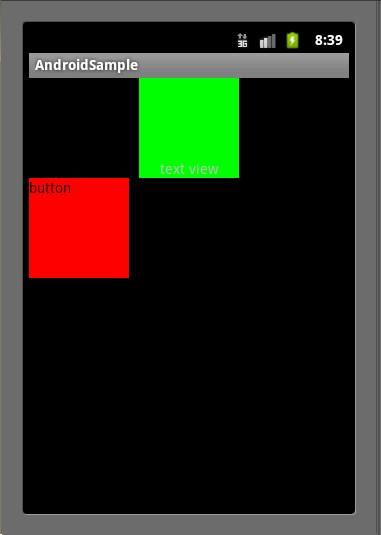
注意,TextView并没有按照我们设置的android:layout_gravity属性那样显示在界面的下方正中央,Button也没有显示在界面的左下方。这是因为我们设置了 LinearLayout的android:orientation属性为"vertical"。对于LinearLayout如果设置 android:orientation="vertical",那么android:layout_gravity的设置只在水平方向生效,如上图 TextView显示在屏幕的水平正中央,而Button显示在水平方向的最左边;如果设置 android:orientation="horizontal",那么android:layout_gravity属性只在垂直方向生效
Android layout属性之gravity和layout_gravity的更多相关文章
- Android Layout属性
通用属性 android:layout_height android:layout_width 值 含义 fill_parent/match_parent 高度或者宽度对齐到父控件 wrap_cont ...
- Android layout属性大全
第一类:属性值 true或者 false android:layout_centerHrizontal 水平居中 android:layout_centerVertical 垂直居中 ...
- android layout 属性大全
第一类:属性值为true可false android:layout_centerHrizontal 水平居中 android:layout_centerVertical 垂直居中 android:la ...
- Android Layout属性笔记
android:id 为控件指定相应的ID android:text 指定控件当中显示的文字,需要注意的是,这里尽量使用strings.xml文件当中的字符串 android:gravity 指定Vi ...
- Android:layout属性大全
Android layout属性大全 第一类:属性值 true或者 false android:layout_centerHrizontal 水平居中android:layout_centerVert ...
- Xamarin Layout属性(转)
第一类:属性值 true或者 false android:layout_centerHrizontal 水平居中 android:layout_centerVertical 垂直居中 android: ...
- Android开发UI之android:gravity / android:layout_Gravity,android:padding / android:layout_margin属性区分
android:gravity / android:layout_Gravity区别: android:gravity 是设置该view里面的内容相对于该view的位置,例如设置button里面的te ...
- Android布局(一)layout_gravity 属性和 gravity属性的区别
安卓中的 layout_gravity 属性和 gravity属性 有啥区别? LinearLayout有两个非常相似的属性: android:gravity与android:layout_gravi ...
- 【Android UI】Android Layout XML属性
Layout对于迅速的搭建界面和提高界面在不同分辨率的屏幕上的适应性具有很大的作用.这里简要介绍Android的Layout和研究一下它的实现. Android有Layout:FrameLayout, ...
随机推荐
- INS-30002 口令和确认口令不同
1.错误描述 2.错误原因 由截图上的提示,可以看出是管理口令和确认口令不一致 3.解决办法 重新输入密码
- 芝麻HTTP:Python爬虫入门之Cookie的使用
为什么要使用Cookie呢? Cookie,指某些网站为了辨别用户身份.进行session跟踪而储存在用户本地终端上的数据(通常经过加密) 比如说有些网站需要登录后才能访问某个页面,在登录之前,你想抓 ...
- 微信小程序滚动动画,点击事件及评分星星制作!
前言 小程序上线刷爆了朋友圈,但是最近渐渐消沉了,很少有动静!最近公司项目需要,体验了一下微信小程序,制作了几个功能,布局感觉很简单,但是交互和动画等写起来确实很费劲,主要是因为他不能操作DOM,只能 ...
- C#:继承过程中的静态成员
在知乎上看到一个关于"泛基"的实现,感觉挺有意思,想试试效果,代码如下: public abstract class MyBase<T> where T : MyBas ...
- 关于better-scroll中的问题点
最近在学习vue和better-scroll结合开发音乐APP,看着视频介绍中在制作slidet轮播图的时候,视频中讲解要想实现无缝滚动,则加入snapLoot:true,但是不可以单独引入它,必须将 ...
- WP-player——WordPress的一款好用的音乐插件
作者的主页:http://webjyh.com/wp-player/ 安装:在WordPress后台搜索安装即可,或者去作者的主页下载安装. 使用方法:这个插件是通过短代码调用的,安装好插件之后便可以 ...
- Redis分布式锁的正确实现方式
前言 分布式锁一般有三种实现方式:1. 数据库乐观锁:2. 基于Redis的分布式锁:3. 基于ZooKeeper的分布式锁.本篇博客将介绍第二种方式,基于Redis实现分布式锁.虽然网上已经有各种介 ...
- Js基本函数 2017-03-20
自定义函数: Var y = xxx (参数) xxx. yyy():表示引用这个类的方法:如document.write() xxx.yyy: 表示引用这个类的属性: 如:atrr.lenth ...
- Servlet的监听器
Listener是Servlet的监听器,它可以监听客户端的请求.服务端的操作等.通过监听器,可以自动激发一些操作,比如监听在线的用户的数量.当增加一个HttpSession时,就激发sessionC ...
- Filecoin2017年Q4进度更新(完整版)
亲爱的Filecoin支持者.矿工.用户.投资者和广大的社区朋友们, 自从Token销售完成以后,我们便开始集中精力把Filecoin项目从设想变为现实-从实现Filecoin协议的核心代码到打造我们 ...