
android中的简单animation(三)accelerate(加速),decelerate(减速),anticipate,overshoot,bounce
animation_3.xml:
 <?xml version="1.0" encoding="utf-8"?>

 <LinearLayout xmlns:android="http://schemas.android.com/apk/res/android"

     android:orientation="vertical"

     android:padding="10dip"

     android:layout_width="match_parent"

     android:layout_height="wrap_content"

     android:clipToPadding="false">

     <TextView

         android:id="@+id/target"

         android:layout_width="wrap_content"

         android:layout_height="wrap_content"

         android:textSize="26sp"

         android:text="@string/animation_3_text"/>

     <TextView

         android:layout_width="match_parent"

         android:layout_height="wrap_content"

         android:layout_marginTop="20dip"

         android:layout_marginBottom="5dip"

         android:text="@string/animation_2_instructions" />

     <Spinner

         android:id="@+id/spinner"

         android:layout_width="match_parent"

         android:layout_height="wrap_content" />

 </LinearLayout>
Animation3.java:
 package com.example.android.apis.view;

 import com.example.android.apis.R;

 import android.app.Activity;

 import android.os.Bundle;

 import android.view.View;

 import android.view.animation.AnimationUtils;

 import android.view.animation.Animation;

 import android.view.animation.TranslateAnimation;

 import android.widget.AdapterView;

 import android.widget.ArrayAdapter;

 import android.widget.Spinner;

 public class Animation3 extends Activity implements AdapterView.OnItemSelectedListener {

     private static final String[] INTERPOLATORS = {

             "Accelerate", "Decelerate", "Accelerate/Decelerate",

             "Anticipate", "Overshoot", "Anticipate/Overshoot",

             "Bounce"

     };

     @Override

     public void onCreate(Bundle savedInstanceState) {

         super.onCreate(savedInstanceState);

         setContentView(R.layout.animation_3);

         Spinner s = (Spinner) findViewById(R.id.spinner);

         ArrayAdapter<String> adapter = new ArrayAdapter<String>(this,

                 android.R.layout.simple_spinner_item, INTERPOLATORS);

         adapter.setDropDownViewResource(android.R.layout.simple_spinner_dropdown_item);

         s.setAdapter(adapter);

         s.setOnItemSelectedListener(this);

     }

     public void onItemSelected(AdapterView<?> parent, View v, int position, long id) {

         final View target = findViewById(R.id.target);

         final View targetParent = (View) target.getParent();

         Animation a = new TranslateAnimation(0.0f,

                 targetParent.getWidth() - target.getWidth() - targetParent.getPaddingLeft() -

                 targetParent.getPaddingRight(), 0.0f, 0.0f);

         a.setDuration(1000);

         a.setStartOffset(300);

         a.setRepeatMode(Animation.RESTART);

         a.setRepeatCount(Animation.INFINITE);

         switch (position) {

             case 0:

                 a.setInterpolator(AnimationUtils.loadInterpolator(this,

                         android.R.anim.accelerate_interpolator));

                 break;

             case 1:

                 a.setInterpolator(AnimationUtils.loadInterpolator(this,

                         android.R.anim.decelerate_interpolator));

                 break;

             case 2:

                 a.setInterpolator(AnimationUtils.loadInterpolator(this,

                         android.R.anim.accelerate_decelerate_interpolator));

                 break;

             case 3:

                 a.setInterpolator(AnimationUtils.loadInterpolator(this,

                         android.R.anim.anticipate_interpolator));

                 break;

             case 4:

                 a.setInterpolator(AnimationUtils.loadInterpolator(this,

                         android.R.anim.overshoot_interpolator));

                 break;

             case 5:

                 a.setInterpolator(AnimationUtils.loadInterpolator(this,

                         android.R.anim.anticipate_overshoot_interpolator));

                 break;

             case 6:

                 a.setInterpolator(AnimationUtils.loadInterpolator(this,

                         android.R.anim.bounce_interpolator));

                 break;

         }

         target.startAnimation(a);

     }

     public void onNothingSelected(AdapterView<?> parent) {

     }

 }
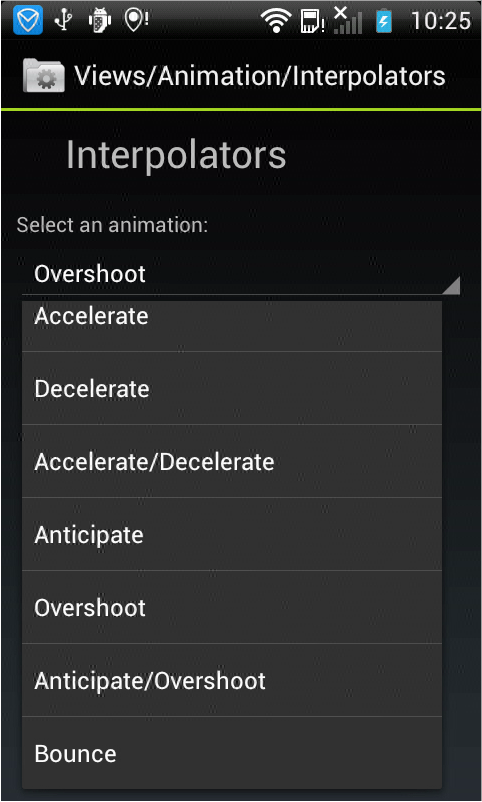
效果如下,文字会根据不同的效果执行动画显示效果:
android中的简单animation(三)accelerate(加速),decelerate(减速),anticipate,overshoot,bounce的更多相关文章
- android中的简单animation(四)3D transition
animation_main_screen.xml: <?xml version="1.0" encoding="utf-8"?> <Fram ...
- android中的简单animation(二)push up,push left,cross fade,hyperspace
animation_2.xml: <?xml version="1.0" encoding="utf-8"?> <LinearLayout x ...
- android中的简单animation(一)shake
1.shake animation_1.xml: <?xml version="1.0" encoding="utf-8"?> <Linear ...
- android中解析文件的三种方式
android中解析文件的三种方式 好久没有动手写点东西了,最近在研究android的相关技术,现在就android中解析文件的三种方式做以下总结.其主要有:SAX(Simple API fo ...
- MVP架构在xamarin android中的简单使用
好几个月没写文章了,使用xamarin android也快接近两年,还有一个月职业生涯就到两个年了,从刚出来啥也不会了,到现在回头看这个项目,真jb操蛋(真辛苦了实施的人了,无数次吐槽怎么这么丑),怪 ...
- Gradle在Android中的简单使用
Gradle在Android中简单的使用 还望支持个人博客站:http://www.enjoytoday.cn Android Studio 使用gradle进行工程构建,为了更好的了解整个andro ...
- URL转Drawable之 Android中获取网络图片的三种方法
转载自: http://doinone.iteye.com/blog/1074283 Android中获取网络图片是一件耗时的操作,如果直接获取有可能会出现应用程序无响应(ANR:Applicatio ...
- Android中xml设置Animation动画效果详解
在 Android 中, Animation 动画效果的实现可以通过两种方式进行实现,一种是 tweened animation 渐变动画,另一种是 frame by frame animation ...
- android中实现简单的聊天功能
这个例子只是简单的实现了单机版的聊天功能,自己跟自己聊,啦啦~~ 主要还是展示RecyclerView控件的使用吧~ 参考我之前写的文章: android中RecyclerView控件的使用 andr ...
随机推荐
- Mysql 分组查询出现'this is incompatible with sql_mode=only_full_group_by'的解决办法
由于Mysql自动开启了 only_full_group_by,所以若查询的字段不在group by里面,则分组报错. 解决办法其一:mysql配置,关闭only_full_group_by,这种办法 ...
- Redis常用命令操作
字符串类型: * 存储:set key value * 获取:get key * 无值返回nil * 删除:del key 哈希类型 hash: * 存储:hset key field value * ...
- python 基础之字典一
字典特点:无序.键唯一 字典的创建 bag = {'cx':'chenxi','gghg':35} print(bag['cx']) 测试 chenxi Process finished with e ...
- 避免学习Linux走弯路
我并不是一位Linux老鸟.在学习Linux的一路上.也是走了很多弯路,踩了不少坑.而今日就把自己趟过的那些坑给我们总结出来,期望能给初学Linux的童靴们带来一丝丝的帮助吧.文采可能没有那么高深,只 ...
- Linux命令:ss命令
ss功能:用来显示套接字信息的,类似于netstat,可以显示更多的信息,用于替代netstat. ss常用选项 ss -t:tcp协议的连接 -u:udp协议的链接 -w:裸套接字相关 -x:uni ...
- [NOI 2005]瑰丽华尔兹
Description 题库链接 给你一张 \(n\times m\) 的棋盘,棋盘上有一些障碍.一共 \(t\) 个时刻,被分为 \(k\) 段,在每一段中都有一个向上/下/左/右倾斜的趋势(持续时 ...
- SpringBoot之基础入门-专题一
SpringBoot之基础入门-专题一 一.Spring介绍 1.1.SpringBoot简介 在初次学习Spring整合各个第三方框架构建项目的时候,往往会有一大堆的XML文件的配置,众多的dtd或 ...
- SRS源码——调用FFmpeg参数问题
在SRS的Ingest功能中,会调用本地FFmpeg进行拉流转码, 调用的核心代码在srs_app_ffmpeg.cpp 的 SrsFFMPEG::start() 中: // memory leak ...
- IDEA中打war 包
把war 放入tomcat 的 webapps 目录下,重启tomcat即可自动解压war包跑起来 (最好是,解压完成后,关闭tomcat,把war包拷贝出去,再启动,不然每次启动tomcat都会自动 ...
- ping命令工具:同时ping多个IP
检测多个ip在同一时间点的响应状态,通过对比来判断哪个ip异常. 下载地址:https://share.weiyun.com/5XCkypG