
Android新浪微博获取评论信息、发表评论、转发微博等
首先前面一节中说过,获取用户的微博信息,这里简单介绍下获取微博的评论信息,以及对微博进行评论,转发微博等.
OAuth认证,这里就不多说了,
我说名一下接口:
获取微博的评论列表接口: http://api.t.sina.com.cn/statuses/comments.json
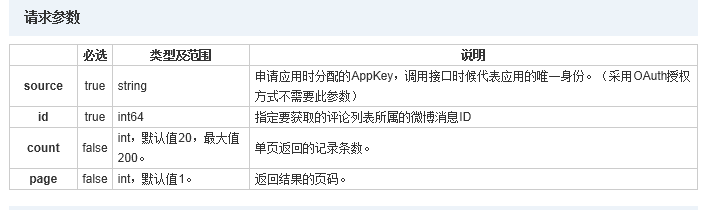
我们这里需要把微博ID做为参数请求,这个ID我们可以根据前面一节解析用户的微博信息得到.
对微博进行评论接口:http://api.t.sina.com.cn/statuses/comment.json
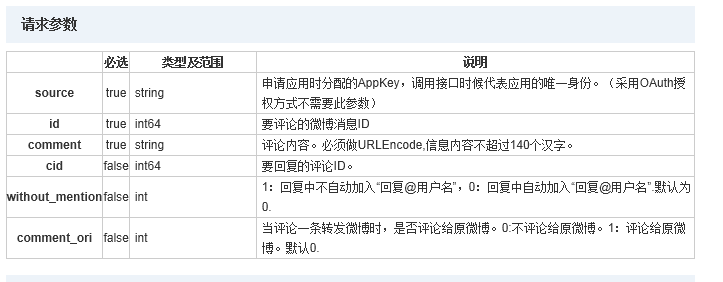
我们需要把微博的id,与我们的评论comment做为参数进行请求.
微博转发接口:http://api.t.sina.com.cn/statuses/repost.json
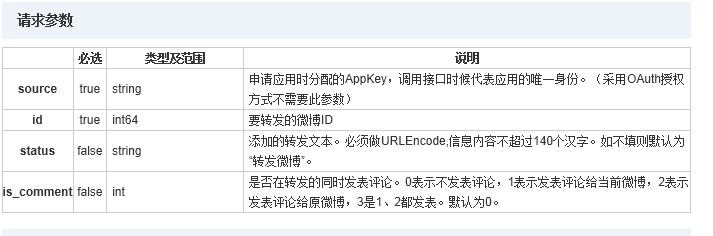
这里我们只需要微博的id.
下面是实现部分代码:
- /***
- * 获取用户的评论
- *
- * @param requstURL
- * 请求url
- * @param blog_id
- * 微博id
- * @return JSON(String)
- * @throws OAuthMessageSignerException
- * @throws OAuthExpectationFailedException
- * @throws OAuthCommunicationException
- * @throws ClientProtocolException
- * @throws IOException
- * @throws JSONException
- */
- public static String getJSONBlogsComments(String requstURL, String blog_id)
- throws OAuthMessageSignerException,
- OAuthExpectationFailedException, OAuthCommunicationException,
- ClientProtocolException, IOException, JSONException {
- String jsonArray = null;
- HttpResponse httpResponse;
- HttpClient client = new DefaultHttpClient();
- HttpPost httpPost = new HttpPost(requstURL);
- getTokenAndTokenSecret();
- CommonsHttpOAuthConsumer authConsumer = new CommonsHttpOAuthConsumer(
- Constant.weiBo.consumerKey, Constant.weiBo.consumerSecret);
- authConsumer.setTokenWithSecret(token, tokenSecret);
- List<NameValuePair> nameValuePairs = new ArrayList<NameValuePair>();
- nameValuePairs
- .add(new BasicNameValuePair(Constant.weiBoTag.id, blog_id));
- httpPost.setEntity(new UrlEncodedFormEntity(nameValuePairs, HTTP.UTF_8));
- httpPost.getParams().setBooleanParameter(
- CoreProtocolPNames.USE_EXPECT_CONTINUE, false);
- authConsumer.sign(httpPost);
- httpResponse = client.execute(httpPost);
- if (HttpStatus.SC_OK == httpResponse.getStatusLine().getStatusCode()) {
- jsonArray = EntityUtils.toString(httpResponse.getEntity());
- }
- Log.i(Constant.TAG, jsonArray);
- return jsonArray;
- }
- /***
- * 评论一条微博
- *
- * @throws IOException
- * @throws ClientProtocolException
- * @throws OAuthCommunicationException
- * @throws OAuthExpectationFailedException
- * @throws OAuthMessageSignerException
- */
- public static boolean CommentBlogByID(String blog_ID, String comment,
- String requstURL) throws ClientProtocolException, IOException,
- OAuthMessageSignerException, OAuthExpectationFailedException,
- OAuthCommunicationException {
- HttpResponse httpResponse;
- HttpClient client = new DefaultHttpClient();
- HttpPost httpPost = new HttpPost(requstURL);
- getTokenAndTokenSecret();
- CommonsHttpOAuthConsumer authConsumer = new CommonsHttpOAuthConsumer(
- Constant.weiBo.consumerKey, Constant.weiBo.consumerSecret);
- authConsumer.setTokenWithSecret(token, tokenSecret);
- List<NameValuePair> nameValuePairs = new ArrayList<NameValuePair>();
- nameValuePairs
- .add(new BasicNameValuePair(Constant.weiBoTag.id, blog_ID));
- nameValuePairs.add(new BasicNameValuePair(Constant.weiBoTag.comment,
- comment));
- httpPost.setEntity(new UrlEncodedFormEntity(nameValuePairs, HTTP.UTF_8));
- httpPost.getParams().setBooleanParameter(
- CoreProtocolPNames.USE_EXPECT_CONTINUE, false);
- authConsumer.sign(httpPost);
- httpResponse = client.execute(httpPost);
- if (HttpStatus.SC_OK == httpResponse.getStatusLine().getStatusCode()) {
- return true;
- }
- return false;
- }
- /****
- * 微博转发
- *
- * @param blog_ID
- * 微博id
- * @param requstURL
- * 请求URL
- * @return
- * @throws OAuthMessageSignerException
- * @throws OAuthExpectationFailedException
- * @throws OAuthCommunicationException
- * @throws ClientProtocolException
- * @throws IOException
- */
- public static boolean TranspondBlog(String blog_ID, String requstURL)
- throws OAuthMessageSignerException,
- OAuthExpectationFailedException, OAuthCommunicationException,
- ClientProtocolException, IOException {
- HttpResponse httpResponse;
- HttpClient client = new DefaultHttpClient();
- HttpPost httpPost = new HttpPost(requstURL);
- getTokenAndTokenSecret();
- CommonsHttpOAuthConsumer authConsumer = new CommonsHttpOAuthConsumer(
- Constant.weiBo.consumerKey, Constant.weiBo.consumerSecret);
- authConsumer.setTokenWithSecret(token, tokenSecret);
- List<NameValuePair> nameValuePairs = new ArrayList<NameValuePair>();
- nameValuePairs
- .add(new BasicNameValuePair(Constant.weiBoTag.id, blog_ID));
- httpPost.setEntity(new UrlEncodedFormEntity(nameValuePairs, HTTP.UTF_8));
- httpPost.getParams().setBooleanParameter(
- CoreProtocolPNames.USE_EXPECT_CONTINUE, false);
- authConsumer.sign(httpPost);
- httpResponse = client.execute(httpPost);
- if (HttpStatus.SC_OK == httpResponse.getStatusLine().getStatusCode()) {
- return true;
- }
- return false;
- }
/***

	 * 获取用户的评论

	 *

	 * @param requstURL

	 *            请求url

	 * @param blog_id

	 *            微博id

	 * @return JSON(String)

	 * @throws OAuthMessageSignerException

	 * @throws OAuthExpectationFailedException

	 * @throws OAuthCommunicationException

	 * @throws ClientProtocolException

	 * @throws IOException

	 * @throws JSONException

	 */

	public static String getJSONBlogsComments(String requstURL, String blog_id)

			throws OAuthMessageSignerException,

			OAuthExpectationFailedException, OAuthCommunicationException,

			ClientProtocolException, IOException, JSONException {

		String jsonArray = null;

		HttpResponse httpResponse;

		HttpClient client = new DefaultHttpClient();

		HttpPost httpPost = new HttpPost(requstURL);

		getTokenAndTokenSecret();

		CommonsHttpOAuthConsumer authConsumer = new CommonsHttpOAuthConsumer(

				Constant.weiBo.consumerKey, Constant.weiBo.consumerSecret);

		authConsumer.setTokenWithSecret(token, tokenSecret);

		List<NameValuePair> nameValuePairs = new ArrayList<NameValuePair>();

		nameValuePairs

				.add(new BasicNameValuePair(Constant.weiBoTag.id, blog_id));

		httpPost.setEntity(new UrlEncodedFormEntity(nameValuePairs, HTTP.UTF_8));

		httpPost.getParams().setBooleanParameter(

				CoreProtocolPNames.USE_EXPECT_CONTINUE, false);

		authConsumer.sign(httpPost);

		httpResponse = client.execute(httpPost);

		if (HttpStatus.SC_OK == httpResponse.getStatusLine().getStatusCode()) {

			jsonArray = EntityUtils.toString(httpResponse.getEntity());

		}

		Log.i(Constant.TAG, jsonArray);

		return jsonArray;

	}

		/***

	 * 评论一条微博

	 *

	 * @throws IOException

	 * @throws ClientProtocolException

	 * @throws OAuthCommunicationException

	 * @throws OAuthExpectationFailedException

	 * @throws OAuthMessageSignerException

	 */

	public static boolean CommentBlogByID(String blog_ID, String comment,

			String requstURL) throws ClientProtocolException, IOException,

			OAuthMessageSignerException, OAuthExpectationFailedException,

			OAuthCommunicationException {

		HttpResponse httpResponse;

		HttpClient client = new DefaultHttpClient();

		HttpPost httpPost = new HttpPost(requstURL);

		getTokenAndTokenSecret();

		CommonsHttpOAuthConsumer authConsumer = new CommonsHttpOAuthConsumer(

				Constant.weiBo.consumerKey, Constant.weiBo.consumerSecret);

		authConsumer.setTokenWithSecret(token, tokenSecret);

		List<NameValuePair> nameValuePairs = new ArrayList<NameValuePair>();

		nameValuePairs

				.add(new BasicNameValuePair(Constant.weiBoTag.id, blog_ID));

		nameValuePairs.add(new BasicNameValuePair(Constant.weiBoTag.comment,

				comment));

		httpPost.setEntity(new UrlEncodedFormEntity(nameValuePairs, HTTP.UTF_8));

		httpPost.getParams().setBooleanParameter(

				CoreProtocolPNames.USE_EXPECT_CONTINUE, false);

		authConsumer.sign(httpPost);

		httpResponse = client.execute(httpPost);

		if (HttpStatus.SC_OK == httpResponse.getStatusLine().getStatusCode()) {

			return true;

		}

		return false;

	}

	/****

	 * 微博转发

	 *

	 * @param blog_ID

	 *            微博id

	 * @param requstURL

	 *            请求URL

	 * @return

	 * @throws OAuthMessageSignerException

	 * @throws OAuthExpectationFailedException

	 * @throws OAuthCommunicationException

	 * @throws ClientProtocolException

	 * @throws IOException

	 */

	public static boolean TranspondBlog(String blog_ID, String requstURL)

			throws OAuthMessageSignerException,

			OAuthExpectationFailedException, OAuthCommunicationException,

			ClientProtocolException, IOException {

		HttpResponse httpResponse;

		HttpClient client = new DefaultHttpClient();

		HttpPost httpPost = new HttpPost(requstURL);

		getTokenAndTokenSecret();

		CommonsHttpOAuthConsumer authConsumer = new CommonsHttpOAuthConsumer(

				Constant.weiBo.consumerKey, Constant.weiBo.consumerSecret);

		authConsumer.setTokenWithSecret(token, tokenSecret);

		List<NameValuePair> nameValuePairs = new ArrayList<NameValuePair>();

		nameValuePairs

				.add(new BasicNameValuePair(Constant.weiBoTag.id, blog_ID));

		httpPost.setEntity(new UrlEncodedFormEntity(nameValuePairs, HTTP.UTF_8));

		httpPost.getParams().setBooleanParameter(

				CoreProtocolPNames.USE_EXPECT_CONTINUE, false);

		authConsumer.sign(httpPost);

		httpResponse = client.execute(httpPost);

		if (HttpStatus.SC_OK == httpResponse.getStatusLine().getStatusCode()) {

			return true;

		}

		return false;

	}
其实主要是Oauth认证,我们只需要相应的Token 和Tokensecret,这些接口没有什么,相信大家看过新浪API都会的.
下面是实现后的效果:


获取用微博的评论列表 获取用户的评论列表
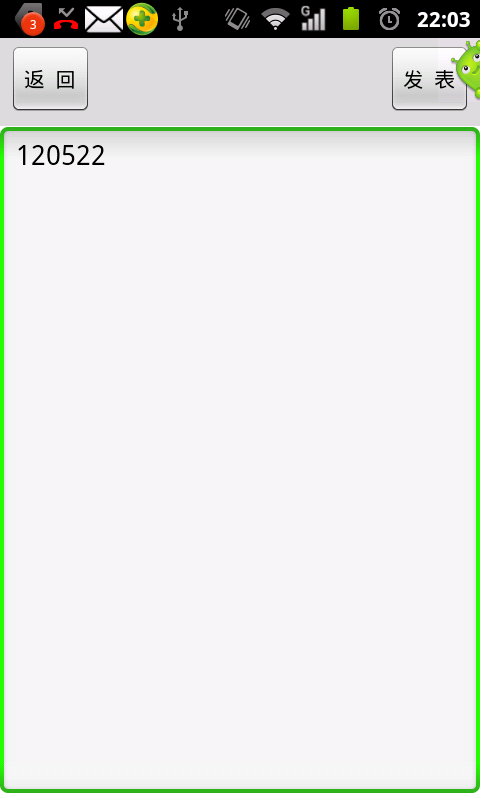
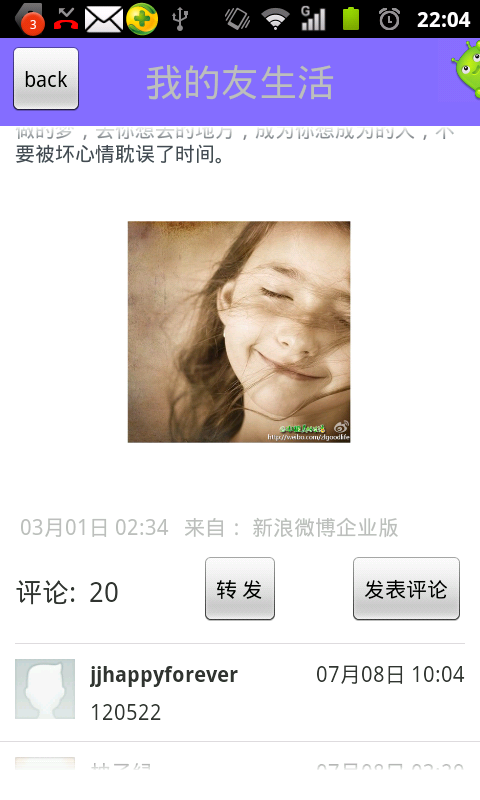
微博评论界面 刚评论的信息
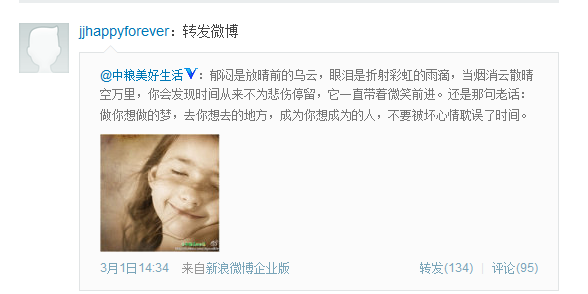
转发的微博.
Android新浪微博获取评论信息、发表评论、转发微博等的更多相关文章
- 【Android Studio安装部署系列】十一、Android studio获取数字签名信息
版权声明:本文为HaiyuKing原创文章,转载请注明出处! 概述 下面介绍下调试版本和发布版本获取数字签名的方法,通过以下方法可以获取到SHA1和MD5. 一般在使用分享功能,在第三方平台中创建应用 ...
- Android 开发 获取设备信息与App信息
设备信息 设备ID(DeviceId) 获取办法 android.telephony.TelephonyManager tm = (android.telephony.TelephonyManager ...
- 如何通过android代码获取LTE信息?
最近为了成功得到LTE的信号强度,尝试了很多种方法: (1)通过解析signalstrength字符串,但是不同手机设备获得的字符串排列顺序不同,代码如下: private PhoneStateLis ...
- Android之使用MediaMetadataRetriever类获取媒体信息
一.昨天.介绍了使用MediaMetadataRetriever类来获取视频第一帧:http://blog.csdn.net/u012561176/article/details/47858099,今 ...
- Android 获取内存信息
由于工作需要,研究了一下android上获取内存信息的方法,总结如下: 1.SDK获取 在Java层利用API获取很简单,直接使用ActivityManager.MemoryInfo类即可,代码如下: ...
- android之读取联系人信息
联系人信息被存放在一个contacts2.db的数据库中 主要的两张表 读取联系人 读取联系人需要知道联系人内容提供者的地址,以及对应的操作对象.一般情况下操作对象是的命名方式和表明是一致的. 布局文 ...
- [Python爬虫] Selenium爬取新浪微博客户端用户信息、热点话题及评论 (上)
转载自:http://blog.csdn.net/eastmount/article/details/51231852 一. 文章介绍 源码下载地址:http://download.csdn.net/ ...
- 好客租房43-react组件基础综合案例-4获取评论信息
获取评论信息 1使用受控组件方式创建表单 //导入react import React from 'react' import ReactDOM from 'react-dom' //导入组件 // ...
- [Python爬虫] Selenium+Phantomjs动态获取CSDN下载资源信息和评论
前面几篇文章介绍了Selenium.PhantomJS的基础知识及安装过程,这篇文章是一篇应用.通过Selenium调用Phantomjs获取CSDN下载资源的信息,最重要的是动态获取资源的评论,它是 ...
随机推荐
- Ubuntu操作系统安装使用教程 (转)
随着微软的步步紧逼,包括早先的Windows黑屏计划.实施,逮捕番茄花园作者并判刑,种种迹象表明,中国用户免费使用盗版Windows的日子将不会太长久了,那么这个世界上有没有即免费又易用的操作系统呢? ...
- swift objective-及c语言 混编
在xocde6出来我们大部分代码都是用objective-c写的(部分C/C++),现在出生来了一个新的语言叫swift,那么如何既能使用我们之前的代码,还可以使用新语言呢, 本文就此做一下说明. 关 ...
- Activity之间数据传递(一)(简单传递,数据包Bundle,传递对象)
一,简单传递(简单的字符串) 第一个activity通过putExtra()将字符串传入i protected void onCreate(Bundle savedInstanceState) { s ...
- Python控制语句
1.结构化程序设计 结构化程序设计包含三种基本结构:顺序结构.选择结构.循环结构. 1)顺序结构 如图所示,虚线框内是一个顺序结构:其中A和B两个框是顺序执行的,即在执行完A框所指定的操作后,必然接着 ...
- HDU1215(筛选法)
题意:求n的所有因子和: 思路:类似于筛选法求素数的思想,只有第一次的时候了解过它的思想,然后就只是用来求素数,思想的运用反而少: 筛选法求素数: int prime() { memset(vis, ...
- SVN小贴士
我辛辛苦苦写的到哪里了? SVN小贴士SVN服务器上的代码项目组公用,你的每一个提交都会体现给项目组每个人,所以提交要慎重,要注意避免代码冲突,使用SVN小贴士: 1.提前宣布开发计划,保持项目组成员 ...
- .net解决数据导出excel时的格式问题
在项目中一般都需要将报表数据导出到EXCEL中,但经常出现导出长串数据(如身份证)到EXCEL中后显示为科学计数法的格式,或者报表中显示为001的数据导出到Excel后成了1的格式. 下面简单介绍一下 ...
- pyhton 27 pip命令无法使用 没有Scripts文件夹 的解决方法
1 安装了setuptools http://jingyan.baidu.com/article/fb48e8be52f3166e622e1400.html 2 用ez_setup.py安装了setu ...
- Model1
jsp+javabean的开发模式 此处JavaBean也可是封装的业务逻辑 流程: 浏览器端访问jsp,jsp交给Javabean处理,javabean处理后台数据,交还给Jsp
- js isnull 赋值方法
<script>var b = 'test';var a = b || {};alert(a)</script> 结果:test <script>var b;var ...