
[转]SpringBoot整合Swagger2以及生产环境的安全问题处理
1.创建springboot项目
https://www.cnblogs.com/i-tao/p/8878562.html
这里我们使用多环境配置:
- application-dev.yml(开发环境)
- application-test.yml(测试环境)
- application-uat.yml(预发布)
- application-pro.yml(生产环境)
2.添加Swagger2依赖
<dependency>
    <groupId>io.springfox</groupId>
    <artifactId>springfox-swagger2</artifactId>
    <version>2.6.1</version>
</dependency>

<dependency>
    <groupId>io.springfox</groupId>
    <artifactId>springfox-swagger-ui</artifactId>
    <version>2.6.1</version>
</dependency>
2.1 启动类开启Swagger2
package com.tao.springboot;

import org.springframework.boot.SpringApplication;

import org.springframework.boot.autoconfigure.SpringBootApplication;

import springfox.documentation.swagger2.annotations.EnableSwagger2;

@SpringBootApplication

@EnableSwagger2

public class SpringbootApplication {

    public static void main(String[] args) {

        SpringApplication.run(SpringbootApplication.class, args);

    }

}
2.2 Swagger2配置类
package com.tao.springboot.util;

import org.springframework.context.annotation.Bean;

import org.springframework.context.annotation.Configuration;

import springfox.documentation.builders.ApiInfoBuilder;

import springfox.documentation.builders.PathSelectors;

import springfox.documentation.builders.RequestHandlerSelectors;

import springfox.documentation.service.ApiInfo;

import springfox.documentation.spi.DocumentationType;

import springfox.documentation.spring.web.plugins.Docket;

@Configuration

public class Swagger2 {

    @Bean

    public Docket createRestApi() {

        return new Docket(DocumentationType.SWAGGER_2)

                .apiInfo(apiInfo())

                .select()

                .apis(RequestHandlerSelectors.basePackage("com.tao.springboot.action"))//controller路径

                .paths(PathSelectors.any())

                .build();

    }

    private ApiInfo apiInfo() {

        return new ApiInfoBuilder()

                .title("标题")

                .description("描述")

                .termsOfServiceUrl("地址")

                .version("1.0")

                .build();

    }

}
2.3 开始在action里面写一个接口
package com.tao.springboot.action;

import org.springframework.web.bind.annotation.RequestMapping;
import org.springframework.web.bind.annotation.RequestMethod;
import org.springframework.web.bind.annotation.RestController;

@RestController
@RequestMapping(value = "/says",method = RequestMethod.GET)
public class sayHello {
    /**
     * 根据用户名说hello
     * @param name
     * @return
     */
    @RequestMapping(value = "/hello",method = RequestMethod.GET)
    public String hello(String name){
        return name+" hello";
    }
}
为了方便接口管理和维护,增加Swagger2注解:
- @Api:修饰整个类,描述Controller的作用
- @ApiOperation:描述一个类的一个方法,或者说一个接口
- @ApiParam:单个参数描述
- @ApiModel:用对象来接收参数
- @ApiProperty:用对象接收参数时,描述对象的一个字段
- @ApiResponse:HTTP响应其中1个描述
- @ApiResponses:HTTP响应整体描述
- @ApiIgnore:使用该注解忽略这个API
- @ApiError :发生错误返回的信息
- @ApiImplicitParam:一个请求参数
- @ApiImplicitParams:多个请求参数
package com.tao.springboot.action;

import io.swagger.annotations.ApiImplicitParam;

import io.swagger.annotations.ApiOperation;

import org.springframework.web.bind.annotation.RequestMapping;

import org.springframework.web.bind.annotation.RequestMethod;

import org.springframework.web.bind.annotation.RestController;

@RestController

@RequestMapping(value = "/says",method = RequestMethod.GET)

public class sayHello {

    /**

     * 根据用户名说hello

     * @param name

     * @return

     */

    @ApiOperation(value="say hello", notes="根据url的name来say hello!")

    @ApiImplicitParam(name = "name", value = "用户名称", required = true, dataType = "String", paramType = "path")

    @RequestMapping(value = "/hello",method = RequestMethod.GET)

    public String hello(String name){

        return name+" hello";

    }

}
访问:http://localhost:8081/swagger-ui.html
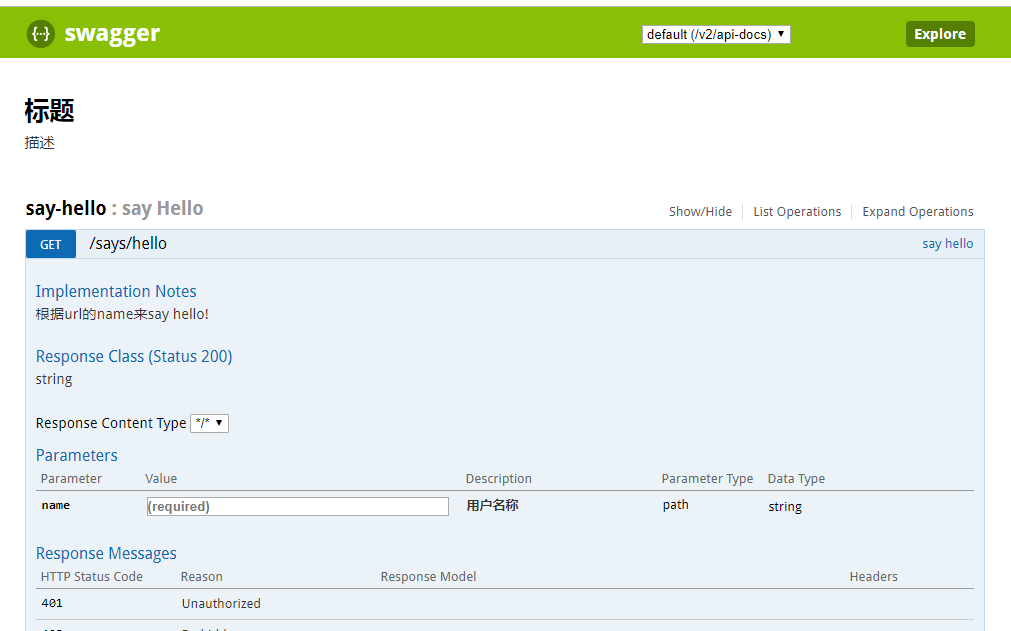
3.如果解决线上接口不被暴露?
3.1 使用springboot security过滤
略……
3.2 生产环境移除Swagger2
略……
3.3 直接使用多环境配置,生产环境不启用Swagger2
application.yml文件
spring:
  profiles:
    active: pro
application-pro.yml
#生产环境

server:

  port:

swagger2:

  enable: false
2.2 Swagger2配置类增加
@Value("${swagger2.enable}")

    private boolean swagger2Enable;
package com.tao.springboot.util;

import org.springframework.beans.factory.annotation.Value;

import org.springframework.context.annotation.Bean;

import org.springframework.context.annotation.Configuration;

import springfox.documentation.builders.ApiInfoBuilder;

import springfox.documentation.builders.PathSelectors;

import springfox.documentation.builders.RequestHandlerSelectors;

import springfox.documentation.service.ApiInfo;

import springfox.documentation.spi.DocumentationType;

import springfox.documentation.spring.web.plugins.Docket;

@Configuration

public class Swagger2 {

    @Value("${swagger2.enable}")

    private boolean swagger2Enable;

    @Bean

    public Docket createRestApi() {

        return new Docket(DocumentationType.SWAGGER_2)

                .enable(swagger2Enable)

                .apiInfo(apiInfo())

                .select()

                .apis(RequestHandlerSelectors.basePackage("com.tao.springboot.action"))//controller路径

                .paths(PathSelectors.any())

                .build();

    }

    private ApiInfo apiInfo() {

        return new ApiInfoBuilder()

                .title("标题")

                .description("描述")

                .termsOfServiceUrl("地址")

                .version("1.0")

                .build();

    }

}
访问:http://localhost:8081/swagger-ui.html

访问:http://localhost:8080/swagger-ui.html

github地址:https://github.com/80905949/springbootswagger2.git
---------------------
作者:缘故为何
来源:CNBLOGS
原文:https://www.cnblogs.com/i-tao/p/10548181.html
版权声明:本文为作者原创文章,转载请附上博文链接!
内容解析By:CSDN,CNBLOG博客文章一键转载插件
[转]SpringBoot整合Swagger2以及生产环境的安全问题处理的更多相关文章
- SpringBoot整合Swagger2以及生产环境的安全问题处理
1.创建springboot项目 https://www.cnblogs.com/i-tao/p/8878562.html 这里我们使用多环境配置: application-dev.yml(开发环境) ...
- SpringBoot(七):SpringBoot整合Swagger2
原文地址:https://blog.csdn.net/saytime/article/details/74937664 手写Api文档的几个痛点: 文档需要更新的时候,需要再次发送一份给前端,也就是文 ...
- SpringBoot整合Swagger2
相信各位在公司写API文档数量应该不少,当然如果你还处在自己一个人开发前后台的年代,当我没说,如今为了前后台更好的对接,还是为了以后交接方便,都有要求写API文档. 手写Api文档的几个痛点: 文档需 ...
- SpringBoot整合Swagger2(Demo示例)
写在前面 由于公司项目采用前后端分离,维护接口文档基本上是必不可少的工作.一个理想的状态是设计好后,接口文档发给前端和后端,大伙按照既定的规则各自开发,开发好了对接上了就可以上线了.当然这是一种非常理 ...
- springboot 整合Swagger2的使用
Swagger2相较于传统Api文档的优点 手写Api文档的几个痛点: 文档需要更新的时候,需要再次发送一份给前端,也就是文档更新交流不及时. 接口返回结果不明确 不能直接在线测试接口,通常需要使用工 ...
- SpringBoot整合Swagger2案例,以及报错:java.lang.NumberFormatException: For input string: ""原因和解决办法
原文链接:https://blog.csdn.net/weixin_43724369/article/details/89341949 SpringBoot整合Swagger2案例 先说SpringB ...
- SpringBoot整合Swagger2详细教程
1. 简介 随着前后端分离开发模式越来越流行,编写接口文档变成了开发人员非常头疼的事.而Swagger是一个规范且完整的web框架,用于生成.描述.调用可视化的RESTful风格的在线接口文档,并 ...
- SpringBoot整合Swagger2及使用
简介 swagger是一个流行的API开发框架,这个框架以"开放API声明"(OpenAPI Specification,OAS)为基础, 对整个API的开发周期都提供了相应的解决 ...
- SpringBoot整合Swagger2,再也不用维护接口文档了!
前后端分离后,维护接口文档基本上是必不可少的工作.一个理想的状态是设计好后,接口文档发给前端和后端,大伙按照既定的规则各自开发,开发好了对接上了就可以上线了.当然这是一种非常理想的状态,实际开发中却很 ...
随机推荐
- 二分查找(BinSearch)的Javascript实现
二分查找 解析:二分查找,也为折半查找.对于一个从小到大排列的有序数组,首先要找到一个中间值,通过与中间值比较,大的放又,小的放在左边.再在两边中寻找中间值,持续以上操作,直到找到所在位置为止. 1. ...
- Hdu 4251 区间中位数(划分树)
题目链接 The Famous ICPC Team Again Time Limit: 30000/15000 MS (Java/Others) Memory Limit: 32768/3276 ...
- 学习笔记(2)---Matlab 图像处理相关函数命令大全
Matlab 图像处理相关函数命令大全 一.通用函数: colorbar 显示彩色条 语法:colorbar \ colorbar('vert') \ colorbar('horiz') \ col ...
- JDK的KEYTOOL的应用,以及签署文件的应用(原创)
首先,我是这样的情况下学到这部分知识的: 我们公司同事把自己的unity生成的APK包查出MD5值直接拿出去微信那边申请,当然这样本来是没毛病,毕竟当时只有他一个人开发这个游戏, 然而我们几个前端过去 ...
- java jsp j2ee
1. JavaScript用于编写嵌入在网页文档中的程序,它由浏览器负责解释和执行,可以在网页上产生动态的显示效果和实现与用户交互的功能,譬如,让一串文字跟着鼠标移动,让一个图标在网页漂浮移动,验证用 ...
- 怎么在 CentOS 6 上配置私有 NPM 仓库?
Sinopia 是一个简单易用的私有 NPM 仓库服务器.在 CentOS 6 上安装时,遇到如下报错(Node 版本 6.9.1) #error This version of node/NAN/v ...
- LaTeX Error: File `slashbox.sty' not found. 解决办法
从这里下载对应的文件,解压后把文件放在C:\Latex\2018\texmf-dist\tex\latex 中. 再打开cmd命令窗口,输入texhash刷新!
- Django中blank和NULL
当我们在django中添加一个数据库字段时,我们通常会写models.CharField(max_length = 100,null = True,blank = True).用ForeignKey, ...
- docker 常用的命令
1.运行容器 sudo docker run -d -t -p : --name demo ubuntu:16.04 2.删除容器 sudo docker rm -f demo 3.在容器中安装必备软 ...
- 服务网关zuul----zuul中的动态刷新路由配置
Spring Cloud实战小贴士:Zuul处理Cookie和重定向 所以解决该问题的思路也很简单,我们只需要通过设置sensitiveHeaders即可,设置方法分为两种: 全局设置: zuul.s ...