
每天进步一点点------Error: Can't place pins assigned to pin location Pin_K22 (IOPAD_X41_Y19_N14)
在QII中的Assignments----Device----Device and pin option-----(选项卡)Dual purpose pin
将nCE0 的设置改为: use as regular IO
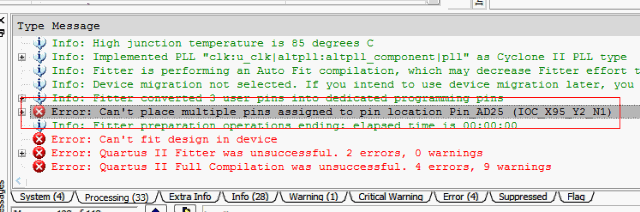
1.『Error:Can't place pins assigned to pin location Pin_AD25 (IOC_X95_Y2_N1)』錯誤訊息的意義。
2. 什麼是Dual-Purpose Pin?
3.什麼是nCEO?
4.如何使用Quartus II GUI將nCEO設定成regular I/O pin?
5.如何使用Tcl將nCEO設定成regular I/O pin?
『Error:Can't place pins assigned to pin location Pin_AD25 (IOC_X95_Y2_N1)』錯誤訊息的意義
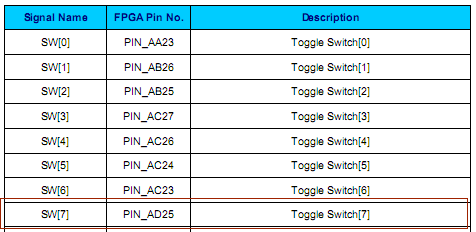
在DE2-70,若用到SW[7],根據[1] DE2-70 User Manual v1.08,在pin assignment時會指定到PIN_AD25。
在編譯時,一定會遇到以下錯誤訊息:
在(原創) 如何解決DE2-70的『Error: Can't place pins assigned to pin location Pin_AD25 (IOC_X95_Y2_N1)』的錯誤訊息? (SOC) (Quartus II) (DE2-70)曾經討論過解決方式,基本上只要跟著做就可以解決問題,不過當初並沒有解釋為什麼要這樣做。
根據Quartus II的Help的解釋如下:

--------------------------------------------------------------------------------
CAUSE: You assigned two or more pins to the specified location, but the Fitter cannot place all the pins in that location.
ACTION: If the conflict arises from location assignments in the current project, delete or change the location assignment of one or more of the pins. If the pin location assignments come from one or more imported design partitions, delete or change the location assignment (possibly using the Virtual Pin assignments) in the lower-level designs, re-generate the Quartus II Exported Partition File(s) (.qxp), and re-import.
大意就是你同時對Pin_AD25做了兩次的pin assignment,導致Fitter無法作P&R。
通常會遇到這個錯誤訊息,都是自己的pin assignment有寫錯,導致對同一根pin assign了兩次,不過在這裡,很顯然不是我們自己弄錯了。
根據[2] DE2-70 Schematic v1.1的電路圖
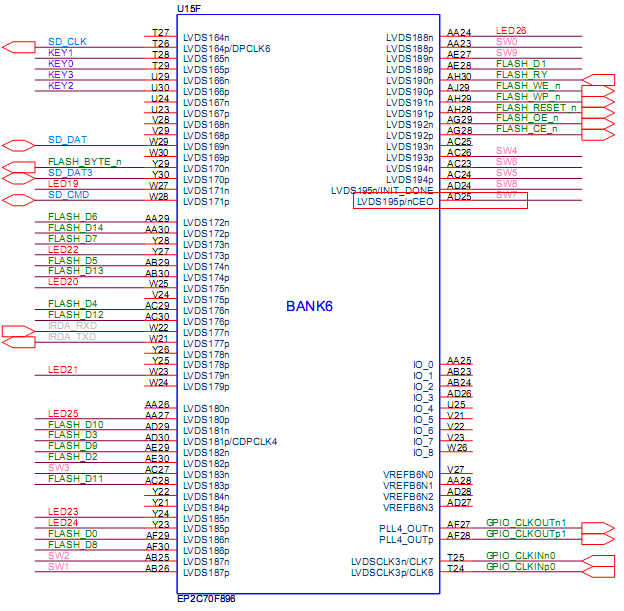
AD25除了SW7使用外,其實nCEO也使用這個pin,這也就是為什麼SW7會與nCEO都指定到Pin_AD25的原因了。
什麼是Dual-Purpose Pins?
根據[3] Quartus II Help, dual-purpose pins
我們知道FPGA基本上是由SRAM所構成,使用前必須將*.sof檔program進FPGA後才可使用,所以FPGA保留了一些pin做programming用,一旦FPGA經過program之後,這些pin就可以拿來當一般的I/O pin使用,這些pin就是dual-purpose pin,之前所遇到的nCEO就是個dual-purpose pin。
什麼是nCEO?
根據[4] Cyclone III Device Family Pin Connection Guidelines對nCEO的description為
其connection guidelines為
nCE的定義為
其connection guidelines為
大意是說,每顆FPGA都有nCE與nCEO兩根pin,在多顆FPGA的系統中,第一顆FPGA的nCE接GND,而第一顆FPGA的nCEO將接到下一顆FPGA的nCE,如此這樣繼續接下去,而在最後一顆FPGA時,可以將nCEO floating或者當成普通I/O pin使用。而在單顆FPGA時,nCE直接接GND,nCEO可直接floating或者當普通I/O pin使用。
在DE2-70,因為只是單顆FPGA,nCEO並沒有用到,所以當成SW[7]的input pin使用。
如何使用Quartus II GUI將nCEO設定成regular I/O pin?
如何使用Tcl將nCEO設定成regular I/O pin?
Conclusion
在[7] MyFPGA, DE0的VGA_B[0] Pin assignment有錯有人抱怨為什麼Quartus II要default將nCEO弄成programming pin,而非regular I/O pin,害我們自己必須手動改一次,其實要怪的是設計DE2-70的人為什麼非要用nCEO這個pin不可,在pin足夠的的狀況下,應該是不會把nCEO拿來當regular I/O pin來用,除非是在pin不夠用的狀況下,且又只有單顆FPGA時,才會將nCEO也拿來用。在Terasic其他的版子也有類似的設計,熟析了其背後的道理後,也可套用到其他版子上。
每天进步一点点------Error: Can't place pins assigned to pin location Pin_K22 (IOPAD_X41_Y19_N14)的更多相关文章
- Nios程序烧写到EPCS方法 - 第1页 - asus119's Blog - EDN China电子设计技术
Nios程序烧写到EPCS方法 - 第1页 - asus119's Blog - EDN China电子设计技术 这里主要是针对EP3C系列FPGA的Nios程序固化到EPCS中的方法做简要说明.硬件 ...
- FPGA引脚锁定 注意err和高阻状态
1.fpga没有用的的管脚一定要设置成高阻状态设置路径如下: Assignmen->Device->Device&Pin Option->Unused pins->As ...
- System Error Codes
很明显,以下的文字来自微软MSDN 链接http://msdn.microsoft.com/en-us/library/windows/desktop/ms681382(v=vs.85).aspx M ...
- winerror.h中的内容(可以查看last error对应)
/************************************************************************* ** winerror.h -- error co ...
- ERROR: Unable to globalize '/usr/local/NONE/etc/php-fpm.d/*.conf' (ret = 2) from /usr/local/etc/php-fpm.conf at line WARNING: Nothing matches the include pattern '/usr/local/php7/etc/php-fpm.d/*.conf'
Building from source is not easy if something is a bit different, and I had a hard time with some di ...
- Windows Error Codes
http://www.briandunning.com/error-codes/?source=Windows Windows Error Codes List All Error Codes | S ...
- Maven error in eclipse (pom.xml) : Failure to transfer org.apache.maven.plugins:maven-surefire-plugin:pom:2.12.4
i wanna make web project using the Maven to import automatically all libraries that i need, so i cho ...
- AFNetworking 2.0教程
在iOS 7中,Apple更新了iOS中的网络基础架构,新推出的网络基础架构是NSURLSession(原来的网络基础架构NSURLConnection). iOS开发中往往会涉及网络数据处理,像其他 ...
- C++随笔:.NET CoreCLR之corleCLR核心探索之coreconsole(2)
这篇文章是上篇的续集,本文将会继续介绍coreconsole.cpp里面的逻辑.也许大家会看一些CLR的书,我承认我没有看过,因为我觉得一个人,他再NB,那也是他自己的眼光,而且说句难听的,CLR也不 ...
随机推荐
- Ubuntu 18.04 怎么安装Gnome Tweak Tool
地址:https://jingyan.baidu.com/article/86f4a73ebd6c9437d7526963.html 终端键入命令:[sudo add-apt-repository u ...
- windows环境下安装JDK
一.环境准备 Windows10 jdk-9.0.1 二.下载并安装JDK 到Java的官网下载JDK安装包,地址:http://www.oracle.com/technetwork/java/jav ...
- 2级迁移类Q201-Oracle RAC 到单机RMAN迁移(同字节序)非公
项目文档引子系列是根据项目原型,制作的测试实验文档,目的是为了提升项目过程中的实际动手能力,打造精品文档AskScuti. 项目文档引子系列目前不对外发布,仅作为博客记录.如学员在实际工作过程中需提前 ...
- mysql远程链接(可以在服务器上配置然后在本地连接远程服务器)
ps:如果一下的连接不成功原因:一定要关闭windows防火墙或者linux的防火墙 1.在服务器端授权(黄色标记的地方第一个是用户名,第二个的意思是可以远程连接,第三个是密码) GRANT ALL ...
- jQuery---入口函数的写法
入口函数的写法 <!DOCTYPE html> <html lang="zh-CN"> <head> <meta charset=&quo ...
- python面试的100题(15)
41.super函数的具体用法和场景 为了调用父类(超类)的一个方法,可以使用 super() 函数,比如: class A: def spam(self): print('A.spam') clas ...
- hdu1716--全排列(dfs+有重复数字+输出格式)
Ray又对数字的列产生了兴趣: 现有四张卡片,用这四张卡片能排列出很多不同的4位数,要求按从小到大的顺序输出这些4位数. Input每组数据占一行,代表四张卡片上的数字(0<=数字<=9 ...
- C++-POJ2955-Brackets[DP]
题意就是,找出最长合法子括号序列 容易想到设f[l][r]为l~r的最长合法子括号序列的长度 然后从短的状态往长的状态枚举,不断更新答案就可以了 //#include<bits/stdc++.h ...
- JavaScript的严格检查模式
JavaScript的严格检查模式 前提:IDEA设置为ECMAScript 6语法. 'use strict':严格检查模式,用来预防JS的随意性导致的问题. 比如:直接 i=1;这样定义成了全局变 ...
- 使用Python发送、订阅消息
使用Python发送.订阅消息 使用插件 paho-mqtt 官方文档:http://shaocheng.li/post/blog/2017-05-23 Paho 是一个开源的 MQTT 客户端项目, ...