
MVC之 自定义过滤器(ActionFilterAttribute)
一、自定义Filter
//表示所有操作-筛选器特性的基类。

    [AttributeUsage(AttributeTargets.Class | AttributeTargets.Method, Inherited = true, AllowMultiple = false)]

    public abstract class ActionFilterAttribute : FilterAttribute, IActionFilter, IResultFilter

    {

        protected ActionFilterAttribute();

        //    在Action执行之后由 MVC 框架调用。

        public virtual void OnActionExecuted(ActionExecutedContext filterContext);

        //     在Action执行之前由 MVC 框架调用。

        public virtual void OnActionExecuting(ActionExecutingContext filterContext);

        //     在执行Result后由 MVC 框架调用。

        public virtual void OnResultExecuted(ResultExecutedContext filterContext);

        //     在执行Result之前由 MVC 框架调用。

        public virtual void OnResultExecuting(ResultExecutingContext filterContext);

    }
因此自定义过滤器可以选择适当的方法来重写方可。下面来举个简单的例子:检查登录状态的过滤器,没有登录则跳转到登录页
[CheckLogin]  //此处为自定义属性,要引用相应的命名空间

        public ActionResult Index()

        {

            return View();

        }

        public ActionResult Login()   //此Action自动往cookie里写入登录信息

        {

            HttpCookie hcUserName = new HttpCookie("username","admin");

            HttpCookie hcPassWord = new HttpCookie("password","");

            System.Web.HttpContext.Current.Response.SetCookie(hcUserName);

            System.Web.HttpContext.Current.Response.SetCookie(hcPassWord);

            return View();

        }
过滤器代码
public class CheckLogin : ActionFilterAttribute

    {

        //在Action执行之前 乱了点,其实只是判断Cookie用户名密码正不正确而已而已。

        public override void OnActionExecuting(ActionExecutingContext filterContext)

        {

            HttpCookieCollection CookieCollect = System.Web.HttpContext.Current.Request.Cookies;if (CookieCollect["username"] == null || CookieCollect["password"] == null)

            {

                filterContext.Result = new RedirectResult("/Home/Login");

            }

            else

            {

                if (CookieCollect["username"].Value != "admin" && CookieCollect["password"].Value != "")

                {

                    filterContext.Result = new RedirectResult("/Home/Login");

                }

            }

        }

    }//本示例贪图方便,将要跳转到的Action放在同一个Controller下了,如果将过滤器放到Controller类顶部,则永远也跳不到这个LoginAction。
此过滤器实现的效果是,当用户Cookie中用户名和密码不正确则跳转到登录页,注意过滤器也可以放在整个Controller类的顶部,表示该Controller下的
二、带参数的自定义Filter
首先,还是按照之前添加自定义过滤器的方法,添加一个自定义过滤器,只是里面多了一个属性,代码如下:
public class FilterAttribute : ActionFilterAttribute

    {

        public string Message { get; set; }

        public override void OnActionExecuting(ActionExecutingContext filterContext)

        {

            base.OnActionExecuting(filterContext);

            filterContext.HttpContext.Response.Write("Action执行之前" + Message + "<br />");

        }

        public override void OnActionExecuted(ActionExecutedContext filterContext)

        {

            base.OnActionExecuted(filterContext);

            filterContext.HttpContext.Response.Write("Action执行之后" + Message + "<br />");

        }

        public override void OnResultExecuting(ResultExecutingContext filterContext)

        {

            base.OnResultExecuting(filterContext);

            filterContext.HttpContext.Response.Write("返回Result之前" + Message + "<br />");

        }

        public override void OnResultExecuted(ResultExecutedContext filterContext)

        {

            base.OnResultExecuted(filterContext);

            filterContext.HttpContext.Response.Write("返回Result之后" + Message + "<br />");

        }

    }
后在调用过滤器的时候,添加上该参数,Controller代码如下:
[Filter(Message="刘备")]  //参数给上

        public ActionResult Index()

        {

            return View();

        }
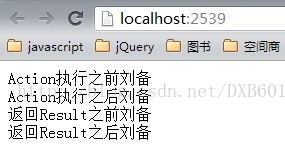
如果标签打到Controller上的话,TestFilterAttributeFilter将作用到Controller下的所有的Action。
默认情况下Action上打了某个自定义标签后,虽然在Controller上也打上了此标签,但它只有Action上的标签起作用了。
补充:如果Action没有打上该标签,那么Controller上的标签便会被执行。
如果想让Action上的标签执行一次,然后Controller上的标签也执行一次,那么应该如何操作呢?
我们只需在FilterAttribute类的定义上打上标记[AttributeUsage(AttributeTargets.All, AllowMultiple = true)]即可【下面类的最上面红色字体部分】,也就是让其成为可以多次执行的Action。代码如下:
[AttributeUsage(AttributeTargets.All,AllowMultiple = true)]

    public class FilterAttribute : ActionFilterAttribute

    {

        public string Message { get; set; }

        ......
三、全局过滤器
public static void RegisterGlobalFilters(GlobalFilterCollection filters)

        {

            filters.Add(new HandleErrorAttribute());

            //注册全局过滤器

            filters.Add(new TestFilterAttribute() { Message="全局"});

        }
这样就每个Action都会执行此过滤器,而不必每个Controller顶部都加上标签。
MVC之 自定义过滤器(ActionFilterAttribute)的更多相关文章
- MVC之自定义过滤器(ActionFilterAttribute)
一.自定义Filter 自定义Filter需要继承ActionFilterAttribute抽象类,重写其中需要的方法,来看下ActionFilterAttribute类的方法签名. //表示所有操作 ...
- MVC之 自定义过滤器(Filter)
MVC之 自定义过滤器(Filter) 一.自定义Filter 自定义Filter需要继承ActionFilterAttribute抽象类,重写其中需要的方法,来看下ActionFilterAttri ...
- asp.net MVC之 自定义过滤器(Filter) - shuaixf
一.系统过滤器使用说明 1.OutputCache过滤器 OutputCache过滤器用于缓存你查询结果,这样可以提高用户体验,也可以减少查询次数.它有以下属性: Duration :缓存的时间, 以 ...
- asp.net MVC之 自定义过滤器(Filter)
一.系统过滤器使用说明 1.OutputCache过滤器 OutputCache过滤器用于缓存你查询结果,这样可以提高用户体验,也可以减少查询次数.它有以下属性: Duration:缓存的时间,以秒为 ...
- [转]MVC之 自定义过滤器(Filter)
本文转自:http://www.cnblogs.com/kissdodog/archive/2013/01/21/2869298.html 一.自定义Filter 自定义Filter需要继承Actio ...
- 利用MVC的自定义过滤器FilterAttribute、IActionFilter、IExceptionFilter实现异常处理等功能
今天在博客园上看了一篇推荐文章,还说得蛮有道理: http://www.cnblogs.com/richieyang/p/4779028.html 项目中确实有各种后台验证过程,最常见的莫过于判空,而 ...
- MVC 自定义过滤器/特性来实现登录授权及验证
最近悟出来一个道理,在这儿分享给大家:学历代表你的过去,能力代表你的现在,学习代表你的将来. 十年河东十年河西,莫欺少年穷 学无止境,精益求精 最近在做自学MVC,遇到的问题很多,索性一点点总结 ...
- MVC系统过滤器、自定义过滤器
一.系统过滤器使用说明 1.OutputCache过滤器 OutputCache过滤器用于缓存你查询结果,这样可以提高用户体验,也可以减少查询次数.它有以下属性: Duration:缓存的时间,以秒为 ...
- ASP.NET MVC 系统过滤器、自定义过滤器
一.系统过滤器使用说明 1.OutputCache过滤器 OutputCache过滤器用于缓存你查询结果,这样可以提高用户体验,也可以减少查询次数.它有以下属性: Duration:缓存的时间,以秒为 ...
随机推荐
- 腾讯机试题 AcWing 603 打怪兽
题目链接:https://www.acwing.com/problem/content/605/ 题目大意: 略 分析: 用dp[i][j]表示用j元钱能在前i只怪兽上所能贿赂到的最大武力值. 有一种 ...
- python之路-字符串
一.类型转换 a = 10 print(type(a)) # <class 'int'> d = str(a) # 把数字转换成str print(type(d)) # <class ...
- Python 命令行工具 argparse 模块使用详解
先来介绍一把最基本的用法 import argparse parser = argparse.ArgumentParser() parser.parse_args() 在执行 parse_args() ...
- C#使用WebClient下载文件到本地目录
C#使用WebClient下载文件到本地目录. 1.配置本地目录路径 <appSettings> <!--文件下载目录--> <add key="Downloa ...
- C-Lodop提示“网页还没下载完毕,请稍等一下再操作.”
该提示在Lodop旧版本中是: 提示"WebSocket没准备好,点确定继续",提示“C-Lodop没准备好”,新版本修改了该提示的描述“网页还没下载完毕,请稍等一下再操作.”,让 ...
- css进行网站布局
一.一列布局(例如百度首页) 通常用 {margin:0 auto;} 控制. <!DOCTYPE> <html xmlns="http://www.w3.org/1999 ...
- 集成Javascript Logging on MVC or Core
ASP.NET Core provides us a rich Logging APIs which have a set of logger providers including: Console ...
- codevs2822
解题思路: tarjan缩点后算出度为0的点有几个,如果只有一个且这个点为爱心天使就行了: #include<iostream> #include<algorithm> #in ...
- Linux命令归纳
Linux基本命令 Linux Xshell远程连接 ssh 用户名@id地址 例如: ssh root@192.168.11.53 增加类指令 创建文件夹 mkdir 文件名 mkdir -p 路径 ...
- SpringBoot之get请求404
后台:SpringBoot 前台:VUE 异常:调get接口,返回404 场景:get请求传参,后台返回n条数据,不传参则返回所有 原因:原请求url为"~/one/{param}" ...