
Nginx 服务器开启status页面检测服务状态
一、Nginx status monitor
和apache 中服务器状态一样。输出的内容如:
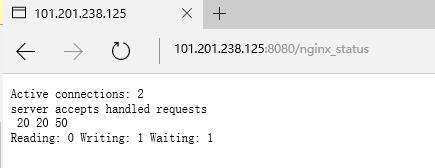
第1列:
- 当前与http建立的连接数,包括等待的客户端连接:2
第2列:
- 接受的客户端连接总数目:20
- 处理的客户端连接总数目:20
- 客户端总的请求数目:50
第3列:
- 当前,nginx读请求连接
- 当前,nginx写响应返回给客户端
- 目前有多少空闲客户端请求连接
二、启用 status 条件
- 检查一下当前nginx的安装配置
[root@elk ~]# nginx -V

nginx version: nginx/1.10.

built by gcc 4.8.  (Red Hat 4.8.-) (GCC)

built with OpenSSL 1.0.1e-fips  Feb

TLS SNI support enabled

configure arguments: --prefix=/etc/nginx --sbin-path=/usr/sbin/nginx --modules-path=/usr/lib64/nginx/modules \
--conf-path=/etc/nginx/nginx.conf --error-log-path=/var/log/nginx/error.log --http-log-path=/var/log/nginx/access.log \
--pid-path=/var/run/nginx.pid --lock-path=/var/run/nginx.lock --http-client-body-temp-path=/var/cache/nginx/client_temp \
--http-proxy-temp-path=/var/cache/nginx/proxy_temp --http-fastcgi-temp-path=/var/cache/nginx/fastcgi_temp \
--http-uwsgi-temp-path=/var/cache/nginx/uwsgi_temp --http-scgi-temp-path=/var/cache/nginx/scgi_temp --user=nginx --group=nginx \
--with-http_ssl_module --with-http_realip_module --with-http_addition_module --with-http_sub_module --with-http_dav_module \
--with-http_flv_module --with-http_mp4_module --with-http_gunzip_module --with-http_gzip_static_module --with-http_random_index_module \
--with-http_secure_link_module --with-http_stub_status_module --with-http_auth_request_module --with-http_xslt_module=dynamic \
--with-http_image_filter_module=dynamic --with-http_geoip_module=dynamic --with-http_perl_module=dynamic \
--add-dynamic-module=njs-1c50334fbea6/nginx --with-threads --with-stream --with-stream_ssl_module --with-http_slice_module --with-mail \
--with-mail_ssl_module --with-file-aio --with-ipv6 --with-http_v2_module --with-cc-opt='-O2 -g -pipe -Wall -Wp,-D_FORTIFY_SOURCE=2
-fexceptions -fstack-protector-strong --param=ssp-buffer-size=4 -grecord-gcc-switches -m64 -mtune=generic'
如果你的环境中可以看到有 --with-http_sub_module 这个模块,就代表可以启用status 。如果没有,可以在编译时加上。
- 现在编辑nginx 的配置文件。我们新建一个配置文件 /etc/nginx/conf.d/status.conf, 内容如下
[root@elk ~]# cat /etc/nginx/conf.d/status.conf

server {

    listen ;

    access_log off;

    server_name localhost;

    root /var/www/html;

    location /nginx_status {

       stub_status on;

       access_log off;

       allow .xxx.xxx.xxx;

       allow 139.59.253.208;

       deny all;

    }

}
对该页面的访问者进行了过滤,并禁用了访问写入log文件。
- 重启nginx后,在网站后面加上/nginx_status 即可。
http://101.201.238.125:8080/nginx_status
三、nginx plus (企业用户)
官方图:
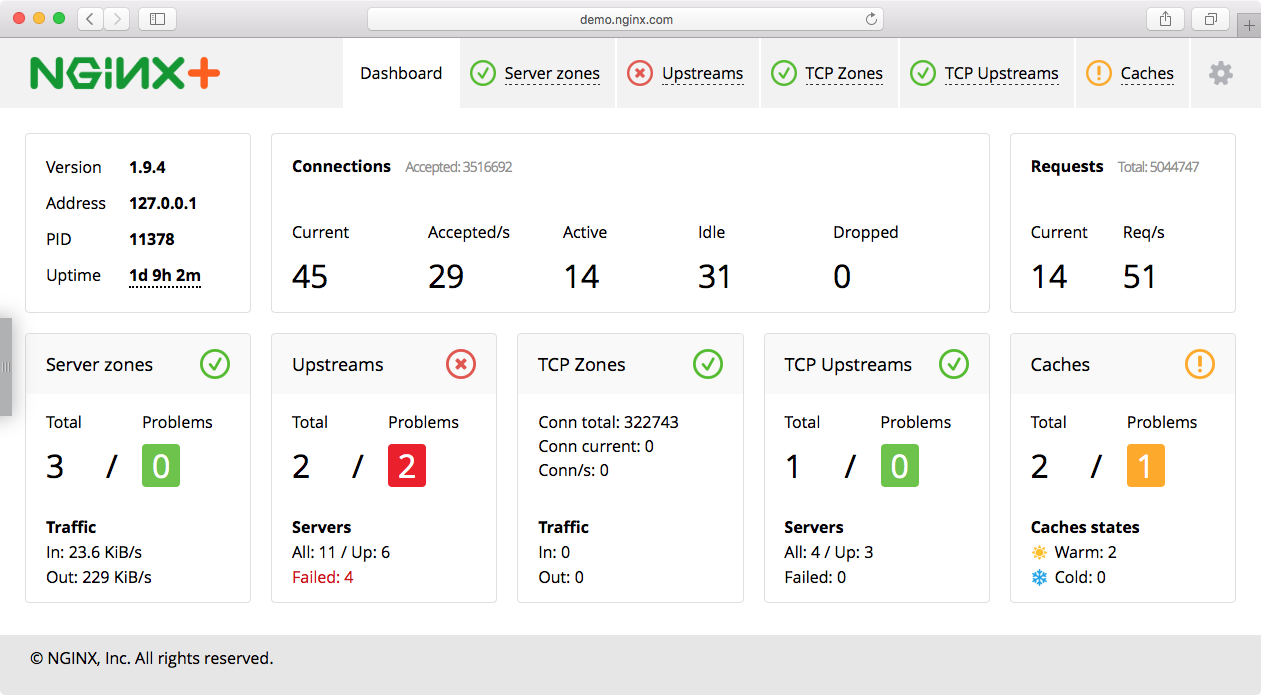
nginx plus 状态检测图,不过是面对企业用户,需要收费的。而且plus 用户还可以设置nginx 减轻DDOS攻击。具体点击这里
参考文章:
https://nginx.org/en/docs/http/ngx_http_stub_status_module.html#stub_status
https://www.nginx.com/blog/mitigating-ddos-attacks-with-nginx-and-nginx-plus/
https://www.nginx.com/products/live-activity-monitoring/
Nginx 服务器开启status页面检测服务状态的更多相关文章
- 全面掌握Nginx配置+快速搭建高可用架构 一 开启status页面检测服务状态
输入命令Nginx -V 打开conf.d/default.conf 配置模块,配置位置在server或者location 配置完成后测试语法正确 nginx -tc /etc/nginx/nginx ...
- Nginx 开启status用以监控状态信息
Nginx 可以通过with-http_stub_status_module模块来监控nginx的一些状态信息.1.通过nginx -V来查看是否有with-http_stub_status_modu ...
- nginx服务器开启缓存、反向代理
一.反向代理配置 1.反向代理服务器配置如下 反向代理就是需要这一行proxy_pass来完成.当我们要访问后端web服务器的时候,我们只需要访问代理服务器就可以了,此时代理服务器就充当后端web服务 ...
- Nginx 之四: Nginx服务器的压缩功能和缓存功能
在Nginx服务器配置文件中可以通过配置Gzip的使用,可以配置在http块,server 块或者location块中设置,Nginx服务器可以通过ngx_http_gzip_module模块.ngx ...
- lunix nginx安装 报错页面 状态码
web服务器软件IIS (windows底下的web服务器软件) Nginx (Linux底下新一代高性能的web服务器) Tengine www.taobao.com 这是淘宝 Apach ...
- nginx服务器状态监控
Nginx开启监控需在编译时加入with-http_stub_status_module,查看当前Nginx编译参数:/usr/local/nginx/sbin/nginx -V 1.以二级目录方式开 ...
- 查看nginx服务器状态
编译安装时使用--with-http_stub_status_module开启状态页面模块 [root@proxy ~]# yum -y install gcc pcre-devel openssl- ...
- 通过浏览器查看nginx服务器状态配置方法
通过浏览器查看nginx服务器状态配置方法 投稿:junjie 字体:[增加 减小] 类型:转载 这篇文章主要介绍了通过浏览器查看nginx服务器状态配置方法,本文讲解开启nginx-status的配 ...
- Httpd服务入门知识-Httpd服务常见配置案例之Apache的工作做状态status页面
Httpd服务入门知识-Httpd服务常见配置案例之Apache的工作做状态status页面 作者:尹正杰 版权声明:原创作品,谢绝转载!否则将追究法律责任. 一.status功能概述 status页 ...
随机推荐
- Vim技能修炼教程(11) - 代码折叠
上一讲我们是程序员篇的第一讲,关于代码跳转.代码跳转是一个付出很少收获很大的功能.这一节我们开始一个收获很多,但是付出也相对多一点功能:代码折叠. 代码折叠 折叠的类型 折叠有下面几种类型: * Ma ...
- Java 进阶巩固:什么是注解以及运行时注解的使用
这篇文章 2016年12月13日星期二 就写完了,当时想着等写完另外一篇关于自定义注解的一起发.结果没想到这一等就是半年多 - -. 有时候的确是这样啊,总想着等条件更好了再干,等准备完全了再开始,结 ...
- Vmware无法正常打开
VMware的问题 VMware总是搞一些事情,比如隔三差五就打不开了.那么怎么办呢?以前总要把Vm的安装程序重新开始一遍,然后选择修复 但是呢?这样太麻烦了,前几月做web开发的时候接触了Apach ...
- JVM原理一
简述: 这个其实不是很重要,一般配好环境就好了,如果不对jvm做啥动作不需要搞清楚这个. JVM ---->< JVM.DLL 挂接到JNIENV的实例 JAVA程序和操作系统的一个沟通者 ...
- 在exsi6.0中安装debian8.1 64位 无界面服务器版.
之前介绍了exsi6.0的安装. 现在开始应用. 上一篇介绍的exsi6.0是安装在U盘上的系统.U盘为群联芯片,芯片型号为2251-50/30.容量为2G.发现容量足够用.比较节省成本. 现在开始为 ...
- 滑动ViewPager引起swiperefreshlayout刷新的冲突
ViewPager是Android中提供的页面切换的控件,SwipeRefreshLayout是Android提供的下拉刷新控件,通过SwipeRefreshLayout可以很简单的实现下拉刷新的功能 ...
- CF 148D D. Bag of mice (概率DP||数学期望)
The dragon and the princess are arguing about what to do on the New Year's Eve. The dragon suggests ...
- Visual->UIElement->FrameworkElement,带来更多功能的同时也带来了更多的限制
在 WPF 或 UWP 中,我们平时开发所遇到的那些 UI 控件或组件,都直接或间接继承自 Framework.例如:Grid.StackPanel.Canvas.Border.Image.Butto ...
- 《DSP using MATLAB》示例Example 8.18
代码: %% ------------------------------------------------------------------------ %% Output Info about ...
- 【DUBBO】dubbo的Cluster接口
Directory中的多个Invoker伪装成一个Invoker, 对上层透明,包含集群的容错机制 Cluster可以看做是工厂类, 将目录directory下的invoker合并成一个统一的Invo ...