
2.Prometheus邮件报警配置
1、安装配置 Alertmanager
wget https://github.com/prometheus/alertmanager/releases/download/v0.20.0/alertmanager-0.20.0.linux-amd64.tar.gz

tar -zxv -f alertmanager-0.20.0.linux-amd64.tar.gz -C /usr/local

cd /usr/local

mv alertmanager-0.20.0.linux-amd64/ alertmanager
2,创建启动文件
vim /usr/lib/systemd/system/alertmanager.service

[Unit]

Description=alertmanager

Documentation=https://github.com/prometheus/alertmanager

After=network.target

[Service]

Type=simple

User=prometheus

ExecStart=/usr/local/alertmanager/alertmanager --config.file=/usr/local/alertmanager/alert-test.yml --storage.path=/usr/local/alertmanager/data

Restart=on-failure

[Install]

WantedBy=multi-user.target
Alertmanager 安装目录下默认有 alertmanager.yml 配置文件,可以创建新的配置文件,在启动时指定即可。
cd /usr/local/alertmanager

vim alert-test.yml

global:

  smtp_smarthost: 'smtp.qiye.aliyun.com:25'

  smtp_from: 'jump@tongchuangkeji.net'

  smtp_auth_username: 'jump@tongchuangkeji.net'

  smtp_auth_password: 'xxxx'

  smtp_require_tls: false

templates:

  - '/alertmanager/template/*.tmpl'

route:

  group_by: ['alertname', 'cluster', 'service']

  group_wait: 30s

  group_interval: 5m

  repeat_interval: 10m

  receiver: default-receiver

receivers:

- name: 'default-receiver'

  email_configs:

  - to: 'liqilong@edspay.com'

    html: ''

    headers: {Subject: "[WARN] 报警邮件 test"}
邮箱一开始使用的是公司的邮箱,结果在后边验证的时候,总是会报错level=error ts=2019-01-26T06:21:59.062483579Z caller=notify.go:332 component=dispatcher msg="Error on notify" err="*smtp.plainAuth failed: unencrypted connection",也在这里看了一些人踩坑的报告,试验了25、465、587端口,发现均无效果,最后改成163邮箱,直接就生效了。
- smtp_smarthost:是用于发送邮件的邮箱的 SMTP 服务器地址+端口;
- smtp_auth_password:是发送邮箱的授权码而不是登录密码;
- smtp_require_tls:不设置的话默认为 true,当为 true 时会有 starttls 错误,为了简单这里设置为 false;
- templates:指出邮件的模板路径;
- receivers 下 html 指出邮件内容模板名,这里模板名为 “alert.html”,在模板路径中的某个文件中定义。
- headers:为邮件标题;
使用阿里云企业邮箱无法发送邮件,报错如下:
Jun 11 13:40:52 worker alertmanager: level=error ts=2020-06-11T05:40:52.638Z caller=notify.go:372 component=dispatcher msg="Error on notify" err="*smtp.plainAuth auth: unencrypted connection" context_err="context deadline exceeded"

Jun 11 13:40:52 worker alertmanager: level=error ts=2020-06-11T05:40:52.638Z caller=dispatch.go:301 component=dispatcher msg="Notify for alerts failed" num_alerts=1 err="*smtp.plainAuth auth: unencrypted connection"
3,配置告警规则
配置 rule.yml。
cd /usr/local/prometheus

vim rule.yml

groups:

- name: alert-rules.yml

  rules:

  - alert: InstanceStatus # alert 名字

    expr: up{job="192.168.75.10"} == 0 # 判断条件,job是指prometheus.yml文件中的job_name

    for: 10s # 条件保持 10s 才会发出 alter

    labels: # 设置 alert 的标签

      severity: "critical"

    annotations:  # alert 的其他标签,但不用于标识 alert

      description: 服务器  已当机超过 20s

      summary: 服务器  运行状态
在 prometheus.yml 中指定 rule.yml 的路径
cat prometheus.yml

# my global config

global:

  scrape_interval:     15s # Set the scrape interval to every 15 seconds. Default is every 1 minute.

  evaluation_interval: 15s # Evaluate rules every 15 seconds. The default is every 1 minute.

  # scrape_timeout is set to the global default (10s).

# Alertmanager configuration

alerting:

  alertmanagers:

  - static_configs:

    - targets:

      - localhost:9093 # 这里修改为 localhost,# 新增

# Load rules once and periodically evaluate them according to the global 'evaluation_interval'.

rule_files:

  # - "first_rules.yml"

  # - "second_rules.yml"

  - "/usr/local/prometheus/rule.yml" # 新增

# A scrape configuration containing exactly one endpoint to scrape:

# Here it's Prometheus itself.

scrape_configs:

  # The job name is added as a label `job=<job_name>` to any timeseries scraped from this config.

  - job_name: '192.168.75.11'

    # metrics_path defaults to '/metrics'

    # scheme defaults to 'http'.

    static_configs:

    - targets: ['localhost:9090','localhost:9100']

  - job_name: '192.168.75.10'

    scrape_interval: 5s

    static_configs:

    - targets: ['192.168.75.10:9100']
重启 Prometheus 服务:
chown -R prometheus.prometheus /usr/local/prometheus/rule.yml

systemctl restart prometheus
4,编写邮件模板
注意:文件后缀为 tmpl
mkdir -pv /alertmanager/template/ # 路径跟上面的alertmanager.yml 配置文件保持一致

vim /alertmanager/template/alert.tmpl

<table>

	<tr><td>报警名</td><td>开始时间</td></tr>

	<tr><td></td><td></td></tr>

</table>
注意:启动的时候报错如下:
Jun 11 12:55:44 worker alertmanager: level=error ts=2020-06-11T04:55:44.744Z caller=main.go:236 msg="Unable to create data directory" err="mkdir data/: permission denied"

Jun 11 12:55:44 worker systemd: alertmanager.service: main process exited, code=exited, status=1/FAILURE

Jun 11 12:55:44 worker systemd: Unit alertmanager.service entered failed state.

Jun 11 12:55:44 worker systemd: alertmanager.service failed.

Jun 11 12:55:44 worker systemd: alertmanager.service holdoff time over, scheduling restart.

Jun 11 12:55:44 worker systemd: Stopped alertmanager.
这是因为在新版本中默认情况下存储路径
--storage.path是相对目录data/,但是prometheus用户在该路径下没权限创建目录,所以导致启动报错
解决办法:在alertmanager.service文件中指定默认存储路径在当前路径下即可
5,启动 Alertmanager
chown -R prometheus.prometheus /usr/local/alertmanager

systemctl daemon-reload

systemctl start alertmanager.service

systemctl status alertmanager.service

ss -tnl|grep 9093
6,验证效果
此时到管理界面可以看到如下信息:
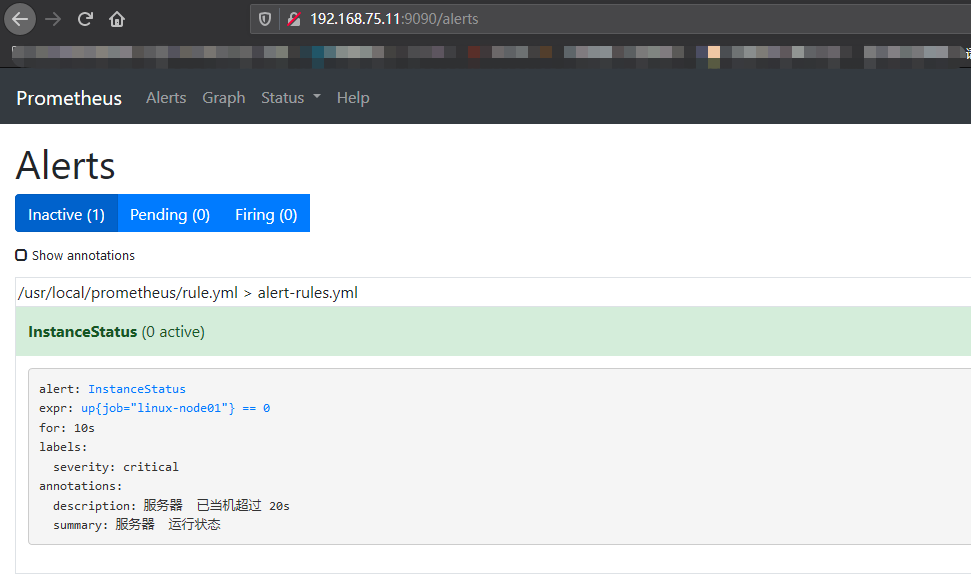
然后停止192.168.75.10节点上的 node_exporter 服务,然后再看效果。
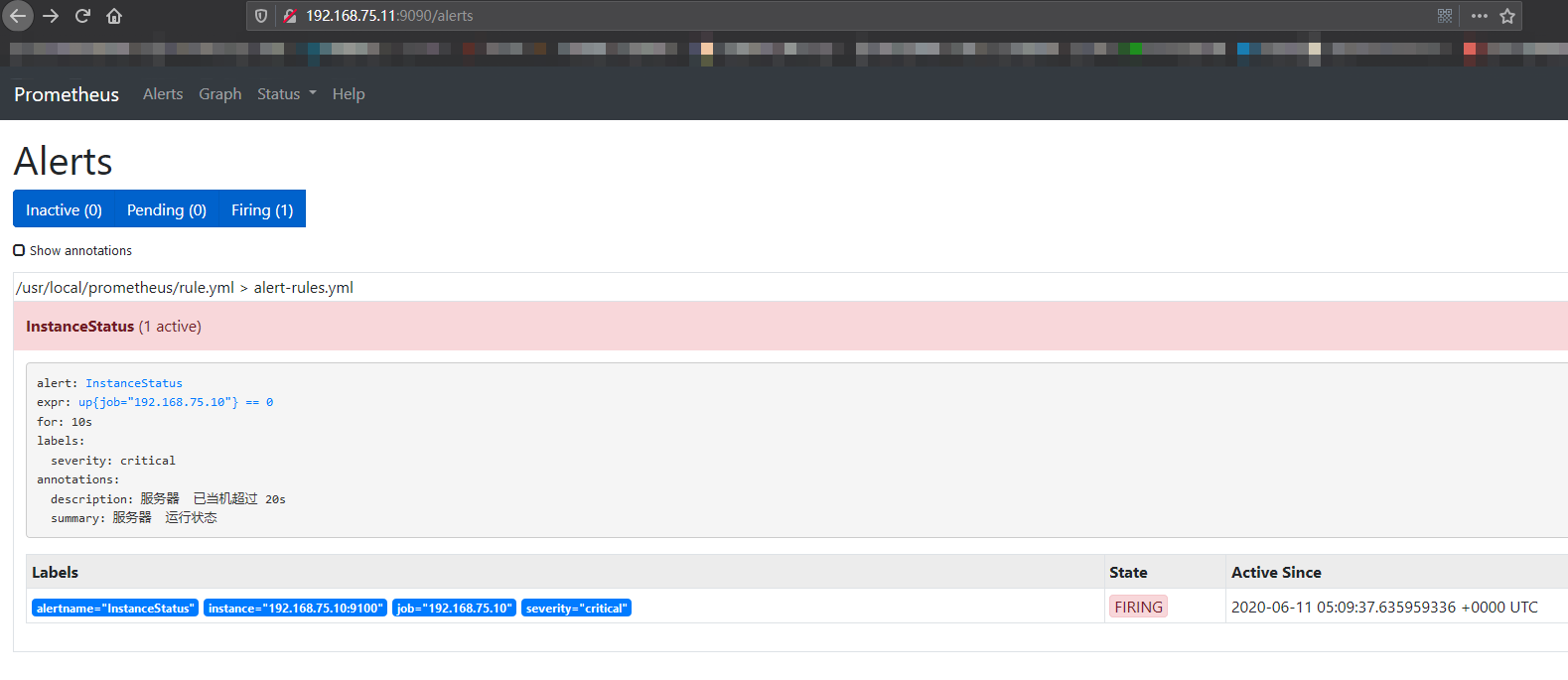
接着邮箱应该会收到邮件:
略
2.Prometheus邮件报警配置的更多相关文章
- zabbix 邮件报警配置
zabbxi 邮件告警推送有两种方式: 1.使用zabbix服务端的本地邮箱账号发送,邮件名为:user@hostname.localdomain,user为发送邮件的用户,hostname为zabb ...
- Zabbix邮件报警配置
一.安装sendmail或者postfix yum install sendmail #安装 service sendmail start #启动 chkconfig sendmail on #设置开 ...
- zabbix(7)邮件报警配置
邮件报警可以使用Linux自带邮件服务器(postfix等),也可以使用其他邮件服务器(像腾讯邮箱,126邮箱) 一.使用mail. 1.确定zabbix server是否安装发送邮件的命令mail, ...
- CentOS7.3下Zabbix3.5之邮件报警配置
一.邮件客户端以及脚本相关配置 1.安装sendmail,一般操作系统默认安装了安装 yum install sendmail 启动 service sendmail start 设置开机启动 chk ...
- 实战:Zabbix 3.4邮件报警配置
环境:CentOS 7 + Zabbix 3.4 如果只是监测并不能满足需求,还需要通过邮件的方式对问题进行报警.接下来进行实战操作: 一.安装邮件发送工具 mailx 如果CentOS 有邮件服务, ...
- jenkins(5): jenkins邮件报警配置
参考: https://blog.csdn.net/u013066244/article/details/78665075 1. 使用 增强版的邮件通知 1.1 安装插件 1.2. 系统配置 ...
- Oracle管理监控之使用utl_mail自动邮件报警配置
--代发邮件存储过程源码如下: CREATE OR REPLACE PROCEDURE send_mail(p_recipient VARCHAR2, -- 邮件接收人 ...
- elasticsearch5之Elastalert 安装使用 配置邮件报警和微信报警
简介 Elastalert是用python2写的一个报警框架(目前支持python2.6和2.7,不支持3.x),github地址为 https://github.com/Yelp/elastaler ...
- zabbix3 设置邮件报警(五)
Zabbix邮件报警配置 一.安装sendmail或者postfix(安装一种即可) yum install sendmail #安装 service sendmail start #启动 chkco ...
随机推荐
- AI写代码! 神器copilot介绍+安装+使用
!郑重提示!!!!!!!: 正在学编程.算法的同学请千万不要依赖此插件,否则你可能甚至无法手写出一个for循环 AI帮我写代码?我帮AI写代码?庄周梦蝶?蝶梦庄周?十分梦幻. copilot在VSco ...
- 应用启动加速-并发初始化spring bean
背景 随着需求的不断迭代,服务承载的内容越来越多,依赖越来越多,导致服务启动慢,从最开始的2min以内增长到5min,导致服务发布很慢,严重影响开发效率,以及线上问题的修复速度.所以需要进行启动加速. ...
- 【每天学一点-03】 使用Html5+Less实现简单的静态登录界面(入门Less)
1.首先引用Less 有npm安装.cdn引用.或者下载Less.js本地引用,我采用的是第三种方法 less.js引用: 下载地址:https://github.com/less/less.js/t ...
- flush方法和close方法的区别和字符输出流写数据的其他方法和字符输出流的续写和换行
flush方法和close方法的区别 flush:刷新缓冲区,流对象可以继续使用 close:先刷新缓冲区,然后通知系统释放资源.刘对象不可以再被使用了. public class demo02 { ...
- mac 无任何来源选项
终端执行命令 sudo spctl --master-disable
- 并发异步编程之争:协程(asyncio)到底需不需要加锁?(线程/协程安全/挂起/主动切换)Python3
原文转载自「刘悦的技术博客」https://v3u.cn/a_id_208 协程与线程向来焦孟不离,但事实上是,线程更被我们所熟知,在Python编程领域,单核同时间内只能有一个线程运行,这并不是什么 ...
- 不安装运行时运行.NET程序
好久没写文章了,有些同学问我公众号是不是废了?其实并没有.其实想写的东西很多很多,主要是最近公司比较忙,以及一些其他个人原因没有时间来更新文章.这几天抽空写了一点点东西,证明公众号还活着. 长久以来的 ...
- CodeTON Round 2 (Div. 1 + Div. 2, Rated, Prizes!) A-E
比赛链接 A 题解 知识点:思维,模拟. 发现 \(b\) 串第一个字符是 \(1\) 则只能使用 max , \(0\) 则只能使用 min ,随后只需要模拟到 \(a\) 串剩余 \(m\) 个字 ...
- bs4爬虫的一点心得----坑
bs4 里提取a标签里的坑啊 今天遇到了一个很坑的事情 使用bs4(全称:BeautifulSoup)提取一个网页里所有a标签里的href属性 比较坑的地方是这个网页里有的a标签里没有href属性,所 ...
- @babel/runtime 和 @babel/plugin-transform-runtime 两个的作用是什么
Babel 最基础的功能就是将采用 ECMAScript 2015+ 语法编写的代码转换为向后兼容的 JavaScript 语法,以便能够运行在当前和旧版本的浏览器或其他环境中. 最基础的依赖包也就是 ...