
layui水平导航条三级
需求
需要做一个顶部的水平导航条,有三级,展开的时候二级和三级一起展开,结果如图:
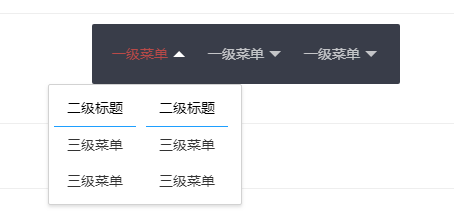
效果
代码
下面贴上代码:
HTML代码
<div class="layui-header">
<ul id="moudleMenu" class="layui-nav layui-layout-left kit-nav">
<li class="layui-nav-item nav-custom"><a href="javascript:;">一级菜单</a>
<div class="layui-nav-child layui-anim layui-anim-upbit">
<ul style="float: left; text-align: center; color: black; margin: 0;">
<li>
<span>二级标题</span>
<!-- 标题下面的线 -->
<div style="height: 1px; background-color: #1e9fff; width: 90%; margin: 0 auto;"> </div>
</li>
<li><a style="padding: 0;" href="'javascript:void(0);"><span>三级菜单</span></a></li>
<li><a style="padding: 0;" href="'javascript:void(0);"><span>三级菜单</span></a></li>
</ul>
<ul style="float: left; text-align: center; color: black; margin: 0;">
<li>
<span>二级标题</span>
<div style="height: 1px; background-color: #1e9fff; width: 90%; margin: 0 auto;"> </div>
</li>
<li><a style="padding: 0;" href="'javascript:void(0);"><span>三级菜单</span></a></li>
<li><a style="padding: 0;" href="'javascript:void(0);"><span>三级菜单</span></a></li>
</ul>
</div>
</li>
<li class="layui-nav-item nav-custom"><a href="javascript:;">一级菜单</a>
<div class="layui-nav-child layui-anim layui-anim-upbit">
<ul style="float: left; text-align: center; color: black; margin: 0;">
<li>
<span>二级标题</span>
<div style="height: 1px; background-color: #1e9fff; width: 90%; margin: 0 auto;"> </div>
</li>
<li><a style="padding: 0;" href="'javascript:void(0);"><span>三级菜单</span></a></li>
<li><a style="padding: 0;" href="'javascript:void(0);"><span>三级菜单</span></a></li>
<li><a style="padding: 0;" href="'javascript:void(0);"><span>三级菜单</span></a></li>
</ul>
<ul style="float: left; text-align: center; color: black; margin: 0;">
<li>
<span>二级标题</span>
<div style="height: 1px; background-color: #1e9fff; width: 90%; margin: 0 auto;"> </div>
</li>
<li><a style="padding: 0;" href="'javascript:void(0);"><span>三级菜单</span></a></li>
<li><a style="padding: 0;" href="'javascript:void(0);"><span>我是独特的三级菜单</span></a></li>
<li><a style="padding: 0;" href="'javascript:void(0);"><span>三级菜单</span></a></li>
</ul>
<ul style="float: left; text-align: center; color: black; margin: 0;">
<li>
<span>二级标题</span>
<div style="height: 1px; background-color: #1e9fff; width: 90%; margin: 0 auto;"> </div>
</li>
<li><a style="padding: 0;" href="'javascript:void(0);"><span>三级菜单</span></a></li>
<li><a style="padding: 0;" href="'javascript:void(0);"><span>三级菜单</span></a></li>
</ul>
</div>
</li>
<li class="layui-nav-item nav-custom"><a href="javascript:;">一级菜单</a>
<div class="layui-nav-child layui-anim layui-anim-upbit">
<ul style="float: left; text-align: center; color: black; margin: 0;">
<li><a style="padding: 0;" href="'javascript:void(0);"><span>我上面的二级标题呢</span></a></li>
<li><a style="padding: 0;" href="'javascript:void(0);"><span>我是三级</span></a></li>
</ul>
</div>
</li>
</ul>
</div>
需要加上一个css .layui-nav-child{top:60px !important;}
JS代码:
引用jQuery、layui.js、layui.css和element.js文件
layui.use('element', function(){

  var element = layui.element;

  element.init();
    //如果不把layui自带的滑动线移除,会导致子菜单隐藏
  $(".layui-nav-bar").css("display","none");


    //鼠标悬浮

    navMouseOver();

    //鼠标移出

    navMouseOut();

});

  //当鼠标经过时 设置展开菜单的宽度及位置的CSS样式

        function navMouseOver() {

            $(".nav-custom").each(function() {

                $(this).mouseover(function () {

                    //当鼠标放上时显示子菜单

                    $(this).children("div").css("visibility", "visible");

                    $(this).children("div").children("ul").children("li").children("a").children("span").css("visibility", "visible");

                    //ul的个数

                    var ulCount = $(this).children("div").children("ul").length;

                    //li的个数

                    var liCount = $(this).children("div").children("ul").children("li").length;

                    //定义字符最大长度

                    var maxLength = 0;

                    //遍历当前展开菜单的li

                    $(this).children("div").children("ul").children("li").each(function() {

                        //获取展开菜单的标题字符数

                        if ($(this).children("span").text().length > maxLength) {

                            maxLength = $(this).children("span").text().length;

                        }

                        //获取展开菜单的选择项的字符数

                        if ($(this).children("span").text() == "") {

                            if ($(this).children("a").children("span").text().length > maxLength) {

                                maxLength = $(this).children("a").children("span").text().length;

                            }

                        }

                    });

                    //每个子菜单的ul长度 为最长字符数*字符像素px+左右空白间隔

                    var width = maxLength * 13 + 40;

                    //设置展开菜单的每个子菜单的ul长度 为最长字符数*字符像素px

                    $(".nav-custom").children("div").children("ul").css("width", width + "px");

                    //设置展开菜单的总div宽度 为子菜单的ul长度*子菜单ul个数

                    $(".nav-custom").children("div").css("width", width * ulCount + "px");

                    //设置展开菜单的总div偏移居中

                    $(".nav-custom").children("div").css("left", (-1 * width * ulCount) / 2 + ($(".nav-custom").width()) / 2 + "px");

                });

            });

        }

        //当鼠标移出时,立即隐藏子菜单(因为不设置隐藏的话,来回切会有延迟导致未隐藏的子菜单变形)

        function navMouseOut() {

            $(".nav-custom").each(function () {

                $(this).mouseout(function () {

                    //设置div不可见

                    $(this).children("div").css("visibility", "hidden");

                    //设置div中的字不可见

                    $(this).children("div").children("ul").children("li").children("a").children("span").css("visibility", "hidden");

                });

            });

        }
样式的话,按照自己喜欢的调吧(`・ω・´)
layui水平导航条三级的更多相关文章
- CSS水平导航条和纵向导航条
问题描述: 使用CSS制作水平导航条和纵向导航条 问题解决: (1)水平导航条 1.1 效果预览: 1.2 ...
- HTML布局水平导航条2制作
前两个博文导航条都不是铺满水平的浏览器的,很多导航条样式都是随着浏览器的移动,是100%.此外前两个博文导航条都是块状点击的,也就是给a标签加宽高,设置成块状显示,点击的时候不一定要点文字,只要点击该 ...
- HTML布局水平导航条1制作
该文是用css制作个导航条,用竖线分隔,导航条是点击的多个区块.步骤:ul里设置需要数量的li,li中加上a链接给ul加样式,去掉默认的前面的点给li设置左浮动,让ul里的li横向排列a链接设置成块状 ...
- div自定义的滚动条 (水平导航条)
<!DOCTYPE html> <html> <head> <title></title> <style> div{ /* wi ...
- simple水平导航条
话不多说,看代码: html部分 <body> <ul> <li><a href="#">Home</a></li ...
- css -- 导航条
1.垂直导航条 HTML: <ul class="nav"> <li><a href="">Home</a>&l ...
- CSS列表及导航条
大多数网页中都包含某种形式的列表,今天我们就来联系几个基本的导航条. 垂直导航条 注意要点: 去掉默认的项目符号(list-style-type:none),将外边距和内边距都设为0. 以em设置 ...
- [前端]如何写一个水平导航栏?(浮动、inline-block+消除间距)
在看W3school时,看到一个很好的例子,如何制作一个水平的导航栏?没有任何要求,只需要达到下面的效果: 我认为这个例子包含了很多css布局需要了解的知识,因此单独写一下. W3school上面的方 ...
- ch6 列表和导航条
为列表添加定制的项目符号 可使用list-style-image属性:缺点是对项目符号图像的位置的控制能力不强. 常用的方法:使用list-style-type来关闭项目符号,将定制的项目符号作为背景 ...
随机推荐
- 在Eclipse中指定JDK
1.Windows下的Eclipse中的eclipse.ini -startup plugins/org.eclipse.equinox.launcher_1.3.100.v20150511-1540 ...
- adb调试桥(5037端口)
path里添加路径:../platform 查看设备 adb devices 杀死adb:adb kill -server 启动adb:adb start- server adb不能启动解决办法: 1 ...
- web 学习资源
学习 https://skills.bugbank.cn/ https://github.com/JnuSimba/MiscSecNotes 靶场 http://skysec.top/2018/01/ ...
- maven属性、profile、资源过滤、不同环境构建项目
maven针对不同环境构建项目 maven使用属性.profile及资源过滤支持针对不同环境构建项目 maven属性 maven共有六类属性 1.最常见的是自定义属性,即在pom文件里通过<pr ...
- LeetCode题解之Hamming Distance
1.题目描述 2.问题分析 使用C++ 标准库中的 bitset 类,将整数转换为二进制形式,然后再将其转换为字符串,最后比较字符串. 3.代码 int hammingDistance(int x, ...
- C# 中 DataTable 使用详解。
在项目中经常用到DataTable,如果DataTable使用得当,不仅能使程序简洁实用,而且能够提高性能,达到事半功倍的效果,现对DataTable的使用技巧进行一下总结. 一.DataTable简 ...
- systemd 之 systemctl
Systemd 常规操作与彩蛋 一.前言 上了俩个月的RHCE工程师的班,收获颇多.话说回来,在 redhat 7 中有个非常重要的概念,即:systemd systemd 是 Linux 下的一款系 ...
- 转: c#.net利用RNGCryptoServiceProvider产生任意范围强随机数的办法
//这样产生0 ~ 100的强随机数(含100) ; int rnd = int.MinValue; decimal _base = (decimal)long.MaxValue; ]; System ...
- 搭建企业级全网数据定时备份方案[cron + rsync]
1.1.1. 服务端的配置[192.168.25.141] Rsync的端口是:873 man rsyncd.conf 查看帮助 Rsync是Redhat默认自带的,这里只是做了rsync服务器端的后 ...
- Centos7+Mysql80安装+远程链接开启
CentOS7安装mysql80 下载repo源 在xshell运行命令 # wget http://repo.mysql.com/mysql80-community-release-el7.rpm ...