
matplotlib 进阶之Customizing Figure Layouts Using GridSpec and Other Functions
matplotlib教程学习笔记
如何创建网格形式的axes的组合呢:
- subplots()
- GridSpec
- SubplotSpec
- subplot2grid()
import matplotlib

import matplotlib.pyplot as plt

import matplotlib.gridspec as gridspec
第一个例子是利用subplots()和gridspec来创建一个\(2\times 2\)的网格
首先利用subplots()是很容易做到这一点的:
fig1, fi_axes = plt.subplots(ncols=2, nrows=2, constrained_layout=True) #constrain_layout参数似乎是控制是否会重叠的
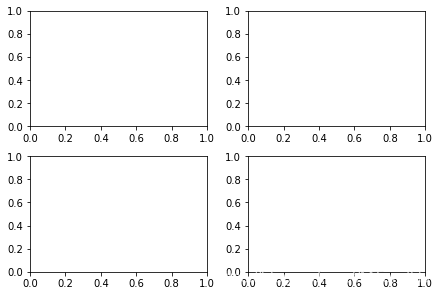
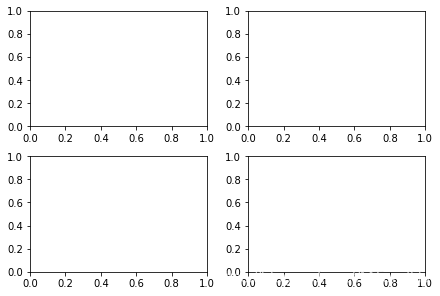
使用gridspec需要先创建一个fig对象,再创建Gridspec对象,然后将实例传入add_subplot(),gridspec的使用习惯和numpy数组是相当的
fig2 = plt.figure(constrained_layout=True)

spec2 = gridspec.GridSpec(ncols=2, nrows=2, figure=fig2)

f2_ax1 = fig2.add_subplot(spec2[0, 0])

f2_ax2 = fig2.add_subplot(spec2[0, 1])

f2_ax3 = fig2.add_subplot(spec2[1, 0])

f2_ax4 = fig2.add_subplot(spec2[1, 1])
gridspec有什么厉害的地方呢,我们可以通过索引和切片操作,使得某些axes占据多个格子
fig3 = plt.figure(constrained_layout=True)

gs = fig3.add_gridspec(3, 3)

f3_ax1 = fig3.add_subplot(gs[0, :])

f3_ax1.set_title('gs[0, :]')

f3_ax2 = fig3.add_subplot(gs[1, :-1])

f3_ax2.set_title('gs[1, :-1]')

f3_ax3 = fig3.add_subplot(gs[1:, -1])

f3_ax3.set_title('gs[1:, -1]')

f3_ax4 = fig3.add_subplot(gs[-1, 0])

f3_ax4.set_title('gs[-1, 0]')

f3_ax5 = fig3.add_subplot(gs[-1, -2])

f3_ax5.set_title('gs[-1, -2]');
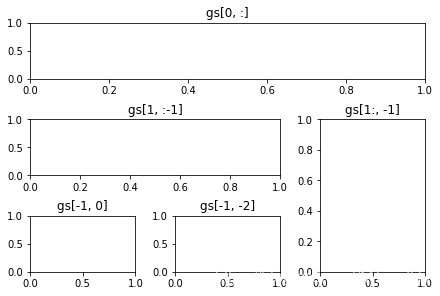
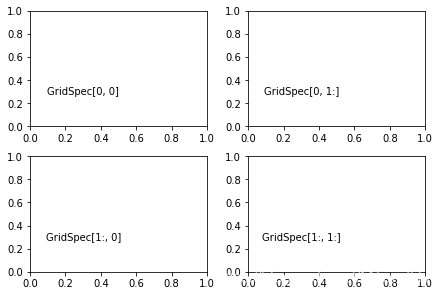
fig4 = plt.figure(constrained_layout=True)

spec4 = fig4.add_gridspec(ncols=2, nrows=2)

anno_opts = dict(xy=(0.3, 0.3), xycoords='axes fraction',

                 va='center', ha='center')

f4_ax1 = fig4.add_subplot(spec4[0, 0])

f4_ax1.annotate('GridSpec[0, 0]', **anno_opts)

fig4.add_subplot(spec4[0, 1]).annotate('GridSpec[0, 1:]', **anno_opts)

fig4.add_subplot(spec4[1, 0]).annotate('GridSpec[1:, 0]', **anno_opts)

fig4.add_subplot(spec4[1, 1]).annotate('GridSpec[1:, 1:]', **anno_opts);
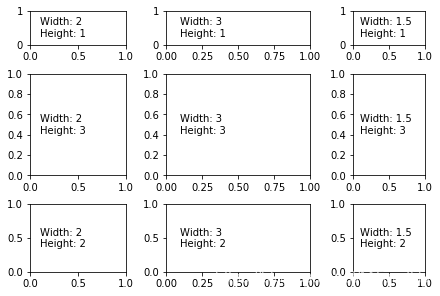
另外的,width_ratios和height_ratios参数,参数需要传入一个装有数字,比如[2, 4, 8]和
[1, 2, 4],不过这俩个表示的含义是一样的,因为参数关系的他们之间的比例:
2:4:8与1:2:4是一致的。
fig5 = plt.figure(constrained_layout=True)

widths = [2, 3, 1.5]

heights = [1, 3, 2]

spec5 = fig5.add_gridspec(ncols=3, nrows=3, width_ratios=widths,

                          height_ratios=heights)

for row in range(3):

    for col in range(3):

        ax = fig5.add_subplot(spec5[row, col])

        label = 'Width: {}\nHeight: {}'.format(widths[col], heights[row])

        ax.annotate(label, (0.1, 0.5), xycoords='axes fraction', va='center')
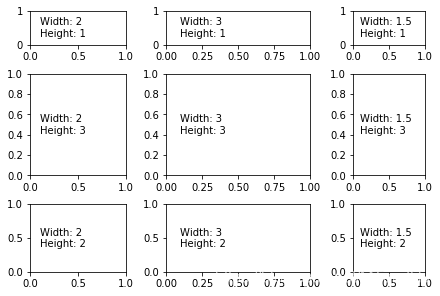
事实上,width_ratio参数和height_ratio参数对于subplots()是十分便利的一个工具,subplots()有一个gridspec_kw参数,事实上,借此我们可以将传入gridspec的参数传入subplots(),具体形式如下:
gs_kw = dict(width_ratios=widths, height_ratios=heights)

fig6, f6_axes = plt.subplots(ncols=3, nrows=3, constrained_layout=True,

        gridspec_kw=gs_kw)

for r, row in enumerate(f6_axes):

    for c, ax in enumerate(row):

        label = 'Width: {}\nHeight: {}'.format(widths[c], heights[r])

        ax.annotate(label, (0.1, 0.5), xycoords='axes fraction', va='center')
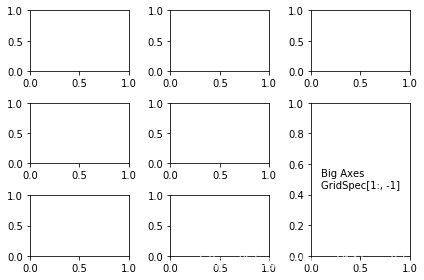
subplots和gridspec二者可以结合,比如,我们可以通过subplots先创建大部分的axes,再利用gridspec组合某些部分,当然,这可能需要利用到
get_gridspec方法和remove方法
fig7, f7_axs = plt.subplots(ncols=3, nrows=3)

gs = f7_axs[1, 2].get_gridspec()

# remove the underlying axes

for ax in f7_axs[1:, -1]:

    ax.remove()

axbig = fig7.add_subplot(gs[1:, -1])

axbig.annotate('Big Axes \nGridSpec[1:, -1]', (0.1, 0.5),

               xycoords='axes fraction', va='center')

fig7.tight_layout();
对Gridspec的一些精细的调整
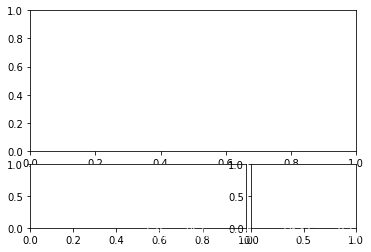
当gridspec被显示使用的时候,我们可以通过一些参数来进行细微的调整,注意这个选择与constrained_layout或者figure.tight_layout是有冲突的
left : axes左边缘距离画板左侧的距离
right: axes右边缘距离画板左侧的距离
top : axes上边缘距离画板下侧的距离
bottom : axes下边缘距离画板下侧的距离
hspace: 预留给subplots之间的高度的距离
wspace: 预留给subplots之间的宽度的距离
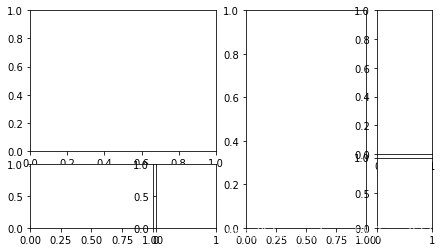
fig8 = plt.figure(constrained_layout=False) #注意设置为False否则会冲突

gs1 = fig8.add_gridspec(nrows=3, ncols=3, right=0.88, wspace=0.05)

f8_ax1 = fig8.add_subplot(gs1[:-1, :])

f8_ax2 = fig8.add_subplot(gs1[-1, :-1])

f8_ax3 = fig8.add_subplot(gs1[-1, -1])
这些细微的调整只对由gridspec创建的格子有效
fig9 = plt.figure(constrained_layout=False)

gs1 = fig9.add_gridspec(nrows=3, ncols=3, left=0.05, right=0.48,

                        wspace=0.05)

f9_ax1 = fig9.add_subplot(gs1[:-1, :])

f9_ax2 = fig9.add_subplot(gs1[-1, :-1])

f9_ax3 = fig9.add_subplot(gs1[-1, -1])

gs2 = fig9.add_gridspec(nrows=3, ncols=3, left=0.55, right=0.98,

                        hspace=0.05)

f9_ax4 = fig9.add_subplot(gs2[:, :-1])

f9_ax5 = fig9.add_subplot(gs2[:-1, -1])

f9_ax6 = fig9.add_subplot(gs2[-1, -1])
利用SubplotSpec
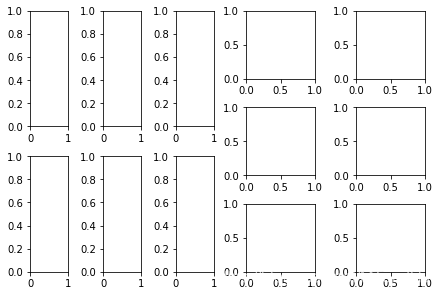
fig.add_grdispec; gs.subgridspec
fig10 = plt.figure(constrained_layout=True)

gs0 = fig10.add_gridspec(1, 2)

gs00 = gs0[0].subgridspec(2, 3)

gs01 = gs0[1].subgridspec(3, 2)

for a in range(2):

    for b in range(3):

        fig10.add_subplot(gs00[a, b])

        fig10.add_subplot(gs01[b, a])
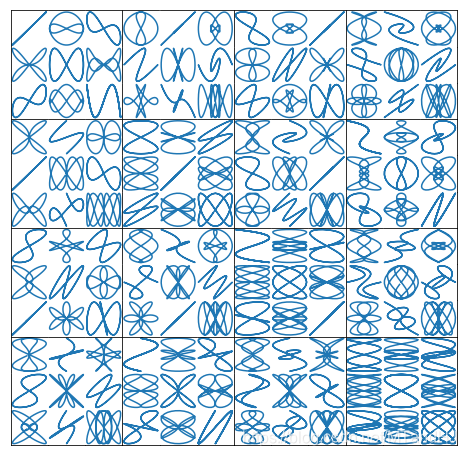
一个利用Subplotspec的复杂例子
import numpy as np

from itertools import product

def squiggle_xy(a, b, c, d, i=np.arange(0.0, 2*np.pi, 0.05)):

    return np.sin(i*a)*np.cos(i*b), np.sin(i*c)*np.cos(i*d)

fig11 = plt.figure(figsize=(8, 8), constrained_layout=False)

# gridspec inside gridspec

outer_grid = fig11.add_gridspec(4, 4, wspace=0.0, hspace=0.0) #4 x 4个大格子

for i in range(16):

    inner_grid = outer_grid[i].subgridspec(3, 3, wspace=0.0, hspace=0.0) #3 x 3个小格子

    a, b = int(i/4)+1, i % 4+1

    for j, (c, d) in enumerate(product(range(1, 4), repeat=2)):

        ax = plt.Subplot(fig11, inner_grid[j])

        ax.plot(*squiggle_xy(a, b, c, d))

        ax.set_xticks([])

        ax.set_yticks([])

        fig11.add_subplot(ax)

all_axes = fig11.get_axes()

# show only the outside spines

# 之显示每个大格子外面的边框,小格子的边框就不显示

for ax in all_axes:

    for sp in ax.spines.values():

        sp.set_visible(False)

    if ax.is_first_row():

        ax.spines['top'].set_visible(True)

    if ax.is_last_row():

        ax.spines['bottom'].set_visible(True)

    if ax.is_first_col():

        ax.spines['left'].set_visible(True)

    if ax.is_last_col():

        ax.spines['right'].set_visible(True)

plt.show()
函数链接
subplots
GridSpec
Subplotsepc
subplot2grid()
subplots.adjust()
matplotlib 进阶之Customizing Figure Layouts Using GridSpec and Other Functions的更多相关文章
- matplotlib 进阶之origin and extent in imshow
目录 显示的extent Explicit extent and axes limits matplotlib教程学习笔记 import numpy as np import matplotlib.p ...
- matplotlib 进阶之Tight Layout guide
目录 简单的例子 Use with GridSpec Legend and Annotations Use with AxesGrid1 Colorbar 函数链接 matplotlib教程学习笔记 ...
- matplotlib 进阶之Constrained Layout Guide
目录 简单的例子 Colorbars Suptitle Legends Padding and Spacing spacing with colobars rcParams Use with Grid ...
- 【python】matplotlib进阶
参考文章:https://liam0205.me/2014/09/11/matplotlib-tutorial-zh-cn/ 几个重要对象:图像.子图.坐标轴.记号 figure:图像, subplo ...
- matplotlib 进阶之Legend guide
目录 matplotlib.pyplot.legend 方法1自动检测 方法2为现有的Artist添加 方3显示添加图例 控制图例的输入 为一类Artist设置图例 Legend 的位置 loc, b ...
- matplotlib 进阶之Artist tutorial(如何操作Atrist和定制)
目录 基本 plt.figure() fig.add_axes() ax.lines set_xlabel 一个完整的例子 定制你的对象 obj.set(alpha=0.5, zorder=2), o ...
- matplotlib常用操作2
关于matplotlib学习还是强烈建议常去官方http://matplotlib.org/contents.html里查一查各种用法和toturial等. 下面是jupyter notebook代码 ...
- Python第三方库matplotlib(2D绘图库)入门与进阶
Matplotlib 一 简介: 二 相关文档: 三 入门与进阶案例 1- 简单图形绘制 2- figure的简单使用 3- 设置坐标轴 4- 设置legend图例 5- 添加注解和绘制点以及在图形上 ...
- matplotlib使用GridSpec调整子图位置大小 (非对称的子图)
用matplotlib.pyplot的subplots命令可以很方便的画对称的子图,但是如果要画非对称的子图(如下)就需要用GridSpec命令来控制子图的位置和大小: 而上图的结构可以用一下两种方式 ...
随机推荐
- SpringCloud微服务实战——搭建企业级开发框架(三十二):代码生成器使用配置说明
一.新建数据源配置 因考虑到多数据源问题,代码生成器作为一个通用的模块,后续可能会为其他工程生成代码,所以,这里不直接读取系统工程配置的数据源,而是让用户自己维护. 参数说明 数据源名称:用于查找区分 ...
- JavaIO——File类
1.File文件类 File类(描述具体文件或文件夹的类):是唯一一个与文件本身操作有关的程序类,可完成文件的创建.删除.取得文件信息等操作.但不能对文件的内容进行修改. (1)File类的基本使用 ...
- linux vi(vim)常用命令汇总(转)
前言 首先解析一个vim vi是unix/linux下极为普遍的一种文本编辑器,大部分机器上都有vi的各种变种,在不同的机器上常用不同的变种软件,其中vim比较好用也用的比较广泛.vim是Vi Imp ...
- Linux基础命令---lynx浏览器
lynx lynx是一个字符界面的全功能www浏览器,它没有图形界面,因此占用的资源较少. 此命令的适用范围:RedHat.RHEL.Ubuntu.CentOS.Fedora. 1.语法 ...
- mysql index 8.0
创建表 use vodb; drop table if exists test1; create table test1(id int NOT NULL AUTO_INCREMENT primary ...
- 基于war的Spring Boot工程
一.简介 前面创建的Spring Boot工程最终被打为了Jar包,是以可执行文件的形式出现的,其使用了Spring Boot内嵌的Tomcat作为Web服务器来运行web应用的.新版Dubbo的监控 ...
- 【科研】科研【合同】盖章流程/横向·非涉密/电子科技大学
[前置手续] 一.在科研管理系统里填单子,立项. 二.科研管理系统审核通过后,对于对面给好的合同,在合同系统里选择[合同业务发起-发起非标准合同],填单子. 三.会有一系列的审核,审核完成后打印合同备 ...
- Python把两个列表索引相同的值相加
方案一 list1=[1,2,3,4,5] list2=[6,7,8,9,10] list3=[] list3=[i + j for i, j in zip(list1, list2)] print( ...
- 一文详解 OpenGL ES 纹理颜色混合
在OpenGL中绘制的时候,有时候想使新画的颜色和已经有的颜色按照一定的方式进行混合.例如:想使物体拥有半透明的效果,或者绘制叠加光亮的效果,这时候就需要用到OpenGLES混合. 如上图所示,为石头 ...
- C# 扫描识别图片中的文字(.NET Framework)
环境配置 本文以C#及VB.NET代码为例,介绍如何扫描并读取图片中的文字. 本次程序环境如下: Visual Studio版本要求不低于2017 图片扫描工具:Spire.OCR for .NET ...