
MSSQL-Scripter,一个新的生成T-SQL脚本的SQL Server命令行工具
这里向大家介绍一个新的生成T-SQL脚本的SQL Server命令行工具:mssql-scripter。它支持在SQL Server、Azure SQL DB以及Azure SQL DW中为数据库生成CREATE和INSERT T-SQL脚本。
Mssql-scripter是一个跨平台的命令行工具,功能等同于SQL Server Management Studio中的Generate and Publish Scripts Wizard。
咱们能够在Linux、macOS和Windows上使用它生成数据定义语言(DDL-Data Definition Language)和数据操纵语言(DML – Data Manipulation Language),并且生成的T-SQL脚本可以运行在所有平台的SQL Server、Azure SQL Database、以及Azure SQL Data Warehouse中。
Installation
1. Windows
a) 安装Python,最新安装包下载地址:https://www.python.org/downloads/,注意安装的时候要选择”Add Python to PATH”选项:
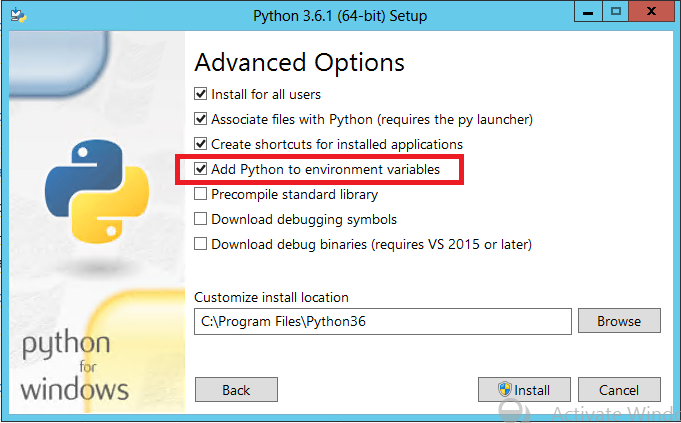
b) 安装mssql-scripter,命令行里执行下面命令:
pip install mssql-scripter
2. Linux
a) 检查pip版本,是否是9.0及其以上:
pip –version
b) 如果pip未安装或者版本低于9.0,使用如下命令安装以及升级版本:
sudo apt-get install python-pip

sudo pip install --upgrade pip
c) 安装mssql-scripter:
sudo pip install mssql-scripter
如果系统是Ubuntu或者Debian,需要安装libunwind8软件包:
Ubuntu 14 & 17
执行如下命令:
sudo apt-get update

sudo apt-get install libunwind8
Debian 8(暂时没有环境,未测试)
文件‘/etc/apt/sources.list’需要更新:
deb http://ftp.us.debian.org/debian/ jessie main
执行如下命令:
sudo apt-get update

sudo apt-get install libunwind8
3. macOS(暂时没有环境,未测试)
a) 检查pip版本,是否是9.0及其以上:
pip –version
b) 如果pip未安装或者版本低于9.0,使用如下命令安装以及升级版本:
sudo apt-get install python-pip

sudo pip install --upgrade pip
c) 安装mssql-scripter:
sudo pip install mssql-scripter
Usage Guide
帮助命令:
mssql-scripter -h

usage: mssql-scripter [-h] [--connection-string  | -S ] [-d] [-U] [-P] [-f]

                  [--data-only | --schema-and-data]

                  [--script-create | --script-drop | --script-drop-create]

                  [--target-server-version {,,2008R2,,,,vNext,AzureDB,AzureDW}]

                  [--target-server-edition {Standard,PersonalExpress,Enterprise,Stretch}]

                  [--include-objects [[...]]] [--exclude-objects [[...]]]

                  [--ansi-padding] [--append] [--check-for-existence] [-r]

                  [--convert-uddts] [--include-dependencies] [--headers]

                  [--constraint-names] [--unsupported-statements]

                  [--object-schema] [--bindings] [--collation]

                  [--defaults] [--extended-properties] [--logins]

                  [--object-permissions] [--owner] [--use-database]

                  [--statistics] [--change-tracking] [--check-constraints]

                  [--data-compressions] [--foreign-keys]

                  [--full-text-indexes] [--indexes] [--primary-keys]

                  [--triggers] [--unique-keys] [--display-progress]

                  [--enable-toolsservice-logging] [--version]

Microsoft SQL Server Scripter Command Line Tool. Version 1.0.0a1

optional arguments:

  -h, --help            show this help message and exit

  --connection-string   Connection string of database to script. If connection

                        string and server are not supplied, defaults to value

                        in Environment Variable

                        MSSQL_SCRIPTER_CONNECTION_STRING.

  -S , --server         Server name.

  -d , --database       Database name.

  -U , --user           Login ID for server.

  -P , --password       Password.

  -f , --file           Output file name.

  --data-only           Generate scripts that contains data only.

  --schema-and-data     Generate scripts that contain schema and data.

  --script-create       Script object CREATE statements.

  --script-drop         Script object DROP statements

  --script-drop-create  Script object CREATE and DROP statements.

  --target-server-version {,,2008R2,,,,vNext,AzureDB,AzureDW}

                        Script only features compatible with the specified SQL

                        Version.

  --target-server-edition {Standard,PersonalExpress,Enterprise,Stretch}

                        Script only features compatible with the specified SQL

                        Server database edition.

  --include-objects [ [ ...]]

                        Database objects to include in script.

  --exclude-objects [ [ ...]]

                        Database objects to exclude from script.

  --ansi-padding        Generates ANSI Padding statements.

  --append              Append script to file.

  --check-for-existence

                        Check for database object existence.

  -r, --continue-on-error

                        Continue scripting on error.

  --convert-uddts       Convert user-defined data types to base types.

  --include-dependencies

                        Generate script for the dependent objects for each

                        object scripted.

  --headers             Include descriptive headers for each object scripted.

  --constraint-names    Include system constraint names to enforce declarative

                        referential integrity.

  --unsupported-statements

                        Include statements in the script that are not

                        supported on the target SQL Server Version.

  --object-schema       Prefix object names with the object schema.

  --bindings            Script options to set binding options.

  --collation           Script the objects that use collation.

  --defaults            Script the default values.

  --extended-properties

                        Script the extended properties for each object

                        scripted.

  --logins              Script all logins available on the server, passwords

                        will not be scripted.

  --object-permissions  Generate object-level permissions.

  --owner               Script owner for the objects.

  --use-database        Generate USE DATABASE statement.

  --statistics          Script all statistics.

  --change-tracking     Script the change tracking information.

  --check-constraints   Script the check constraints for each table or view

                        scripted.

  --data-compressions   Script the data compression information.

  --foreign-keys        Script the foreign keys for each table scripted.

  --full-text-indexes   Script the full-text indexes for each table or indexed

                        view scripted.

  --indexes             Script the indexes (XML and clustered) for each table

                        or indexed view scripted.

  --primary-keys        Script the primary keys for each table or view

                        scripted.

  --triggers            Script the triggers for each table or view scripted.

  --unique-keys         Script the unique keys for each table or view

                        scripted.

  --display-progress    Display scripting progress.

  --enable-toolsservice-logging

                        Enable verbose logging.

  --version             show program's version number and exit
相关例子:
- Dump database object schema
# generate DDL scripts for all objects in the Adventureworks database and save the script to a file

mssql-scripter -S localhost -d AdventureWorks -U sa

# alternatively, specify the schema only flag to generate DDL scripts for all objects in the Adventureworks database and save the script to a file

mssql-scripter -S localhost -d AdventureWorks -U sa --schema-only
- Dump database object data
# generate DDL scripts for all objects in the Adventureworks database and save the script to a file

mssql-scripter -S localhost -d AdventureWorks -U sa --data-only
- Dump the database object schema and data
# script the database schema and data to a file.

mssql-scripter -S localhost -d AdventureWorks -U sa --schema-and-data  > ./adventureworks.sql

# execute the generated above script with sqlcmd

sqlcmd -S mytestserver -U sa -i ./adventureworks.sql
- Include database objects
# generate DDL scripts for objects that contain 'Employee' in their name to stdout

mssql-scripter -S localhost -d AdventureWorks -U sa --include-objects Employee

# generate DDL scripts for the dbo schema and pipe the output to a file

mssql-scripter -S localhost -d AdventureWorks -U sa --include-objects dbo. > ./dboschema.sql
- Exclude database objects
# generate DDL scripts for objects that do not contain 'Sale' in their name to stdout

mssql-scripter -S localhost -d AdventureWorks -U sa --exclude-objects Sale
- Target server version
# specify the version of SQL Server the script will be run against

mssql-scripter -S -U myUser -d AdventureWorks –target-server-version “SQL Azure DB” > myData.sql
- Target server edition
# specify the edition of SQL Server the script will be run against

mssql-scripter -S -U myUser -d devDB –target-server-edition “SQL Server Enterprise Edition” > myData.sql
- Pipe a generated script to sed
下面这个是Linux和macOS的用法。
# change a schema name in the generated DDL script

# ) generate DDL scripts for all objects in the Adventureworks database

# ) pipe generated script to sed and change all occurrences of SalesLT to SalesLT_test and save the script to a file

mssql-scripter scripter -S localhost -d Adventureworks -U sa | sed -e "s/SalesLT./SalesLT_test./g" > adventureworks_SalesLT_test.sql
- Script data to a file
# script all the data to a file.

mssql-scripter -S localhost -d AdventureWorks -U sa --data-only > ./adventureworks-data.sql
更详细的Usage Guide或更新请参考:https://github.com/Microsoft/sql-xplat-cli/blob/dev/doc/usage_guide.md。
下面执行一个命令看看效果,生成SharePoint Translation Service Database的CREATE语句:
mssql-scripter --server 10.2.53.22\ZEUS --database 'TranslationService_cd4699102b0745ba81ca0cf72d9ffe6e' --user sa --password '1qaz2wsxE' --file E:\CreateTranslationServiceDatabase.sql
执行结果的文件可以在这里下载:http://files.cnblogs.com/files/lavender000/CreateTranslationServiceDatabase.zip。
另外还可以把连接字符串设置成环境变量:
# set environment variable MSSQL_SCRIPTER_CONNECTION_STRING with a connection string.

export MSSQL_SCRIPTER_CONNECTION_STRING='Server=myserver;Database=mydb;User Id=myuser;Password=mypassword;'

mssql-scripter

# set environment variable MSSQL_SCRIPTER_PASSWORD so no password input is required.

export MSSQL_SCRIPTER_PASSWORD='ABC123'

mssql-scripter -S localhost -d AdventureWorks -U sa
[原创文章,转载请注明出处,仅供学习研究之用,如有错误请留言,谢谢支持]
[原文:http://www.cnblogs.com/lavender000/p/6886560.html,来自永远薰薰]
MSSQL-Scripter,一个新的生成T-SQL脚本的SQL Server命令行工具的更多相关文章
- 缓存cache(5.2新:redis): gem faker (6600✨) 命令行工具curl(系统内置,可在git上看到文档)
⚠️本章节记录缓存的一些方法的用法案例,配合这篇博客一起阅读:https://i.cnblogs.com/EditPosts.aspx?postid=8776632 前置种子 https://git ...
- 图解sql server 命令行工具sqlcmd的使用
http://blog.csdn.net/bcbobo21cn/article/details/52260733
- 使用命令行工具npm新创建一个vue项目
使用vue开发项目的前期工作可以参考前面写的: Vue环境搭建及node安装过程整理 Vue.js 提供一个官方命令行工具,可用于快速搭建大型单页应用.该工具提供开箱即用的构建工具配置,带来现代化的 ...
- dedecms:织梦文章如何添加“自定义属性”标签(sql命令行工具)
dede织梦如何添加“自定义属性”标签“症状” 1.进入后台——系统——SQL命令行工具——运行SQL命令行,添加arcatt表字段: insert into`dede_arcatt`(sortid, ...
- 如何创建一个基于命令行工具的跨平台的 NuGet 工具包
命令行可是跨进程通信的一种非常方便的手段呢,只需启动一个进程传入一些参数即可完成一些很复杂的任务.NuGet 为我们提供了一种自动导入 .props 和 .targets 的方法,同时还是一个 .NE ...
- 来认识一下venus-init——一个让你仅需一个命令开始Java开发的命令行工具
源代码地址: Github仓库地址 个人网站:个人网站地址 前言 不知道你是否有过这样的经历.不管你是什么岗位,前端也好,后端也罢,想去了解一下Java开发到底是什么样的,它是不是真的跟传说中的一样. ...
- 如何用node编写命令行工具,附上一个ginit示例,并推荐好用的命令行工具
原文 手把手教你写一个 Node.js CLI 强大的 Node.js 除了能写传统的 Web 应用,其实还有更广泛的用途.微服务.REST API.各种工具……甚至还能开发物联网和桌面应用.Java ...
- 如何用SQL命令行工具删除dedecms指定id文章
用dedecms采集时标题字段设置错了,出现了注释符号<!---->,导致后台的文章列表出现错误,也无法直接从列表中删除,可以远程登录数据库去操作,这个相对比较麻烦,想着直接从后台的SQL ...
- [转]轻松学习Ionic (四) 修改应用图标及添加启动画面(更新官方命令行工具自动生成)
本文转自:http://blog.csdn.net/zapzqc/article/details/42237935 由于Ionic更新了命令行工具,以后修改应用图标和添加启动画面就简单了,最新方法见最 ...
随机推荐
- SQLite 数据库
内容来源:高成珍.钟元生<Android编程经典案例解析> SQLite 数据库是Android 中内嵌的轻量级关系型数据库,本质上只是一个文件.SQLite 内部只支持NULL,INTE ...
- [Linux] PHP程序员玩转Linux系列-Nginx中的HTTPS
1.PHP程序员玩转Linux系列-怎么安装使用CentOS 2.PHP程序员玩转Linux系列-lnmp环境的搭建 3.PHP程序员玩转Linux系列-搭建FTP代码开发环境 4.PHP程序员玩转L ...
- mysql 4 索引的优缺点
为什么要创建索引呢?这是因为,创建索引可以大大提高系统的性能. 第一,通过创建唯一性索引,可以保证数据库表中每一行数据的唯一性. 第二,可以大大加快 数据的检索速度,这也是创建索引的最主要的原因. 第 ...
- C#调用WebService接口实现天气预报在web前端显示
本文使用web (C#)调用互联网上公开的WebServices接口: (http://www.webxml.com.cn/WebServices/WeatherWebService.asmx)来实现 ...
- ios 渐进淡出
在github上寻找的经典demo //以view为继承类 LazyFadeInView-master https://github.com/itouch2/LazyFadeInView //以Lab ...
- 前馈神经网络-反向传播(Back Propagation)公式推导走读
构造:输入神经元个数等于输入向量维度,输出神经元个数等于输出向量维度.(x1=(1,2,3),则需要三个输入神经元) 一 前向后传播 隐层:
- JS中的函数、Bom、DOM及JS事件
本期博主给大家带来JS的函数.Bom.DOM操作,以及JS各种常用的数据类型的相关知识,同时,这也是JavaScript极其重要的部分,博主将详细介绍各种属性的用法和方法. 一.JS中的函数 [函数的 ...
- 如何选择适合自己的CMS建站系统
在互联网发展突飞猛进的今天,可谓”得市场者得天下”,而电商已成为占据市场速度最快.范围最广的手段,进而网站建设也逐渐引起商家重视,并深入到了企业和个体的发展战略之中. 如今企业建站已 ...
- 时间同步方法及几个可用的NTP服务器地址
大家都知道计算机电脑的时间是由一块电池供电保持的,而且准确度比较差经常出现走时不准的时候.通过互联网络上发布的一些公用网络时间服务器NTP server,就可以实现自动.定期的同步本机标准时间. 依靠 ...
- html5脚本编程
(1)跨文档消息传递,XDM.指的是来自不同域的页面间传递消息. XDM的核心是postMessage();向另一个地方传递数据,指是包含在当前页面中的iframe元素,由当前页面弹出的窗口. var ...