
spring通知的注解
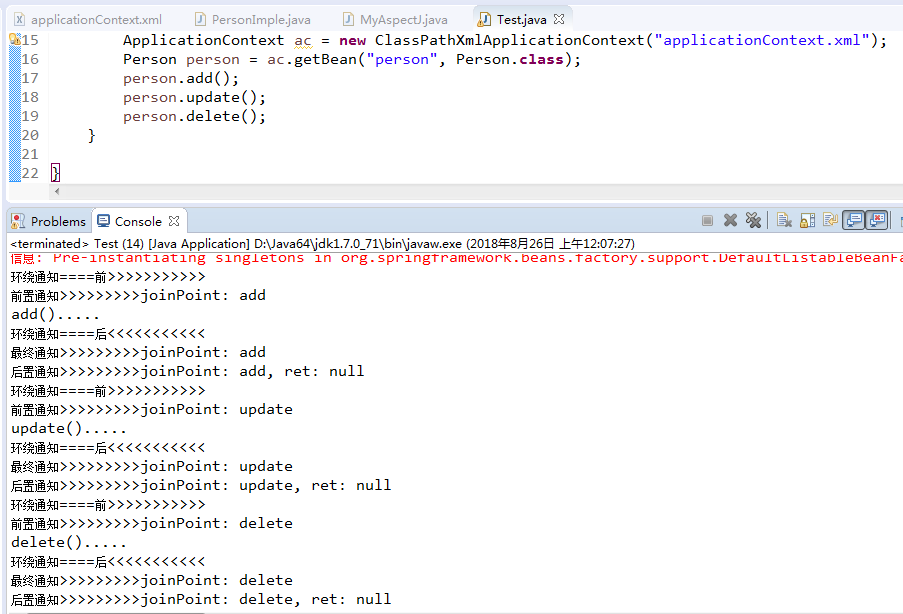
1、代理类接口Person.java
 package com.xiaostudy;

 /**

  * @desc 被代理类接口

  *

  * @author xiaostudy

  *

  */

 public interface Person {

     public void add();

     public void update();

     public void delete();

 }
2、代理类PersonImple.java
 package com.xiaostudy;

 import org.springframework.stereotype.Component;

 /**

  * @desc 被代理类

  *

  * @author xiaostudy

  *

  */

 @Component("person")//类注解

 public class PersonImple implements Person {

     /**

      * @desc 实现接口方法

      */

     public void add() {

         System.out.println("add().....");

     }

     @Override

     public void update() {

         System.out.println("update().....");

 //        int i = 1/0;

     }

     @Override

     public void delete() {

         System.out.println("delete().....");

     }

 }
3、通知类MyAspectJ.java
 package com.xiaostudy;

 import org.aspectj.lang.JoinPoint;

 import org.aspectj.lang.ProceedingJoinPoint;

 import org.aspectj.lang.annotation.After;

 import org.aspectj.lang.annotation.AfterReturning;

 import org.aspectj.lang.annotation.AfterThrowing;

 import org.aspectj.lang.annotation.Around;

 import org.aspectj.lang.annotation.Aspect;

 import org.aspectj.lang.annotation.Before;

 import org.aspectj.lang.annotation.Pointcut;

 import org.springframework.stereotype.Component;

 /**

  * @desc 通知类

  *

  * @author xiaostudy

  *

  */

 @Component//类注解

 @Aspect//AspectJ注解

 public class MyAspectJ {

     //声明公共切入点

     @Pointcut("execution(* com.xiaostudy.PersonImple.*(..))")

     public void myPointcut() {

     }

     //前置通知注解,只有一个参数时,value可以省略不写

     @Before("execution(* com.xiaostudy.PersonImple.*(..))")

     public void myBefort(JoinPoint joinPoint) {

         System.out.println("前置通知>>>>>>>>>joinPoint: " + joinPoint.getSignature().getName());

     }

     //后置通知注解,当参数大于1时,value必须写

     @AfterReturning(value="myPointcut()", returning="ret")

     public void myAfterReturning(JoinPoint joinPoint, Object ret) {

         System.out.println("后置通知>>>>>>>>>joinPoint: " + joinPoint.getSignature().getName()

                 + ", ret: " + ret);

     }

     //环绕通知注解

     @Around("myPointcut()")

     public Object myAround(ProceedingJoinPoint joinPoint) throws Throwable {

         System.out.println("环绕通知====前>>>>>>>>>>>");

         Object obj = joinPoint.proceed();

         System.out.println("环绕通知====后<<<<<<<<<<<");

         return obj;

     }

     //异常通知注解

     @AfterThrowing(value="myPointcut()", throwing="e")

     public void myThrowint(JoinPoint joinPoint, Throwable e) {

         System.out.println("异常通知>>>>>>>>>joinPoint: " + joinPoint.getSignature().getName()

                 + ", e: " + e.getMessage());

         System.exit(0);

     }

     //最终通知注解

     @After("myPointcut()")

     public void myAfter(JoinPoint joinPoint) {

         System.out.println("最终通知>>>>>>>>>joinPoint: " + joinPoint.getSignature().getName());

     }

 }
4、spring配置文件applicationContext.xml
 <?xml version="1.0" encoding="UTF-8"?>

 <beans xmlns="http://www.springframework.org/schema/beans"

        xmlns:xsi="http://www.w3.org/2001/XMLSchema-instance"

        xmlns:aop="http://www.springframework.org/schema/aop"

        xmlns:context="http://www.springframework.org/schema/context"

        xsi:schemaLocation="http://www.springframework.org/schema/beans

                               http://www.springframework.org/schema/beans/spring-beans.xsd

                               http://www.springframework.org/schema/aop

                               http://www.springframework.org/schema/aop/spring-aop.xsd

                               http://www.springframework.org/schema/context

                               http://www.springframework.org/schema/context/spring-context.xsd">

     <!-- 扫描注解类 -->

     <context:component-scan base-package="com.xiaostudy"></context:component-scan>

     <!-- 确定 AOP注解生效 -->

     <aop:aspectj-autoproxy></aop:aspectj-autoproxy>

 </beans>
5、测试类Test.java
 package com.xiaostudy;

 import org.springframework.context.ApplicationContext;

 import org.springframework.context.support.ClassPathXmlApplicationContext;

 /**

  * @desc 测试类

  *

  * @author xiaostudy

  *

  */

 public class Test {

     public static void main(String[] args) {

         ApplicationContext ac = new ClassPathXmlApplicationContext("applicationContext.xml");

         Person person = ac.getBean("person", Person.class);

         person.add();

         person.update();

         person.delete();

     }

 }
spring通知的注解的更多相关文章
- spring aop 使用注解方式总结
spring aop的注解方式:和xml的配置方式略有区别,详细如下: 1.首先还是建立需要的切面类:切面类里面定义好切点配置,以及所有的需要实现的通知方法. /** * */ package com ...
- 利用Spring AOP自定义注解解决日志和签名校验
转载:http://www.cnblogs.com/shipengzhi/articles/2716004.html 一.需解决的问题 部分API有签名参数(signature),Passport首先 ...
- Spring笔记04_AOP注解开发_模板_事务
目录 1. Spring基于AspectJ的注解的AOP开发 1. 1 SpringAOP的注解入门 1.2 Spring的AOP的注解通知类型 1.2.1 @Before:前置通知 1.2.2 @A ...
- spring 、spring boot 常用注解
@Profile 1.用户配置文件注解. 2.使用范围: @Configration 和 @Component 注解的类及其方法, 其中包括继承了 @Component 的注解: @Service. ...
- spring AOP自定义注解方式实现日志管理
今天继续实现AOP,到这里我个人认为是最灵活,可扩展的方式了,就拿日志管理来说,用Spring AOP 自定义注解形式实现日志管理.废话不多说,直接开始!!! 关于配置我还是的再说一遍. 在appli ...
- Spring基于纯注解方式的使用
经过上篇xml与注解混合方式,对注解有了简单额了解,上篇的配置方式极大地简化了xml中配置,但仍有部分配置在xml中进行,接下来我们就通过注解的方式将xml中的配置用注解的方式实现,并最终去掉xml配 ...
- spring AOP自定义注解 实现日志管理
今天继续实现AOP,到这里我个人认为是最灵活,可扩展的方式了,就拿日志管理来说,用Spring AOP 自定义注解形式实现日志管理.废话不多说,直接开始!!! 关于配置我还是的再说一遍. 在appli ...
- Spring AOP的注解方式实现
spring也支持注解方式实现AOP,相对于配置文件方式,注解配置更加的轻量级,配置.修改更加方便. 1.开启AOP的注解配置方式 <!-- 开启aop属性注解 --> <aop:a ...
- (转)利用Spring AOP自定义注解解决日志和签名校验
一.需解决的问题 部分API有签名参数(signature),Passport首先对签名进行校验,校验通过才会执行实现方法. 第一种实现方式(Origin):在需要签名校验的接口里写校验的代码,例如: ...
随机推荐
- angualar入门学习-- 作用域$scope
作用域$scope: 是ng执行环境,视图与controller之间的胶水,双向绑定的基础 $scope提供里$watch方法,监听数据模型变化 $scope提供里$apply方法,将数据模型变化更新 ...
- 在Sql Server中使用证书加密数据
IF NOT EXISTS () CREATE MASTER KEY ENCRYPTION BY PASSWORD = 'QWE23987zxJKL569&agf1$94467GRkjg5k3 ...
- cocopods
一.什么是CocoaPods 1.为什么需要CocoaPods 在进行iOS开发的时候,总免不了使用第三方的开源库,比如SBJson.AFNetworking.Reachability等等.使用这些库 ...
- JSON LIKE
is_exist = HelperInfoModel.query.filter(and_("json_extract(content,'$.cn'" == content.get( ...
- 报错:Cannot remove entries from nonexistent file c:\program files\anaconda3\lib\site-packages\easy-install.pth
Outline 这两天通过“掘金量化终端”跑模型策略,之前装好环境一直ok,可以顺畅的Running~ 下午重装了下 Anaconda,刚才跑的时候提示 缺少“gm”模块 (掘金量化必须包): 就按照 ...
- 迭代器模拟for循环
s = 'wgugq wgugfgfqwihqwohd' it = s.__iter__() # 生成一个迭代器 while 1: try: # 尝试 el = it.__next__() # 下一个 ...
- const,var,let区别(转载)
1.const定义的变量不可以修改,而且必须初始化. const b = 2;//正确 // const b;//错误,必须初始化 console.log('函数外const定义b:' + b);// ...
- django 快速数据库操作,不用SQL语句
配置models文件 # -*- coding: utf-8 -*- from __future__ import unicode_literals from django.db import mod ...
- PHP逐行读取数据
PHP逐行读取数据 <?php $file = fopen("Minot.txt", "r") or exit("Unable to open ...
- java多线程总结(二)
线程一般有6个状态: 新建状态:NEW 可运行状态:RUNNABLE 休眠状态:TIMED_WAITING 等待状态:WAITING 阻塞状态:BLOCKED 终止状态“TERMINATED 当我们使 ...