
android AIDL 语言用法
跨进程通信可以用AIDL语言
这里讲述下如何使用AIDL语言进行跨进程通信
文章参考 《设计模式》一书
demo结构参考
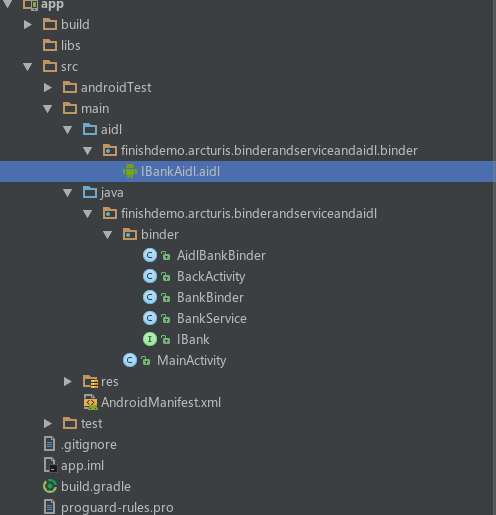
主要的文件类有:IBankAidl.aidl
java文件:AidlBankBinder,BackActivity(应该是BankActivity写错了),BankService(继承自Service,服务类)
IBankAidl.aidl文件 这里AIdl的使用对包位置有要求,所以我就把包名放出来了
package finishdemo.arcturis.binderandserviceandaidl.binder;

// Declare any non-default types here with import statements

interface IBankAidl {

    /**

     * Demonstrates some basic types that you can use as parameters

     * and return values in AIDL.

     */

    void basicTypes(int anInt, long aLong, boolean aBoolean, float aFloat,

            double aDouble, String aString);

   /**

     * 开户

     * @param name 户主名

     * @param password 密码

     * @return 开户信息

     */

    String openAccount(String name,String password);

    /**

     * 存钱

     * @param money

     * @param account

     * @return

     */

    String saveMoney(int money,String account);

    /**

     * 取钱

     * @param money

     * @param account

     * @param password

     * @return

     */

    String takeMoney(int money,String account,String password);

    /**

     * 销户

     * @param account

     * @param password

     * @return

     */

    String closeAccount(String account,String password);

}
AidlBankBinder文件 继承自IBankAidl的Stub类,然后重写并实现Aidl内的方法,这里是模拟一个银行的操作
public class AidlBankBinder extends IBankAidl.Stub {

    @Override

    public void basicTypes(int anInt, long aLong, boolean aBoolean, float aFloat, double aDouble, String aString) throws RemoteException {

    }

    @Override

    public String openAccount(String name, String password) {

        return name+"开户成功!账号为:"+ UUID.randomUUID().toString();

    }

    @Override

    public String saveMoney(int money, String account) {

        return "账户:"+account + "存入"+ money + "单位:人民币";

    }

    @Override

    public String takeMoney(int money, String account, String password) {

        return "账户:"+account + "支取"+ money + "单位:人民币";

    }

    @Override

    public String closeAccount(String account, String password) {

        return account + "销户成功";

    }

}
BankService文件 返回一个AidlBankBinder
public class BankService extends Service {

    @Nullable

    @Override

    public IBinder onBind(Intent intent) {

        //单进程写法

//        return new BankBinder();

        //不同进程AIDL 通信写法

        return new AidlBankBinder();

    }

}
接下来在Activity中使用 BackActivity方法
public class BackActivity extends AppCompatActivity implements View.OnClickListener {

//    private BankBinder mBankBinder;

    private IBankAidl mBankBinder;

    private TextView tvMsg;

    private Context context;

    private ServiceConnection conn = new ServiceConnection() {

        @Override

        public void onServiceConnected(ComponentName name, IBinder service) {

            //同一进程写法

//            mBankBinder = (BankBinder) service;

            //不同进程写法

            mBankBinder = IBankAidl.Stub.asInterface(service);

        }

        @Override

        public void onServiceDisconnected(ComponentName name) {

        }

    };

    @Override

    protected void onCreate(@Nullable Bundle savedInstanceState) {

        super.onCreate(savedInstanceState);

        setContentView(R.layout.activity_main);

        context = this;

        tvMsg = (TextView) findViewById(R.id.tv_msg);

        Intent intent = new Intent();

        intent.setAction("actionname.aidl.bank.BankService");

        //这里遇到一个问题,如果你直接使用intent 这个意图去开启服务的话就会报

        //Android Service Intent must be explicit 意思是服务必须要显示的调用,这个是5.0之后新的规定

        //这个 createExplicitFromImplicitIntent 可以将隐性调用变成显性调用

        Intent intent1  = new Intent(createExplicitFromImplicitIntent(context,intent));

        bindService(intent1,conn,BIND_AUTO_CREATE);

        initBtn(R.id.btn_aidl_bank_close);

        initBtn(R.id.btn_aidl_bank_open);

        initBtn(R.id.btn_aidl_bank_save);

        initBtn(R.id.btn_aidl_bank_take);

    }

    @Override

    protected void onDestroy() {

        super.onDestroy();

        unbindService(conn);

    }

    private void initBtn(int resID){

        Button b = (Button) findViewById(resID);

        b.setOnClickListener(this);

    }

    @Override

    public void onClick(View v) {

        switch (v.getId()){

            case R.id.btn_aidl_bank_open:

                //这个RemoteException 是 AIDL跨进程通信的用法必须加上的异常捕获

                try {

                    tvMsg.setText(mBankBinder.openAccount("BigAss","123456"));

                }catch (RemoteException e){

                    e.printStackTrace();

                }

                break;

            case R.id.btn_aidl_bank_save:

                try {

                    tvMsg.setText(mBankBinder.saveMoney(8888888,"bigAss123"));

                }catch (RemoteException e){

                    e.printStackTrace();

                }

                break;

            case R.id.btn_aidl_bank_take:

                try {

                    tvMsg.setText(mBankBinder.takeMoney(520,"bigAss123","123456"));

                }catch (RemoteException e){

                    e.printStackTrace();

                }

                break;

            case R.id.btn_aidl_bank_close:

                try {

                    tvMsg.setText(mBankBinder.closeAccount("bigAss123","123456"));

                }catch (RemoteException e){

                    e.printStackTrace();

                }

                break;

        }

    }

    /***

     * Android L (lollipop, API 21) introduced a new problem when trying to invoke implicit intent,

     * "java.lang.IllegalArgumentException: Service Intent must be explicit"

     *

     * If you are using an implicit intent, and know only 1 target would answer this intent,

     * This method will help you turn the implicit intent into the explicit form.

     *

     * Inspired from SO answer: http://stackoverflow.com/a/26318757/1446466

     * @param context

     * @param implicitIntent - The original implicit intent

     * @return Explicit Intent created from the implicit original intent

     */

    public static Intent createExplicitFromImplicitIntent(Context context, Intent implicitIntent) {

        // Retrieve all services that can match the given intent

        PackageManager pm = context.getPackageManager();

        List<ResolveInfo> resolveInfo = pm.queryIntentServices(implicitIntent, 0);

        // Make sure only one match was found

        if (resolveInfo == null || resolveInfo.size() != 1) {

            return null;

        }

        // Get component info and create ComponentName

        ResolveInfo serviceInfo = resolveInfo.get(0);

        String packageName = serviceInfo.serviceInfo.packageName;

        String className = serviceInfo.serviceInfo.name;

        ComponentName component = new ComponentName(packageName, className);

        // Create a new intent. Use the old one for extras and such reuse

        Intent explicitIntent = new Intent(implicitIntent);

        // Set the component to be explicit

        explicitIntent.setComponent(component);

        return explicitIntent;

    }

}
主要思路是用隐式的方法启动一个服务,然后调用Aidl实例类的方法即可,具体的Aidl语言在BuildApp之后在
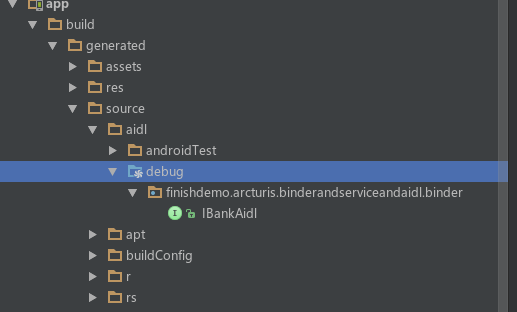
这里即可查看 内部是他实现进程间数据传输所做的转化代码,有兴趣可以看下
android AIDL 语言用法的更多相关文章
- Android AIDL的用法
一.什么是AIDL服务 一般创建的服务并不能被其他的应用程序访问.为了使其他的应用程序也可以访问本应用程序提供的服务,Android系统采用了远程过程调用(Remote Procedure Cal ...
- Android webservice的用法详细讲解
Android webservice的用法详细讲解 看到有很多朋友对WebService还不是很了解,在此就详细的讲讲WebService,争取说得明白吧.此文章采用的项目是我毕业设计的webserv ...
- Android aidl Binder框架浅析
转载请标明出处:http://blog.csdn.net/lmj623565791/article/details/38461079 ,本文出自[张鸿洋的博客] 1.概述 Binder能干什么?B ...
- AIDL/IPC Android AIDL/IPC 进程通信机制——超具体解说及使用方法案例剖析(播放器)
首先引申下AIDL.什么是AIDL呢?IPC? ------ Designing a Remote Interface Using AIDL 通常情况下,我们在同一进程内会使用Binder.Broad ...
- (转载)你真的理解Android AIDL中的in,out,inout么?
前言 这其实是一个很小的知识点,大部分人在使用AIDL的过程中也基本没有因为这个出现过错误,正因为它小,所以在大部分的网上关于AIDL的文章中,它都被忽视了——或者并没有,但所占篇幅甚小,且基本上都是 ...
- Android AIDL 小结
1.AIDL (Android Interface Definition Language ) 2.AIDL 适用于 进程间通信,并且与Service端多个线程并发的情况,如果只是单个线程 可以使用 ...
- Android AIDL使用详解_Android IPC 机制详解
一.概述 AIDL 意思即 Android Interface Definition Language,翻译过来就是Android接口定义语言,是用于定义服务器和客户端通信接口的一种描述语言,可以拿来 ...
- 【Android学习】android:layout_weight的用法实例
对于android:layout_weight的用法,用下面的例子来说明: <LinearLayout xmlns:android="http://schemas.android.co ...
- Android之Adapter用法总结-(转)
Android之Adapter用法总结 1.概念 Adapter是连接后端数据和前端显示的适配器接口,是数据和UI(View)之间一个重要的纽带.在常见的View(List View,Grid Vie ...
随机推荐
- Python3基础 list append 向尾部添加一个元素
Python : 3.7.0 OS : Ubuntu 18.04.1 LTS IDE : PyCharm 2018.2.4 Conda ...
- 流程控制if,while,for
if语句 什么是if语句 判断一个条件如果成立则做...不成立则做....为何要有if语句 让计算机能够像人一样具有判断的能力 如何用if语句 语法1: if 条件1: code1 code2 cod ...
- HBase底层存储原理
HBase底层存储原理——我靠,和cassandra本质上没有区别啊!都是kv 列存储,只是一个是p2p另一个是集中式而已! 首先HBase不同于一般的关系数据库, 它是一个适合于非结构化数据存储的数 ...
- vs添加webservice
VS2010中添加WebService注意的几个地方 添加web引用和添加服务引用有什么区别? 2.4.1 基础知识——添加服务引用与Web引用的区别 C#之VS2010开发Web Service V ...
- Linux命令1——a
addUser: -c:备注 -d:登陆目录 -e:有效期限 -f:缓冲天数 -g:组 -b:用户目录 -G:附加组 -s:制定使用默认的shell -u:指定用户ID -r:建立系统账号 -M:不自 ...
- 杭电hdu-6168 Numbers
这一题是考察排序与后续数据处理的题.我是用了map来给“和”做标记,把确定为a数组内数的数两两求和.给这些和标记,这样就可以很好的处理带有重复数的数据了~~ 贴个碼: #include<iost ...
- java 注解的使用
@Target({ElementType.METHOD})@Retention(RetentionPolicy.RUNTIME)@Documentedpublic @interface Without ...
- Latex: "Missing $ inserted" 解决方法
参考: Latex报"Missing $ inserted"的解决方法 Latex: "Missing $ inserted" 解决方法 原因一:在文中出现&q ...
- 用maven和spring搭建ActiveMQ环境
前面搭建过了简单的环境,这次用稍微实际一点的maven+spring+activemq来进行搭建 准备:win7,eclipse,jdk1.8,tomcat8,maven3.5.2,activemq5 ...
- _itemmod_unbind
该表中的物品可以用一定代价进行解绑,解绑后可以移动,但下线将会导致物品重新绑定 `entry`物品entry `reqId` 解绑消耗模板Id `备注` 备注