
【小超_Android】android上开源的酷炫的交互动画和视觉效果:Interactive-animation
1.交互篇
2.视觉篇
交互篇
1.SlidingUpPanelLayout
项目介绍:他的库提供了一种简单的方式来加入一个可拖动滑动面板(由谷歌音乐推广,谷歌地图和Rdio)你的Android应用程序。
项目地址:https://github.com/umano/AndroidSlidingUpPanel
DEMO演示:
2.FoldableLayout
项目介绍:折叠展开点击的ITEM
项目地址:https://github.com/alexvasilkov/FoldableLayout
3.android-flip
项目介绍:折叠翻页效果 项目地址:https://github.com/openaphid/android-flip DEMO演示:
4.SwipeBackLayout
项目介绍:拖动关闭当前活动窗口 项目地址:https://github.com/Issacw0ng/SwipeBackLayout DEMO演示: APK:https://play.google.com/store/apps/details?id=me.imid.swipebacklayout.demo raw=true" style="padding:0px; margin:0px; text-decoration:none; color:rgb(0,95,169)">
5.AndroidImageSlider
项目介绍:一个美丽的Slider,能够通过自己定义达到更好的效果 项目地址:https://github.com/daimajia/AndroidImageSlider DEMO演示:
APK:https://jumpshare.com/v/PAKDLjG0UYQjCy9bSSdX
6.Android-ParallaxHeaderViewPager
项目介绍:栏目展示动画,自己主动播放,滚动下方列表时候,收缩效果 项目地址:https://github.com/kmshack/Android-ParallaxHeaderViewPager DEMO演示:
APK:https://play.google.com/store/apps/details?
id=com.kmshack.newsstand

7.FragmentTransactionExtended
项目介绍: 项目地址:https://github.com/DesarrolloAntonio/FragmentTransactionExtended DEMO演示:

8.FragmentTransactionExtended
项目介绍:Android按钮能够化身进度 项目地址:https://github.com/dmytrodanylyk/circular-progress-buttonDEMO演示:

9.floatlabelededittext
项目介绍:简单的实现浮动标签EditText:Android视图使用EditText之上,并提示EditText时填充文本。
项目地址:https://github.com/wrapp/floatlabelededittext
DEMO演示:
10.QuickReturn
项目介绍:Showcases QuickReturn view as a header, footer, and both header and footer.
项目地址:https://github.com/lawloretienne/QuickReturn
DEMO演示:
11.VNTNumberPickerPreference
项目介绍:这是一个易于使用的自己定义偏好,打开一个对话框中有很多选择。
的值被自己主动保存,你能够设置默认,min -和maxValue方便地在XML。
项目地址:https://github.com/vanniktech/VNTNumberPickerPreference
DEMO演示:
12.CircularFloatingActionMenu
项目介绍:动画,可定制的圆形浮动菜单为Android,
项目地址:https://github.com/oguzbilgener/CircularFloatingActionMenu
DEMO演示:
13.NiftyDialogEffects
项目介绍:Dialog的各种打开动画。Nifty Modal Dialog Effects look like this(Nifty Modal Window Effects)
项目地址:https://github.com/sd6352051/NiftyDialogEffects
DEMO演示:
14.material-menu
项目介绍:变形安卓菜单,返回和删除button
项目地址:https://github.com/balysv/material-menu
DEMO演示:
15.AndroidViewHover
项目介绍:我们须要一个悬停视图,显示菜单,显示消息。
项目地址:https://github.com/daimajia/AndroidViewHover
DEMO演示:
16.PagedHeadListView
项目介绍:图片轮转切换
项目地址:https://github.com/JorgeCastilloPrz/PagedHeadListView
DEMO演示:

17.android-movies-demo
项目介绍:电影列表3级联动。交互
项目地址:https://github.com/dlew/android-movies-demo
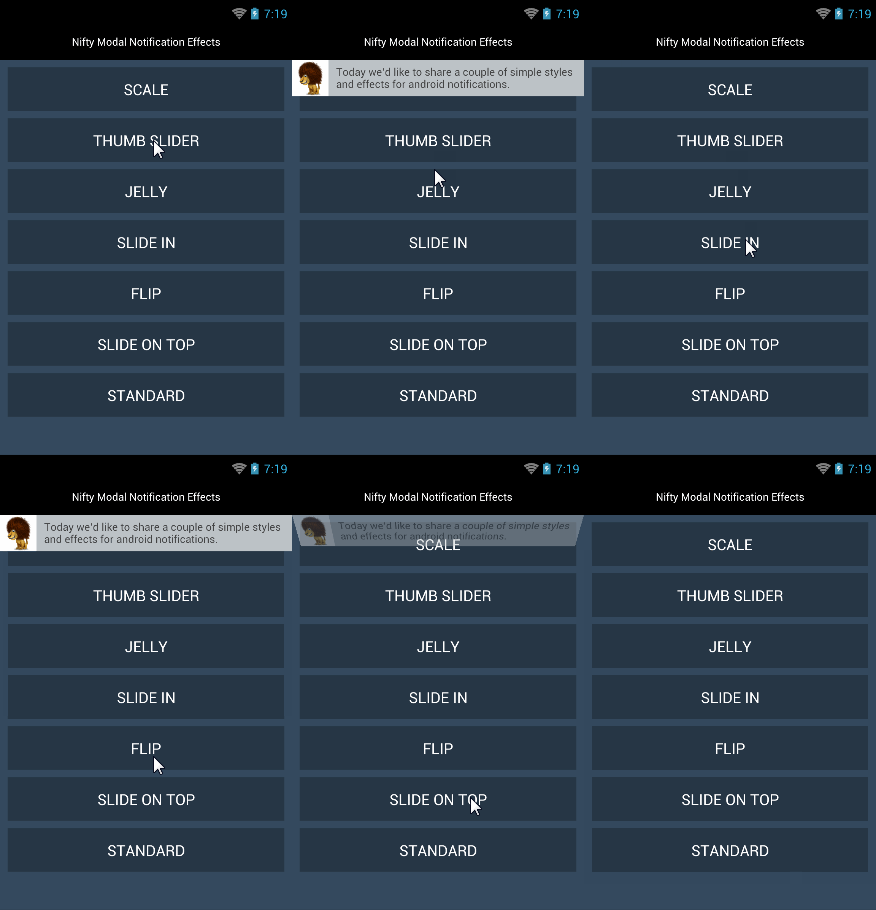
18.NiftyNotification
项目介绍:提示通知栏的各种动画
项目地址:https://github.com/sd6352051/NiftyNotification
DEMO演示:
19.SwipeBack
项目介绍:拖动关闭,榜样:kicker app(https://play.google.com/store/apps/details?id=com.netbiscuits.kicker)
项目地址:https://github.com/sockeqwe/SwipeBack
DEMO演示:
20.AndroidSwipeLayout
项目介绍:类似微信的測拉菜单
项目地址:https://github.com/daimajia/AndroidSwipeLayout
DEMO演示:
21.SnackBar
项目介绍:
项目地址:https://github.com/MrEngineer13/SnackBar
DEMO演示:
视觉篇
1.android-stackblur
项目介绍:毛玻璃,朦胧美
项目地址:https://github.com/kikoso/android-stackblur
DEMO演示:
2.BlurEffectForAndroidDesign
项目介绍:实现模糊图形技巧 项目地址:https://github.com/PomepuyN/BlurEffectForAndroidDesign
DEMO演示:
3.Shimmer-android
项目介绍:闪动的文字 项目地址:https://github.com/RomainPiel/Shimmer-android
DEMO演示:

4.WizardPager
项目介绍:它提供了一个演示样例实现的Android手机上安装一个向导界面 项目地址:https://github.com/TechFreak/WizardPager
DEMO演示:
youtube:http://www.youtube.com/watch?
v=7EOsegp4J2o&feature=youtu.be
5.FloatingActionButton
项目介绍:浮动的button 项目地址:https://github.com/FaizMalkani/FloatingActionButton
DEMO演示:
6.JumpingBeans
项目介绍:跳动的文本 项目地址:https://github.com/frakbot/JumpingBeans
DEMO演示:

7.android_maskable_layout
项目介绍:可屏蔽的布局 项目地址:https://github.com/christophesmet/android_maskable_layout
DEMO演示:
8.activityanimation
项目介绍:Activit之间切换动画 项目地址:https://github.com/flavienlaurent/activityanimation
DEMO演示: youtube: https://www.youtube.com/watch?v=-E0sc6w_Jck
9.android-shape-imageview
项目介绍:提供了一组自己定义形状的android imageview组件,和一个框架来定义很多其它的形状。
实现着色器和位图基于掩模图像视图。
项目地址:https://github.com/siyamed/android-shape-imageview
DEMO演示:

10.RippleView
项目介绍:觉得模仿的连锁反应在单击推出了Android L
项目地址:https://github.com/siriscac/RippleView
DEMO演示:
https://github.com/Rano1/Interactive-animation
【小超_Android】android上开源的酷炫的交互动画和视觉效果:Interactive-animation的更多相关文章
- [转]收集android上开源的酷炫的交互动画和视觉效果:Interactive-animation
原文链接:http://www.open-open.com/lib/view/open1411443332703.html 描述:收集android上开源的酷炫的交互动画和视觉效果. 1.交互篇 2. ...
- [转]收集android上开源的酷炫的交互动画和视觉效果
原文链接:http://www.open-open.com/lib/view/open1411443332703.html 描述:收集android上开源的酷炫的交互动画和视觉效果. 1.交互篇 2. ...
- 收集android上开源的酷炫的交互动画和视觉效果:Interactive-animation
查看网址:http://www.open-open.com/lib/view/open1411443332703.html
- Android github上开源项目、酷炫的交互动画和视觉效果地址集合
Android上开源的酷炫的交互动画和视觉效果:http://blog.csdn.net/u013278099/article/details/50323689 Awesome-android-ui: ...
- Flutter酷炫的路由动画效果
现在Flutter的路由效果已经非常不错了,能满足大部分App的需求,但是谁不希望自己的App更酷更炫那,下面介绍几个酷炫的路由动画. 其实路由动画的原理很简单,就是重写并继承PageRouterBu ...
- 【小超_Android】2015最流行的android组件、工具、框架大全(兴许)
2015.07.07 FlyRefresh 创意Replace的Android实现,非常cool. fab-toolbar Material Design风格的FAB工具栏效果 MaterialVie ...
- 使用 CSS 构建强大且酷炫的粒子动画
粒子动画,顾名思义,就是页面上存在大量的粒子构建而成的动画.传统的粒子动画主要由 Canvas.WebGL 实现. 当然,不使用 HTML + CSS 的主要原因在于,粒子动画通常需要较多的粒子,而如 ...
- 【Flutter 实战】酷炫的开关动画效果
此动画效果是我在浏览文章时发现的一个非常酷炫的效果,于是就使用 Flutter 实现了. 更多动画效果及Flutter资源:https://github.com/781238222/flutter-d ...
- 【小超_Android】GitHub源码项目整理,希望对大家有帮助
收集的经常使用Github上比較优秀的项目,希望对大家日常开发有所帮助: AndroidSlidingMenu https://github.com/jfeinstein10/SlidingMen ...
随机推荐
- selenium3 + python - xpath定位
什么是xpath呢? 官方介绍:XPath即为XML路径语言,它是一种用来确定XML1(标准通用标记语言3的子集)文档中某部分位置的语言.反正小编看这个介绍是云里雾里的,通俗一点讲就是通过元素的路径来 ...
- python 5:str(某一变量)(将其他数字解释为字符串)
age = messege = "Your's age is " + str(age) #将其他数字更改为字符串 print(messege) 运行结果应该是: Your's ag ...
- 树莓派-基于raspistill实现定时拍照
raspistill 经过上一篇<<树莓派-安装摄像头模块>>之后 raspistill 是树莓派基于摄像头拍照命令 比如我要截取一张宽1024px,高768px,旋转180度 ...
- C# 多线程系列(二)
传递数据给一个线程 通过函数或lambda表达式包一层进行传递. static void Main(string[] args) { Thread thread = new Thread(() =&g ...
- java反射_01
为什么要用反射? 举个栗子: package com.imooc.reflect; public class Work { // 定义一个word方法 public void word() { Sys ...
- 我所理解的monad(4):函子(functor)是什么--可把范畴简单的看成高阶类型
大致介绍了幺半群(monoid)后,我们重新回顾最初引用wadler(haskell委员会成员,把monad引入haskell的家伙)的那句话: 现在我们来解读这句话中包含的另一个概念:自函子(End ...
- Leetcode刷题笔记——查找
33.Search in Rotated Sorted Array 题目描述: 给定一个被翻转的整型升序数组nums,数组中无重复元素,如[4,5,6,7,0,1,2],和一个整数target.要求在 ...
- [转载]查看Linux系统硬件信息实例详解
linux查看系统的硬件信息,并不像windows那么直观,这里我罗列了查看系统信息的实用命令,并做了分类,实例解说. cpu lscpu命令,查看的是cpu的统计信息. blue@blue-pc:~ ...
- GDI 边框绘制函数(8)
绘制矩形 调用 Rectangle 函数可以绘制一个矩形(它将填充这个矩形): BOOL Rectangle( HDC hdc, // 设备环境句柄 int nLeftRect, // 左边线的位置 ...
- nyoj113-字符串替换
字符串替换 时间限制:3000 ms | 内存限制:65535 KB 难度:2 描述 编写一个程序实现将字符串中的所有"you"替换成"we" 输入 输入包 ...