
NX二次开发-NXOPEN找相切面方法ScRuleFactory()->CreateRuleFaceTangent
 #include <uf_defs.h>

 #include <uf_ui_types.h>

 #include <iostream>

 #include <NXOpen/Session.hxx>

 #include <NXOpen/UI.hxx>

 #include <NXOpen/NXMessageBox.hxx>

 #include <NXOpen/Callback.hxx>

 #include <NXOpen/NXException.hxx>

 #include <NXOpen/BlockStyler_UIBlock.hxx>

 #include <NXOpen/BlockStyler_BlockDialog.hxx>

 #include <NXOpen/BlockStyler_PropertyList.hxx>

 #include <NXOpen/BlockStyler_Group.hxx>

 #include <NXOpen/BlockStyler_FaceCollector.hxx>

 #include <uf.h>

 #include <uf_obj.h>

 #include <NXOpen/NXObjectManager.hxx>

 #include <NXOpen/PartCollection.hxx>

 #include <NXOpen/Face.hxx>

 #include <NXOpen/FaceTangentRule.hxx>

 #include <NXOpen/ScCollectorCollection.hxx>

 #include <NXOpen/ScRuleFactory.hxx>

         UF_initialize();

         //NXOPEN初始化

         NXOpen::Session *theSession = NXOpen::Session::GetSession();

         NXOpen::Part *workPart(theSession->Parts()->Work());

         NXOpen::Part *displayPart(theSession->Parts()->Display());

         //选择面控件

         PropertyList* FaceSelectProps = face_select0->GetProperties();

         std::vector<NXOpen::TaggedObject*> faces = FaceSelectProps->GetTaggedObjectVector("SelectedObjects");

         delete FaceSelectProps;

         FaceSelectProps = NULL;

         tag_t FaceTag = faces[]->Tag();

         //对选中的面设置颜色

         UF_OBJ_set_color(FaceTag, );

         //给入一个面

         NXOpen::Face *face1(dynamic_cast<NXOpen::Face *>(NXOpen::NXObjectManager::Get(FaceTag)));

         //使用NXOPEN相切面规则

         std::vector<NXOpen::Face *> boundaryFaces1();

         NXOpen::FaceTangentRule *faceTangentRule1;

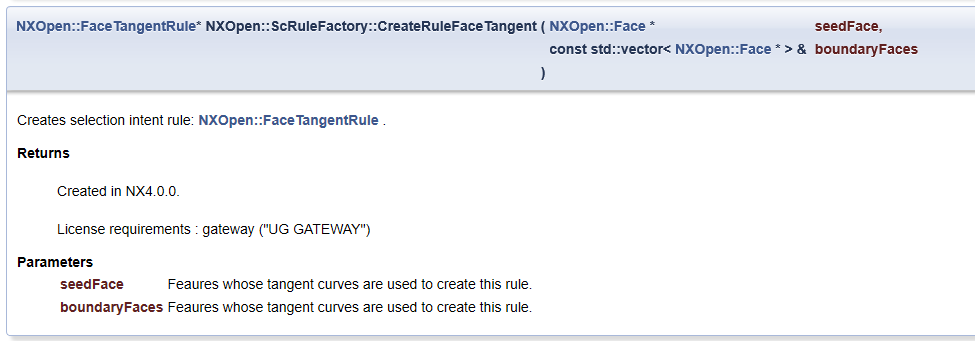
         faceTangentRule1 = workPart->ScRuleFactory()->CreateRuleFaceTangent(face1, boundaryFaces1, 0.050000000000000003);

         std::vector<NXOpen::SelectionIntentRule *> rules1();

         rules1[] = faceTangentRule1;

         NXOpen::ScCollector* scCollector1 = workPart->ScCollectors()->CreateCollector();

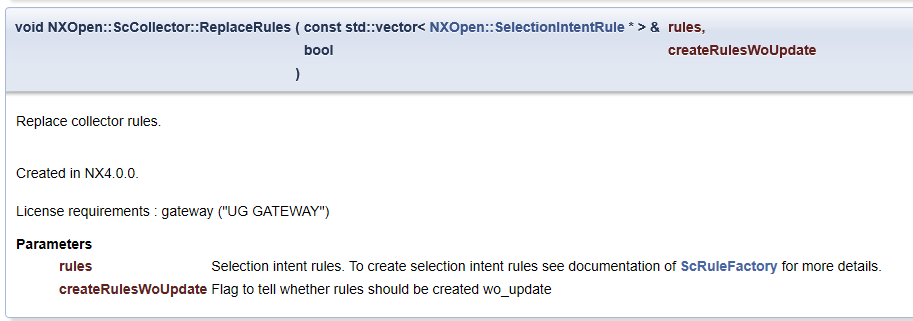
         scCollector1->ReplaceRules(rules1, false);

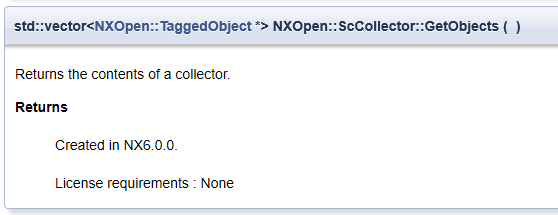
         std::vector<NXOpen::TaggedObject*> BB = scCollector1->GetObjects();

         for (int i = ; i < BB.size(); i++)

         {

             UF_OBJ_set_color(BB[i]->Tag(), );

         }

         UF_terminate();

NX二次开发-NXOPEN找相切面方法ScRuleFactory()->CreateRuleFaceTangent的更多相关文章
- NX二次开发-NXOPEN自动切换到工程图模块
UFUN的API里是没有切换到工程图的函数的,NXOPEN里是有方法可以用的.不过应该是不支持NX9以下的版本. NX9的不能录制出来,在UI类里有方法 NX9+VS2012 #include < ...
- NX二次开发-NXOPEN更改工程图视图名字baseView1->SetName("LSY");
NX9+VS2012 #include <uf.h> #include <uf_draw.h> #include <uf_obj.h> #include <u ...
- NX二次开发-NXOpen获取边的端点NXOpen::Edge::GetVertices
NX9+VS2012 #include <NXOpen/Features_BlockFeatureBuilder.hxx> #include <NXOpen/Features_Fea ...
- NX二次开发-NXOpen::Drawings::DrawingSheet Class Reference
NX11+VS2013 #include <NXOpen/Section.hxx> #include <NXOpen/SectionCollection.hxx> #inclu ...
- NX二次开发-NXOpen::CoordinateSystemCollection Class Reference
NX11+VS2013 #include <NXOpen/Section.hxx> #include <NXOpen/SectionCollection.hxx> #inclu ...
- NX二次开发-NXOpen::WCS Class Reference
NX11+VS2013 #include <NXOpen/Part.hxx> #include <NXOpen/PartCollection.hxx> #include < ...
- NX二次开发-NXOpen中Point3d类型转换成point类型
NX9+VS2012 #include <NXOpen/NXObject.hxx> #include <NXOpen/Part.hxx> #include <NXOpen ...
- NX二次开发-NXOPEN设置工程图表格注释字体workPart->Fonts()->AddFont("chinesef_fs", NXOpen::FontCollection::TypeNx);
NX9+VS2012 #include <uf.h> #include <uf_tabnot.h> #include <NXOpen/Part.hxx> #incl ...
- NX二次开发-NXOPEN获取所有工程图和所有视图DrawingSheet,DrawingSheetCollection,DraftingView
NX11+VS2013 #include <NXOpen/Part.hxx> #include <NXOpen/PartCollection.hxx> #include < ...
随机推荐
- 启动php-fpm和nginx
/usr/local/php/sbin/php-fpm #手动打补丁的启动方式/usr/local/php/sbin/php-fpm start sudo /usr/local/nginx/nginx ...
- 【LeetCode 9】回文数
题目链接 [题解] 还是要注意,取反的时候,-2^31 取反的话会爆掉Int..(因为int的正数最多到2^31-1) [代码] class Solution { public: bool isPal ...
- Xcode Command Line Tools for Mac OS X 10.9 Mavericks
by Daniel Kehoe Last updated 28 December 2013 How to install Apple Xcode Command Line Tools for Mac ...
- 【SQL】语句/函数汇总
1.CHARINDEX(短字符A,长字符B) 说明:返回A在B的位置,从1开始,若B中不存在A,则为0 例如: SELECT CHARINDEX('aaaa','abaaaacded') ----- ...
- python 生成json格式文件,并存储到手机上
上代码 #!/usr/bin/env python # -*- encoding: utf-8 -*- import json import os import random "" ...
- 无法将 Ethernet0 连接到虚拟网络”VMnet0″ 详细信息可以在 vmware.log 文件中找到未能连接虚拟机Ethernet0
在 vmware“编辑->虚拟网络设置”里面,点“恢复默认”可解决.
- 牛客 判断t1树中是否含有与t2树拓扑结构完全相同的子树
题目链接:https://www.nowcoder.com/practice/5a41ce17e8194e1688aa83a73137f7ee?tpId=101&tqId=33239& ...
- 国内pypi镜像
V2EX pypi.v2ex.com/simple 豆瓣 http://pypi.douban.com/simple 阿里云(推荐使用) http://mirrors.aliyun.com/pypi/ ...
- EM相关两个算法 k-mean算法和混合高斯模型
转自http://www.cnblogs.com/jerrylead/archive/2011/04/06/2006924.html http://www.cnblogs.com/jerrylead/ ...
- 关于py中lxml模块的cssselect的小问题
今天在使用lxml进行解析页面的时候遇到了不能解析空格的问题,就是类似于: <div class="aa bb"></div> 使用cssselect('. ...