
~request库的使用
官方文档:
安装:pip install request
特点:requests最大的特点就是其风格简单直接优雅。
1.请求方法
import requests        # 导入requests

resp_1 = requests.get('http://httpbin.org/get')    # 发送get请求

resp_2 = requests.post('http://httpbin.org/post', data = {'key':'value'})    # 发送post请求,data:传递参数

resp_3 =requests.put('http://httpbin.org/put',data={'key': 'value'})   #发送put请求,data:传递参数

resp_4 = resp_5 = requests.head('http://httpbin.org/get')   # 发送head请求

resp_5 = requests.options('http://httpbin.org/get')    # 发送options请求

resp_6 = requests.delete('http://httpbin.org/delete')  # 发送delete请求
2.传递URL参数
# requests中使用关键字params传递URL参数

import requests

params = {'key1': 'value1', 'key2': ['value2','value3']}

resp = requests.get('http://httpbin.org/get', params=params)

print(resp.url)
3.自定义header
import requests

url = 'https://www.douban.com/'

headers = {

     'User-Agent': 'Mozilla/5.0 (Windows NT 10.0; WOW64) AppleWebKit/537.36 (KHTML, like Gecko) Chrome/63.0.3239.26 Safari/537.36 Core/1.63.6821.400 QQBrowser/10.3.3040.400'

}

resp = requests.get(url=url,headers=headers)

resp.encoding = 'utf-8'

print(resp.text)
4.自定义Cookie
import requests

cookies = {

    'cookies_are': 'working'

}

resp = requests.get('http://www.baidu.com',cookies=cookies)

for items in resp.cookies.items():

      cookies[items[0]] = items[1]

      print(cookies)
5.设置代理
proxies = {

    'http': 'http://127.0.0.10:3126',

    'https': 'http://10.10.1.10:1080'

}

requests.get('http://example.org',proxies=proxies)
6.重定向
# 在网络请求中,我们常常会遇到状态码是3开头的重定向问题,

# 在Requests中是默认开启允许重定向的,即遇到重定向时,会自动继续访问。

# 使用allow_redirects来控制是否开启重定向

resp = requests.get('http://github.com', allow_redirects=False)

print(resp.status_code)
7.禁止证书验证
"有时候我们使用了抓包工具,这个时候由于抓包工具提供的证书并不是由受信任的数字证书颁发机构颁发的,"

"所以证书的验证会失败,所以我们就需要关闭证书验证。在请求的时候把verify参数设置为False就可以关闭证书验证了。"

resp = requests.get('http://httpbin.org/post', verify=False)
8.设置超时
"设置访问超时,设置timeout参数就可"

requests.get('http://github.com', timeout=0.001)
9.接收响应
"通过Requests发起请求获取到的,是一个requests.models.Response对象。通过这个对象我们可以很方便的获取响应的内容。"

"之前通过urllib获取的响应,读取的内容都是bytes的二进制格式,需要我们自己去将结果decode()一次转换成字符串数据。"

"而Requests通过text属性,就可以获得字符串格式的响应内容。"

resp = requests.get('http://www.baidu.com')

resp.encoding = 'utf-8'   # --------------指定解码的编码格式

print(resp.text)          # --------------获取字符串格式的响应内容

print(resp.content)       # --------------获得原始的二进制数据

print(resp.json())        # --------------将json格式数据转换为字典格式的数据

print(resp.status_code)   # --------------获取响应的状态码

print(resp.headers)       # --------------获取响应的报头

print(resp.cookies)       # --------------获取服务器返回的cookies

print(resp.url)           # --------------查看访问的URL
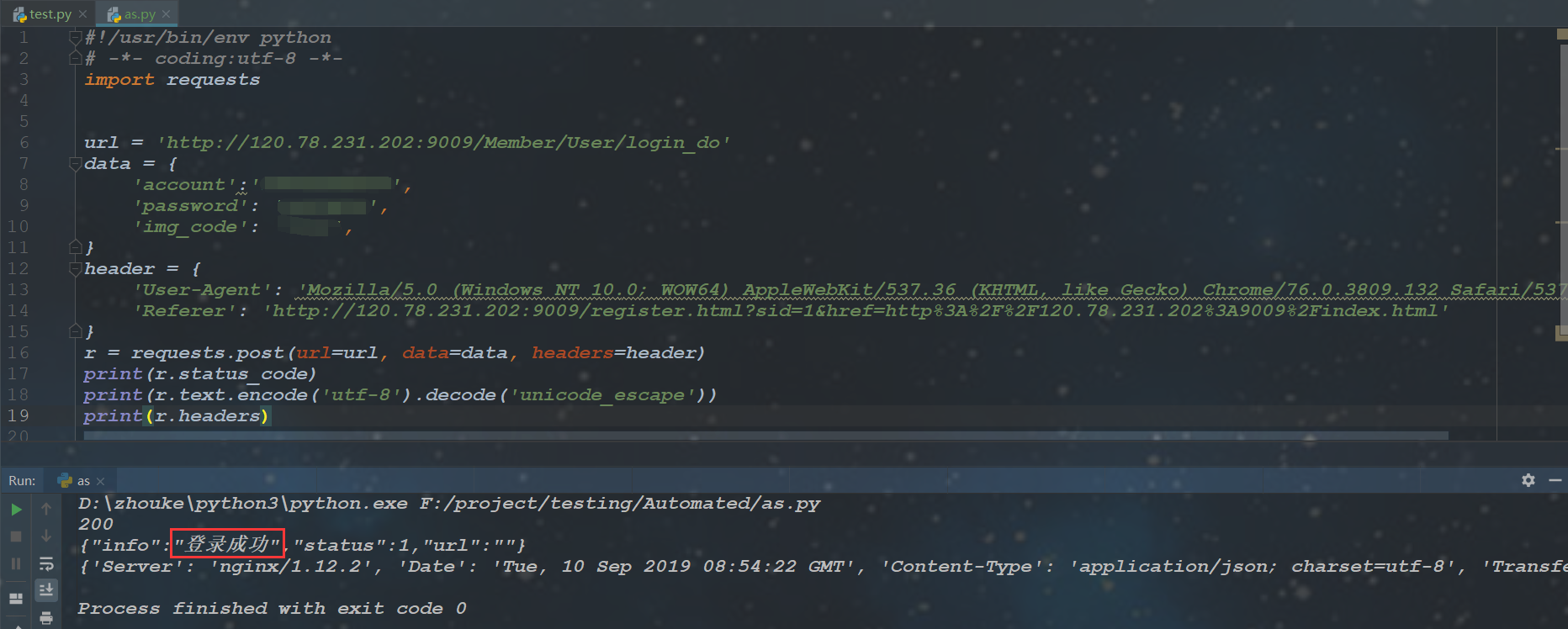
10.案例:使用request完成登录
~request库的使用的更多相关文章
- Python3 urllib.request库的基本使用
Python3 urllib.request库的基本使用 所谓网页抓取,就是把URL地址中指定的网络资源从网络流中读取出来,保存到本地. 在Python中有很多库可以用来抓取网页,我们先学习urlli ...
- Python request库与爬虫框架
Requests库的7个主要方法 requests.request():构造一个请求,支持以下各方法的基础方法 requests.get():获取HTML网页的主要方法,对应于HTTP的GET ...
- Request库使用response.text返回乱码问题
我们日常使用Request库获取response.text,这种调用方式返回的text通常会有乱码显示: import requests res = requests.get("https: ...
- 爬虫——urllib.request库的基本使用
所谓网页抓取,就是把URL地址中指定的网络资源从网络流中读取出来,保存到本地.在Python中有很多库可以用来抓取网页,我们先学习urllib.request.(在python2.x中为urllib2 ...
- 爬虫request库规则与实例
Request库的7个主要方法: requests.request(method,url,**kwargs) method:请求方式,对应get/put/post等7种: r = reques ...
- Python网络爬虫与信息提取[request库的应用](单元一)
---恢复内容开始--- 注:学习中国大学mooc 嵩天课程 的学习笔记 request的七个主要方法 request.request() 构造一个请求用以支撑其他基本方法 request.get(u ...
- Request库的安装与使用
Request库的安装与使用 安装 pip install reqeusts Requests库的7个主要使用方法 requests.request() 构造一个请求,支撑以下各方法的基础方法 req ...
- python网络爬虫学习笔记(一)Request库
一.Requests库的基本说明 引入Rquests库的代码如下 import requests 库中支持REQUEST, GET, HEAD, POST, PUT, PATCH, DELETE共7个 ...
- Request库学习
0x00前言 这库让我爱上了python 碉堡! 开心去学了一些python,然后就来学这个时候神库~~ 资料来源:http://cn.python-requests.org/en/latest/u ...
- 爬虫入门【1】urllib.request库用法简介
urlopen方法 打开指定的URL urllib.request.urlopen(url, data=None, [timeout, ]*, cafile=None, capath=None, ca ...
随机推荐
- 小程序中嵌套的h5页面设置分享转发
场景描述:当在小程序中打开h5页面时,希望小程序的转发出去的标题,图片,跳转link可以通过h5通信实现自定义. 实现方式:通过h5给小程序通信,发送标题,图片,跳转link等信息,让小程序设置分享. ...
- python操作toml文件
# -*- coding: utf-8 -*- # @Time : 2019-11-18 09:31 # @Author : cxa # @File : toml_demo.py # @Softwar ...
- JavaScript 如何工作的: 事件循环和异步编程的崛起 + 5 个关于如何使用 async/await 编写更好的技巧
原文地址:How JavaScript works: Event loop and the rise of Async programming + 5 ways to better coding wi ...
- NoSql数据库Redis系列(4)——Redis数据持久化(AOF)
上一篇文章我们介绍了Redis的RDB持久化,RDB 持久化存在一个缺点是一定时间内做一次备份,如果redis意外down掉的话,就会丢失最后一次快照后的所有修改(数据有丢失).对于数据完整性要求很严 ...
- heatmap.js 参数说明
blur:每个点都是两个圆组成的,分别为内圆和外圆:外圆越大,看起来这个点越模糊,内圆部分比较清晰:外圆的颜色比较固定且与内圆颜色不同,内圆的颜色由value确定:blur决定外圆与内圆的占比大小 ...
- gogs 实现webhook钩子(php接口形式)
1.概要流程 2.准备工作 gogs服务器 linux网站服务器(宝塔) 本地客户端 3.编写钩子访问的接口 在public下新建githook.php文件,代码如下: <?php $cmd = ...
- DialogFragment: DialogFragment的一些理解
Android 自3.0版本引入了DialogFragment这个类,并推荐开发者使用这个类替代之前经常使用的Dialog类,那么DialogFragment相对于之前的Dialog究竟有什么优势呢? ...
- blaze advisor模型部署工具
python信用评分卡建模(附代码,博主录制) https://study.163.com/course/introduction.htm?courseId=1005214003&utm_ca ...
- 000 装docker
直接参考别人的文章,经过验证,没有问题,需要网络. URL: https://www.cnblogs.com/qgc1995/archive/2018/08/29/9553572.html 我是虚拟机 ...
- java类型 jdbcType类型 mysql类型关系
java类型 jdbcType类型 mysql类型关系 Java类型 JdbcType Mysql类型 备注 String VARCHAR VARCHAR 变长字符串 String LONGVARCH ...