
flink 安装及wordcount
1、下载
http://mirror.bit.edu.cn/apache/flink/
2、安装
确保已经安装java8以上

解压flink

tar zxvf flink-1.8.0-bin-scala_2.11.tgz

启动本地模式

$ ./bin/start-cluster.sh  # Start Flink
[hadoop@bigdata-senior01 flink-1.8.0]$ ./bin/start-cluster.sh

Starting cluster.

Starting standalonesession daemon on host bigdata-senior01.home.com.

Starting taskexecutor daemon on host bigdata-senior01.home.com.

[hadoop@bigdata-senior01 flink-1.8.0]$ jps

1995 StandaloneSessionClusterEntrypoint

2443 TaskManagerRunner

2526 Jps
3、访问flink
http://localhost:8081
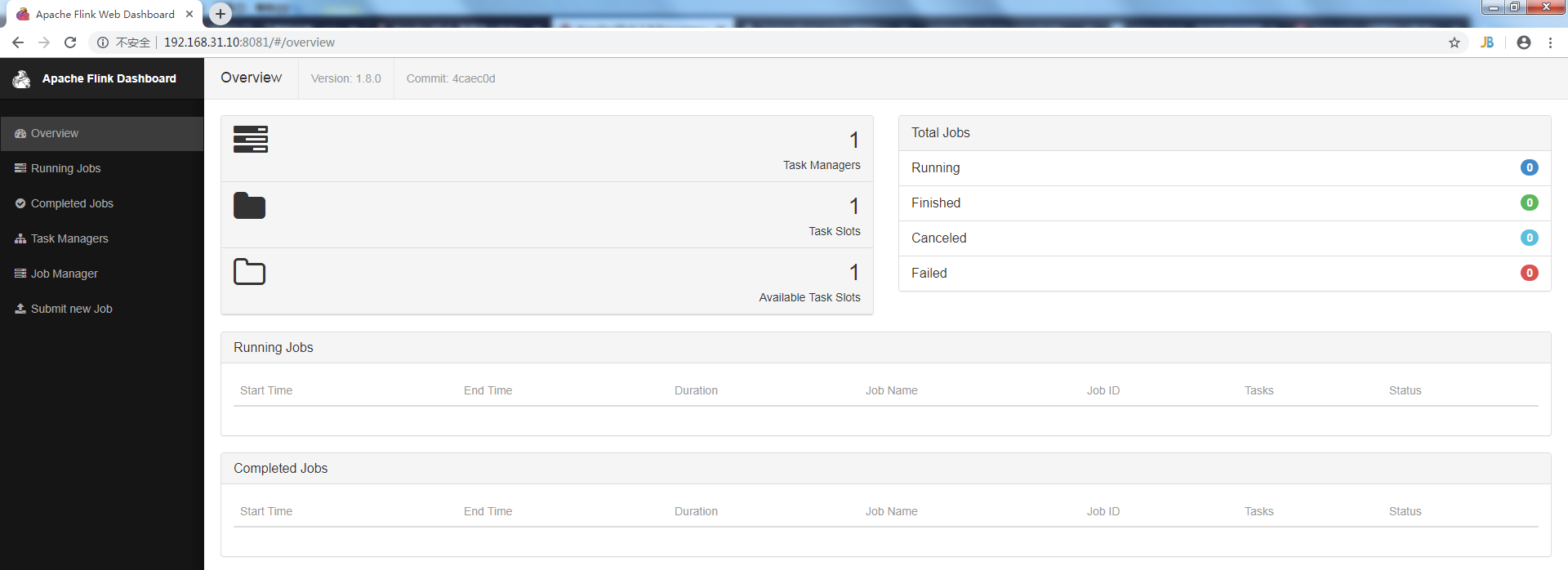
4、第一个程序wordcount,从一个socket流中读出字符串,计算10秒内的词频
4.1 引入依赖
    <dependencies>

        <dependency>

            <groupId>org.apache.flink</groupId>

            <artifactId>flink-clients_2.12</artifactId>

            <version>1.8.0</version>

        </dependency>

        <dependency>

            <groupId>org.apache.flink</groupId>

            <artifactId>flink-streaming-java_2.12</artifactId>

            <version>1.8.0</version>

            <scope>provided</scope>

        </dependency>

    </dependencies>
4.2 代码
public class SocketWindowWordCount {

    public static void main(String args[]) throws Exception {

        // the host and the port to connect to

        final String hostname;

        final int port;

        try {

            final ParameterTool params = ParameterTool.fromArgs(args);

            hostname = params.has("hostname") ? params.get("hostname") : "localhost";

            port = params.getInt("port");

        } catch (Exception e) {

            e.printStackTrace();

            System.err.println(e.getMessage());

            System.err.println("No port specified. Please run 'SocketWindowWordCount " +

                    "--hostname <hostname> --port <port>', where hostname (localhost by default) " +

                    "and port is the address of the text server");

            System.err.println("To start a simple text server, run 'netcat -l <port>' and " +

                    "type the input text into the command line");

            return;

        }

        // get the execution environment

        final StreamExecutionEnvironment env = StreamExecutionEnvironment.getExecutionEnvironment();

        // get input data by connecting to the socket

        DataStream<String> text = env.socketTextStream(hostname, port, "\n");

        // parse the data, group it, window it, and aggregate the counts

        DataStream<WordWithCount> windowCounts = text

                .flatMap(new FlatMapFunction<String, WordWithCount>() {

                    @Override

                    public void flatMap(String value, Collector<WordWithCount> out) throws Exception {

                        for (String word : value.split("\\s")) {

                            out.collect(new WordWithCount(word,1L));

                        }

                    }

                })

                .keyBy("word")

                .timeWindow(Time.seconds(10))

                .reduce(new ReduceFunction<WordWithCount>() {

                    @Override

                    public WordWithCount reduce(WordWithCount value1, WordWithCount value2) throws Exception {

                        return new WordWithCount(value1.word,value1.count+value2.count);

                    }

                });

        // print the results with a single thread, rather than in parallel

        windowCounts.print().setParallelism(1);

        env.execute("Socket Window WordCount");

    }

    /**

     * Data type for words with count.

     */

    public static class WordWithCount {

        public String word;

        public long count;

        public WordWithCount() {

        }

        public WordWithCount(String word, long count) {

            this.word = word;

            this.count = count;

        }

        @Override

        public String toString() {

            return word + " : " + count;

        }

    }

}
4.4 编译成jar包上传
先用nc启动侦听并接受连接

nc -lk 9000

启动SocketWindowWordCount

[hadoop@bigdata-senior01 bin]$ ./flink run /home/hadoop/SocketWindowWordCount.jar --port 9000

查看输出

[root@bigdata-senior01 log]# tail -f flink-hadoop-taskexecutor-0-bigdata-senior01.home.com.out
在nc端输入字符串,在日志监控端10秒为一个周期就可以看到输出合计。
flink 安装及wordcount的更多相关文章
- Flink单机版安装与wordCount
Flink为大数据处理工具,类似hadoop,spark.但它能够在大规模分布式系统中快速处理,与spark相似也是基于内存运算,并以低延迟性和高容错性主城,其核心特性是实时的处理流数据.从此大数据生 ...
- 第02讲:Flink 入门程序 WordCount 和 SQL 实现
我们右键运行时相当于在本地启动了一个单机版本.生产中都是集群环境,并且是高可用的,生产上提交任务需要用到flink run 命令,指定必要的参数. 本课时我们主要介绍 Flink 的入门程序以及 SQ ...
- Eclipse的下载、安装和WordCount的初步使用(本地模式和集群模式)
包括: Eclipse的下载 Eclipse的安装 Eclipse的使用 本地模式或集群模式 Scala IDE for Eclipse的下载.安装和WordCount的初步使用(本地模式和集群 ...
- IntelliJ IDEA的下载、安装和WordCount的初步使用(本地模式和集群模式)
包括: IntelliJ IDEA的下载 IntelliJ IDEA的安装 IntelliJ IDEA中的scala插件安装 用SBT方式来创建工程 或 选择Scala方式来创建工程 本地模式或集群 ...
- Hadoop-2.4.0安装和wordcount执行验证
Hadoop-2.4.0安装和wordcount执行验证 下面描写叙述了64位centos6.5机器下,安装32位hadoop-2.4.0,并通过执行 系统自带的WordCount样例来验证服务正确性 ...
- IntelliJ IDEA(Ultimate版本)的下载、安装和WordCount的初步使用(本地模式和集群模式)
不多说,直接上干货! IntelliJ IDEA号称当前Java开发效率最高的IDE工具.IntelliJ IDEA有两个版本:社区版(Community)和旗舰版(Ultimate).社区版时免费的 ...
- IntelliJ IDEA(Community版本)的下载、安装和WordCount的初步使用(本地模式和集群模式)
不多说,直接上干货! 对于初学者来说,建议你先玩玩这个免费的社区版,但是,一段时间,还是去玩专业版吧,这个很简单哈,学聪明点,去搞到途径激活!可以看我的博客. 包括: IntelliJ IDEA(Co ...
- 从flink-example分析flink组件(3)WordCount 流式实战及源码分析
前面介绍了批量处理的WorkCount是如何执行的 <从flink-example分析flink组件(1)WordCount batch实战及源码分析> <从flink-exampl ...
- 2、flink入门程序Wordcount和sql实现
一.DataStream Wordcount 代码地址:https://gitee.com/nltxwz_xxd/abc_bigdata 基于scala实现 maven依赖如下: <depend ...
随机推荐
- python 之Entry
# Tkinter教程之Entry篇 # Entry用来输入单行文本 from tkinter import * root = Tk() # 创建entry Entry(root, text='inp ...
- JAVA并发-CountDownLatch
源码: 内部类Sync private static final class Sync extends AbstractQueuedSynchronizer { private static fina ...
- yum 初始化国内
修改为阿里源备份默认的yum源文件 mv /etc/yum.repos.d/CentOS-Base.repo /etc/yum.repos.d/CentOS-Base.repo.backup 下载阿里 ...
- <Stack> 150 71 388
150. Evaluate Reverse Polish Notation class Solution { public int evalRPN(String[] tokens) { Stack&l ...
- 【转载】预处器的对比——Sass、LESS和Stylus
常用的3大css预编译器:Sass.LESS和Stylus,你是否会混淆它们的区别和用法.这里有篇文章介绍的挺详细. 传送门:https://www.w3cplus.com/css/sass-vs-l ...
- 洛谷 P5021 [NOIP2018]赛道重建
洛谷 P5021 [NOIP2018]赛道重建 传送门 思路 思路就是常规的思路,所以就不说了--我就是来记录一下我的\(AC\)之路的,真的是太爽了 没错--我也是一个个打的部分分,最后终于AC的, ...
- ADB/Fastboot刷机
谷歌官方ADB/Fastboot等工具包下载地址(最新版/免.墙):WINDOWS :https://dl.google.com/android/repository/platform-tools-l ...
- 截图上传录屏gif上传工具推荐
github地址:https://github.com/mrousavy/ImgurSniper 这款工具默认是上传到imgur网站的. 可以很简单的改一下其中的代码 把他改造成上传到七牛 或者 os ...
- mysql数据库备份工具xtrabackup
1.下载二进制安装包 其他高版本测试缺少依赖 2.xtrabackup参数说明 简介: Xtrabackup是一个对InnoDB做数据备份的工具,支持在线热备份(备份时不影响数据读写),是商业备份工 ...
- Navicat Premium 12 安装与激活
一.Navicat Premium 12下载 官方下载地址:https://www.navicat.com.cn/download/navicat-premium 百度云盘:https://pan.b ...