
ios开发之--UITableView中的visibleCells的用法
先上图:
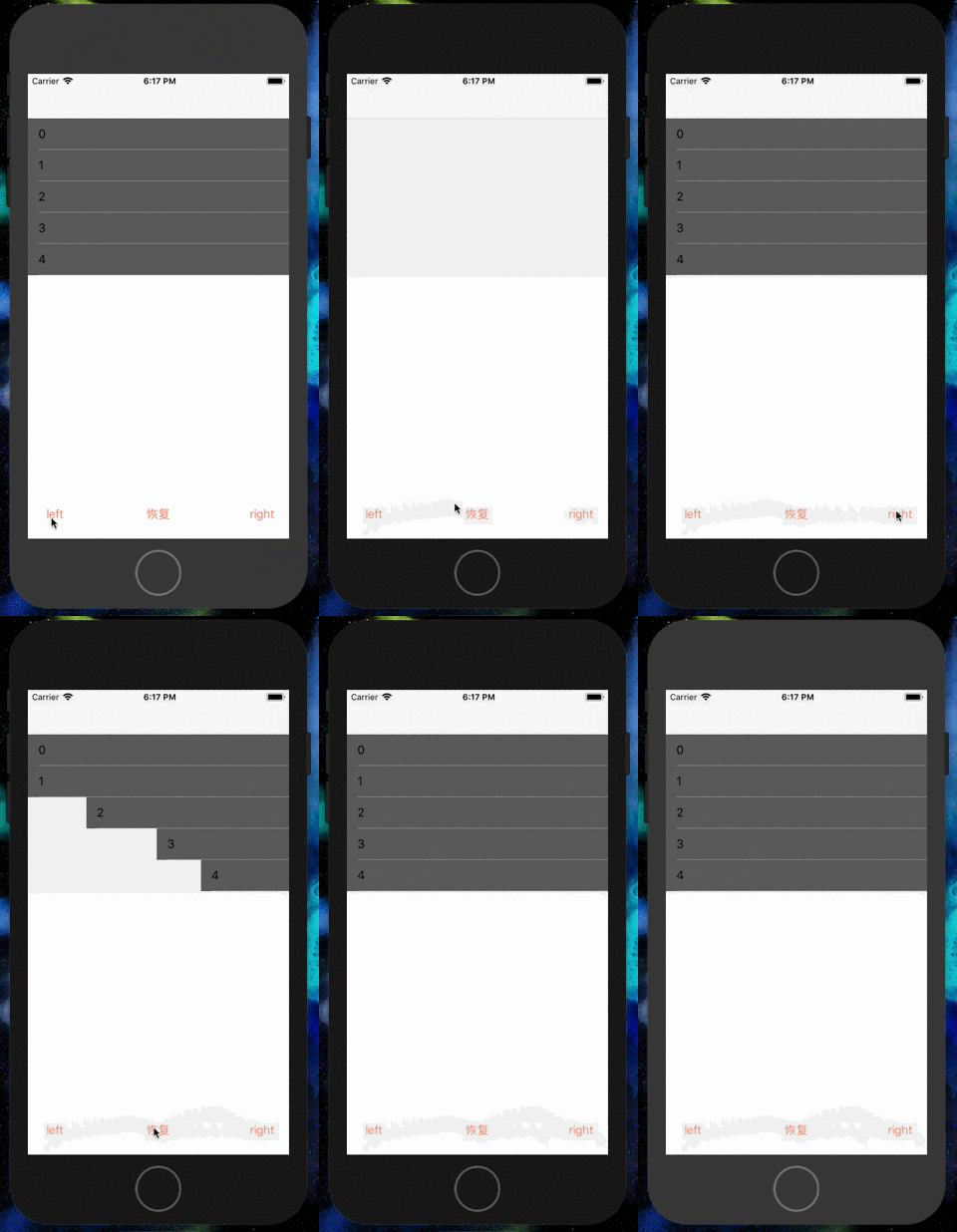
具体代码如下:
#import "ViewController.h"

@interface ViewController ()<UITableViewDelegate,UITableViewDataSource>

@property(nonatomic,strong)UITableView *myTableV;

@property(nonatomic,strong)NSArray *contentAry;

@end

@implementation ViewController

- (void)viewDidLoad {

    [super viewDidLoad];

    // Do any additional setup after loading the view, typically from a nib.

    self.contentAry = [NSArray array];

    [self creatUI];

}

- (IBAction)leftAction:(id)sender {

    self.contentAry = self.myTableV.visibleCells;

    NSLog(@"----%@",self.contentAry);

    UIButton *button = (UIButton*)sender;

    button.selected = !button.selected;

    CGAffineTransform transform;

    double duration = 0.1;

    if (button.tag == ) {

        transform = CGAffineTransformMakeTranslation(-[UIScreen mainScreen].bounds.size.width, );

    }else if (button.tag == )

    {

        for (UITableViewCell *cell in self.contentAry) {

            [UIView animateWithDuration:duration delay: options: animations:^{

                cell.transform = CGAffineTransformIdentity;

            } completion:^(BOOL finished) {

            }];

            duration += 0.1;

        }

        return;

    }else

    {

        transform = CGAffineTransformMakeTranslation([UIScreen mainScreen].bounds.size.width, );

    }

    for (UITableViewCell *cell in self.contentAry) {

        [UIView animateWithDuration:duration delay: options: animations:^{

            cell.transform = transform;

        } completion:^(BOOL finished) {

        }];

        duration += 0.1;

    }

}

-(void)creatUI

{

    self.myTableV = [[UITableView alloc]initWithFrame:CGRectMake(, , self.view.bounds.size.width, self.view.bounds.size.height - ) style:UITableViewStylePlain];

    self.myTableV.delegate = self;

    self.myTableV.dataSource = self;

    self.myTableV.tableFooterView = [[UIView alloc]init];

    [self.view addSubview:self.myTableV];

}

-(NSInteger)tableView:(UITableView *)tableView numberOfRowsInSection:(NSInteger)section

{

    return ;

}

-(UITableViewCell *)tableView:(UITableView *)tableView cellForRowAtIndexPath:(NSIndexPath *)indexPath

{

    static NSString *celliden = @"CELLS";

    UITableViewCell *cell = [tableView dequeueReusableCellWithIdentifier:celliden];

    if (!cell) {

        cell = [[UITableViewCell alloc]initWithStyle:UITableViewCellStyleDefault reuseIdentifier:celliden];

    }

    cell.textLabel.text = [NSString stringWithFormat:@"%ld",(long)indexPath.row];

    cell.backgroundColor = [[UIColor blackColor]colorWithAlphaComponent:0.6];

    return cell;

}
仅做记录!
ios开发之--UITableView中的visibleCells的用法的更多相关文章
- UITableView中的visibleCells的用法(visibleCells帮上大忙了)
这两天遇到一个问题,UITableView中需要加入动画,而且每一行的速度不一样. 刚开始做时把所有的cell都遍历一遍加上动画,后来发现,如果数据很多时,就会出现各种各样的问题,而且没有显示在界 ...
- 李洪强iOS开发之 - enum与typedef enum的用法
李洪强iOS开发之 - enum与typedef enum的用法 01 - 定义枚举类型 上面我们就在ViewController.h定义了一个枚举类型,枚举类型的值默认是连续的自然数,例如例子中的T ...
- iOS开发系列--UITableView全面解析
--UIKit之UITableView 概述 在iOS开发中UITableView可以说是使用最广泛的控件,我们平时使用的软件中到处都可以看到它的影子,类似于微信.QQ.新浪微博等软件基本上随处都是U ...
- iOS开发基础-UITableView控件简单介绍
UITableView 继承自 UIScrollView ,用于实现表格数据展示,支持垂直滚动. UITableView 需要一个数据源来显示数据,并向数据源查询一共有多少行数据以及每一行显示什么 ...
- iOS开发:UITableView的优化技巧-异步绘制Cell
最近在微博上看到一个很好的开源项目VVeboTableViewDemo,是关于如何优化UITableView的.加上正好最近也在优化项目中的类似朋友圈功能这块,思考了很多关于UITableView的优 ...
- iOS学习之UITableView中Cell的操作
接着iOS学习之Table View的简单使用 这篇,这里主要讲UITableView 中的Cell的操作,包括标记.移动.删除.插入. 为了简单快捷,直接从原来那篇的代码开始,代码下载地址:http ...
- iOS开发之动画中的时间(概况)
一.引言 在iOS开发中使用动画时,可以通过设置动画的duration.speed.begintime.offset属性,来设置动画的时长.速度.起始时间及起始偏移. 用一个简单的例子来说明各个参数的 ...
- iOS开发总结-UITableView 自定义cell和动态计算cell的高度
UITableView cell自定义头文件:shopCell.h#import <UIKit/UIKit.h>@interface shopCell : UITableViewCell@ ...
- iOS开发之UITableView中计时器的几种实现方式(NSTimer、DispatchSource、CADisplayLink)
最近工作比较忙,但是还是出来更新博客了.今天博客中所涉及的内容并不复杂,都是一些平时常见的一些问题,通过这篇博客算是对UITableView中使用定时器的几种方式进行总结.本篇博客会给出在TableV ...
随机推荐
- lvreduce -L 1000M /dev/vg0/lv0 表示最后缩减至多大,不是减少了多大
resize2fs在前 lvextend 在后 将/dev/vg0/lv0缩减到1000M umount /lv/ 取消挂载 [root@desktop4 ~]# e2fsck -f /dev/vg0 ...
- pdf ppt word office转图片 教学白板
https://zh-cn.libreoffice.org/ http://www.imagemagick.org/script/ 首先用libreoffice将ppt转换为pdf格式,然后再用con ...
- 使用JS和JQuery 阻止表单提交的两种方法
<html> <head> <meta http-equiv="Content-Type" content="text/html; char ...
- css控制固定表头,兼容行列合并
项目中设计的报表table设计的列数相对过多,当拖动下方的滚动条时无法对应表头所对应的列,因此在网上搜索了好一段日子,最后在网上找到了一些参考资料,然后总结归纳出兼容行列合并的固定表头demo. 多浏 ...
- Android学习之SharedPreferences
SharedPreferences使用键值对的方式来存储数据,并支持多种不同类型的数据存储. 1.界面布局 <TableLayout xmlns:android="http://sch ...
- 摄像头驱动0V7725学习笔记连载(三):0V7725 SCCB时序的实现
上一篇博客主要是讲解了关于需要配置的重要寄存器,那么接下来就是要通过SCCB接口实现对OV7725的配置.参考<OmniVision Serial Camera Control Bus (SCC ...
- python3 异步模块asyncio
yield方法引入, 这里存在的问题是,如果你想创建从0到1,000,000这样一个很大的序列,你不得不创建能容纳1,000,000个整数的列表. 但是当加入了生成器之后,你可以不用创建完整的序列,你 ...
- 第三百八十五节,Django+Xadmin打造上线标准的在线教育平台—登录功能实现,回填数据以及错误提示html
第三百八十五节,Django+Xadmin打造上线标准的在线教育平台—登录功能实现 1,配置登录路由 from django.conf.urls import url, include # 导入dja ...
- 第三百六十六节,Python分布式爬虫打造搜索引擎Scrapy精讲—elasticsearch(搜索引擎)的bool组合查询
第三百六十六节,Python分布式爬虫打造搜索引擎Scrapy精讲—elasticsearch(搜索引擎)的bool组合查询 bool查询说明 filter:[],字段的过滤,不参与打分must:[] ...
- MySQL存储过程、触发器 小例子
一.存储过程 语法: CREATE PROCEDURE([[IN |OUT |INOUT ] 参数名 数据类形...]) BEGIN ... END 参数: IN 输入参数 表示该参数的值必须在调用存 ...