
After install XAMPP
1. configure mysql and phpmyadmin
1.1 mysql
$ /Applications/XAMPP/xamppfiles/bin/mysql -uroot

$ mysql > update mysql.user set password = password('somepass') where user = 'root';

# add another account

$ mysql > create user 'admin'@'%' identified by 'somepass';

$ mysql > grant all privileges on *.* to 'admin'@'%' with grant option;

#by default, use admin
1.2 phpmyadmin
- edit /Applications/XAMPP/xamppfiles/phpMyAdmin/config.inc.php and add account info
$cfg['Servers'][$i]['user'] = 'root';

$cfg['Servers'][$i]['password'] = 'somepass';

$cfg['Servers'][$i]['hide_db']='^(cdcol|information_schema|mysql|phpmyadmin|performance_schema|webauth|test|raylee_db)$';

$cfg['Servers'][$i]['host'] = '127.0.0.1';

$cfg['Servers'][$i]['connect_type'] = 'tcp';

$cfg['Servers'][$i]['extension'] = 'mysqli';

$cfg['Servers'][$i]['AllowNoPassword'] = false;
- install metro theme for phpmyadmin
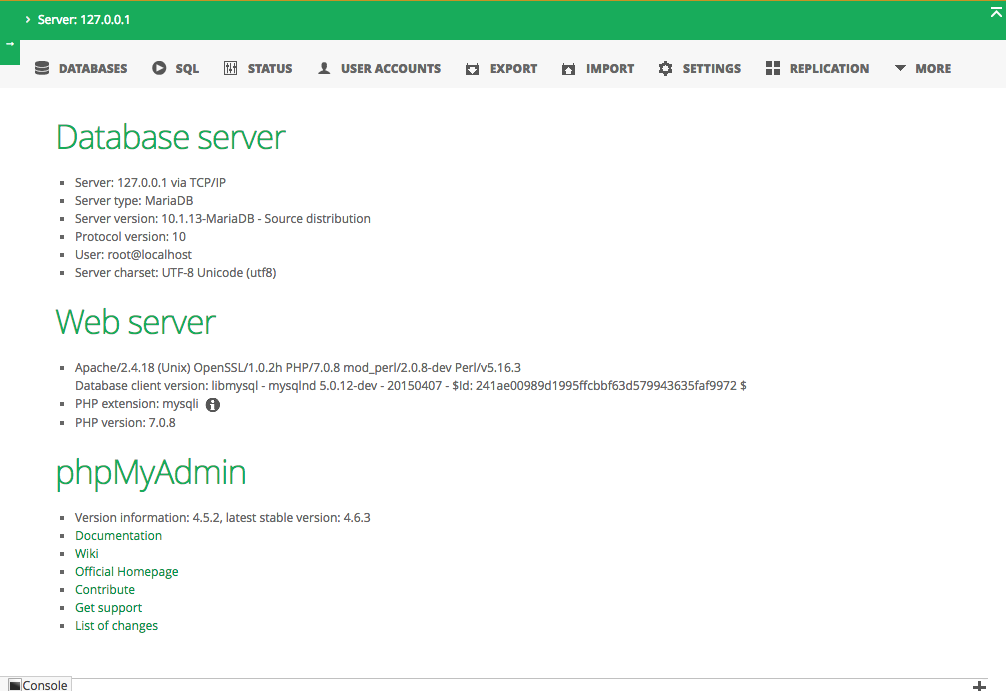
2. install DBI support for XMAPP Perl5 (OS X 10.11.3)
$ /Applications/XAMPP/xamppfiles/bin/perl -V

# check the Perl5 version

# is 5.16.3

$ sudo /Applications/XAMPP/xamppfiles/bin/cpan

cpan[1]> install DBD::mysql

# get Error

./dbdimp.h:21:10: fatal error: 'mysql.h' file not found
see here for details
$ sudo /Applications/XAMPP/xamppfiles/bin/perl -MDBD::mysql -e1

# if nothing is displayed, congrats

# OK le
3. configure DocumentRoot
- default is htdocs/
- change it to another place : /Users/$USER/WebRoot/html
- change /cgi-bin/ to /Users/$USER/WebRoot/cgi-bin/
edit xamppfiles/etc/httpd.conf
line 229-230 :

DocumentRoot "/Users/ruili/WebRoot/html"

<Directory "/Users/ruili/WebRoot/html">

line 325 :

<IfModule alias_module>

	# useless comment deleted

    ScriptAlias /cgi-bin/ "/Users/ruili/WebRoot/cgi-bin/"

</IfModule>

line 341:

<Directory "/Users/XAMPP/xamppfiles/cgi-bin">

Options Indexes FollowSymLinks ExecCGI Includes
After install XAMPP的更多相关文章
- 在xampp中配置dvwa
DVWA主要是用于学习Web的常见攻击,比如SQL注入.XSS等的一个渗透测试系统,下面我将结合XAMPP来说明它的安装过程. 一.环境 OS:Windows 10 XAMPP:5.6.24 DVWA ...
- xampp常见安装失败问题
遇到这两个错误后不管它,继续安装.完成后下载Microsoft Visual C++ 2008 Redistributable Package (x86),可以到这里下载:Microsoft Visu ...
- xampp 安装red扩展出错解决
Linux Mint + Xampp Error + ‘grep: /opt/lampp/include/php/main/php.h: No Such File Or Directory’ FEBR ...
- Linux下配置xampp
How do I install XAMPP?Choose your flavor for your linux OS, the 32-bit or 64-bit version. Change th ...
- Configuration python CGI in XAMPP in win-7
1.After install XAMPP,we need add the path of the Mysql just find the path and add it to your sys-pa ...
- XAMPP启动MySQL时报端口被占用错误
1 问题描述 启动XAMPP中的mysql时宝凑,错误信息是:3306端口被占用 2 问题诊断 2.1 可能是在安装XAMPP之前安装了MySQL,这样电脑中就有两个MySQL啦,如果我们在安装时都采 ...
- xampp lampp 改变网页root目录的方法
This is an old question but I haven't seen it properly answered yet. Here is what you need to do: In ...
- 学习Linux系列--安装软件环境
本系列文章记录了个人学习过程的点点滴滴. 回到目录 10.安装Lamp套件. 最简单的方式,如下 sudo tasksel install lamp-server Apache 菜鸟教程 Ubuntu ...
- Java开发环境配置(1)--tool准备
工具准备:1.eclipse-mars开发工具必须安装 2.XAMPP-环境集成了MYSQL,APACHE,TOMCAT建议安装 3.TOMCAT提供了二个版本(8.0和9.0),建议安装一个以备不时 ...
随机推荐
- iOS: 悬浮的条件筛选框使用二
一.介绍: 在前面已经介绍了一种条件悬浮框,使用的是tableView的Plain分组样式实现的,因为这是tableView本身就具备的功能,分组悬浮效果.这次我来介绍第二种更加简单的方法,采用两个S ...
- 微信公众平台开发(112) 自动更新微信access token
关键字:Memcache access_token 更新 存储 7200 本文介绍如何存储及更新 access token的方法. 一.Access Token access_token是公众号的全局 ...
- Linux就这个范儿 第9章 特种文件系统
Linux就这个范儿 第9章 特种文件系统 http://book.douban.com/reading/32081222/ P326 有一种文件系统,根本不在磁盘上.这种文件系统就是大名顶顶的ram ...
- DOS - for
遍历当前目录,显示文件/文件夹列表 for /f "usebackq" %i in (`dir /b`) do echo %i 注意点: 1.%i用于dos窗口,batch中需要使 ...
- Java遇见HTML——JSP篇之JSP内置对象(下)
一.什么是session 1.session表示客户端与服务器的一次会话2.Web中的session指:用户在浏览某个网站时,从进入网站到浏览器关闭所经过的这段时间,也就是用户浏览这个网站所花费的时间 ...
- MAC中开发Unity3D
一直想做3D开发,去年后半年开始学IOS下的OpenGL,只学会了纹理,而且灯光音效什么的好麻烦,于是想学学Unity3D. 今年年初就计划上了,可是Unity3D收费,费用不便宜呢.用Unity3D ...
- redis tcp-backlog配置
在redis2.8版本中有一个tcp-backlog配置, 说明如下: # TCP listen() backlog.## In high requests-per-second environmen ...
- mysql 插入重复值 INSERT ... ON DUPLICATE KEY UPDATE
向数据库插入记录时,有时会有这种需求,当符合某种条件的数据存在时,去修改它,不存在时,则新增,也就是saveOrUpdate操作.这种控制可以放在业务层,也可以放在数据库层,大多数数据库都支持这种需求 ...
- iOS 提交代码出现提示弹出框显示 “A commit message is required to perform this operation.Enter a commit message and try again.“
需要你写一下你确认提交的信息,就是你这次提交上去修改了什么功能,简单描述一下
- Lintcode: Sort Letters by Case
Given a string which contains only letters. Sort it by lower case first and upper case second. Note ...